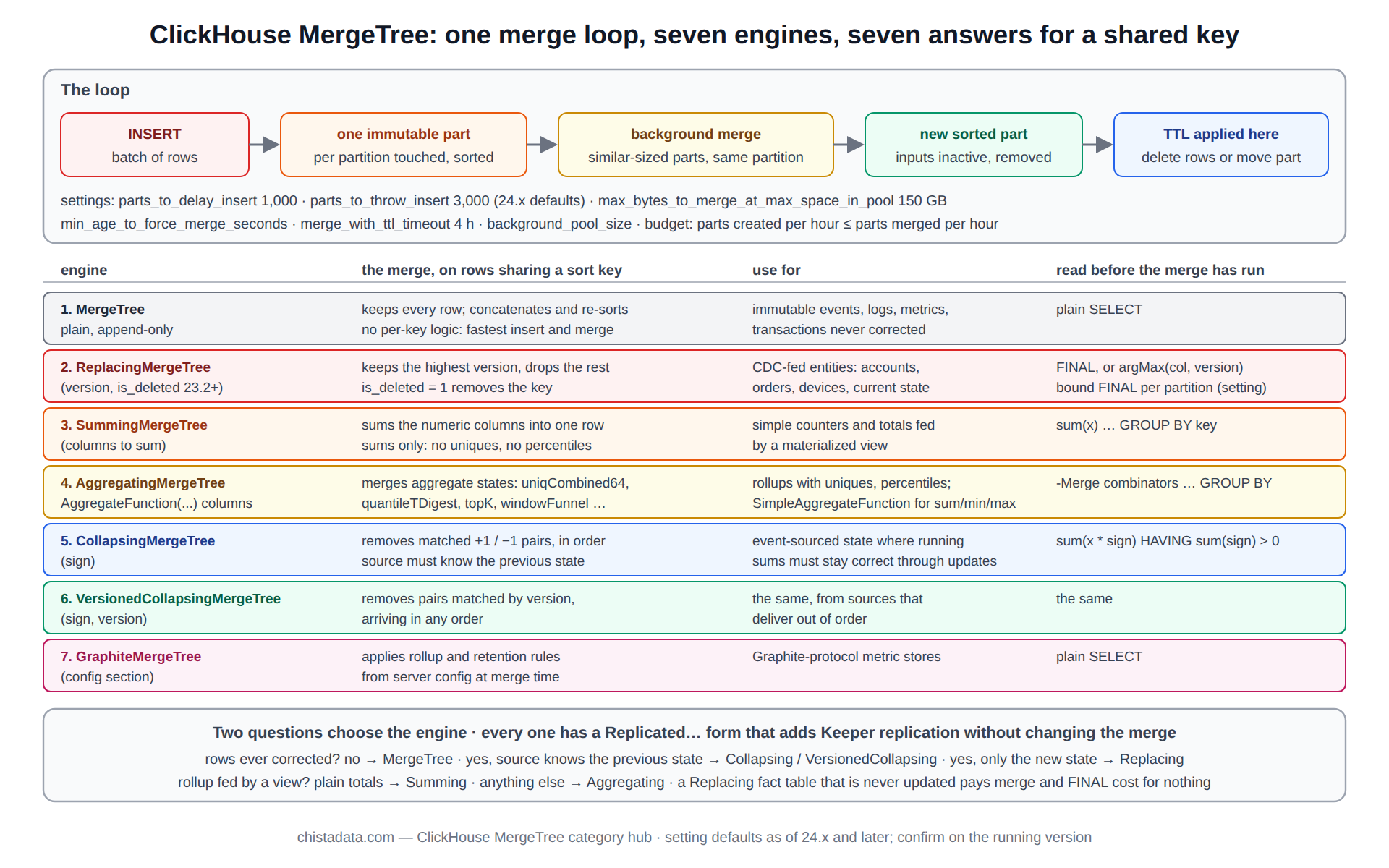
ClickHouse MergeTree is one storage engine with one background loop and seven ways of resolving what happens when two rows share a key. Every table that matters in production is a MergeTree variant, every insert becomes a part, every part is eventually merged, and the variant chosen decides what the merge does with duplicates: keep them all, keep the newest, sum them, collapse them in pairs, fold aggregate states, or apply a graphite rollup. Understanding the loop once explains all seven.
This page is organised around that idea. It explains the merge loop and the settings that govern it, then walks the seven engines as seven answers to the same question, with the schema and the read pattern each requires, and closes with the storage configuration and TTL behaviour that sit underneath all of them. The archive posts under this category cover each engine in depth.
The archive holds the engine overview and use-case posts, the ReplacingMergeTree, CollapsingMergeTree and VersionedCollapsingMergeTree introductions, the merge-behaviour and settings tuning posts, the TTL scheduling post, partition pruning versus primary-key pruning, storage infrastructure configuration, and the 26.8 LTS settings changes.
What ClickHouse MergeTree does with an insert
An insert writes one immutable part per partition it touches: a directory holding one compressed file pair per column, the primary index, skip indexes, checksums and a count. Nothing is modified in place, ever. The part is sorted by the table’s ORDER BY and named by its partition, its minimum and maximum block number, and its merge level. The number of parts grows with every insert and shrinks only when the background loop merges them, which is why insert batch size is the first ClickHouse MergeTree performance decision.
The overview of ClickHouse storage engines and the introduction to storage engine types posts are the archive’s ground-level explanation; the internals hub follows a row from insert to select in detail.
-- what one insert produced: the parts it created, by partition
SELECT partition, name, rows, formatReadableSize(bytes_on_disk) AS size, level, modification_time
FROM system.parts
WHERE table = 'events' AND active
ORDER BY modification_time DESC
LIMIT 10;

-- part name anatomy: 202609_1_1_0 = partition 202609, min block 1, max block 1, level 0 (never merged)
--                    202609_1_57_3 = blocks 1..57 merged, three merge generations deep
The ClickHouse MergeTree merge loop, and the settings that govern it
The ClickHouse MergeTree background pool selects sets of parts within one partition, merges them into a new sorted part, and marks the inputs inactive for later removal. Selection favours similar-sized parts and stops at max_bytes_to_merge_at_max_space_in_pool (150 GB by default), so very large parts stop merging and a partition settles into a few big parts plus a churn of small ones.
Insert pressure is controlled by parts_to_delay_insert and parts_to_throw_insert, whose defaults moved from 150 and 300 to 1,000 and 3,000 in 24.x. The optimising merge behaviour post covers pool sizing and selection; the MergeTree settings for insert versus query speed post covers the trade each setting makes.
-- the merge loop's state right now
SELECT database, table, elapsed, progress, num_parts, formatReadableSize(total_size_bytes_compressed) AS input, is_mutation
FROM system.merges
ORDER BY elapsed DESC;

-- the budget: parts created vs merged per hour (system.part_log must be enabled)
SELECT toStartOfHour(event_time) AS h,
       countIf(event_type = 'NewPart')    AS created,
       countIf(event_type = 'MergeParts') AS merged
FROM system.part_log
WHERE event_time > now() - INTERVAL 1 DAY
GROUP BY h ORDER BY h;

-- settings that govern it, as set on this server (unit: parts, bytes, seconds)
SELECT name, value, changed FROM system.merge_tree_settings
WHERE name IN ('parts_to_delay_insert', 'parts_to_throw_insert', 'max_bytes_to_merge_at_max_space_in_pool',
               'min_age_to_force_merge_seconds', 'merge_with_ttl_timeout', 'max_replicated_merges_in_queue');
SELECT name, value FROM system.server_settings
WHERE name IN ('background_pool_size', 'background_merges_mutations_concurrency_ratio');
Engine 1: MergeTree, the plain append-only case
Plain MergeTree keeps every row it is given. Duplicate keys are ordinary rows; the merge concatenates and re-sorts. It is the right ClickHouse MergeTree engine for immutable events (clicks, logs, metrics samples, transactions that are never corrected) and it is the fastest to insert into and merge, because the merge has no per-key logic. Most fact tables are plain MergeTree, and most of the other six engines are used for the smaller tables around them.
CREATE TABLE events
(
    ts         DateTime64(3),
    tenant_id  UInt32,
    event_type LowCardinality(String),
    user_id    UInt64,
    payload    String
)
ENGINE = MergeTree
PARTITION BY toYYYYMM(ts)
ORDER BY (tenant_id, event_type, ts)
SETTINGS index_granularity = 8192;
Engine 2: ReplacingMergeTree, the ClickHouse MergeTree that keeps the newest version
ReplacingMergeTree keeps, per sort key, the row with the highest version column (or the last inserted when no version is given) and drops the rest at merge time. It is the engine for mutable entities fed by CDC (accounts, orders, devices), and its one rule is that deduplication is eventual: until a merge has run, both versions exist, and a read that needs the current state uses FINAL or argMax.
The is_deleted argument (23.2 and later) lets a CDC delete propagate as a row rather than a mutation. The introduction to ReplacingMergeTree post covers the version semantics; the columnar databases hub shows the upsert pattern in context.
CREATE TABLE orders_current
(
    order_id    UInt64,
    status      LowCardinality(String),
    amount      Decimal(18, 2),
    updated_at  DateTime64(3),
    is_deleted  UInt8 DEFAULT 0
)
ENGINE = ReplacingMergeTree(updated_at, is_deleted)
ORDER BY order_id;

SELECT * FROM orders_current FINAL WHERE order_id = 1001;                  -- exact, merge at read time
SELECT order_id, argMax(status, updated_at) FROM orders_current GROUP BY order_id;   -- cheaper for aggregates
SET do_not_merge_across_partitions_select_final = 1;                        -- FINAL cost bounded per partition
Engine 3: SummingMergeTree, pre-summed counters
SummingMergeTree sums the numeric columns of rows that share a sort key and keeps one row. It is the simplest rollup engine: a materialised view inserts per-minute counts and sums, the merge collapses them, and a dashboard reads a table that is a fraction of the raw size. Its limits are that only sums are supported (no uniques, no percentiles) and that, like every ClickHouse MergeTree engine, the collapse is eventual, so reads still aggregate with sum() and GROUP BY to cover unmerged rows.
CREATE TABLE events_1m_sum
(
    minute      DateTime,
    tenant_id   UInt32,
    event_type  LowCardinality(String),
    events      UInt64,
    amount      Decimal(18, 2)
)
ENGINE = SummingMergeTree((events, amount))
ORDER BY (tenant_id, event_type, minute);

-- reads always re-sum: unmerged rows may still be separate
SELECT minute, sum(events), sum(amount) FROM events_1m_sum WHERE tenant_id = 42 GROUP BY minute ORDER BY minute;
Engine 4: AggregatingMergeTree, the ClickHouse MergeTree for any aggregate
AggregatingMergeTree generalises summing to any aggregate function by storing intermediate states (AggregateFunction(uniqCombined64, UInt64), AggregateFunction(quantileTDigest, Float32)) and merging them. It is the engine behind every serious rollup: uniques, percentiles, top-K and funnels all survive the merge. The cost is that the states are opaque binary columns read with -Merge combinators, and that the schema of the target table must match the view exactly. The materialised view hub covers the topology; SimpleAggregateFunction is the lighter variant for sum, min, max and any.
CREATE TABLE events_1m_agg
(
    minute      DateTime,
    tenant_id   UInt32,
    users       AggregateFunction(uniqCombined64, UInt64),
    p95_latency AggregateFunction(quantileTDigest(0.95), Float32),
    events      SimpleAggregateFunction(sum, UInt64)
)
ENGINE = AggregatingMergeTree
ORDER BY (tenant_id, minute);

SELECT minute, uniqCombined64Merge(users), quantileTDigestMerge(0.95)(p95_latency), sum(events)
FROM events_1m_agg WHERE tenant_id = 42 GROUP BY minute ORDER BY minute;
Engine 5 and 6: CollapsingMergeTree and VersionedCollapsingMergeTree
CollapsingMergeTree models updates as a cancel row (sign −1) that matches an earlier state row (sign +1) followed by the new state; the merge removes matched pairs. It suits event-sourced systems that know the previous state and need running sums to stay correct through updates, since sum(value * sign) is right before and after the collapse.
Its weakness is that pairs must arrive in order to collapse; VersionedCollapsingMergeTree adds a version column so that out-of-order pairs still match. The deletes and updates with CollapsingMergeTree and introduction to VersionedCollapsingMergeTree posts cover both, with the read patterns that stay correct on unmerged data.
CREATE TABLE cart_state
(
    cart_id   UInt64,
    items     UInt32,
    total     Decimal(18, 2),
    version   UInt64,
    sign      Int8
)
ENGINE = VersionedCollapsingMergeTree(sign, version)
ORDER BY cart_id;

-- update = cancel the old state, insert the new one (both rows, one insert)
INSERT INTO cart_state VALUES (7, 3, 120.00, 4, -1), (7, 4, 155.00, 5, 1);

-- reads stay correct whether or not the pair has collapsed
SELECT cart_id, sum(items * sign) AS items, sum(total * sign) AS total
FROM cart_state GROUP BY cart_id HAVING sum(sign) > 0;
Engine 7: GraphiteMergeTree, and the replicated form of all seven
GraphiteMergeTree applies retention and rollup rules from server config to Graphite-style metric rows at merge time; it is a niche engine kept for metric stores that speak that protocol. Every one of the seven has a Replicated prefix form that adds Keeper-coordinated replication without changing the merge semantics, and on any cluster with more than one node the replicated form is the one used. The replication hub covers what the prefix adds.
| Engine | What the merge does with a shared key | Use for | Read pattern on unmerged data |
|---|---|---|---|
| MergeTree | keeps every row | immutable events, logs, metrics | plain SELECT |
| ReplacingMergeTree | keeps the highest version | CDC-fed entities, current state | FINAL, or argMax by version |
| SummingMergeTree | sums numeric columns | simple counters and totals | sum() … GROUP BY |
| AggregatingMergeTree | merges aggregate states | rollups with uniques, percentiles | -Merge combinators … GROUP BY |
| CollapsingMergeTree | removes +1/−1 pairs in order | event-sourced state with running sums | sum(x * sign) HAVING sum(sign) > 0 |
| VersionedCollapsingMergeTree | removes pairs by version, any order | the same, out-of-order sources | the same |
| GraphiteMergeTree | rollup and retention rules | Graphite metric stores | plain SELECT |
Choosing the ClickHouse MergeTree engine: two questions
The ClickHouse MergeTree choice reduces to two questions. Are rows ever corrected after insert? If not, plain MergeTree. If so, does the source know the previous state (collapsing) or only the new one (replacing)? Then, separately, is the table a rollup fed by a view? If so, Summing for plain totals or Aggregating for anything else. The use cases for ClickHouse storage engines post walks the decision with examples; the mistake it warns against most is using ReplacingMergeTree for a fact table that is never actually updated, paying merge cost and FINAL cost for nothing.
Pruning: partition first, then the primary key
Two gates decide how much of a ClickHouse MergeTree table a query reads. Partition pruning removes whole parts whose partition value cannot match, using the partition expression’s minmax; primary-key pruning then removes granules inside the surviving parts.
A predicate on the partition column that is not also in the sort key still prunes at the partition gate, and a predicate on the sort key that does not touch the partition column still prunes at the granule gate; the two are independent and both show in EXPLAIN indexes = 1. The partition pruning versus primary-key pruning post measures the three gates on one table; the partition hub covers the design choices.
EXPLAIN indexes = 1
SELECT count() FROM events
WHERE ts >= '2026-09-01' AND ts < '2026-09-08' AND tenant_id = 42;
-- MinMax      Parts: 2/41   (partition gate: two monthly parts survive)
-- Partition   Parts: 2/41
-- PrimaryKey  Granules: 384/12288   (granule gate inside the survivors)
ClickHouse MergeTree TTL: deletes and moves are merges too
A TTL clause does not delete rows on schedule; it marks a part as having expired rows and the next merge that touches the part drops them, or moves the part to another volume. So TTL behaviour follows the merge loop: a partition that no longer merges (because it is old and settled) keeps expired rows until merge_with_ttl_timeout (four hours by default) triggers a TTL-only merge, and a cluster whose merge pool is saturated runs TTL late.
The how TTL deletes are scheduled and six reasons they fail post lists the failure modes, of which the most common is expecting DELETE TTL to free disk at the moment the rows expire.
ALTER TABLE events MODIFY TTL
    toDateTime(ts) + INTERVAL 30 DAY  TO VOLUME 'cold',
    toDateTime(ts) + INTERVAL 13 MONTH DELETE;

-- parts with expired rows waiting for a merge
SELECT partition, name, rows, delete_ttl_info_min, delete_ttl_info_max
FROM system.parts
WHERE table = 'events' AND active AND delete_ttl_info_max < now()
ORDER BY delete_ttl_info_max;

-- force it for one partition, off-peak, after the verification query above
-- OPTIMIZE TABLE events PARTITION '202508' FINAL;   -- confirmation gate: merge pool idle, disk headroom checked
Storage underneath the engine: disks, volumes, policies
The parts of a ClickHouse MergeTree table live on a storage policy: an ordered list of volumes, each a list of disks, with rules for which volume a new part lands on and when it moves. The defaults put everything on one local disk; production estates define a hot NVMe volume and a cold object-storage volume with a cache, and use TTL … TO VOLUME to move parts between them. The configuring storage infrastructure post covers disks, volumes and policies; the horizontal scaling hub covers when tiering becomes the main cost lever.
-- what the policy looks like from inside the server
SELECT policy_name, volume_name, volume_priority, disks, max_data_part_size, move_factor
FROM system.storage_policies;

SELECT name, path, type, formatReadableSize(free_space) AS free, formatReadableSize(total_space) AS total
FROM system.disks;

-- where each table's bytes are, by disk
SELECT table, disk_name, formatReadableSize(sum(bytes_on_disk)) AS bytes, count() AS parts
FROM system.parts WHERE active GROUP BY table, disk_name ORDER BY table, disk_name;
What changed in 26.8 LTS for ClickHouse MergeTree
Each LTS moves a handful of MergeTree defaults, and 26.8 is no exception; the performance settings in 26.8 LTS post lists the fourteen changes with the before-and-after values, and the seven performance pitfalls post covers the mistakes that survive every version. The release notes hub explains the compatibility pin that holds every moved default at its old value through an upgrade.
The settings review runs in the same order every time on a ClickHouse MergeTree estate crossing an LTS: list the changed defaults, map each to the tables it affects, pin with compatibility, upgrade, and lift the pin one setting at a time with the merge budget and query p95 as the judge.
Version notes
parts_to_delay_insert and parts_to_throw_insert defaults became 1,000 and 3,000 in 24.x. ReplacingMergeTree(version, is_deleted) is 23.2 and later. do_not_merge_across_partitions_select_final has been available since 20.x. Lightweight DELETE has been stable since 23.3 and is a mutation-free alternative to the collapsing engines for simple deletes. The MergeTree family documentation is the source for engine parameters; confirm every setting default on the running version.
Reading the archive
Start with the ClickHouse MergeTree storage-engine overview, engine types and use-case posts for the family; then the ReplacingMergeTree, CollapsingMergeTree and VersionedCollapsingMergeTree introductions for the three engines that handle updates; then the merge-behaviour, settings and TTL posts for the loop; and the partition-pruning and storage-infrastructure posts for what sits above and below it. The 26.8 settings and pitfalls posts are the current-version companions.
ChistaDATA reviews engine choice, merge budget and TTL behaviour as part of every ClickHouse consulting schema review and watches the merge loop continuously under 24×7 support. Engine changes require a table rewrite and settings changes alter the write path: test both on staging with production-shaped data, keep the rollback written, and confirm a tested backup before the first ALTER.