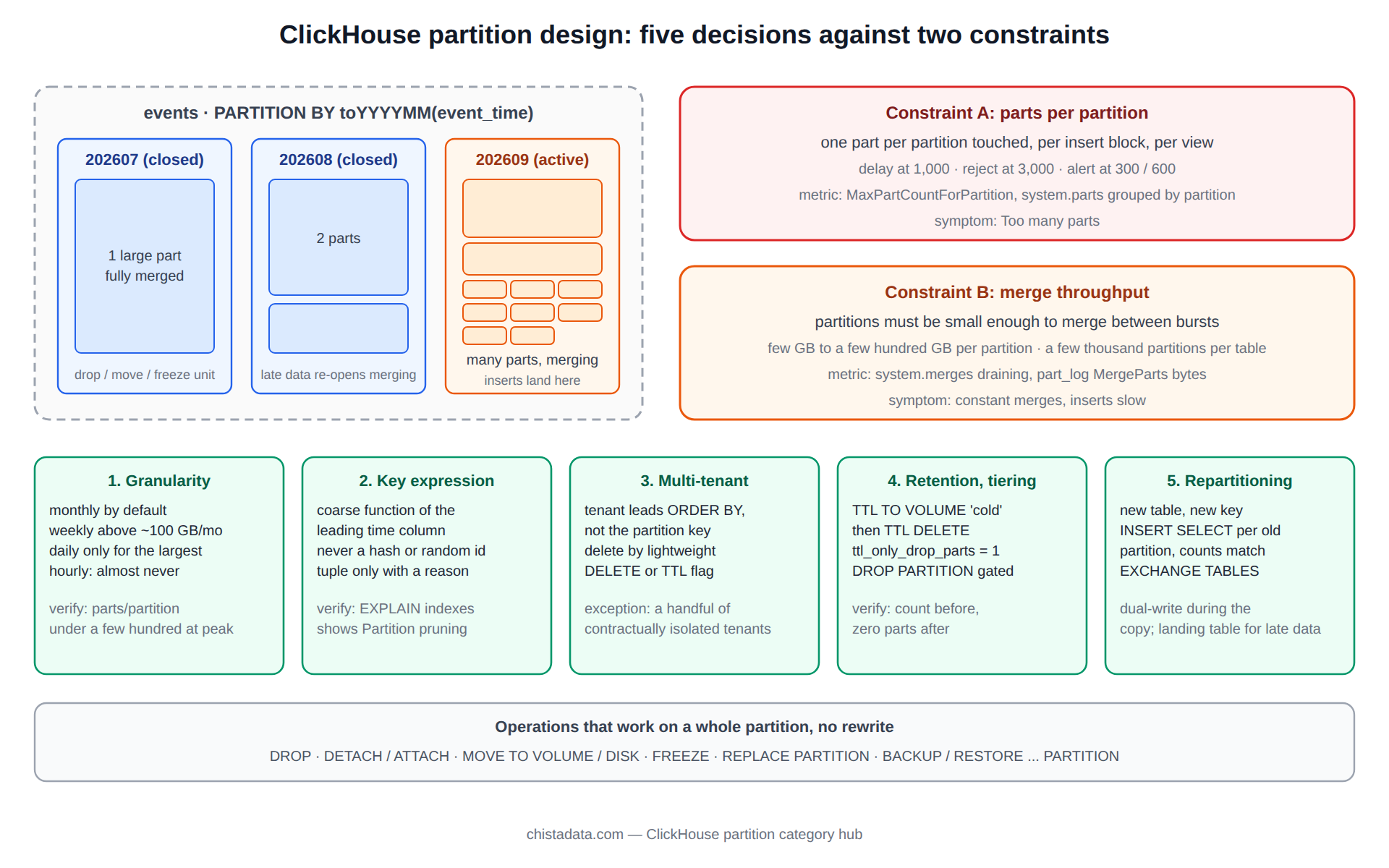
A ClickHouse partition is a management unit, not a performance feature. That distinction is the source of most partitioning mistakes we see, because engineers arriving from PostgreSQL or Hive expect partitions to prune queries and design fine-grained keys accordingly, then meet the Too many parts exception and a merge scheduler that cannot keep up. In ClickHouse, the primary index prunes queries; the partition key decides which rows can never be merged together, which rows can be dropped, moved or replaced in one operation, and how many parts an insert creates.
This page walks the five decisions a partition design has to get right, with the DDL and the verification query for each.
The posts in this category cover the mechanics of parts and partitions, ingestion performance, long-integer keys and the pitfalls list. This page is the design guide that precedes them.
Parts and partitions: what the ClickHouse partition key actually controls
Every insert into a MergeTree table writes one part per distinct partition value in the block. Parts within a partition are merged in the background into fewer, larger parts; parts in different partitions are never merged with each other. A partition is therefore a set of parts that share a key value, and the number of partitions an insert touches is the number of parts it creates. The archive post Parts and partitions in ClickHouse, part one walks through the on-disk layout.
SELECT
    partition,
    count()                                 AS parts,
    sum(rows)                               AS rows,
    formatReadableSize(sum(bytes_on_disk))  AS on_disk,
    min(min_time)                           AS from_time,
    max(max_time)                           AS to_time
FROM system.parts
WHERE database = 'analytics' AND table = 'events' AND active
GROUP BY partition
ORDER BY partition DESC
LIMIT 20;
Three things follow from that. A partition key with many distinct values per insert multiplies part creation. A partition that receives inserts is still merging and should be small enough to merge in reasonable time. And a partition that has stopped receiving inserts is the natural unit for retention, tiering and backup.
Decision one: granularity, the ClickHouse partition size that merges can keep up with
The working rule is that a partition should hold between a few gigabytes and a few hundred gigabytes, and that a table should have at most a few thousand partitions in total. For a time-series table, that usually means monthly partitions below about 100 GB a month, weekly up to a terabyte a month, and daily only for the largest tables. Hourly partitioning is nearly always wrong: an insert that spans an hour boundary creates two parts, a day’s inserts create at least 24 partitions of small parts, and retention by hour is rarely a business requirement.
-- Monthly, the default for most event tables
CREATE TABLE analytics.events
(
    event_time  DateTime64(3, 'UTC'),
    tenant_id   UInt32,
    event_type  LowCardinality(String),
    payload     String
)
ENGINE = ReplicatedMergeTree('/clickhouse/tables/{shard}/events', '{replica}')
PARTITION BY toYYYYMM(event_time)
ORDER BY (tenant_id, event_type, event_time)
SETTINGS index_granularity = 8192;

-- Check the arithmetic before choosing: bytes per month at current rate
SELECT
    toYYYYMM(event_time)                    AS month,
    formatReadableSize(sum(bytes_on_disk))  AS on_disk
FROM system.parts
WHERE table = 'events' AND active
GROUP BY month ORDER BY month DESC LIMIT 6;
The test that confirms the choice is max_part_count_for_partition in system.asynchronous_metrics staying under a few hundred during peak ingestion, and the merge queue in system.merges draining between bursts.
Decision two: the ClickHouse partition expression, derived from the sort key
The partition expression should be a coarse function of a column that also leads or appears early in the ORDER BY, most often the time column, because inserts then arrive in partition order and each block lands in one or two partitions.
Partitioning by a column unrelated to insert order, such as a hash of a user id, sends every block into every partition and creates a part per partition per block. Partitioning by an exact value, such as event_date when the table already sorts by event_time, is the special case that works because the date is coarse and monotonic.
The expression can be a tuple when two management dimensions are genuinely needed, for example (toYYYYMM(event_time), region) on a table where whole regions are dropped for data residency, but every extra dimension multiplies the partition count and should be justified by an operation that will actually be run on it. The archive’s long-integer queries post shows a case where a numeric key looked like a partition candidate and was not.
-- Partition pruning does happen when the WHERE matches the expression; verify it
EXPLAIN indexes = 1
SELECT count() FROM analytics.events
WHERE event_time >= toDateTime('2026-09-01', 'UTC') AND event_time < toDateTime('2026-10-01', 'UTC');
-- MinMax  Parts: 40/612  Granules: ...
-- Partition  Parts: 40/40  ...
The MinMax and Partition lines in that output are the only query benefit a ClickHouse partition gives: parts outside the range are skipped before the primary index is consulted. That benefit is real, but it is coarse, and the primary index would have skipped most of the same granules anyway.
Decision three: multi-tenant tables, and why tenant is a sort key, not a ClickHouse partition
The recurring request is to partition by tenant so that a tenant can be dropped in one statement. It works for ten tenants and fails for ten thousand, because every insert spanning tenants creates a part per tenant and the partition count explodes. The pattern that scales is tenant first in the ORDER BY, time-based partitioning, and tenant deletion by lightweight DELETE, available since 23.x, or by a TTL expression keyed on a per-tenant deletion flag from a dictionary.
-- Tenant isolation through the sort key, deletion through lightweight DELETE
ORDER BY (tenant_id, event_type, event_time)
PARTITION BY toYYYYMM(event_time)

DELETE FROM analytics.events WHERE tenant_id = 4711;

-- Progress of the lightweight delete
SELECT command, parts_to_do, is_done, latest_fail_reason
FROM system.mutations
WHERE table = 'events' AND is_done = 0;
The exception is a small, fixed set of large tenants with contractual isolation, where a tuple key of (tenant_group, toYYYYMM(event_time)) with a handful of groups is defensible, or where each such tenant simply gets its own table.
Decision four: retention and tiering as ClickHouse partition operations
This is where the partition key earns its keep. ALTER TABLE ... DROP PARTITION removes a partition’s parts in one metadata operation with no rewrite. MOVE PARTITION TO VOLUME or TO DISK relocates it to a cold tier. DETACH, ATTACH, FREEZE and REPLACE PARTITION give backup, restore and atomic reload at the same granularity. A TTL expression on the table automates the first two, and since the TTL is evaluated per part, it works most cleanly when the partition boundary and the TTL boundary align.
-- Automated: hot 30 days on NVMe, cold 12 months on object storage, then delete
ALTER TABLE analytics.events
    MODIFY TTL toDateTime(event_time) + INTERVAL 30 DAY TO VOLUME 'cold',
               toDateTime(event_time) + INTERVAL 13 MONTH DELETE;

-- Manual, with the verification before and validation after that the house rules require
SELECT partition, count() AS parts, sum(rows) AS rows
FROM system.parts WHERE table = 'events' AND active AND partition = '202508';
-- confirmation gate: operator confirms the partition and row count above before proceeding
ALTER TABLE analytics.events DROP PARTITION '202508';
SELECT count() FROM system.parts WHERE table = 'events' AND active AND partition = '202508';  -- expect 0
DROP PARTITION is destructive and immediate on all replicas. In a runbook it is always preceded by the row-count query and a confirmation gate, and followed by the validation query, with a FREEZE PARTITION or a verified backup as the rollback path. The archive’s ClickHouse performance pitfalls post includes the partition-related pitfalls that show up in retention jobs.
Decision five: changing the ClickHouse partition key on a live table
The partition key cannot be altered in place. Changing it means a new table, a copy, and a switch, and on a large table the copy is the risk. The procedure that works is to create the new table with the new key, insert partition by partition from the old table with INSERT SELECT bounded by the old partition, verify counts per source partition, keep both tables written by the ingestion path during the copy through a second materialized view or dual writes, and swap with EXCHANGE TABLES, which is atomic since 21.x on Atomic databases.
CREATE TABLE analytics.events_v2 AS analytics.events
ENGINE = ReplicatedMergeTree('/clickhouse/tables/{shard}/events_v2', '{replica}')
PARTITION BY toYYYYMMDD(event_time)          -- the new key
ORDER BY (tenant_id, event_type, event_time);

-- One old partition at a time, verified
INSERT INTO analytics.events_v2 SELECT * FROM analytics.events WHERE toYYYYMM(event_time) = 202508
SETTINGS max_insert_threads = 4, max_insert_block_size = 1048576;

SELECT
    (SELECT count() FROM analytics.events    WHERE toYYYYMM(event_time) = 202508) AS src,
    (SELECT count() FROM analytics.events_v2 WHERE toYYYYMM(event_time) = 202508) AS dst;

-- After every partition matches and the ingestion path is dual-writing:
EXCHANGE TABLES analytics.events AND analytics.events_v2;
Each INSERT SELECT is bounded by a source partition so that a failure is a restart of one partition, not of the whole copy, and the counts are checked before the next one starts. The ClickHouse ingestion hub covers the block-size and thread settings that keep the copy inside the part and memory budgets, and the ingestion performance post in this archive measures a copy at scale.
Backup and restore at ClickHouse partition granularity
The same boundary that makes retention cheap makes backups incremental. BACKUP TABLE ... PARTITION writes only the named partitions, so a nightly job backs up the current month and the previous one and leaves the closed months alone; RESTORE TABLE ... PARTITION brings one back without touching the rest.
On clusters that predate the BACKUP command, FREEZE PARTITION hard-links the parts into shadow/ for an external tool to copy, and ATTACH PARTITION FROM or ATTACH PART is the restore path. Either way, the restore drill that the house rules call for every quarter is a per-partition operation, which is why partition-aligned backups are the only kind that get drilled.
BACKUP TABLE analytics.events PARTITIONS '202608', '202609'
    TO Disk('backup_enc', 'events-2026-09-18.zip')
    SETTINGS compression_method = 'zstd';

-- Restore drill on staging: one partition into a scratch table, then count
RESTORE TABLE analytics.events AS analytics.events_restore_test PARTITION '202608'
    FROM Disk('backup_enc', 'events-2026-09-18.zip');

SELECT
    (SELECT count() FROM analytics.events              WHERE toYYYYMM(event_time) = 202608) AS live,
    (SELECT count() FROM analytics.events_restore_test WHERE toYYYYMM(event_time) = 202608) AS restored;
Reading a ClickHouse partition problem from the symptoms
Inserts rejected with Too many parts on a table whose batching has not changed: a new partition dimension, or a producer that started sending rows spread across old months. system.parts grouped by partition and modification_time shows which partitions are receiving new parts. Merges running constantly on partitions months old: late-arriving data landing in closed partitions, which re-opens them for merging; the fix is a landing table and a scheduled move.
A TTL that appears not to work: merge_with_ttl_timeout has not elapsed, or ttl_only_drop_parts is off and the rewrite is queued behind ordinary merges. A partition that cannot be dropped: a replica is behind, and the drop waits for the replication queue; system.replication_queue names the entry.
Late-arriving data and the landing-table pattern
The partition design above assumes rows arrive roughly in time order. When a source replays days or weeks of history, every replayed block lands in a closed partition, re-opens it for merging, and competes with the current month for merge bandwidth.
The pattern that contains this is a landing table with the same schema and a coarse single partition, into which the replay is written, followed by a scheduled INSERT SELECT that moves one target partition at a time into the main table during a quiet window. The main table’s merge behaviour is unaffected while the replay runs, and the move is verifiable per partition with the same count query used in decision five.
CREATE TABLE analytics.events_landing AS analytics.events
ENGINE = MergeTree
PARTITION BY tuple()
ORDER BY (tenant_id, event_type, event_time);

-- Quiet-window move, one target partition per run
INSERT INTO analytics.events
SELECT * FROM analytics.events_landing WHERE toYYYYMM(event_time) = 202607;

ALTER TABLE analytics.events_landing DELETE WHERE toYYYYMM(event_time) = 202607;
The ClickHouse partition decisions in one table
| Decision | Default answer | Constraint it protects | Verification |
|---|---|---|---|
| 1. Granularity | Monthly; weekly or daily only above ~100 GB/month | Parts per partition, merge throughput | MaxPartCountForPartition, system.merges draining |
| 2. Key expression | Coarse function of the leading time column | Parts created per insert | EXPLAIN indexes shows Partition pruning; one or two parts per block |
| 3. Multi-tenant | Tenant in ORDER BY, not in the partition | Partition count | Lightweight DELETE completes; partition count stable |
| 4. Retention, tiering | TTL TO VOLUME then DELETE aligned to partition boundary | Disk space, cold-tier cost | system.parts.disk_name per partition |
| 5. Repartitioning | New table, per-partition copy, EXCHANGE TABLES | Data loss during the switch | Per-partition counts match; dual writes verified |
Settings that interact with the ClickHouse partition design
All of these are MergeTree settings per table and take effect on the next merge or insert without a restart. parts_to_delay_insert and parts_to_throw_insert, defaults 1,000 and 3,000, are the back-pressure thresholds per partition. max_parts_in_total, default 100,000, caps the table. merge_with_ttl_timeout, seconds, default 14,400, is how often TTL merges are considered, which is why a TTL change is not visible for hours.
ttl_only_drop_parts = 1 makes the delete TTL drop whole parts when every row has expired instead of rewriting them, which is the setting that makes partition-aligned TTL cheap. max_bytes_to_merge_at_max_space_in_disk bounds the largest merge and therefore the practical maximum part size inside a partition.
SELECT name, value, changed
FROM system.merge_tree_settings
WHERE name IN ('parts_to_delay_insert', 'parts_to_throw_insert', 'max_parts_in_total',
               'merge_with_ttl_timeout', 'ttl_only_drop_parts',
               'max_bytes_to_merge_at_max_space_in_disk', 'min_age_to_force_merge_seconds');

ALTER TABLE analytics.events MODIFY SETTING ttl_only_drop_parts = 1;
Version notes
Lightweight DELETE is generally available since 23.x. EXCHANGE TABLES requires the Atomic database engine, the default since 20.x. TTL TO VOLUME and TO DISK moves are 19.x and later, and ttl_only_drop_parts since 20.x. Confirm the running version before relying on these; the ClickHouse custom partitioning key documentation is the reference and is explicit that partitioning is not a substitute for the primary key.
Reading the archive
Start with the parts-and-partitions post for the layout, then ClickHouse ingestion performance for what the key does to insert cost, and the pitfalls post before writing a retention job.
A last observation from the field. Almost every ClickHouse partition problem we are called for was created at table-creation time by copying a key from a different system, and almost every one is cheap to fix in the first month and expensive after the first terabyte. The five decisions above take an hour at design time; the repartitioning procedure in decision five takes a week. That arithmetic is the argument for doing the review before the first insert.
The landing table also serves as the staging point for a repartitioning, since the per-partition move is the same operation, and as the quarantine for a producer whose batching has gone wrong: point it at the landing table, fix the batching, then move.
ChistaDATA’s ClickHouse consulting practice reviews partition keys as part of every schema review and runs repartitioning migrations as a scoped project with per-partition verification, and 24×7 ClickHouse support handles the part storms that a mis-sized key produces. Test any partition change on staging against a replayed insert stream, verify counts per partition, and keep a frozen copy or a tested backup before the first DROP PARTITION on production.