ChistaDATA Managed Services · ClickHouse Cloud FinOps
Managed ClickHouse Cloud FinOps: a dedicated desk that runs your cost discipline every day
Knowing how to cut a ClickHouse Cloud bill is rarely the problem. Doing it every day, after the review meeting ends, is. Managed ClickHouse Cloud FinOps from ChistaDATA puts a named desk on that work: it loads your costs daily, raises budget alerts, ranks fixes weekly, and brings finance and engineering a monthly FinOps pack.
We work with read-only access to billing and telemetry. We do not read business data and we do not change your services. Every proposal arrives with its blast radius, rollback and expected saving, for your teams to approve.
The case for a managed service
Why ClickHouse Cloud cost management fails without an owner
Cost programmes rarely fail for lack of insight. They fail because the insight has no owner after the first quarter. Platform engineers are measured on uptime, application teams on features and finance on forecasts. Untagged spend, a sandbox that never idles and a commitment drifting off course each belong to everyone, and so to no one.
ClickHouse Cloud cost management needs a function whose only job is to keep the numbers honest and the backlog moving. Most organisations do not need that function full time. A managed desk provides it at the cadence the estate needs, with ClickHouse engineers behind it who can tell a real saving from a risky one.
Operating model
How our ClickHouse Cloud FinOps services operate
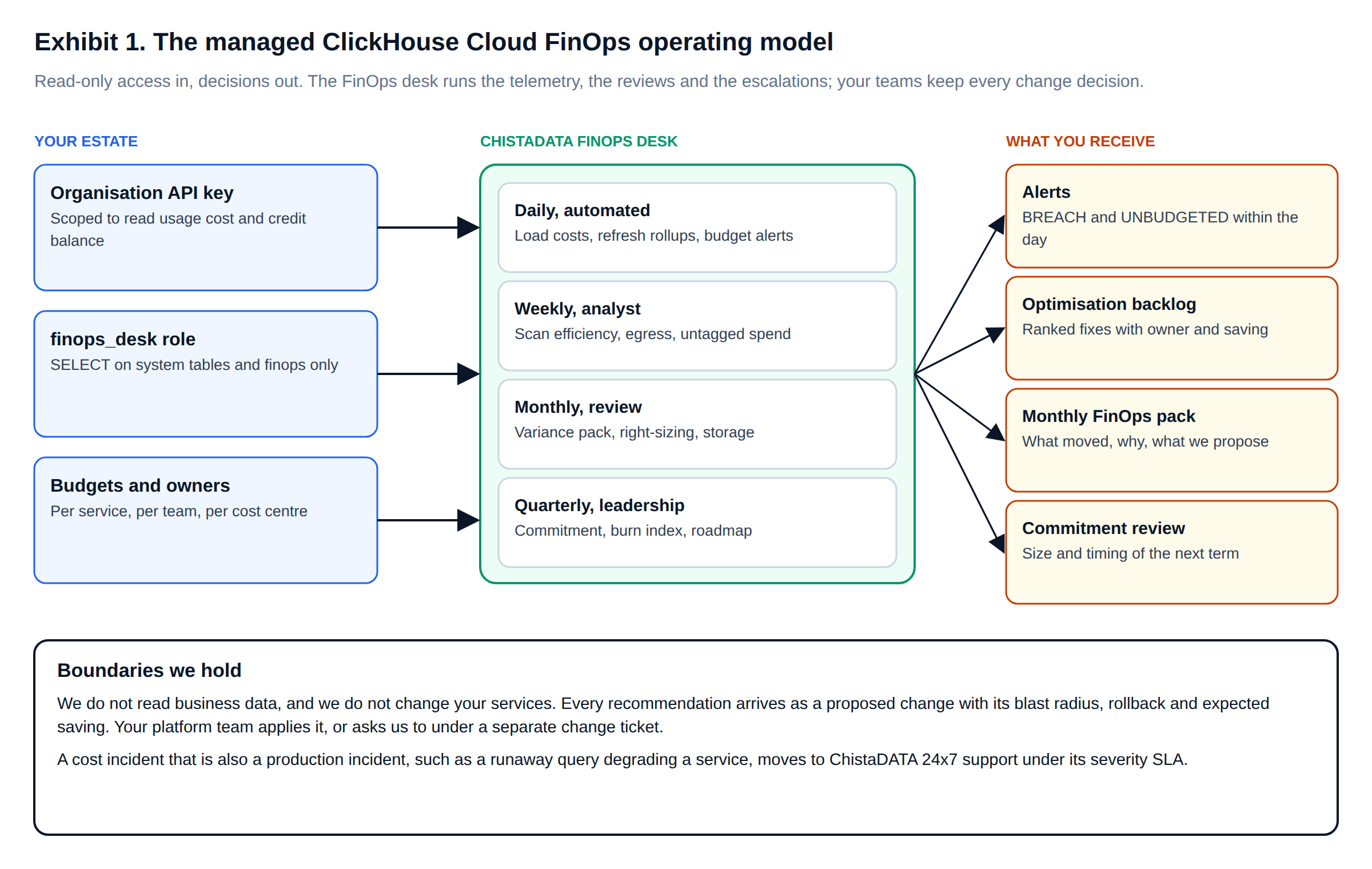
Exhibit 1 shows the model. Your estate provides three inputs, all read-only. The ChistaDATA FinOps desk runs four cadences. You receive four outputs, each with a named owner on your side.
| Cadence | What the desk does | What you receive |
|---|---|---|
| Daily, automated | Loads the usage cost API, refreshes query telemetry, evaluates every budget | ClickHouse Cloud budget alerts for BREACH and UNBUDGETED services, triaged the same day |
| Weekly, analyst | Reviews scan efficiency, egress, untagged spend and new query fingerprints | A ranked optimisation backlog: fix, owner, estimated saving, risk |
| Monthly, review | Builds the variance pack; runs right-sizing and storage reviews | The monthly FinOps pack and a 45-minute review with finance and engineering |
| Quarterly, leadership | Reviews commitment burn, forecast and the savings realised against those proposed | A commitment recommendation and a refreshed roadmap |
Scope
What our FinOps managed service covers, and what it does not
| Included | Not included unless agreed |
|---|---|
| Cost data pipeline: usage cost API loads, query telemetry rollups, ownership map | Reading or exporting business data |
| Budget alerts, forecasts and anomaly triage | Applying changes to production services |
| Tagging standard and coverage reporting | Application code changes in your repositories |
| Guardrail design: profiles, quotas, CI cost gate thresholds | Negotiating contracts on your behalf |
| ClickHouse Cloud spend optimization backlog and right-sizing proposals | Non-ClickHouse cloud spend (available through MinervaDB) |
| Monthly FinOps pack and quarterly commitment review | Accounting, chargeback invoicing or tax treatment |
Changes in the right-hand column can be added under a separate change ticket. Where your team prefers us to apply an approved change, our managed ClickHouse service does so through your change process, with the rollback written before the change starts.
Lifecycle
From first access to steady state
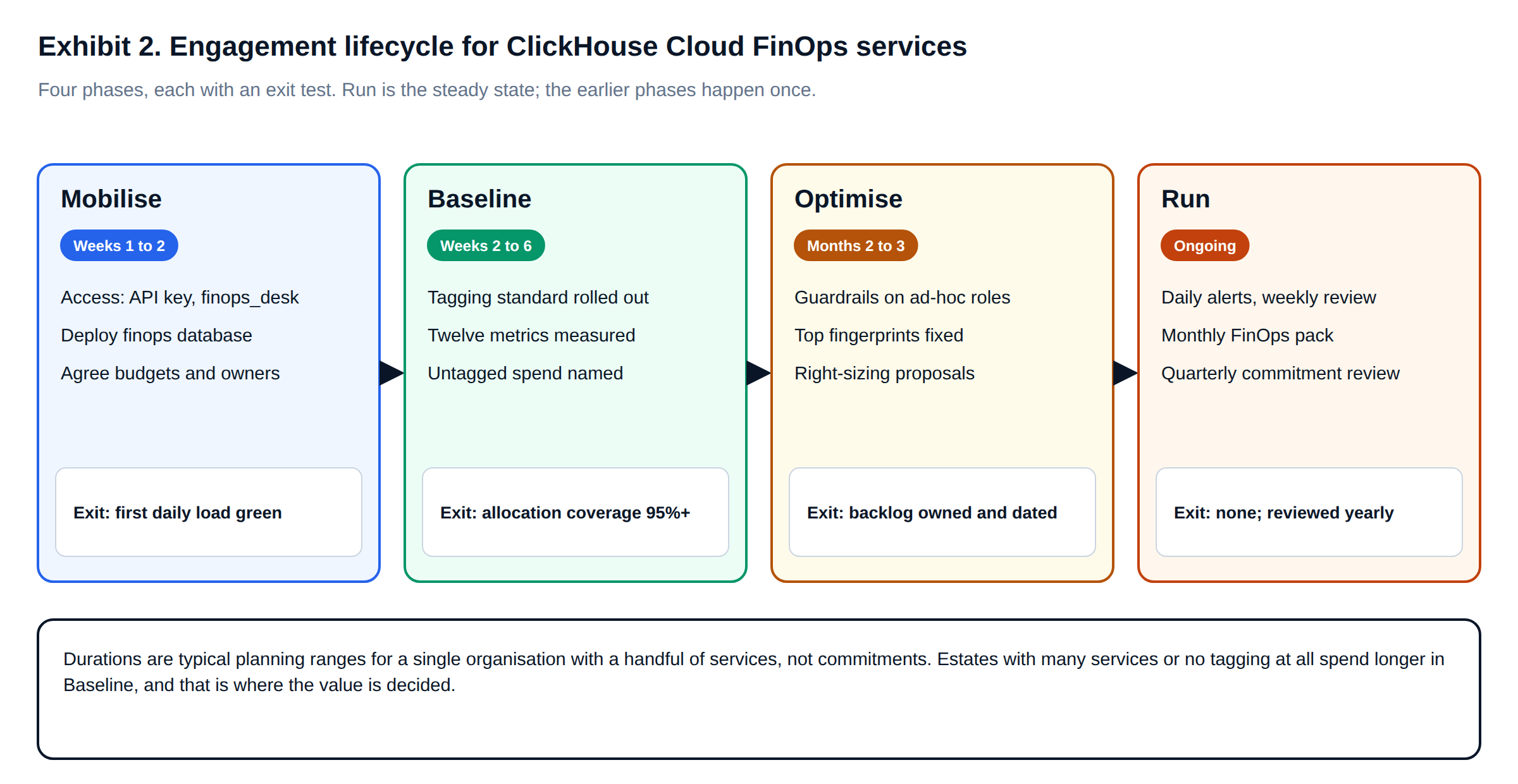
Each phase has an exit test, so progress is measured rather than reported. Mobilise and Baseline set the foundation once; Run is where ClickHouse Cloud spend optimization compounds month after month.
Access and security
The least-privilege access our desk works with
The desk needs two things from each service: the telemetry that explains cost, and the finops database that stores it. It needs nothing else. The role below grants exactly that, as a read-only user with bounded execution time and memory. We tested it on our lab service: it reads system.query_log, and it is refused on a business table and on any DDL.
-- Managed ClickHouse Cloud FinOps: the access the ChistaDATA FinOps desk needs, and nothing more.
-- Metadata and telemetry only: no SELECT on any business table, no INSERT, ALTER or DROP anywhere.
CREATE ROLE IF NOT EXISTS finops_desk;

GRANT SELECT ON system.query_log      TO finops_desk;   -- CPU, bytes, memory, tags per query
GRANT SELECT ON system.parts          TO finops_desk;   -- compressed bytes and partitions per table
GRANT SELECT ON system.tables         TO finops_desk;   -- engines, sort keys, TTLs
GRANT SELECT ON system.columns        TO finops_desk;   -- types and codecs, for compression reviews
GRANT SELECT ON system.view_refreshes TO finops_desk;   -- health of the telemetry rollups
GRANT SELECT ON finops.*              TO finops_desk;   -- the cost warehouse

CREATE USER IF NOT EXISTS chistadata_finops
    IDENTIFIED WITH sha256_password BY '${FINOPS_DESK_PASSWORD}'
    DEFAULT ROLE finops_desk
    SETTINGS readonly = 1, max_execution_time = 120, max_memory_usage = 4294967296;  -- read-only, bounded

-- Lab test as chistadata_finops:
-- SELECT count() FROM system.query_log        -> 11949
-- SELECT count() FROM lab.events              -> Code: 497 ... Not enough privileges
-- DROP TABLE finops.service_owner             -> Code: 497 ... Not enough privileges
On the billing side, we ask for an organisation API key restricted to the least privilege that can read usage costs and credit balances through the ClickHouse Cloud usage cost API, stored in your secret manager or ours, and rotated on your schedule. Credentials never appear in code, tickets or reports. Revoking the key and dropping the role ends our access completely; nothing in the service depends on us to keep running.
Daily control
ClickHouse Cloud budget alerts that arrive while there is still time to act
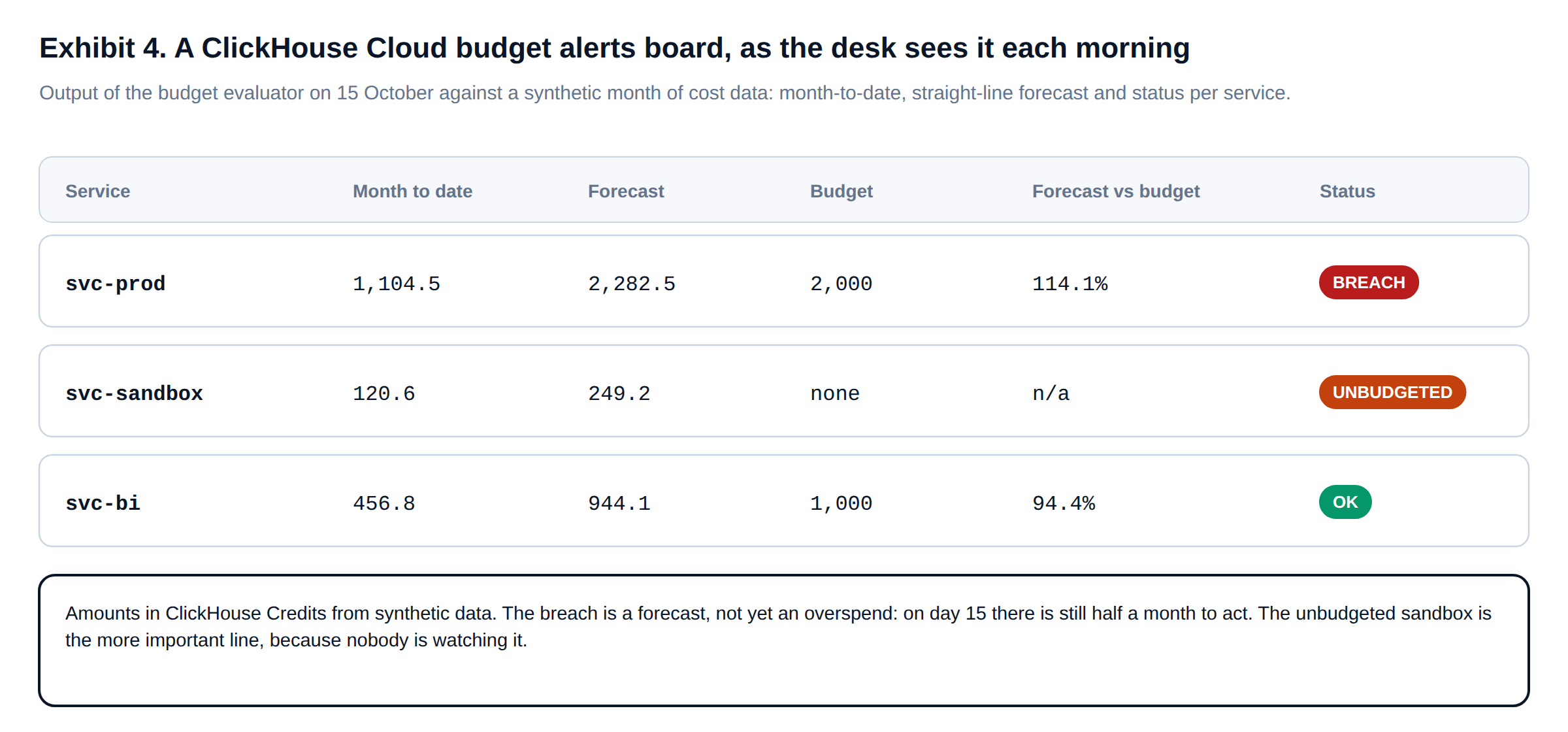
Most budget alerts arrive after the money is spent. Ours forecast to month end every morning and classify each service. BREACH means the forecast exceeds budget. WATCH means month-to-date has crossed the watch line. UNBUDGETED means a service spends with no budget at all. Exhibit 4 is the board the desk reviews, generated by the evaluator below from a synthetic month of cost data.
#!/usr/bin/env python3
"""
Managed ClickHouse Cloud FinOps: daily budget alerts per service, from the finops cost warehouse.

For each budgeted service: month-to-date spend, a straight-line forecast to month end, and a status.
  BREACH  forecast above budget, or month-to-date already at 100%
  WATCH   month-to-date above the watch line (default 80% of budget) but forecast within budget
  OK      neither
Services that spend but have no budget are reported as UNBUDGETED: they are the allocation gap.
Credentials and the webhook come from the environment; --dry-run prints instead of posting.
"""
import base64, calendar, json, os, sys, urllib.parse, urllib.request
from datetime import date

def query(sql: str) -> list[dict]:
    auth = base64.b64encode(f"{os.environ['CH_USER']}:{os.environ.get('CH_PASSWORD', '')}".encode()).decode()
    req = urllib.request.Request(f"{os.environ['CH_URL']}/?query={urllib.parse.quote(sql)}&default_format=JSONEachRow",
                                 headers={"Authorization": f"Basic {auth}"})
    return [json.loads(l) for l in urllib.request.urlopen(req, timeout=60).read().decode().splitlines() if l]

def evaluate(as_of: date, budgets: dict[str, float], watch: float = 0.8) -> list[dict]:
    first = as_of.replace(day=1)
    days_in_month = calendar.monthrange(as_of.year, as_of.month)[1]
    rows = query(f"""
        SELECT service_id, toFloat64(sum(chc)) AS mtd
        FROM finops.usage_cost_daily FINAL
        WHERE usage_date BETWEEN '{first}' AND '{as_of}' AND entity_type = 'service'
        GROUP BY service_id""")
    out = []
    for r in rows:
        mtd, budget = r["mtd"], budgets.get(r["service_id"])
        forecast = mtd / as_of.day * days_in_month               # straight line; replace with seasonality later
        if budget is None:
            status = "UNBUDGETED"
        elif forecast > budget or mtd >= budget:
            status = "BREACH"
        elif mtd >= watch * budget:
            status = "WATCH"
        else:
            status = "OK"
        out.append({"service": r["service_id"], "mtd_chc": round(mtd, 1), "forecast_chc": round(forecast, 1),
                    "budget_chc": budget, "pct_of_budget": round(100 * forecast / budget, 1) if budget else None,
                    "status": status})
    return sorted(out, key=lambda x: ["BREACH", "UNBUDGETED", "WATCH", "OK"].index(x["status"]))

if __name__ == "__main__":
    as_of = date.fromisoformat(os.environ.get("AS_OF", date.today().isoformat()))
    budgets = json.load(open(os.environ.get("FINOPS_BUDGETS", "budgets.json")))   # {"svc-prod": 2000, ...}
    result = evaluate(as_of, budgets)
    for r in result:
        print(f"{r['status']:10} {r['service']:12} mtd {r['mtd_chc']:>8} forecast {r['forecast_chc']:>8} "
              f"budget {r['budget_chc'] or '-':>6} ({r['pct_of_budget'] or '-'}%)")
    alerts = [r for r in result if r["status"] in ("BREACH", "UNBUDGETED")]
    if alerts and "--dry-run" not in sys.argv:
        req = urllib.request.Request(os.environ["FINOPS_WEBHOOK_URL"], method="POST",
                                     data=json.dumps({"text": f"ClickHouse Cloud budget alerts {as_of}", "alerts": alerts}).encode(),
                                     headers={"Content-Type": "application/json"})
        urllib.request.urlopen(req, timeout=30).read()

# Lab test: AS_OF=2026-10-15, budgets.json = {"svc-prod": 2000, "svc-bi": 1000}, synthetic cost data
# BREACH     svc-prod     mtd   1104.5 forecast   2282.5 budget   2000 (114.1%)
# UNBUDGETED svc-sandbox  mtd    120.6 forecast    249.2 budget      - (-%)
# OK         svc-bi       mtd    456.8 forecast    944.1 budget   1000 (94.4%)
On day 15 the production breach is still a forecast, with half a month to act on it. The unbudgeted sandbox matters more, because nobody was watching it. The desk’s first action on an UNBUDGETED line is to find its owner. Its first action on a BREACH is to trace the variance to services, meters and query fingerprints.
Monthly control
The monthly FinOps pack: ClickHouse Cloud cost management in one table
The pack opens with variance, not totals, reconciled to the meters described in the ClickHouse Cloud billing overview. The query below compares the current period with the previous one of the same length, by service and meter. It ranks lines by absolute change and shows each line’s share of the listed change, so the review starts with what moved.
-- Managed ClickHouse Cloud FinOps: the variance table at the front of every monthly FinOps pack.
-- Current period against the previous period of the same length, by service and meter, with each
-- line's share of the listed change, so the review starts with what moved, not with the invoice total.
WITH
    {period_end:Date}                         AS p_end,
    {period_days:UInt16}                      AS p_days,
    p_end - p_days + 1                        AS cur_start,
    cur_start - p_days                        AS prev_start
SELECT
    service_id,
    meter,
    round(sumIf(chc, usage_date >= cur_start), 1)                                     AS current_chc,
    round(sumIf(chc, usage_date <  cur_start), 1)                                     AS previous_chc,
    round(current_chc - previous_chc, 1)                                              AS change_chc,
    round(100 * change_chc / nullIf(previous_chc, 0), 1)                              AS change_pct,
    round(100 * change_chc / nullIf(sum(change_chc) OVER (), 0), 1)                   AS share_of_listed_change_pct
FROM finops.usage_cost_daily FINAL
WHERE usage_date BETWEEN prev_start AND p_end
  AND entity_type = 'service'
GROUP BY service_id, meter
HAVING abs(change_chc) >= {min_change:Float64}
ORDER BY abs(change_chc) DESC;

-- --param_period_end=2026-10-15 --param_period_days=14 --param_min_change=1   (synthetic cost data)
-- service_id   meter       current_chc  previous_chc  change_chc  change_pct  share_of_listed_change_pct
-- svc-sandbox  computeCHC         93.4          82.6        10.8        13.1                        57.8
-- svc-prod     computeCHC        836.6         828.7         7.9         1.0                        42.2
Behind the variance table, the pack carries the twelve ClickHouse Cloud FinOps metrics: allocation coverage, utilization, idle-awake time, scan efficiency, egress, storage and commitment burn. Each comes with a short commentary and the backlog items it produced. The pack is written for a finance reader and an engineering reader at once, and says plainly what did not improve.
Inside the pack
What every monthly FinOps pack contains
The pack follows the same structure every month, so trends are visible and nothing is quietly dropped when the news is bad. A finance reader can stop after the first page; an engineering reader goes on to the backlog and the evidence behind it.
| Section | Content | Primary reader |
|---|---|---|
| 1. Summary | Spend against budget, forecast to quarter end, burn index, three decisions requested | Finance, leadership |
| 2. Variance | What moved by service and meter, and why, from the query above | Finance, platform team |
| 3. Allocation | Spend by team and feature, untagged share, coverage against target | Finance, team leads |
| 4. Efficiency | Utilization, idle-awake minutes, scan efficiency, egress intensity, cold-data share | Platform team |
| 5. Backlog | Open, done and declined fixes, each with owner, date, estimated and realised saving | Platform and application teams |
| 6. Risks | Guardrails that blocked legitimate work, alerts that fired late, data quality issues in the pipeline | Platform team, ChistaDATA desk |
Section six is the one most reports leave out. A guardrail that blocks a legitimate month-end job is a cost as well, and so is an alert that arrives after the money is spent. Reporting our own misses next to the savings is what keeps ClickHouse Cloud cost management credible with the people who have to act on it.
Accountability
Who does what in managed ClickHouse Cloud FinOps
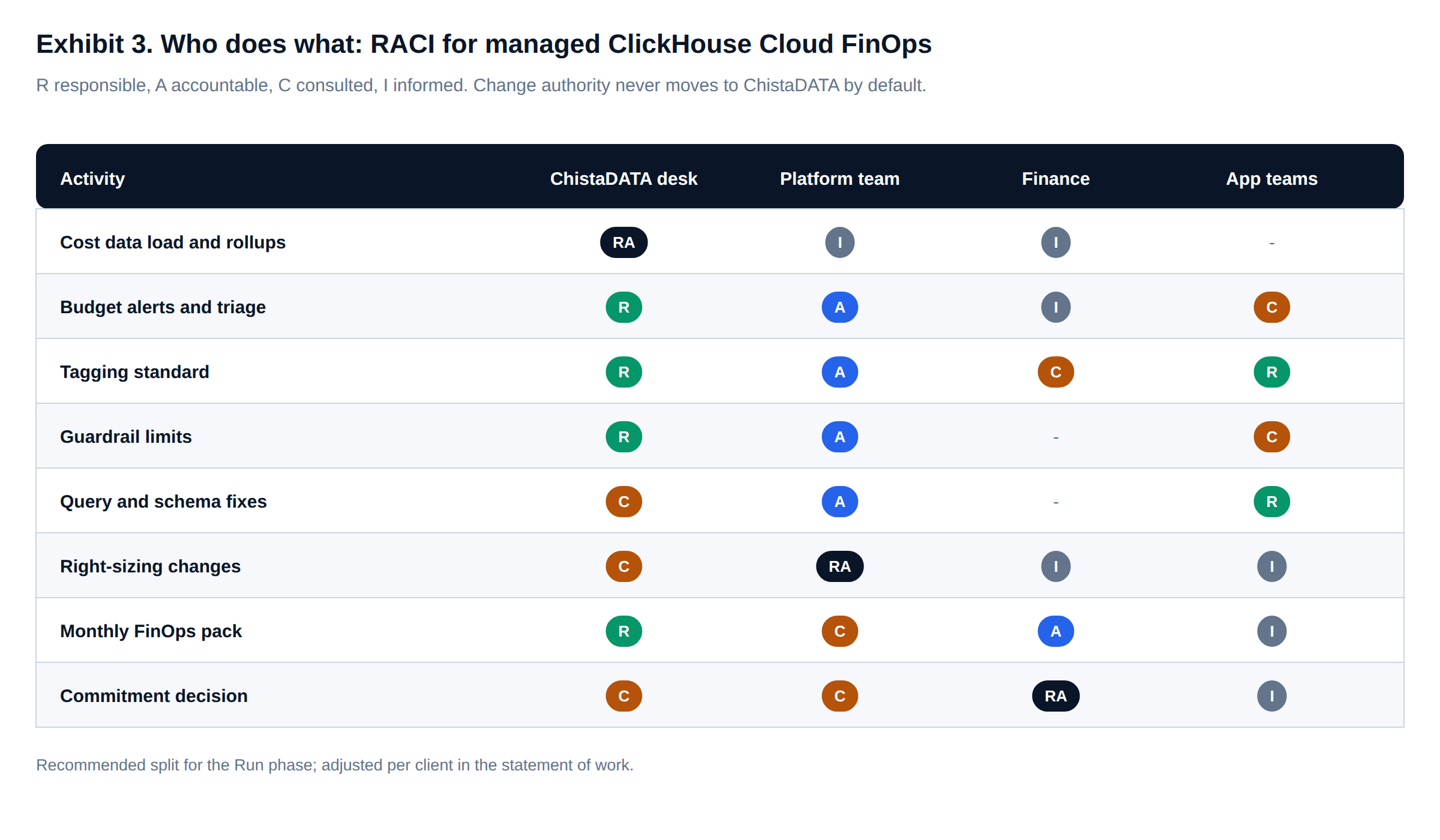
The desk is responsible for the data, the alerts and the analysis. Your platform team stays accountable for every change to a service, and finance stays accountable for budgets and commitments. That split is deliberate. A FinOps managed service that can change production on its own judgement has become an operations team, and should be governed as one.
Service levels
Service levels and the measures we report on ourselves
| Event | Response |
|---|---|
| Severity 1: cost incident that is also a production incident, such as a runaway query degrading a service | 15 minutes, 24×7×365, through ChistaDATA ClickHouse support |
| Severity 2 | 12 hours |
| Severity 3 | 24 hours |
| Severity 4, including routine FinOps questions | 48 hours |
We also report on our own performance every month: the share of budget alerts triaged on the day they fire, allocation coverage against target, the share of backlog items with an owner and a date, and savings realised against savings proposed. If realised savings trail proposals for two consecutive months, the quarterly review starts there.
Why ChistaDATA
ClickHouse engineers behind the FinOps desk
ClickHouse depth
The desk is staffed by ClickHouse engineers. A proposed sort-key change or memory limit is checked against how the engine behaves, not only against a cost curve.
Vendor-neutral
We recommend what lowers your cost, including fewer services, a smaller commitment or a different home for a workload, even when that means less work for us.
No lock-in
The pipeline, SQL and reports live in your account and repository. If the engagement ends, everything keeps running without us.
FAQ
Managed ClickHouse Cloud FinOps: questions we are asked
What do ClickHouse Cloud FinOps services from ChistaDATA include?
A daily cost pipeline and ClickHouse Cloud budget alerts, a weekly optimisation backlog, a monthly FinOps pack with review, and a quarterly commitment review, run by a named desk with read-only access.
Does the desk need access to our data?
No. It needs SELECT on system tables and on the finops database, and a billing API key that can read usage costs. It is refused on business tables and on all DDL.
Who approves changes in a FinOps managed service?
Your platform team, always. The desk proposes each change with blast radius, rollback and expected saving. Applying it is a separate, explicit step.
How is ClickHouse Cloud spend optimization measured?
Against the same metrics every month: allocation coverage, utilization, scan efficiency and commitment burn, plus savings realised against savings proposed.
Can we start with engineering and move to managed later?
Yes. Our ClickHouse Cloud FinOps engineering engagement builds the same platform the desk runs, so handover is a change of operator, not a rebuild.
Related
Further reading on ClickHouse Cloud cost management
ClickHouse Cloud FinOps engineering: the telemetry warehouse, allocation engine and guardrails in detail. ClickHouse Cloud FinOps metrics: the twelve-metric scorecard. ClickHouse managed services and 24×7 ClickHouse support.
Code on this page was tested on ChistaDATA’s lab service, ClickHouse 26.9.17.8, in October 2026; cost data in examples is synthetic. Durations are planning ranges, not commitments. Test every recommendation on a non-production service before applying it to production, and maintain a robust DR posture.
ChistaDATA
Put a FinOps desk on your ClickHouse Cloud estate
Managed ClickHouse Cloud FinOps from ChistaDATA starts with a two-week mobilisation: read-only access, the cost pipeline and your first budget alerts. From then on, the desk runs daily, weekly, monthly and quarterly, backed by 24×7×365 ClickHouse support.