ChistaDATA · Remote ClickHouse DBA · 24×7×365
ClickHouse DBA Services: Senior Remote DBAs and Data SRE for Production Clusters
A production ClickHouse cluster needs a database administrator who understands MergeTree internals, replication and Keeper, and the failure modes that only appear under real load. Hiring that person takes six to twelve months. A ChistaDATA ClickHouse DBA is on your cluster within days.
Our Remote DBA service puts a named, senior ClickHouse DBA inside your team’s workflow, backed by a 24×7×365 bench across eleven global offices and a fifteen-minute Severity 1 response. Every engineer on the bench is a career ClickHouse specialist who operates clusters ingesting millions of rows per second across AdTech, observability, fintech, SaaS and IoT workloads, on self-managed ClickHouse, Kubernetes, ClickHouse Cloud, Aiven and Altinity.Cloud.
01
What a ClickHouse DBA owns
- Availability, replication and Keeper health
- MergeTree schema, sort keys and TTL
- Backups, restore drills and DR
- Upgrades across LTS lines
02
How the work is evidenced
- system.parts, merges and mutations
- system.replicas and replication_queue
- system.query_log p95 and p99
- Written monthly engineering report
03
Supported releases
- Release coverage: ChistaDATA delivers consulting, 24×7 support, managed services and remote DBA on ClickHouse 26.10 (latest stable release, October 2026), 26.8 LTS (current long-term-support release, August 2026, supported to August 2027) and 26.3 LTS (supported to March 2027), plus every supported stable release in between, with upgrade engineering for 24.x and 25.x estates, including 25.8 LTS, which reached end of support in August 2026. Last verified November 2026.
04
Commercial terms
- Hour blocks from 8 to 160 per month
- No per-server licensing
- Plans flex quarterly
- Zero vendor lock-in, 100% open source
The role
What a ClickHouse DBA is responsible for
ClickHouse is not a database that runs itself. Inserts create parts, background merges consolidate them, replication ships them between replicas through ClickHouse Keeper, TTL rules move or delete them, and mutations rewrite them. Each of those mechanisms has a queue, a backlog and a failure mode, and each one is visible in a system table if somebody is looking.
A ClickHouse DBA is the person who looks. The role owns four outcomes: the cluster stays available, queries stay inside their latency budget, data stays durable and recoverable, and every change to the estate is planned, staged and reversible. At ChistaDATA the role also carries Data SRE duties: service-level objectives per workload, error budgets, and runbooks that execute the same way at 3 a.m. as they do in a review meeting.
| Outcome | What the DBA does | Evidence |
|---|---|---|
| Availability | Replica and Keeper quorum health, replication lag, failover readiness | system.replicas, system.zookeeper_connection |
| Performance | Sort-key and schema review, query rewrites, merge and parts hygiene | system.query_log, system.parts, system.merges |
| Durability | Backups to object storage, quarterly restore drills, documented RPO and RTO | system.backup_log, drill reports |
| Change safety | Staged upgrades across LTS lines, settings changes with rollback, mutation control | Change records, system.mutations |
Operating model
How a ChistaDATA ClickHouse DBA operates your cluster
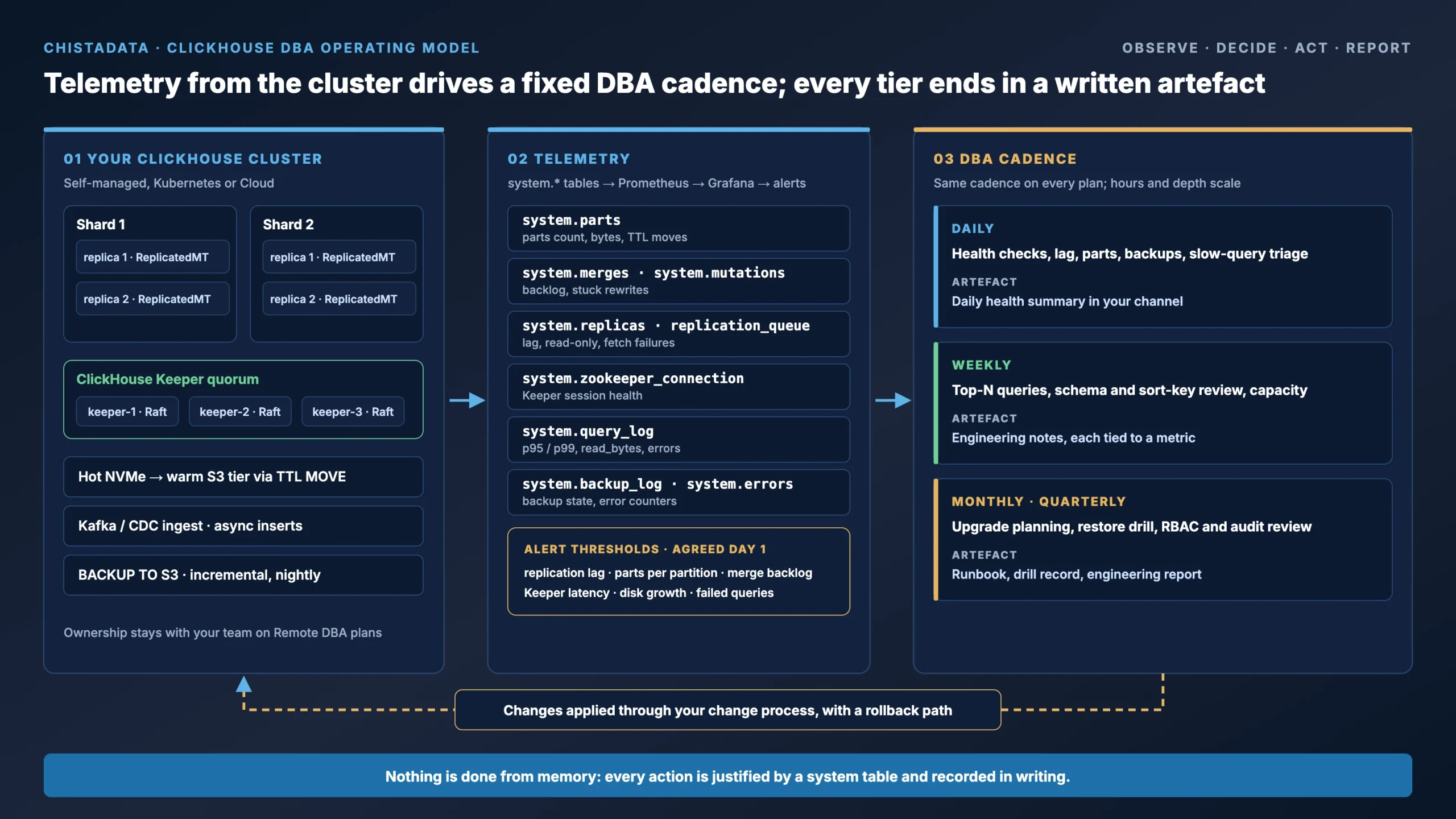
The diagram shows the loop every engagement runs on. Telemetry from the cluster’s system tables flows into monitoring, the DBA acts on it in a fixed cadence, and every action produces a record your team can audit. Nothing is done from memory or intuition.
01 · OBSERVE
Telemetry first
system.* tables are exported into Prometheus and Grafana on day one, with alert thresholds for replication lag, parts count, merge backlog, Keeper latency and disk growth.
02 · DECIDE
Measured, not guessed
Every recommendation names the metric and the system table that justifies it. A sort-key change is proposed with the read_bytes it will save, not an opinion.
03 · ACT
Staged and reversible
Changes go through your change process with a stated blast radius and rollback path. Destructive operations carry a verification query before and a validation query after.
04 · REPORT
Written evidence
A monthly engineering report covers p95 and p99 trends, storage efficiency, incidents, changes made and the next quarter’s capacity plan.
Cadence
What your ClickHouse DBA does daily, weekly and quarterly
The cadence is the contract every ClickHouse DBA engagement runs on. It is the same for an 8-hour On-Demand plan and a 24×7 Ultimate plan; only the depth and the hours change.
Daily operations
Cluster health checks against system.replication_queue, system.merges and system.mutations. Replication-lag monitoring with alert thresholds. Parts-count and merge-backlog review to catch too-many-parts conditions before inserts fail. Backup completion and integrity verification. Slow-query triage from system.query_log, with the worst offenders by read_bytes and memory_usage queued for the weekly review.
Weekly engineering
Top-N query review by cost with rewrite recommendations. Schema-change review before deployment: sort keys, partitioning, TTL policies, codecs, projections and materialized views. Capacity trend review against ingestion velocity and disk growth. Index and projection effectiveness analysis. Review of async insert batching and Kafka consumer lag where streaming ingest is in place. For deeper architectural work the DBA pulls in our ClickHouse consulting bench.
Monthly and quarterly
Version-upgrade planning with a staged rollout and rollback procedure across LTS lines. Restore-drill execution against documented RPO and RTO, from object storage, timed. Security and access review: RBAC, row policies, quotas, audit and system.session_log. A written engineering report covering p95 and p99 latency trends, storage efficiency, incident history and the next quarter’s capacity plan. Quarterly review of the SLOs themselves with your product owners.
Telemetry
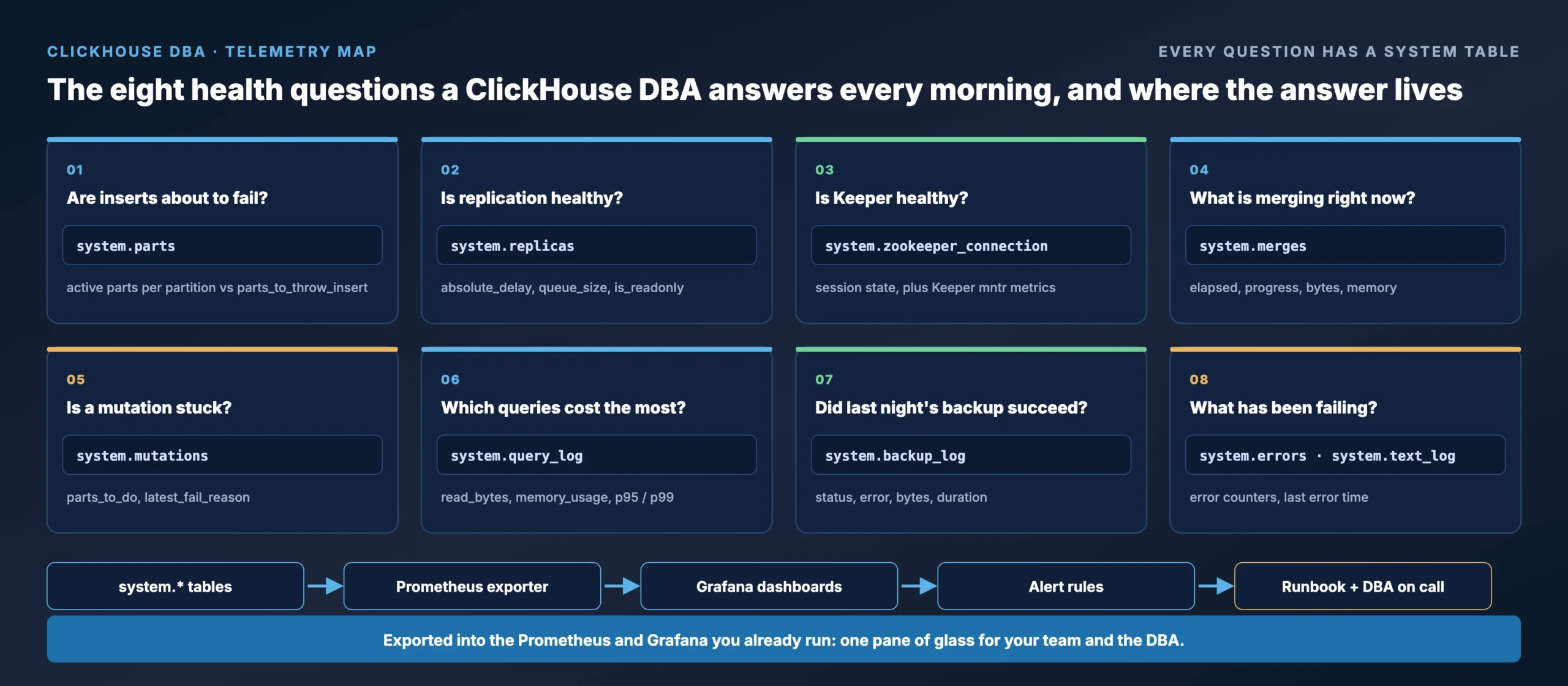
The ClickHouse DBA health checks we run, in SQL
These are three of the checks that run on every cluster we operate, written for ClickHouse 25.8 LTS and later. They are read-only. Run them on your own estate and you will see what a ChistaDATA ClickHouse DBA sees on the first morning of an engagement.
1 · Parts pressure: how close each table is to “too many parts”
SELECT
    database,
    table,
    partition_id,
    count() AS active_parts,
    formatReadableSize(sum(bytes_on_disk)) AS on_disk,
    max(modification_time) AS last_part_written
FROM system.parts
WHERE active
  AND database NOT IN ('system', 'INFORMATION_SCHEMA', 'information_schema')
GROUP BY database, table, partition_id
HAVING active_parts > 300          -- alert well below parts_to_throw_insert (default 3000)
ORDER BY active_parts DESC
LIMIT 20;
A rising parts count with a flat merge rate means inserts are too small or too frequent, merges are starved of CPU, or a mutation is holding parts. Since 26.3 LTS asynchronous inserts are enabled by default, which removes the most common cause on new estates, but older clusters still need the batching reviewed.
2 · Replication health across every replicated table
SELECT
    database,
    table,
    is_leader,
    is_readonly,
    absolute_delay,
    queue_size,
    inserts_in_queue,
    merges_in_queue,
    last_queue_update_exception
FROM system.replicas
WHERE is_readonly
   OR absolute_delay > 60
   OR queue_size > 100
   OR last_queue_update_exception != ''
ORDER BY absolute_delay DESC;
An empty result is what a ClickHouse DBA wants to see every morning. A read-only replica usually means a lost Keeper session; a growing queue with no exception usually means a replica cannot fetch parts fast enough, which is a network or disk question before it is a ClickHouse question.
3 · Merge and mutation backlog
SELECT *
FROM
(
    SELECT
        'merge' AS kind,
        database,
        table,
        round(elapsed) AS elapsed_s,
        round(progress * 100, 1) AS pct,
        formatReadableSize(total_size_bytes_compressed) AS size
    FROM system.merges
    UNION ALL
    SELECT
        'mutation' AS kind,
        database,
        table,
        dateDiff('second', create_time, now()) AS elapsed_s,
        NULL AS pct,
        concat(toString(parts_to_do), ' parts to do') AS size
    FROM system.mutations
    WHERE NOT is_done
)
ORDER BY elapsed_s DESC
LIMIT 20;
Long-running mutations on large partitions are the single most common self-inflicted incident we see. The DBA’s job is to make sure a bulk ALTER TABLE ... UPDATE is scheduled, sized and, on 25.7 and later, replaced with a lightweight UPDATE that writes patch parts instead of rewriting the partition.
Current as of September 2026
What a ClickHouse DBA has to be current on in 2026
ClickHouse ships a stable release every month and two LTS releases a year. A DBA who learned the engine on 23.x is operating a different product today. These are the changes that alter day-to-day ClickHouse DBA operations on the estates we run.
| Change | Since | What it means for operations |
|---|---|---|
| ClickHouse Keeper as the default coordination service | Production since 22.x, standard on every new estate | Raft-based, in C++, replaces ZooKeeper. Quorum sizing (3 or 5 nodes), snapshot and log retention, and Keeper latency become DBA-owned metrics. |
Lightweight UPDATE with patch parts | 25.7 and later | Single-row and small-batch updates no longer rewrite whole parts. The DBA decides which workloads move off ALTER TABLE ... UPDATE mutations. |
| Vector similarity index GA | 25.8 LTS | Approximate nearest-neighbour search with binary quantisation. Index build cost and memory now belong in the capacity plan. |
| Iceberg and Delta writes, catalog integrations | 25.8 to 26.8 | ClickHouse reads and writes open table formats behind Unity, Glue, REST and Polaris catalogs. Tiering and lakehouse retention are DBA-designed, not bolted on. |
| Backups to object storage GA, up to 6× faster | 2025 releases | BACKUP ... TO S3(...) with incremental and configurable backups. Restore drills become routine rather than heroic. |
| Async inserts on by default | 26.3 LTS (April 2026) | Small inserts are batched server-side. Existing insert pipelines and async_insert_max_data_size settings need re-validating on upgrade. |
| Cost-based distributed optimizer, Parquet lazy materialisation | 26.8 LTS | Distributed JOIN plans change on upgrade. Query plans must be re-baselined with EXPLAIN PIPELINE before and after. |
Upgrade engineering between LTS lines is part of every Remote DBA plan. For estates still on 24.x or 25.x, the DBA prepares a staged upgrade with a tested rollback, following the breaking-change list for each crossing. Our ClickHouse release notes series tracks each release as it lands.
Engagement models
Remote ClickHouse DBA vs Managed Services vs Enterprise Support vs hiring
Four ways to get senior ClickHouse DBA coverage. The right one depends on who should own the cluster and how much of a full-time load the work represents.
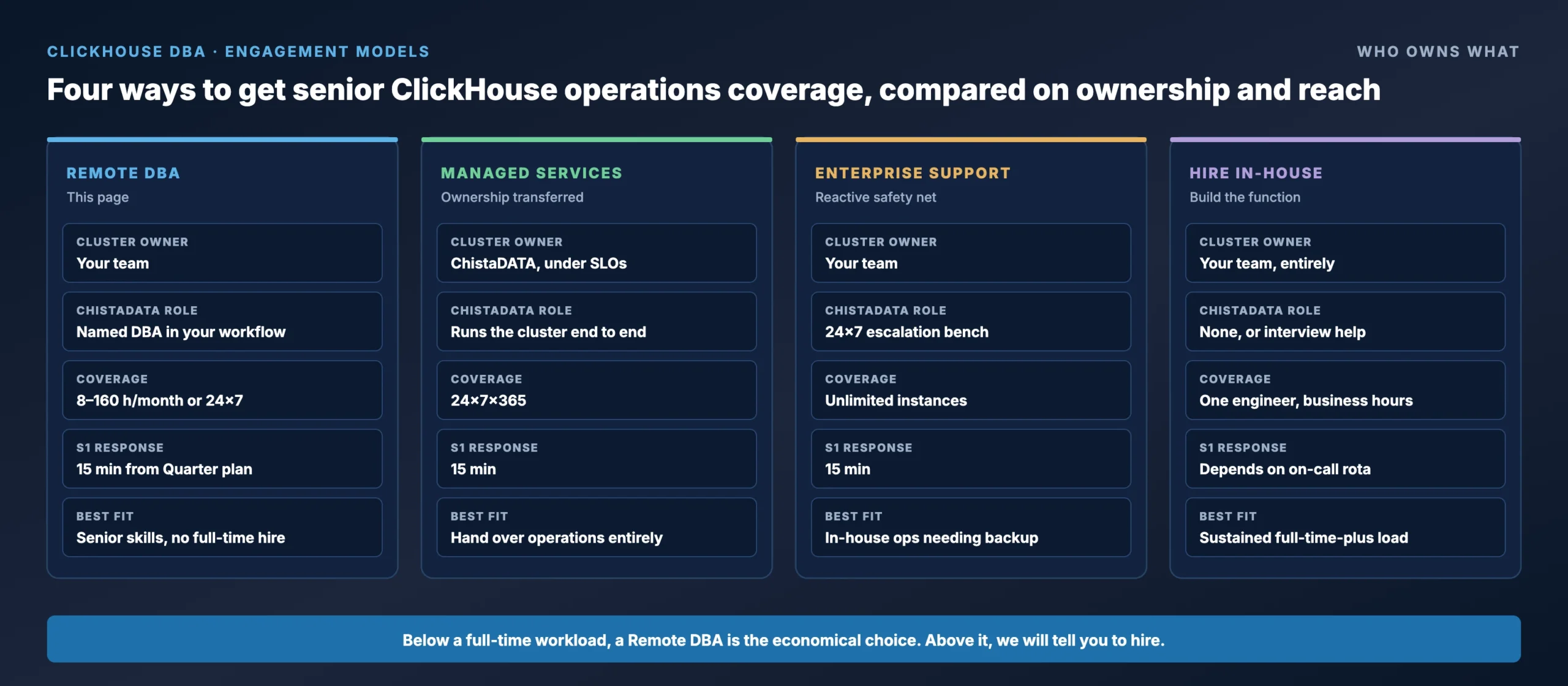
| Model | Who owns the cluster | Best fit | Coverage |
|---|---|---|---|
| Remote DBA (this page) | You. A named ChistaDATA DBA works a contracted block of hours inside your ticketing, Slack and change process. | Teams that want senior ClickHouse skills without a full-time hire, and want to keep operational ownership. | 8 to 160 hours a month, or 24×7×365 on the Ultimate plan |
| Managed Services | ChistaDATA, under contracted SLOs. We run the cluster; you run your product. | Teams that want to hand over operations entirely, including upgrades, backups and DR drills. | 24×7×365 with SLOs per workload |
| Enterprise Support | You. ChistaDATA is the reactive escalation bench. | In-house engineers who own operations but need a 15-minute Severity 1 safety net. | 24×7×365 reactive; US $75,000 a year, unlimited instances |
| Hiring in-house | You, entirely. | Sustained full-time-plus ClickHouse workload with the budget and market to hire a senior specialist. | One engineer, business hours, 6 to 12 months to fill |
Below a full-time workload, a remote ClickHouse DBA delivers senior coverage at a fraction of the fully loaded cost of a ClickHouse specialist hire; customers typically report a 60 to 90 percent cost reduction against building the function internally. Above it, we will tell you to hire, and help you interview.
Pricing
Transparent Remote ClickHouse DBA pricing
No hidden costs and no per-server licensing on any ClickHouse DBA plan. Plans are independent of how many ClickHouse servers, shards or replicas we look after for you. Rates are in US dollars per month, plus GST where applicable.
| Remote DBA plan | Coverage | Rate |
|---|---|---|
| On-Demand Remote DBA | 8 hours per month | US $3,600 per month |
| Quarter DBA | 40 hours per month | US $9,600 per month |
| Half DBA | 80 hours per month | US $14,000 per month |
| Full DBA | 160 hours per month | US $25,000 per month |
| The Ultimate DBA | 24×7×365 | US $65,000 per month |
The Data SRE practice is included from the Quarter plan upward. Hour blocks scale quarterly, and moving to fully Managed Services is a contract amendment, not a re-onboarding.
Onboarding
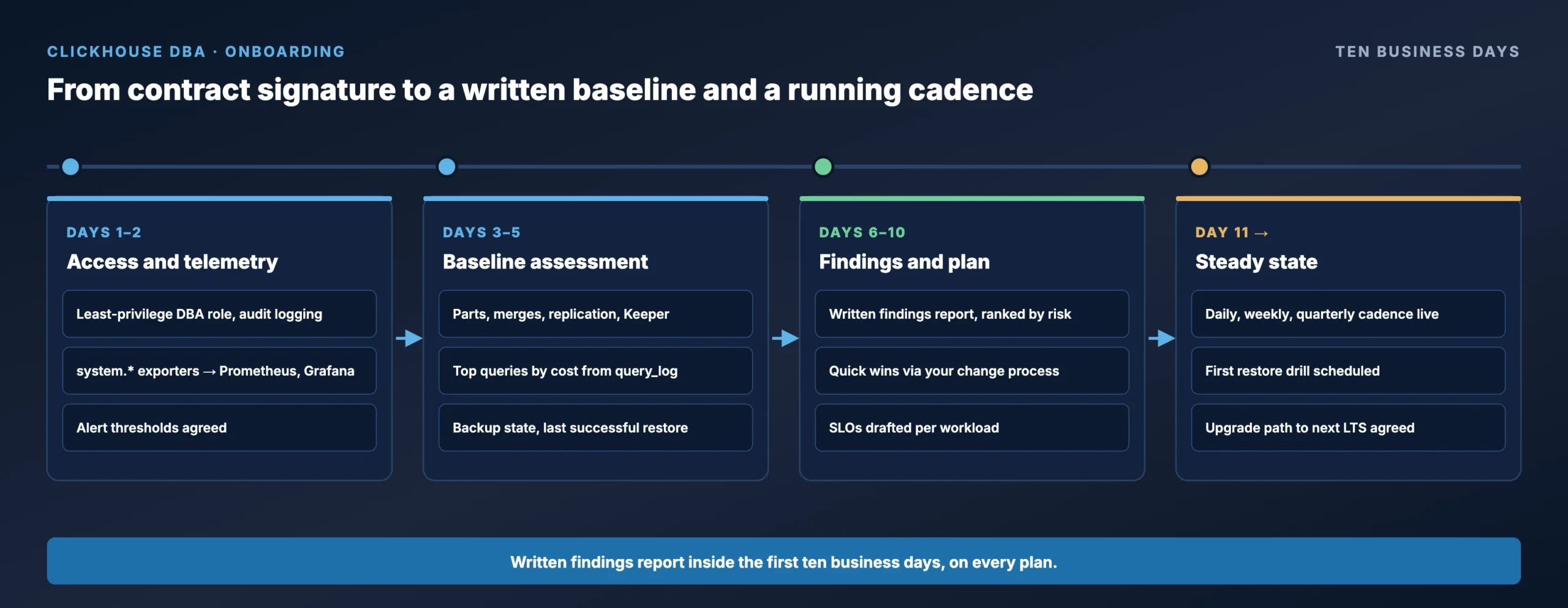
From signature to a written baseline in ten business days
ClickHouse DBA onboarding is the same on every plan. By the end of the second week your team has a monitored cluster, a documented baseline and a prioritised findings list, and the ClickHouse DBA is already working the daily cadence.
Days 1–2
Access and telemetry
- Least-privilege DBA role and audit logging
- system.* exporters into Prometheus and Grafana
- Alert thresholds agreed with your team
Days 3–5
Baseline assessment
- Parts, merges, mutations, replication and Keeper
- Top queries by cost from system.query_log
- Backup state and last successful restore
Days 6–10
Findings and plan
- Written findings report, ranked by risk
- Quick wins applied through your change process
- SLOs drafted per workload
Day 11 onward
Steady state
- Daily, weekly and quarterly cadence running
- First restore drill scheduled
- Upgrade path agreed for the next LTS
Data SRE
Database reliability engineering, not just administration
A ClickHouse DBA who only reacts to pages is a cost centre; a ClickHouse DBA who prevents the page is an investment. ChistaDATA DBAs work as Data Reliability Engineers. Each workload gets service-level objectives for freshness, latency and availability, with an error budget that decides when to ship changes and when to stop. Observability is wired from the system tables into your existing Prometheus and Grafana, so your engineers see the same dashboards the DBA does.
Every incident ends in a blameless postmortem with a named corrective action. Every recovery procedure is a runbook with a verification query before, a validation query after and an explicit confirmation gate before anything destructive. The full practice is described on our Data SRE page, and a ClickHouse performance audit is the usual starting point for estates that have never had a DBA.
A backup that has been restored is the only backup that counts
-- Nightly incremental backup to object storage (credentials from your secret store, never inline)
BACKUP DATABASE analytics
    TO S3('https://${S3_ENDPOINT}/${BACKUP_BUCKET}/analytics/incr-${RUN_DATE}', '${S3_ACCESS_KEY}', '${S3_SECRET_KEY}')
    SETTINGS base_backup = S3('https://${S3_ENDPOINT}/${BACKUP_BUCKET}/analytics/full-${BASE_DATE}', '${S3_ACCESS_KEY}', '${S3_SECRET_KEY}'),
             async = 1;

-- Quarterly restore drill into an isolated database on a drill host, timed for RTO
RESTORE DATABASE analytics AS analytics_drill
    FROM S3('https://${S3_ENDPOINT}/${BACKUP_BUCKET}/analytics/incr-${RUN_DATE}', '${S3_ACCESS_KEY}', '${S3_SECRET_KEY}');

-- Validation: row counts per table must match the backup manifest before the drill is signed off
SELECT table, sum(rows) AS rows
FROM system.parts
WHERE active AND database = 'analytics_drill'
GROUP BY table
ORDER BY table;
Restore drills run against the documented RPO and RTO, on a host that cannot touch production, and the measured RTO goes into the quarterly report. Test every procedure on a non-production environment before it reaches production, and keep a robust DR posture regardless of who operates the cluster.
FAQ
ClickHouse DBA services: frequently asked questions
What is a ClickHouse DBA responsible for?
A ClickHouse DBA owns cluster availability, performance and data durability: monitoring replication, merges and Keeper, tuning MergeTree settings and schema, managing backups and restores, planning upgrades across LTS lines, and enforcing security policy. ChistaDATA DBAs additionally carry Data SRE responsibilities: SLOs, error budgets and runbook automation.
How fast can a ChistaDATA ClickHouse DBA start on our cluster?
Onboarding typically completes within one week of contract signature: access provisioning, monitoring integration and a baseline health assessment, with a written findings report inside the first ten business days.
Do you work with ClickHouse Cloud and other managed platforms?
Yes. The DBA practice is deployment-neutral across self-managed ClickHouse, Kubernetes, ClickHouse Cloud, Aiven and Altinity.Cloud. On managed platforms the work concentrates on schema design, query optimisation, cost engineering and the parts of the system tables the platform still exposes.
Can we combine Remote DBA with Enterprise Support?
Yes. Many customers pair a Quarter or Half DBA plan for proactive engineering with Enterprise Support, at US $75,000 a year for unlimited instances, as the 24×7 incident safety net.
Which ClickHouse versions does the DBA service cover?
Both current ClickHouse LTS lines and every supported stable release between them, as stated in the release coverage line at the top of this page, which is updated as each LTS ships. Estates on older lines are supported through a planned upgrade.
What happens if our workload outgrows the plan?
Plans flex quarterly. Hour blocks scale from 8 to 160 per month, the Ultimate plan provides 24×7×365 cover, and the path to fully Managed Services is a contract amendment rather than a re-onboarding.
Do you replace our monitoring stack?
No. We export ClickHouse system tables into the Prometheus and Grafana you already run, or into Datadog or New Relic where those are standard, and add the dashboards and alert rules a ClickHouse DBA needs. Your team keeps one pane of glass.
Sources
References for ClickHouse DBA practice
- ClickHouse documentation: system tables
- ClickHouse documentation: ClickHouse Keeper
- ClickHouse documentation: BACKUP and RESTORE
- ClickHouse: Release 26.8 LTS
- ClickHouse: Release 26.3 LTS
- ClickHouse: What’s new in ClickHouse, 2025 roundup
- Cloudflare: HTTP analytics for 6M requests per second using ClickHouse
- Prometheus documentation
Next step
Put a senior ClickHouse DBA on your cluster this month
Bring your cluster topology, ingestion rate and the last incident that hurt. In a discovery call we will tell you which plan fits, what the first ten days look like, and plainly whether you should hire instead.
All queries and procedures on this page are general engineering guidance. Test every change on a non-production environment before applying it to production, and maintain a robust backup and disaster recovery posture. Prices and release coverage are as published in September 2026.