ChistaDATA · Customer onboarding · a 24×7 virtual corporation
The pre-engagement questionnaire is the first document in every ChistaDATA engagement. Our Technical Account Managers and engineers work remotely across time zones, so every recommendation we make is built from the written record rather than from hallway knowledge, and this form is the first page of that record. It is normally completed once: from the onboarding call onwards we keep the notes on your database infrastructure operations current ourselves.
This page explains what each block of the pre-engagement questionnaire is for, what the Technical Account Manager does with each answer, which read-only evidence we ask for afterwards, and how the answers populate the escalation matrix that governs response times for the life of the engagement. The form itself is further down the page.
On this page
- Why the pre-engagement questionnaire comes first
- From submission to steady state
- What each question block decides
- What the Linux distribution and infrastructure answers unlock
- The read-only evidence pack, by engine
- HA, DR and the last outage: setting the RPO and RTO baseline
- The escalation matrix the answers populate
- Concerns, growth plan and the capacity model
- The pre-engagement questionnaire
- Pre-engagement questionnaire FAQ
Purpose
Why the pre-engagement questionnaire comes before any recommendation
A database recommendation is only as good as the facts it rests on. When an engineer in one time zone hands a customer to an engineer in another, the facts have to live in a document, not in someone’s memory, and they have to be accurate. That is why the pre-engagement questionnaire asks for specifics rather than impressions: the engine versions actually running, the size on disk, the Linux distribution, whether the infrastructure is bare metal or a managed service, what monitoring exists, what the DR and HA arrangements really are, and what happened during the most recent outage.
The answers do three jobs at once. They select the work: which per-engine evidence we request, which checks the baseline health check runs, which engineers join the bench. They size the work: backup and restore windows, health-check duration, migration effort. And they fix the operating parameters of the engagement: named contacts, time-zone overlap, SLA tier, access model and change-approval flow. Nothing in the pre-engagement questionnaire is asked for its own sake, and the sections below show where each answer goes.
What to have at hand before completing the pre-engagement questionnaire
The form takes about twenty minutes when the details are within reach. Have the exact engine versions (SELECT version() on ClickHouse and PostgreSQL, SELECT VERSION() on MySQL), the size on disk per database rather than a guess, the Linux distribution and kernel version from /etc/os-release and uname -r, the name of the backup tool and the date of the last tested restore, and the topology of replication as it is running today. For the outage question, the ticket or incident record is better than memory: the timeline and the alerts that fired are what the first runbook is built from.
If the estate spans several engines or several environments, describe production only; staging and development are noted on the onboarding call. And if the architecture diagram you have is out of date, send it anyway with a note saying so; reconciling the diagram with the evidence pack is part of the baseline health check, and an honest starting point saves a week.
Timeline
From the pre-engagement questionnaire to steady-state operations
Onboarding follows the same sequence for support, remote DBA and managed-services customers, with an owner and an exit condition at every phase. The elapsed time is typically ten working days; most of it is the baseline health check and the runbooks, not paperwork.
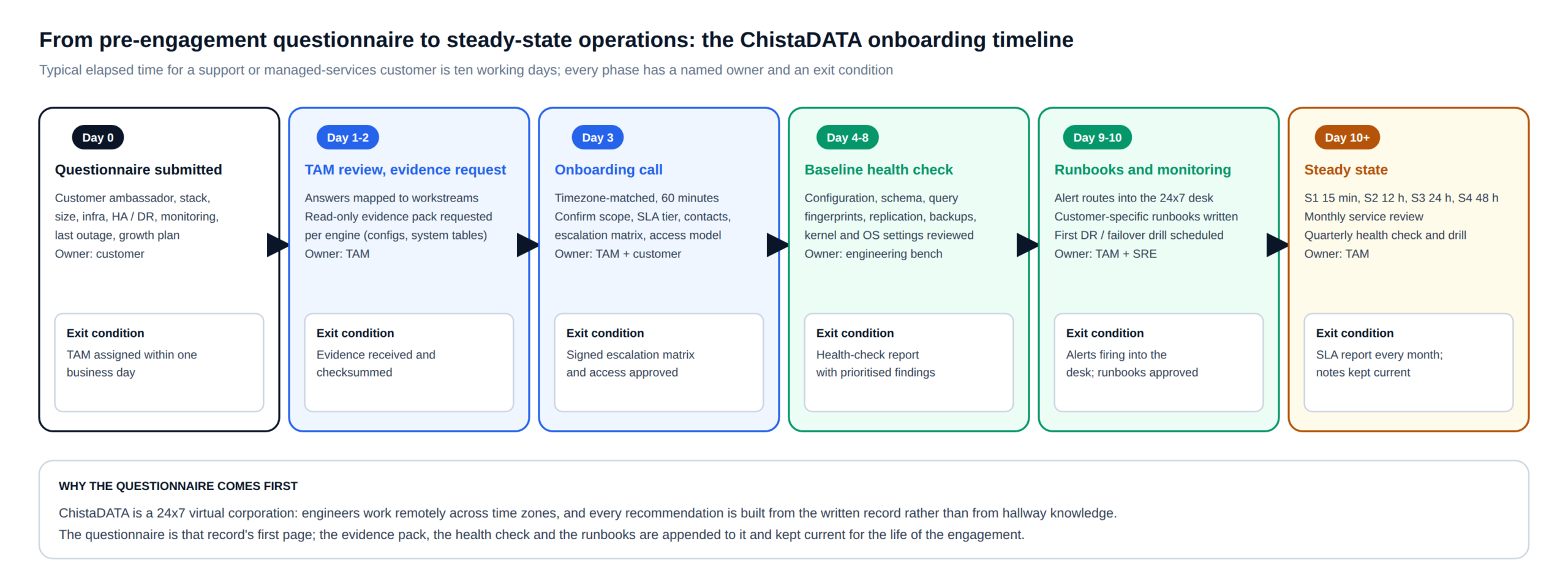
The onboarding call is scheduled in your time zone at the slot you choose on the form and lasts about an hour. It confirms scope and SLA tier, walks through the escalation matrix, agrees the access model (read-only first, change access only where the operating model requires it), and fixes the date of the first failover or restore drill. Everything agreed on the call is written into the engagement notes the same day.
Question by question
What each block of the pre-engagement questionnaire decides
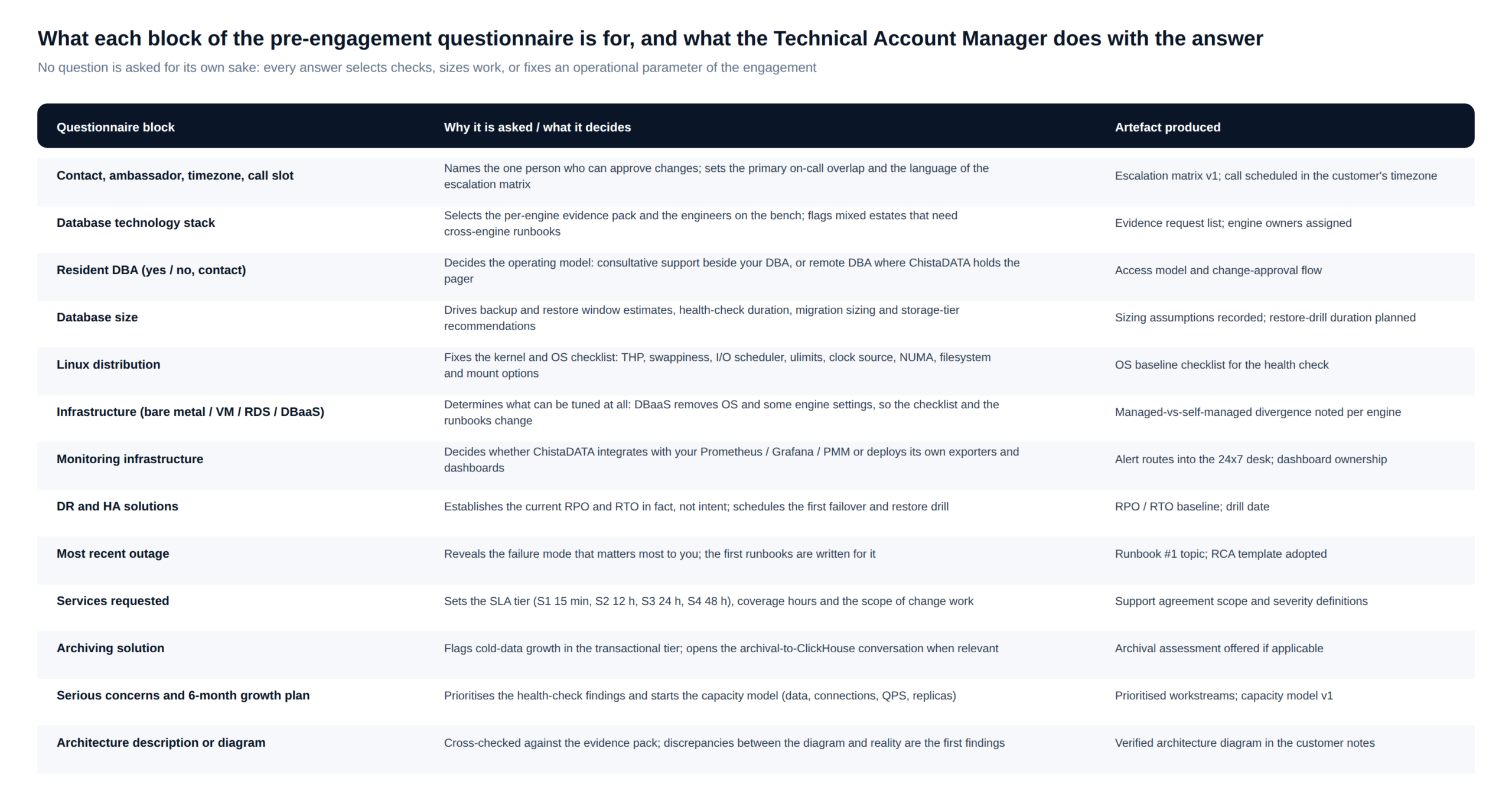
The map below is the one our Technical Account Managers work from. Each row is a block of the form, the decision or check it drives, and the artefact it produces in the engagement notes.
Contact, ambassador and time zone on the pre-engagement questionnaire
The customer ambassador is the one person who can approve a change and who receives the monthly service review. The time zone sets the overlap window in which scheduled work, drills and reviews happen, and the language of the escalation matrix. If a resident DBA exists, they become the technical counterpart and the operating model is consultative support beside them; if not, the operating model is remote DBA, where ChistaDATA holds the pager and the change-approval flow is written accordingly.
Technology stack and database size
The stack answer selects the evidence pack and the engineers. ClickHouse estates are staffed from the ChistaDATA bench directly; PostgreSQL, MySQL, MariaDB, MongoDB, SQL Server, Oracle, Db2 and the cloud DBaaS platforms are covered through the MinervaDB practice ChistaDATA was spun out of, under the same escalation matrix. Mixed estates are flagged for cross-engine runbooks, for example a PostgreSQL primary with a ClickHouse analytics or archival tier fed by CDC. Database size drives everything that scales with bytes: backup and restore windows, the duration of the baseline health check, migration sizing, and whether tiered storage should be on the table from day one.
Operating system and infrastructure
What the Linux distribution and infrastructure answers unlock
Two short questions on the pre-engagement questionnaire decide a large part of the health check. The Linux distribution fixes the kernel and OS checklist, because the defaults differ and so do the fixes. The infrastructure answer decides what can be tuned at all: on bare metal and VMs the whole stack is in scope, while a managed service such as RDS, Cloud SQL or a vendor cloud removes the OS layer and some engine settings, so the checklist and the runbooks are different documents.
# OS baseline captured for every self-managed host (read-only, run by the customer or by ChistaDATA with read access)
cat /etc/os-release; uname -r
cat /sys/kernel/mm/transparent_hugepage/enabled        # ClickHouse, MySQL, MongoDB: prefer never / madvise
sysctl vm.swappiness vm.dirty_ratio vm.dirty_background_ratio vm.max_map_count
sysctl net.core.somaxconn net.ipv4.tcp_max_syn_backlog fs.file-max
cat /sys/block/nvme0n1/queue/scheduler                  # none / mq-deadline for NVMe
findmnt -o TARGET,FSTYPE,OPTIONS /var/lib/clickhouse    # noatime, discard policy, filesystem
numactl --hardware; cat /sys/devices/system/clocksource/clocksource0/current_clocksource
sudo -u clickhouse bash -c 'ulimit -n -u'               # open files, processes for the service user
systemctl cat clickhouse-server | grep -i limit         # unit-level limits override ulimit
Each line maps to a known failure mode: transparent huge pages set to always and a high vm.swappiness produce latency spikes under memory pressure; a low fs.file-max or unit-level LimitNOFILE shows up as “too many open files” during merges; the wrong I/O scheduler on NVMe wastes throughput; a filesystem mounted without noatime costs a write per read. The distribution answer tells us which of these to expect and which package sources and kernel versions to verify against the engine’s supported matrix.
Evidence
The read-only evidence pack requested after the pre-engagement questionnaire
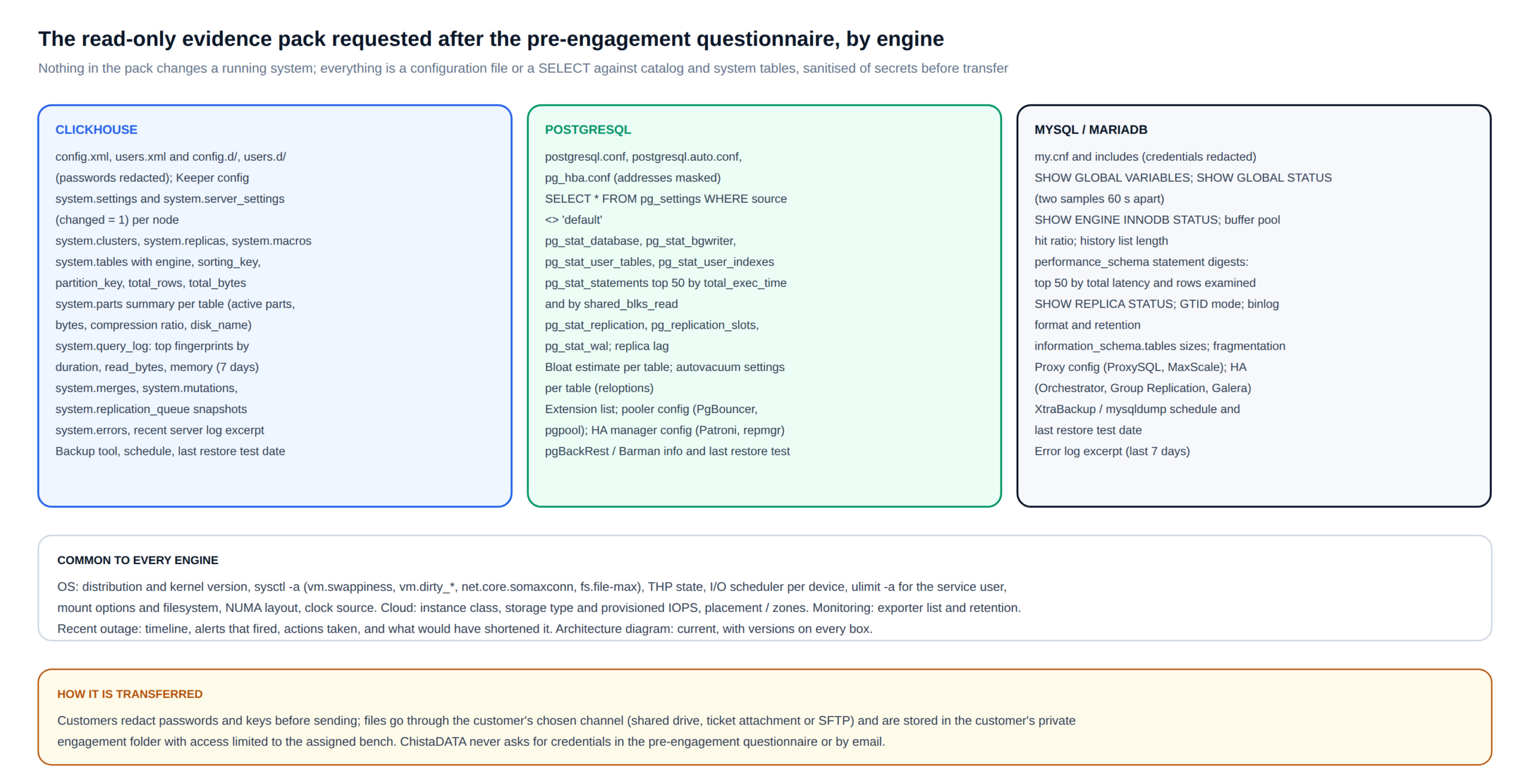
Once the stack is known, the Technical Account Manager sends a short list of configuration files and catalog queries. Nothing in the list changes a running system, and customers redact passwords and keys before sending. The pack is what turns the questionnaire’s answers into a verified baseline.
-- ClickHouse: the four queries that anchor the baseline (run per node, read-only)
SELECT name, value FROM system.settings WHERE changed = 1 ORDER BY name;
SELECT name, value FROM system.server_settings WHERE changed = 1 ORDER BY name;

SELECT database, table, engine, sorting_key, partition_key,
       formatReadableSize(total_bytes) AS size, total_rows
FROM system.tables WHERE database NOT IN ('system', 'INFORMATION_SCHEMA', 'information_schema')
ORDER BY total_bytes DESC LIMIT 50;

SELECT normalizedQueryHash(query) AS fingerprint, count() AS runs,
       quantile(0.95)(query_duration_ms) AS p95_ms,
       formatReadableSize(avg(read_bytes)) AS avg_read,
       formatReadableSize(max(memory_usage)) AS max_mem,
       any(substring(query, 1, 100)) AS sample
FROM system.query_log
WHERE type = 'QueryFinish' AND event_time > now() - INTERVAL 7 DAY
GROUP BY fingerprint ORDER BY runs * p95_ms DESC LIMIT 30;
-- PostgreSQL 16+: the equivalent anchors
SELECT name, setting, unit, source FROM pg_settings WHERE source <> 'default' ORDER BY name;
SELECT relname, n_live_tup, n_dead_tup, seq_scan, idx_scan, last_autovacuum
FROM pg_stat_user_tables ORDER BY n_live_tup DESC LIMIT 50;
SELECT queryid, calls, ROUND(mean_exec_time::numeric, 2) AS mean_ms,
shared_blks_read, LEFT(query, 100) AS sample
FROM pg_stat_statements ORDER BY total_exec_time DESC LIMIT 30;
SELECT client_addr, state, sent_lsn, replay_lsn, replay_lag FROM pg_stat_replication;The pack is reviewed before the onboarding call, so the call spends its hour on decisions rather than discovery. Discrepancies between the pre-engagement questionnaire and the pack (a version that differs, a replica that is not replicating, a backup that has never been restored) are the first findings of the health check.
Resilience
HA, DR and the last outage: setting the RPO and RTO baseline
Three questions on the pre-engagement questionnaire are about resilience, and they are answered in prose on purpose. We are not asking whether you have high availability; we are asking what actually happens when a node dies, how long it takes, how much data is lost, and who does what. The answers establish the current recovery point objective and recovery time objective in fact rather than in intent, which is the baseline every later improvement is measured against.
| Question | What we extract | What it becomes |
|---|---|---|
| Do you have a DR strategy? Explain it. | Backup tool and schedule, where backups live, when a restore was last tested and how long it took, cross-region posture | RPO and RTO baseline; first restore drill scheduled with a timed target |
| Do you have an HA solution? Explain it. | Replication topology and mode, failover mechanism (Keeper quorum, Patroni, Orchestrator, Group Replication, cloud multi-AZ), who triggers it, how clients reconnect | Failover runbook; first failover drill; gaps between the diagram and the evidence pack |
| Describe the most recent outage and how it was addressed. | Timeline, alerts that fired (or did not), actions taken, what would have shortened it | Runbook #1 is written for this failure mode; it becomes the first rehearsed S1 scenario |
Every support and managed-services customer has a restore drill and a failover drill in the first month and quarterly thereafter, each with a timed result recorded against the RPO and RTO baseline. The outage answer is the one we read most carefully: it tells us what a bad day looks like for your business, and the first runbook we write is for exactly that day.
SLA
The escalation matrix the pre-engagement questionnaire populates
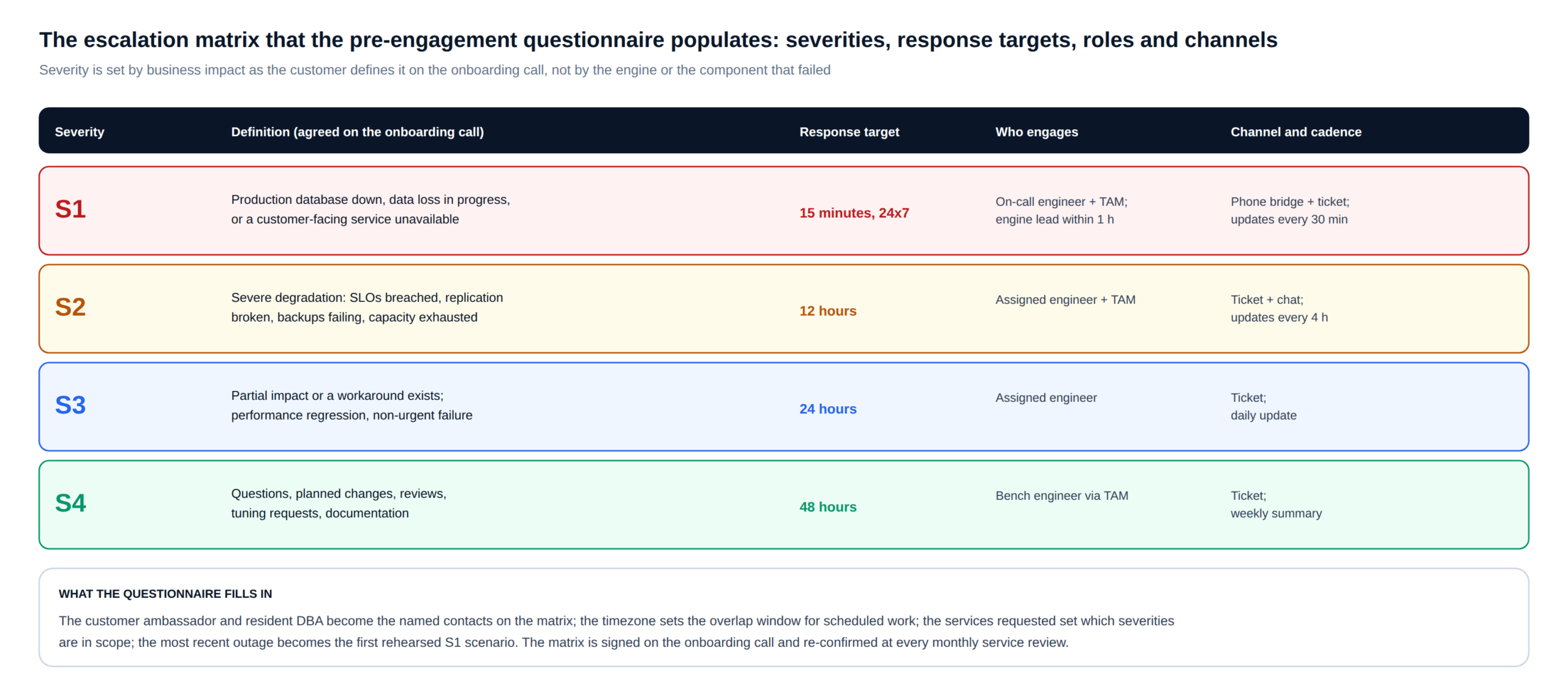
The services you select on the form set the SLA tier and the scope of change work; the contacts and time zone become the names and overlap window on the escalation matrix; the outage description becomes the first S1 scenario we rehearse. Severity is defined by business impact as you describe it on the onboarding call, never by which component failed.
Consulting and professional services
Scoped, time-boxed engineering: architecture reviews, migrations, performance engineering, upgrade planning. The questionnaire’s concerns and growth plan set the first statement of work.
24×7 enterprise-class support
The full escalation matrix with a 15-minute Severity 1 response, monthly service reviews and quarterly health checks and drills; your team operates, ChistaDATA is on call beside it.
Remote DBA and managed services
ChistaDATA holds the pager and operates the estate: upgrades, capacity, backups, DR drills and SLO reporting, with the change-approval flow the resident-DBA answer defines.
Performance audits, health checks, security audits and data recovery are available as one-off engagements from the same form; the Technical Account Manager scopes them from the size, stack and infrastructure answers before the onboarding call.
Planning
Concerns, the six-month growth plan and the capacity model
The “serious concerns” checklist prioritises the health-check findings: if you mark scalability and capacity planning, the report leads with sort-key design, merge throughput and storage tiering; if you mark data security, it leads with RBAC, row policies, TLS and audit logging. The six-month growth plan seeds the capacity model that the monthly service review tracks from then on.
# Capacity model v1, populated from the questionnaire and the evidence pack (illustrative fields)
data_volume_now_tb:        4.2      # from system.parts / pg_database_size
data_growth_6m_tb:         2.5      # from the growth plan answer
ingest_rows_per_s_peak:    120000   # from query_log / pg_stat_user_tables deltas
serving_qps_peak:          350      # from query_log fingerprints
concurrent_connections:    800      # from system.metrics / pg_stat_activity
hot_tier_nvme_tb_per_node: 3.5      # from findmnt / df
replicas_per_shard:        2        # from system.replicas / pg_stat_replication
headroom_target_pct:       30       # agreed on the onboarding call
next_review:               monthly  # tracked at the service review
The architecture description or diagram you attach is cross-checked against the evidence pack. It is common for the diagram to describe the intended design rather than the running one; the differences are recorded as findings and the corrected diagram, with versions on every box, becomes the reference copy in the engagement notes.
The form
The ChistaDATA pre-engagement questionnaire
Fields marked with an asterisk are required. Please do not enter passwords, keys or connection strings anywhere on this form; the Technical Account Manager will agree a secure channel for the evidence pack after the submission is acknowledged.
FAQ
Pre-engagement questionnaire: questions we are asked about it
How long does the pre-engagement questionnaire take to complete?
About twenty minutes if the person completing it knows the estate; the free-text answers on DR, HA and the last outage are the ones worth spending time on. It is normally completed once per customer; the engagement notes are kept current by ChistaDATA from the onboarding call onwards.
What happens after the pre-engagement questionnaire is submitted?
A Technical Account Manager is assigned and acknowledges the submission within one business day, sends the read-only evidence request for your engines, and confirms the onboarding call at the slot you chose, in your time zone.
Is any of this information shared or used to sell to us?
No. The questionnaire and the evidence pack are stored in your private engagement folder with access limited to the assigned bench, and they are used only to scope and deliver the engagement. Credentials are never requested on the form or by email.
We run a mixed estate. Do we complete the pre-engagement questionnaire once per engine?
Once per customer. Select every engine that applies; the Technical Account Manager sends one evidence request per engine and writes cross-engine runbooks where the engines depend on each other, for example a transactional database feeding a ClickHouse analytics or archival tier.
Can we change the services or SLA tier later?
Yes. The escalation matrix is re-confirmed at every monthly service review, and services are added or changed there. The questionnaire captures the starting point, not a commitment.
Contact
Prefer to talk first?
ChistaDATA builds and operates optimal, scalable and highly reliable ClickHouse platforms on-premises and in the cloud. If you would rather discuss scope before completing the pre-engagement questionnaire, call (844) 395-5717 or write to info@chistadata.com, and a Technical Account Manager will take the same details on a call. Whichever route you take, the engagement starts from the same written record.
Related: 24×7 ClickHouse support · Managed services · Migration services · ClickHouse system tables · PostgreSQL statistics collector