A production ClickHouse upgrade done properly is a rolling, replica-by-replica operation with zero query downtime, a measured before/after regression check, and a rollback posture decided before the first package is installed. Done casually, it is how clusters end up on a version they cannot leave, with a merge or mutation behavior change discovered by the workload instead of by the operator. This ClickHouse upgrade guide is the methodology we use across supported ChistaDATA clusters: which version to target, what to check before touching anything, the order of operations, and how to prove the upgrade didn’t cost you performance.
It assumes self-managed ClickHouse with ReplicatedMergeTree tables and ClickHouse Keeper (or ZooKeeper) — the standard production topology — and follows the same rolling principles as the official self-managed upgrade documentation, with the verification gates we hold every ClickHouse upgrade to in production.
1. Choose the ClickHouse upgrade target: LTS-to-LTS unless you need a feature
ClickHouse ships a feature release monthly and designates two LTS releases per year — the *.3 (March) and *.8 (August) releases — each supported for one year. For production clusters, the default ClickHouse upgrade policy is: run the latest LTS, upgrade when the next LTS has a few patch releases behind it, and take a feature release only when a specific capability justifies the faster treadmill.
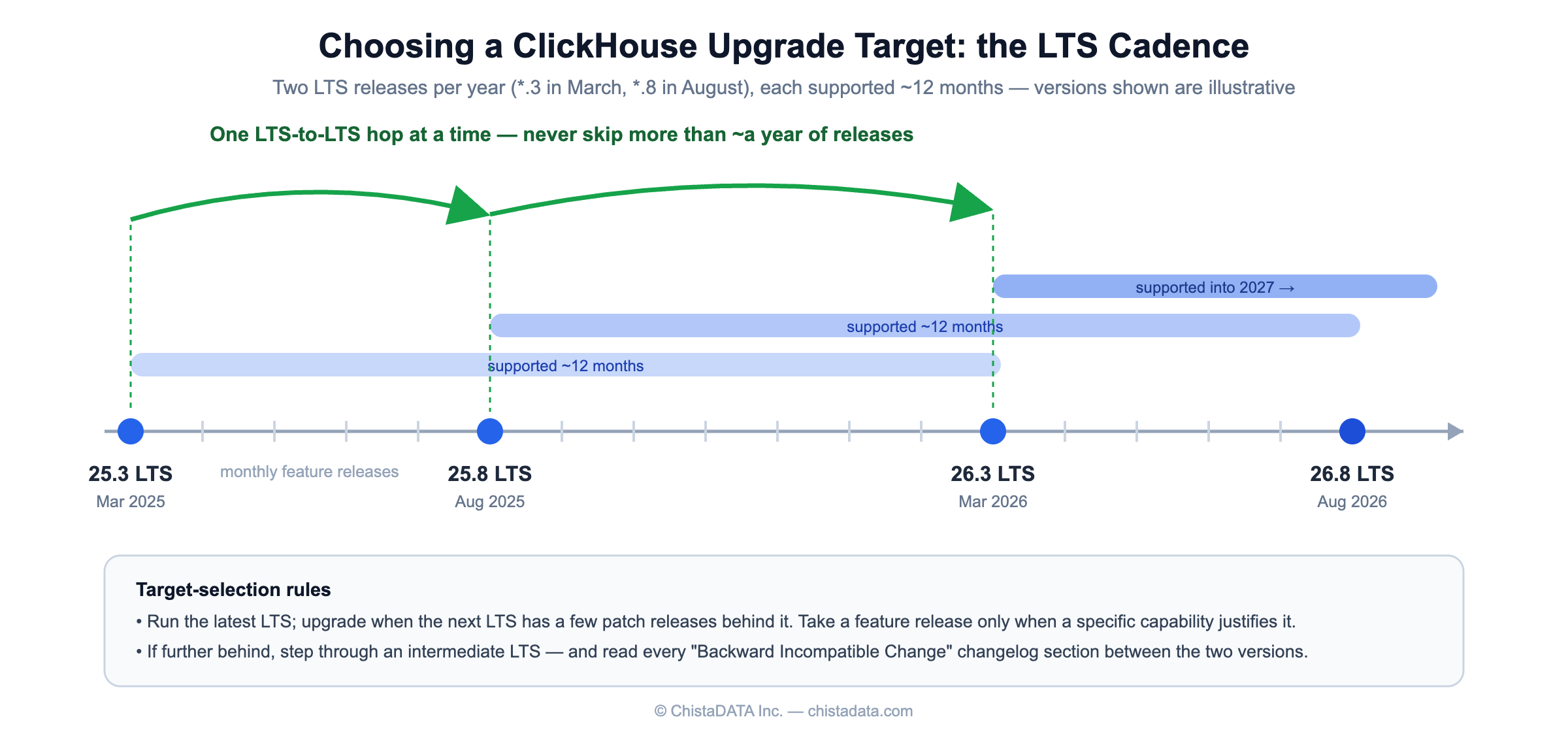
Two rules about distance:
- Do not jump more than about a year of releases in one step. If you’re further behind, step through an intermediate LTS and let the cluster run long enough at each step to shake out behavior changes.
- Read the “Backward Incompatible Change” sections of every ClickHouse changelog between your version and the target — not the feature list, the incompatible list. This is the only part of the changelog that is mandatory reading.
2. Pre-upgrade checks (all from system tables)
Take a verified backup before any ClickHouse upgrade — the upgrade itself is not the risky step; the inability to reconstruct state after a bad interaction is. Then baseline and inspect.
Baseline current behavior, so “slower after upgrade” is measurable rather than anecdotal — the same technique we use when mining the query log for performance insights:
SELECT
    normalized_query_hash,
    count()                              AS executions,
    quantile(0.5)(query_duration_ms)     AS p50_ms,
    quantile(0.99)(query_duration_ms)    AS p99_ms,
    sum(read_bytes)                      AS read_bytes_total
FROM system.query_log
WHERE type = 'QueryFinish'
  AND event_time > now() - INTERVAL 7 DAY
GROUP BY normalized_query_hash
ORDER BY executions DESC
LIMIT 50;
Export this result; you will run the same query against the same window after the upgrade.
Baseline the error surface:
SELECT name, value FROM system.errors ORDER BY value DESC LIMIT 20;Find settings you’ve changed from default — these are your risk surface for renamed, re-defaulted, or removed settings:
SELECT name, value
FROM   system.settings
WHERE  changed
ORDER  BY name;
Check each against the target version’s documentation. Server-level config (users.xml / config.xml deltas) gets the same review. Settings that the target marks obsolete will log warnings rather than fail — but behavior-changing re-defaults (merge, memory, and join settings have all changed defaults across major lines) are exactly what the compatibility setting exists for, below.
Confirm replication is healthy — never start a rolling upgrade with a replica already behind:
SELECT database, table, is_leader, absolute_delay, queue_size
FROM   system.replicas
WHERE  absolute_delay > 0 OR queue_size > 100;
Expected: empty, or explainable rows you can clear first.
3. ClickHouse upgrade order of operations: Keeper first, one replica at a time
The coordination layer upgrades before the data layer. ClickHouse Keeper maintains compatibility with older servers, not the reverse.
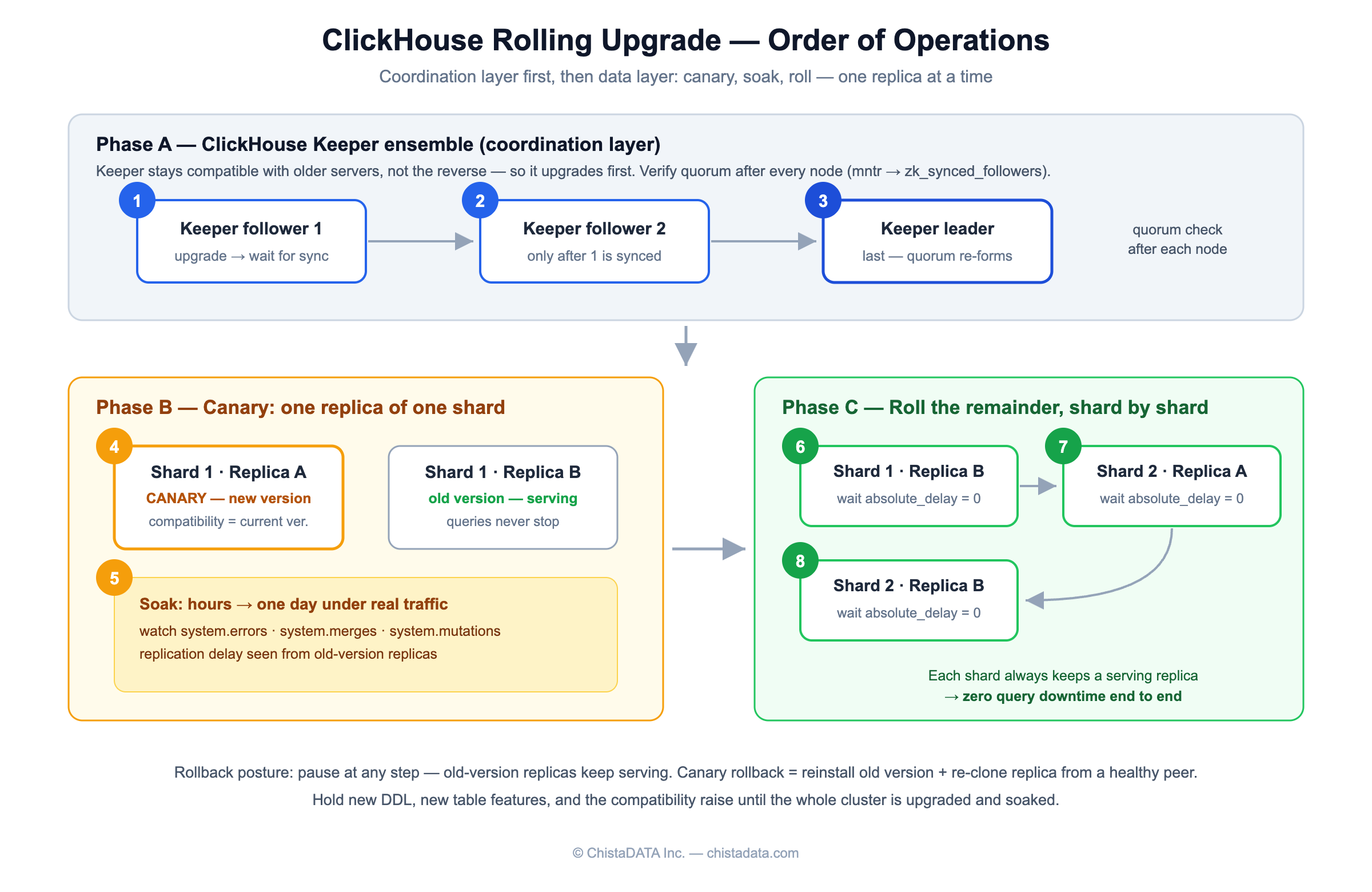
- Keeper ensemble, follower by follower, leader last. After each node: confirm quorum re-formed (
mntrfour-letter command; watchzk_synced_followers), then proceed. Never take a second Keeper node down while the previous one is still syncing. - Canary replica. Upgrade one replica of one shard. Set the session default
compatibilitysetting to your current version (compatibility = '24.8'style; available since ClickHouse 22.8 LTS) if you want new-version binaries with old-version behavior defaults — this decouples “new binary” from “new behavior” and lets you take the behavior change as a separate, revertible step later. - Soak the canary. Hours to a day under real traffic. Watch
system.errorsfor new error names, the replica’s merge/mutation throughput (system.merges,system.mutations), and replication delay from the un-upgraded replicas’ perspective. - Roll the remainder, replica by replica within each shard, waiting for
absolute_delayto return to zero after each node before moving to the next. Query availability holds throughout because each shard always has a serving replica — this is the property that makes the whole procedure zero-downtime.
4. The rollback conversation, honestly
A replica-by-replica rolling ClickHouse upgrade gives you a pause button at every step: if the canary misbehaves, you stop, and the cluster keeps serving from old-version replicas. What it does not give you is a free downgrade button after the fact. Once new-version replicas have written parts in newer formats or metadata versions, reinstalling the old binary on that data directory is not a supported path. Practical consequences:
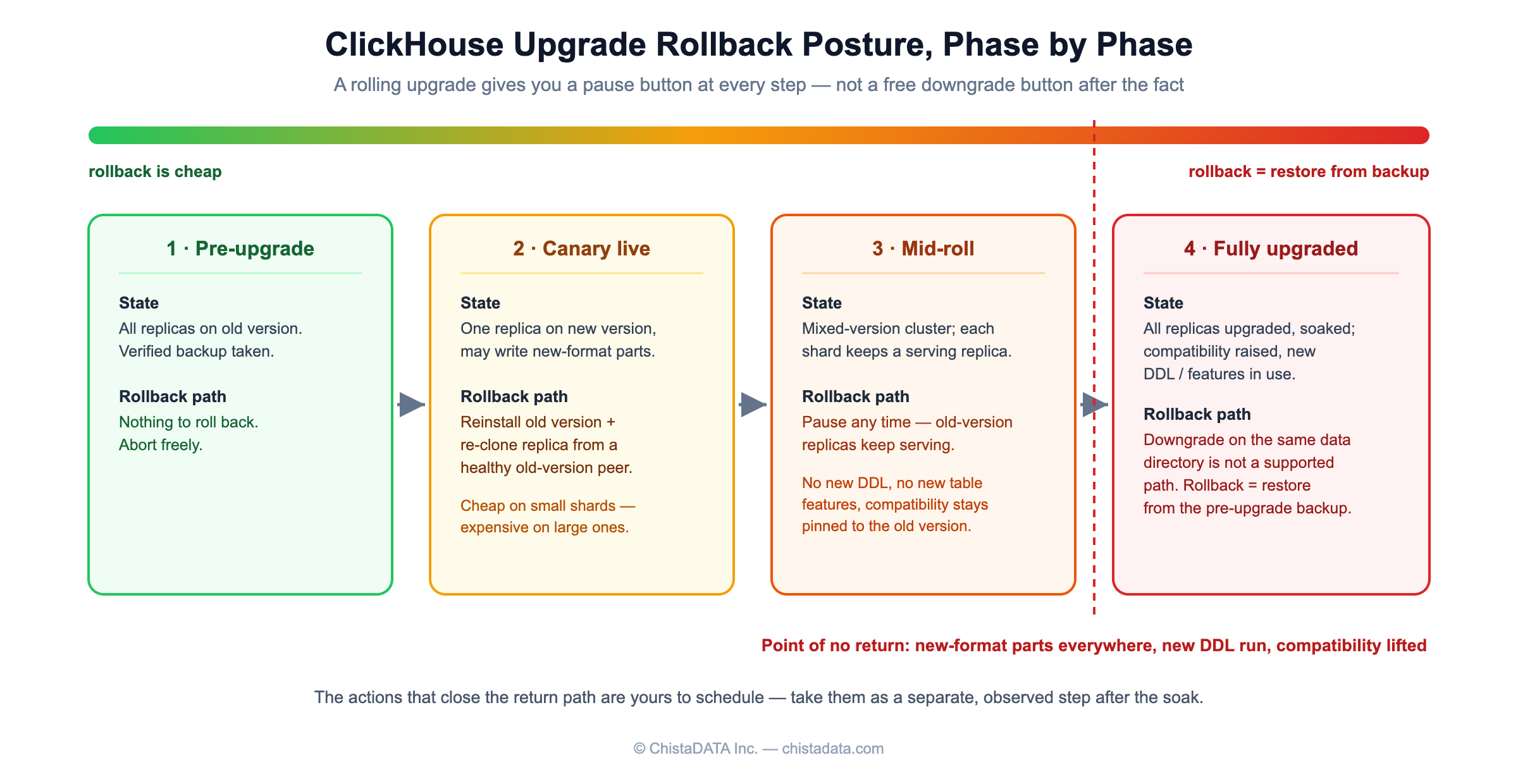
- Rollback plan for the canary = reinstall old version plus re-clone the replica from a healthy old-version peer (drop replica, re-attach, let it fetch). Cheap on small shards, expensive on large ones — know which yours is before you start.
- Avoid running new DDL, enabling new table features, or lifting the
compatibilitysetting until the whole cluster is upgraded and soaked. Those are the actions that close the return path. - Past the point where all replicas are upgraded and behaving, rollback becomes restore-from-backup — which is why the backup in §2 is a prerequisite, not a formality.
5. Post-upgrade verification: prove the ClickHouse upgrade cost nothing
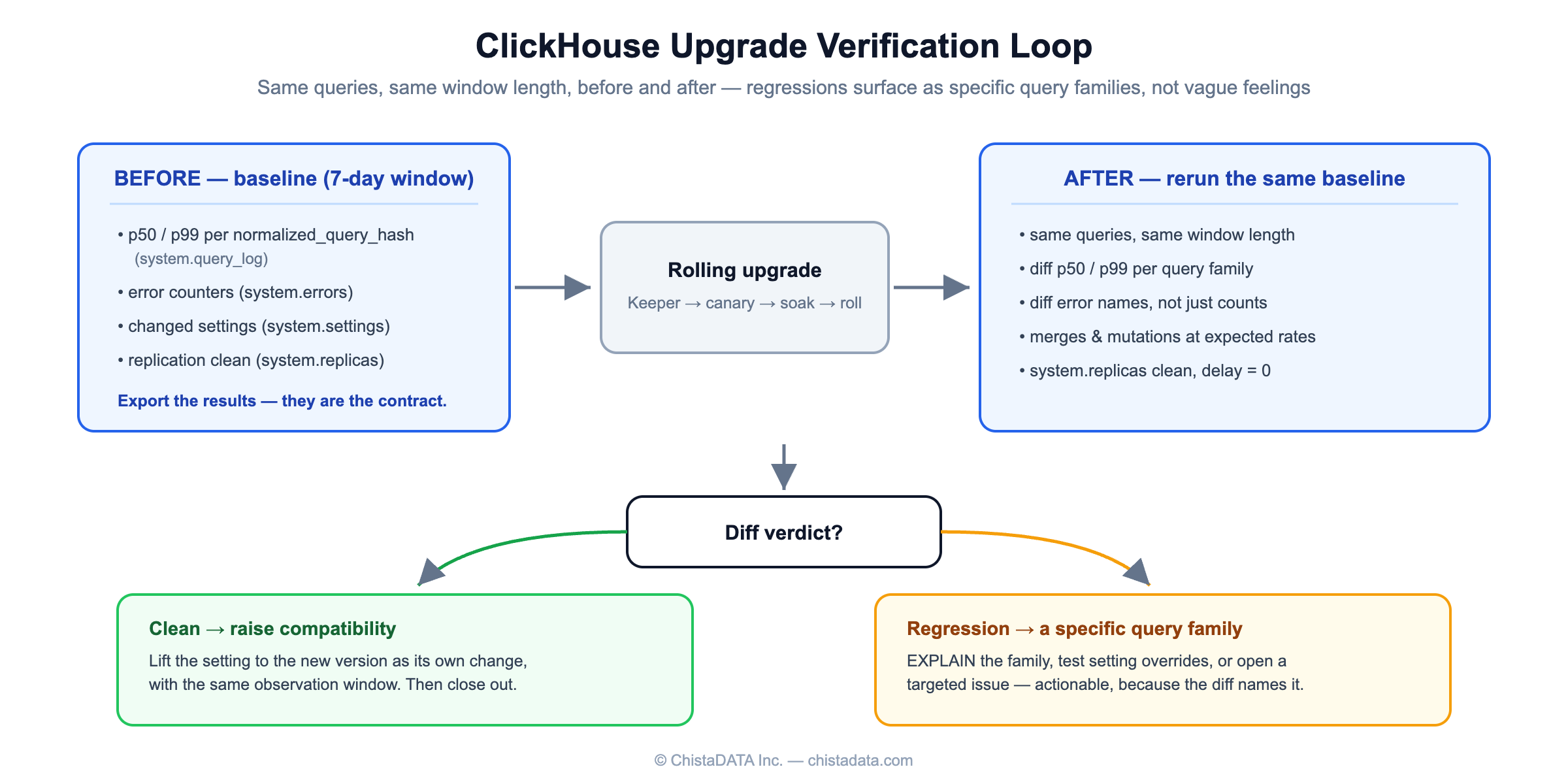
Rerun the §2 baseline query over the post-upgrade window and diff p50/p99 per normalized_query_hash. A regression that matters shows up as a specific query family, which gives you something actionable (EXPLAIN, settings, or a targeted issue) instead of a vague “feels slower”. Rerun the system.errors snapshot and diff for new error names. Confirm system.replicas is clean and background merges are proceeding at expected rates in system.merges — alerting thresholds for both are covered in our ClickHouse observability and monitoring whitepaper. Once satisfied, raise the compatibility setting to the new version as its own change, with the same observation window.
6. Cadence discipline
Clusters get into trouble in the gaps: three years behind, facing a multi-hop upgrade nobody wants to own. The sustainable pattern is one planned LTS-to-LTS ClickHouse upgrade per year, each a routine, rehearsed rolling operation — dress-rehearsed on a staging cluster restored from production backups, which conveniently also exercises your restore path.
Common ClickHouse upgrade failure modes we see
Across supported ChistaDATA clusters, the same ClickHouse upgrade failures repeat — all of them preventable by the gates above:
- Keeper upgraded too fast. A second Keeper node is taken down while the previous one is still syncing, quorum is lost, and every ReplicatedMergeTree table goes read-only until it re-forms. Prevention is mechanical: run
mntrafter every node and proceed only whenzk_synced_followersshows a full quorum. - Behavior change misread as regression. A merge, memory, or join setting re-default changes plan shape or part sizing, and the team spends a day bisecting “the upgrade” when the binary is fine. Pinning
compatibilityduring the roll, then lifting it as its own observed change, keeps the two effects separable. - Rolling with a replica already behind. If
absolute_delayis nonzero when you start, the freshly upgraded node has to catch up and re-fetch at the same time, stretching the maintenance window and thinning the serving margin of its shard. The §2 replication check exists precisely for this. - Heavy mutations in flight. A long-running mutation that straddles the roll makes every anomaly ambiguous — is it the mutation, the mixed versions, or both? Let
system.mutationsdrain (or finish the heavy ones) before the first node goes down.
The condensed ClickHouse upgrade checklist
- Target chosen: next LTS, every “Backward Incompatible Change” changelog section between the versions read.
- Verified backup taken; restore rehearsed on a staging cluster built from that backup.
- Baselines exported: query latency percentiles (
system.query_log), error counters (system.errors), changed settings (system.settings), replication clean (system.replicas). - Keeper ensemble upgraded follower by follower, leader last, quorum verified after each node.
- Canary replica upgraded with
compatibilitypinned to the current version; soaked under real traffic for hours to a day. - Remaining replicas rolled one at a time,
absolute_delayback to zero between nodes. - Post-upgrade diff completed: p50/p99 per query family, error names, merge and mutation throughput.
compatibilityraised to the new version as a separate, observed change — then the next ClickHouse upgrade goes on the calendar for the next LTS.
If you’d rather this were someone else’s pager: planning and executing zero-downtime ClickHouse upgrades — including the version-risk review against your specific settings and workload — is part of ChistaDATA’s 24×7 support and managed services.
Running ClickHouse in production? ChistaDATA provides ClickHouse consulting for architecture, performance and migrations, and 24×7 ClickHouse support with a 15-minute S1 response. For day-to-day operations see ClickHouse DBA services and ClickHouse managed services.
