ClickHouse BYOC (Bring Your Own Cloud) is a deployment model in which the entire ClickHouse® data plane runs inside your cloud account and your VPC, while ChistaDATA operates, tunes, secures and supports that cluster through a narrowly scoped control plane. A ClickHouse BYOC deployment gives you the operational maturity of a fully managed database service without ever handing custody of your data, your encryption keys or your network perimeter to a third-party SaaS account.
This guide is an engineering-level walkthrough of ClickHouse BYOC on AWS, GCP and Azure. It covers the reference architecture, the network and identity model, production Kubernetes manifests, object-storage tiering, RBAC hardening, backup and disaster recovery, observability, cost engineering, and the migration runbook ChistaDATA uses when moving real analytical workloads into a customer-owned cloud footprint.
Key Takeaways
- Residency by construction, not by contract. In a ClickHouse BYOC topology the storage, compute and encryption keys never leave your account, so GDPR, DORA, HIPAA and data-sovereignty requirements are satisfied architecturally instead of through a vendor addendum.
- Your cloud commitments finally work for you. Because the nodes are billed to your account, ClickHouse BYOC spend burns down your Enterprise Discount Program, Committed Use Discount or Azure MACC instead of a vendor margin.
- Egress collapses. Keeping ClickHouse in the same VPC as your lake, your Kafka cluster and your BI tier removes the cross-account and cross-region egress that dominates fully managed analytics bills.
- Operations stay expert. ChistaDATA runs upgrades, merges, schema reviews, failovers and 24×7 incident response against your cluster without ever needing a copy of your data.
- The hard parts are network, identity and lifecycle. Most ClickHouse BYOC projects fail on IAM scoping, Keeper quorum placement and untested restores — not on ClickHouse itself.
Table of Contents
- What Is ClickHouse BYOC (Bring Your Own Cloud)?
- ClickHouse BYOC vs Self-Managed vs Fully Managed SaaS
- ClickHouse BYOC Reference Architecture
- Network and Identity Model
- Deploying ClickHouse BYOC on Kubernetes
- Storage Tiering and Object Storage
- Security Hardening for ClickHouse BYOC
- Backup and Disaster Recovery
- Observability, SLOs and Alerting
- Cost Engineering
- ClickHouse BYOC Migration Runbook
- Seven Pitfalls to Avoid
- The ChistaDATA Operating Model
- Frequently Asked Questions
What Is ClickHouse BYOC (Bring Your Own Cloud)?
ClickHouse BYOC splits a managed database service along a single, very deliberate line: the control plane and the data plane. The control plane — provisioning automation, configuration management, monitoring, alert routing, upgrade orchestration and the humans who respond at 03:00 — is operated by ChistaDATA. The data plane — ClickHouse servers, ClickHouse Keeper, persistent volumes, object storage buckets, KMS keys, load balancers and every byte of analytical data — lives permanently inside the customer cloud account.
That separation is what makes ClickHouse BYOC different from both extremes. You are not running a database alone with a support contract, and you are not shipping your data into someone else’s tenancy. The vendor gets exactly enough access to operate the system and nothing more, and every action they take is logged in your own CloudTrail, Cloud Audit Logs or Azure Activity Log.
A production-grade ClickHouse BYOC platform is defined by five properties:
- Account ownership. Every resource is created in your account, tagged with your cost-allocation keys, and governed by your service control policies.
- Key custody. Encryption at rest uses your customer-managed key. Revoking that key revokes the vendor.
- Network containment. There is no public endpoint. Query traffic never leaves your private subnets.
- Declarative reproducibility. The whole data plane is expressed as Terraform plus Kubernetes manifests in a repository you can read.
- Reversibility. If the engagement ends tomorrow, the cluster keeps running. Only the operations stop.
ClickHouse BYOC vs Self-Managed vs Fully Managed SaaS
Before committing to ClickHouse BYOC it is worth being honest about the trade-offs against the two neighbouring models. Self-managed open source ClickHouse gives maximum control but requires you to hire and retain scarce ClickHouse specialists. Fully managed SaaS is fastest to first query but places your data in a vendor account and adds egress plus margin to every terabyte. ClickHouse BYOC sits between them and is the right answer when your data cannot move but your team should not be paged.
| Dimension | Self-Managed OSS | ClickHouse BYOC (ChistaDATA) | Fully Managed SaaS |
|---|---|---|---|
| Cloud account holding data | Customer | Customer | Vendor |
| Encryption key custody | Customer | Customer CMK | Vendor-managed |
| Who is paged at 03:00 | Your engineers | ChistaDATA SRE | Vendor SRE |
| Cloud discount eligibility | Yes | Yes | No |
| Cross-account egress | None | None | Per TB |
| Server-level config control | Full | Full | Restricted |
| Time to first production cluster | Weeks to months | Days | Minutes |
| Exit cost | None | Low, cluster keeps running | High, full data migration |
If you are still evaluating the engine itself rather than the deployment model, our comparison of ClickHouse versus Snowflake for real-time analytics is a useful companion to this article.
ClickHouse BYOC Reference Architecture
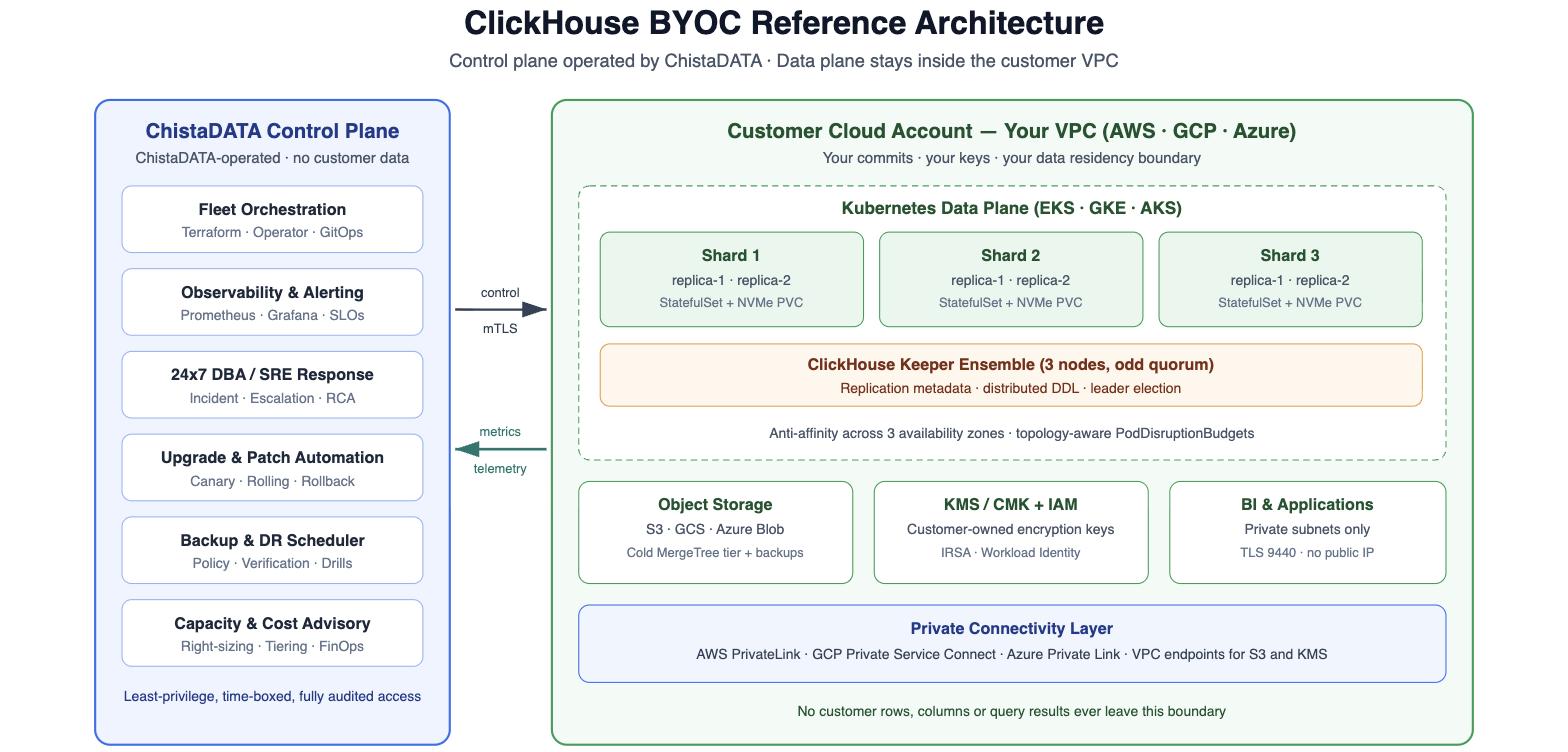
The diagram below is the ClickHouse BYOC blueprint ChistaDATA deploys for production analytics platforms. Everything to the right of the boundary is created in the customer account by Terraform that the customer owns and can audit; everything to the left runs in ChistaDATA infrastructure and only ever handles metrics, health signals and configuration intent.
Control Plane Responsibilities
The control plane never stores customer rows. It holds cluster topology metadata, desired-state configuration, Prometheus time series, alert state and runbook automation. Its access to the data plane is brokered through a short-lived, MFA-gated session that maps to a Kubernetes RBAC role and a cloud IAM role you define. In every ChistaDATA ClickHouse BYOC engagement that role is reviewed with the customer security team before the first deployment.
Data Plane Composition
A standard three-shard, two-replica ClickHouse BYOC data plane consists of six ClickHouse server pods spread across three availability zones, a three-node ClickHouse Keeper ensemble on dedicated nodes, a hot tier of locally attached or high-IOPS network NVMe, a cold tier on object storage, and an internal load balancer. Replication is handled by the ReplicatedMergeTree family, and coordination by ClickHouse Keeper. For guidance on choosing shard counts and distribution keys, see our deep dive on sharding and horizontal scaling in ClickHouse.
Multi-Region ClickHouse BYOC
Regulated customers frequently need one ClickHouse BYOC cluster per jurisdiction with a shared query layer on top. The patterns for that — independent regional clusters, asynchronous replication, or a global routing tier — are covered in detail in our guide to designing multi-region ClickHouse deployments.
Network and Identity Model
The network design is where most ClickHouse BYOC implementations either earn or lose their security review. The rule ChistaDATA applies is simple: there are exactly two paths into the cluster, both private, both authenticated, both logged.
Private connectivity is implemented with the native primitive of each cloud: AWS PrivateLink, Google Cloud Private Service Connect, or Azure Private Link. Object storage traffic uses gateway or interface endpoints so that MergeTree reads against the cold tier never traverse a NAT gateway — a detail that alone has cut six-figure annual NAT charges on large ClickHouse BYOC estates.
Terraform Foundation for a ClickHouse BYOC Landing Zone
The customer-owned foundation is deliberately small: a customer-managed key, an encrypted bucket for the cold tier, a private S3 endpoint, and a workload identity role that the ClickHouse service account assumes. No static access keys are ever issued.
###############################################################################
# ClickHouse BYOC - AWS landing zone (Terraform)
# Creates the customer-owned cold tier, CMK and IRSA role used by ClickHouse.
# Every resource below is created in, and billed to, the CUSTOMER account.
###############################################################################

terraform {
  required_version = ">= 1.6.0"

  required_providers {
    aws = {
      source  = "hashicorp/aws"
      version = "~> 5.60"
    }
  }
}

locals {
  cluster_name = "chistadata-byoc-prod"
  region       = "eu-central-1"
  bucket_name  = "chistadata-byoc-prod-cold-tier"

  tags = {
    Owner       = "data-platform"
    Environment = "production"
    Component   = "clickhouse-byoc"
    ManagedBy   = "ChistaDATA"
  }
}

# ---------------------------------------------------------------------------
# 1. Customer-managed encryption key. Revoking this key revokes the operator.
# ---------------------------------------------------------------------------
resource "aws_kms_key" "clickhouse" {
  description             = "CMK for the ClickHouse BYOC cold tier and backups"
  enable_key_rotation     = true
  deletion_window_in_days = 30
  tags                    = local.tags
}

resource "aws_kms_alias" "clickhouse" {
  name          = "alias/clickhouse-byoc"
  target_key_id = aws_kms_key.clickhouse.key_id
}

# ---------------------------------------------------------------------------
# 2. Object storage tier for cold MergeTree parts.
# ---------------------------------------------------------------------------
resource "aws_s3_bucket" "cold_tier" {
  bucket = local.bucket_name
  tags   = local.tags
}

resource "aws_s3_bucket_versioning" "cold_tier" {
  bucket = aws_s3_bucket.cold_tier.id

  versioning_configuration {
    status = "Enabled"
  }
}

resource "aws_s3_bucket_server_side_encryption_configuration" "cold_tier" {
  bucket = aws_s3_bucket.cold_tier.id

  rule {
    apply_server_side_encryption_by_default {
      sse_algorithm     = "aws:kms"
      kms_master_key_id = aws_kms_key.clickhouse.arn
    }

    bucket_key_enabled = true
  }
}

resource "aws_s3_bucket_public_access_block" "cold_tier" {
  bucket                  = aws_s3_bucket.cold_tier.id
  block_public_acls       = true
  block_public_policy     = true
  ignore_public_acls      = true
  restrict_public_buckets = true
}

# ---------------------------------------------------------------------------
# 3. Gateway endpoint: keeps every cold-tier read on the private backbone.
# ---------------------------------------------------------------------------
resource "aws_vpc_endpoint" "s3" {
  vpc_id            = var.vpc_id
  service_name      = "com.amazonaws.eu-central-1.s3"
  vpc_endpoint_type = "Gateway"
  route_table_ids   = var.private_route_table_ids
  tags              = local.tags
}

# ---------------------------------------------------------------------------
# 4. Least-privilege role assumed by the ClickHouse Kubernetes ServiceAccount.
# ---------------------------------------------------------------------------
data "aws_iam_policy_document" "cold_tier_access" {
  statement {
    sid    = "ColdTierObjectAccess"
    effect = "Allow"

    actions = [
      "s3:GetObject",
      "s3:PutObject",
      "s3:DeleteObject",
      "s3:AbortMultipartUpload",
      "s3:ListMultipartUploadParts",
    ]

    resources = ["arn:aws:s3:::chistadata-byoc-prod-cold-tier/*"]
  }

  statement {
    sid    = "ColdTierBucketMetadata"
    effect = "Allow"

    actions = [
      "s3:ListBucket",
      "s3:GetBucketLocation",
    ]

    resources = ["arn:aws:s3:::chistadata-byoc-prod-cold-tier"]
  }

  statement {
    sid    = "EnvelopeEncryption"
    effect = "Allow"

    actions = [
      "kms:Decrypt",
      "kms:GenerateDataKey",
    ]

    resources = [aws_kms_key.clickhouse.arn]
  }
}
Note that the policy grants object-level actions on one prefix and nothing else. There is no s3:*, no wildcard resource and no permission to read any other bucket in the account. This is the level of scoping your security team should demand from any ClickHouse BYOC vendor.
Deploying ClickHouse BYOC on Kubernetes
Kubernetes is not mandatory for ClickHouse BYOC, but it is the pattern that makes a fleet operable. ClickHouse maps cleanly onto StatefulSets with stable network identities and per-pod persistent volumes, and the Altinity Kubernetes Operator for ClickHouse turns cluster topology into a single declarative resource. The manifests below are a trimmed version of a real three-shard, two-replica ClickHouse BYOC production deployment.
---
# ---------------------------------------------------------------------------
# StorageClass: encrypted, high-IOPS hot tier bound to the customer CMK.
# ---------------------------------------------------------------------------
apiVersion: storage.k8s.io/v1
kind: StorageClass
metadata:
  name: clickhouse-hot
provisioner: ebs.csi.aws.com
parameters:
  type: gp3
  iops: "16000"
  throughput: "1000"
  encrypted: "true"
  kmsKeyId: alias/clickhouse-byoc
volumeBindingMode: WaitForFirstConsumer
allowVolumeExpansion: true
reclaimPolicy: Retain

---
# ---------------------------------------------------------------------------
# ClickHouseInstallation: 3 shards x 2 replicas, one replica per AZ.
# ---------------------------------------------------------------------------
apiVersion: clickhouse.altinity.com/v1
kind: ClickHouseInstallation
metadata:
  name: chistadata-byoc-prod
  namespace: clickhouse
spec:
  defaults:
    templates:
      podTemplate: clickhouse-pod
      dataVolumeClaimTemplate: clickhouse-data
      logVolumeClaimTemplate: clickhouse-log
      serviceTemplate: clickhouse-internal-lb

  configuration:
    clusters:
      - name: analytics
        layout:
          shardsCount: 3
          replicasCount: 2

    zookeeper:
      nodes:
        - host: keeper-0.keeper-headless.clickhouse.svc.cluster.local
          port: 2181
        - host: keeper-1.keeper-headless.clickhouse.svc.cluster.local
          port: 2181
        - host: keeper-2.keeper-headless.clickhouse.svc.cluster.local
          port: 2181
      session_timeout_ms: 30000
      operation_timeout_ms: 10000

    profiles:
      default/max_threads: 16
      default/max_memory_usage: 40000000000
      default/max_bytes_before_external_group_by: 20000000000
      default/join_algorithm: "grace_hash"
      default/load_balancing: "nearest_hostname"
      default/prefer_localhost_replica: 0

    settings:
      max_concurrent_queries: 200
      max_server_memory_usage_to_ram_ratio: 0.85
      background_pool_size: 32
      mark_cache_size: 21474836480
      prometheus/endpoint: /metrics
      prometheus/port: 9363
      prometheus/metrics: true
      prometheus/events: true
      prometheus/asynchronous_metrics: true

  templates:
    podTemplates:
      - name: clickhouse-pod
        podDistribution:
          - type: ShardAntiAffinity
            scope: Zone
          - type: ReplicaAntiAffinity
            scope: Host
        spec:
          securityContext:
            runAsNonRoot: true
            runAsUser: 101
            fsGroup: 101
          serviceAccountName: clickhouse-byoc
          topologySpreadConstraints:
            - maxSkew: 1
              topologyKey: topology.kubernetes.io/zone
              whenUnsatisfiable: DoNotSchedule
              labelSelector:
                matchLabels:
                  clickhouse.altinity.com/chi: chistadata-byoc-prod
          containers:
            - name: clickhouse
              image: clickhouse/clickhouse-server:25.3
              ports:
                - name: https
                  containerPort: 8443
                - name: secure
                  containerPort: 9440
                - name: metrics
                  containerPort: 9363
              resources:
                requests:
                  cpu: "14"
                  memory: 56Gi
                limits:
                  cpu: "16"
                  memory: 60Gi
              readinessProbe:
                httpGet:
                  path: /ping
                  port: 8443
                  scheme: HTTPS
                initialDelaySeconds: 20
                periodSeconds: 10

    volumeClaimTemplates:
      - name: clickhouse-data
        spec:
          storageClassName: clickhouse-hot
          accessModes:
            - ReadWriteOnce
          resources:
            requests:
              storage: 2000Gi

      - name: clickhouse-log
        spec:
          storageClassName: clickhouse-hot
          accessModes:
            - ReadWriteOnce
          resources:
            requests:
              storage: 100Gi

    serviceTemplates:
      - name: clickhouse-internal-lb
        metadata:
          annotations:
            service.beta.kubernetes.io/aws-load-balancer-scheme: internal
            service.beta.kubernetes.io/aws-load-balancer-type: nlb
        spec:
          type: LoadBalancer
          ports:
            - name: https
              port: 8443
            - name: secure
              port: 9440
Two details matter disproportionately in ClickHouse BYOC on Kubernetes. First, ShardAntiAffinity at zone scope guarantees that losing an availability zone never removes both replicas of the same shard. Second, reclaimPolicy: Retain means an accidental namespace deletion does not destroy the underlying volumes. If you run into scheduling, PVC or Keeper issues, our field guide on troubleshooting ClickHouse in Kubernetes covers the diagnostics we use.
Storage Tiering and Object Storage
The economics of ClickHouse BYOC live and die on storage tiering. Analytical tables are almost always accessed with a strong recency bias: the last week of data serves ninety percent of queries while the last two years consume ninety percent of the bytes. Tiering hot parts on NVMe and ageing them onto object storage typically removes half to two-thirds of the storage bill without measurably changing dashboard latency.
Storage Configuration
ClickHouse implements tiering through disks, volumes and storage policies. The configuration below defines a local hot disk, an S3 cold disk, and a local filesystem cache in front of the cold disk. See the ClickHouse documentation on external disks for storing data for the full option list.
<clickhouse>
    <storage_configuration>
        <disks>
            <!-- Hot tier: the local encrypted PersistentVolume -->
            <hot>
                <path>/var/lib/clickhouse/</path>
                <keep_free_space_bytes>107374182400</keep_free_space_bytes>
            </hot>

            <!-- Cold tier: customer-owned bucket, customer-owned KMS key -->
            <s3_cold>
                <type>s3</type>
                <endpoint>https://chistadata-byoc-prod-cold-tier.s3.eu-central-1.amazonaws.com/data/</endpoint>
                <use_environment_credentials>true</use_environment_credentials>
                <server_side_encryption_kms_key_id>alias/clickhouse-byoc</server_side_encryption_kms_key_id>
                <support_batch_delete>true</support_batch_delete>
                <skip_access_check>false</skip_access_check>
            </s3_cold>

            <!-- Local cache so repeated cold-tier scans do not re-fetch objects -->
            <s3_cold_cached>
                <type>cache</type>
                <disk>s3_cold</disk>
                <path>/var/lib/clickhouse/s3_cache/</path>
                <max_size>500Gi</max_size>
                <cache_on_write_operations>true</cache_on_write_operations>
                <enable_filesystem_query_cache_limit>true</enable_filesystem_query_cache_limit>
            </s3_cold_cached>
        </disks>

        <policies>
            <hot_to_cold>
                <volumes>
                    <hot>
                        <disk>hot</disk>
                        <max_data_part_size_bytes>53687091200</max_data_part_size_bytes>
                    </hot>
                    <cold>
                        <disk>s3_cold_cached</disk>
                        <prefer_not_to_merge>true</prefer_not_to_merge>
                    </cold>
                </volumes>
                <move_factor>0.15</move_factor>
            </hot_to_cold>
        </policies>
    </storage_configuration>
</clickhouse>
Table DDL with Lifecycle Rules
-- Replicated local table: one per shard, two replicas per shard.
CREATE TABLE analytics.events_local ON CLUSTER analytics
(
    event_date   Date                    DEFAULT toDate(event_time),
    event_time   DateTime64(3)           CODEC(Delta, ZSTD(1)),
    tenant_id    UInt32                  CODEC(ZSTD(1)),
    user_id      UInt64                  CODEC(ZSTD(1)),
    session_id   UUID,
    event_type   LowCardinality(String),
    country      LowCardinality(String),
    device       LowCardinality(String),
    revenue_usd  Decimal(18, 4)          CODEC(ZSTD(3)),
    payload      String                  CODEC(ZSTD(3)),

    INDEX idx_user_id   user_id   TYPE minmax     GRANULARITY 4,
    INDEX idx_session   session_id TYPE bloom_filter(0.01) GRANULARITY 8
)
ENGINE = ReplicatedMergeTree('/clickhouse/tables/{shard}/analytics/events_local', '{replica}')
PARTITION BY toYYYYMM(event_date)
ORDER BY (tenant_id, event_type, event_time)
TTL event_date + INTERVAL 30  DAY TO VOLUME 'cold',
    event_date + INTERVAL 400 DAY DELETE
SETTINGS storage_policy      = 'hot_to_cold',
         index_granularity   = 8192,
         ttl_only_drop_parts = 1;

-- Distributed table: the only object BI tools ever see.
CREATE TABLE analytics.events ON CLUSTER analytics
AS analytics.events_local
ENGINE = Distributed('analytics', 'analytics', 'events_local', cityHash64(tenant_id));
Setting ttl_only_drop_parts = 1 makes expiry a metadata operation on whole parts instead of a rewrite, which is dramatically cheaper against object storage. For a deeper treatment of this subject, read our article on optimizing ClickHouse MergeTree on S3.
Security Hardening for ClickHouse BYOC
Because a ClickHouse BYOC cluster sits inside your compliance perimeter, it inherits your controls — and your auditors will treat it exactly like any other in-account datastore. ChistaDATA applies a hardening baseline covering transport, authentication, authorisation, row-level isolation and audit before a cluster is declared production-ready.
Transport Security
Plain-text ports are removed rather than firewalled, so a misconfigured security group cannot silently expose them.
<clickhouse>
    <!-- Secure ports only. The plain-text listeners are removed entirely. -->
    <https_port>8443</https_port>
    <tcp_port_secure>9440</tcp_port_secure>
    <http_port remove="1"/>
    <tcp_port remove="1"/>

    <openSSL>
        <server>
            <certificateFile>/etc/clickhouse-server/tls/tls.crt</certificateFile>
            <privateKeyFile>/etc/clickhouse-server/tls/tls.key</privateKeyFile>
            <caConfig>/etc/clickhouse-server/tls/ca.crt</caConfig>
            <verificationMode>strict</verificationMode>
            <disableProtocols>sslv2,sslv3,tlsv1,tlsv1_1</disableProtocols>
            <preferServerCiphers>true</preferServerCiphers>
            <cacheSessions>true</cacheSessions>
        </server>

        <client>
            <caConfig>/etc/clickhouse-server/tls/ca.crt</caConfig>
            <verificationMode>strict</verificationMode>
            <invalidCertificateHandler>
                <name>RejectCertificateHandler</name>
            </invalidCertificateHandler>
        </client>
    </openSSL>

    <!-- Interserver replication traffic is encrypted too. -->
    <interserver_https_port>9010</interserver_https_port>
</clickhouse>
RBAC, Row Policies and Quotas
Least privilege in ClickHouse BYOC is expressed entirely in SQL, which means it is reviewable, diffable and version controlled alongside the rest of the platform.
-- 1. Settings profile: hard caps so one dashboard cannot destabilise a shard.
CREATE SETTINGS PROFILE IF NOT EXISTS bi_readonly ON CLUSTER analytics
SETTINGS
    readonly                          = 2            READONLY,
    max_memory_usage                  = 8000000000   READONLY,
    max_execution_time                = 60           READONLY,
    max_rows_to_read                  = 5000000000   READONLY,
    max_result_rows                   = 1000000      READONLY,
    max_bytes_before_external_group_by = 4000000000;

-- 2. Role carrying the minimum grants required by the BI tier.
CREATE ROLE IF NOT EXISTS bi_reader ON CLUSTER analytics;

GRANT SELECT  ON analytics.events        TO bi_reader ON CLUSTER analytics;
GRANT SELECT  ON analytics.dim_tenant    TO bi_reader ON CLUSTER analytics;
GRANT dictGet ON analytics.*             TO bi_reader ON CLUSTER analytics;

-- 3. Row policy: multi-tenant isolation enforced by the engine, not the app.
CREATE ROW POLICY IF NOT EXISTS tenant_isolation
    ON analytics.events_local ON CLUSTER analytics
    FOR SELECT USING tenant_id IN (
        SELECT tenant_id
        FROM   analytics.user_tenant_map
        WHERE  user_name = currentUser()
    )
    TO bi_reader;

-- 4. Quota: bound the blast radius of a runaway scheduled report.
CREATE QUOTA IF NOT EXISTS bi_hourly ON CLUSTER analytics
    FOR INTERVAL 1 HOUR
        MAX queries   = 3000,
            errors    = 200,
            read_rows = 200000000000
    TO bi_reader;

-- 5. Certificate-authenticated service account: no password is ever stored.
CREATE USER IF NOT EXISTS looker_svc ON CLUSTER analytics
    IDENTIFIED WITH ssl_certificate CN 'looker.internal.example.com'
    HOST IP '10.42.0.0/16'
    DEFAULT ROLE bi_reader
    SETTINGS PROFILE bi_readonly;

-- 6. Verify the effective grants before handing the cluster over.
SHOW GRANTS FOR looker_svc;

SELECT user_name, role_name, granted_role_name
FROM   system.role_grants
ORDER BY user_name;
ChistaDATA pairs this baseline with query-level auditing so that every statement, its user, its client address and its resource consumption are retained for forensic review. Our companion articles on ClickHouse role-based access control best practices and data security and data masking in ClickHouse go deeper on both topics.
Access Boundary for the Operator
A credible ClickHouse BYOC vendor should be able to answer four questions with artefacts, not adjectives: which IAM role do you assume, what does its policy allow, how is the session authenticated, and where can I read the audit trail. In the ChistaDATA model the answers are a named role in your account, a policy you merged into your own Terraform repository, an SSO session with MFA and a fixed expiry, and your own cloud audit log.
Backup and Disaster Recovery
Replication protects against node and zone failure. It does not protect against a dropped table, a bad deployment or a compromised credential, because ClickHouse faithfully replicates all three. Every ClickHouse BYOC cluster therefore needs an independent backup path that lands in a different account with immutability enabled.
Backup Tooling
ChistaDATA uses the native BACKUP and RESTORE statements for logical, point-in-time database backups, and clickhouse-backup for incremental, object-storage-native full-cluster backups. Both write into a bucket owned by the customer.
# /etc/clickhouse-backup/config.yml
general:
  remote_storage:         s3
  backups_to_keep_local:  1
  backups_to_keep_remote: 30
  upload_concurrency:     8
  download_concurrency:   8
  log_level:              info

clickhouse:
  host:           127.0.0.1
  port:           9440
  secure:         true
  skip_verify:    false
  timeout:        30m
  freeze_by_part: true
  sync_replicated_tables: true

s3:
  bucket:                    chistadata-byoc-prod-backups
  region:                    eu-central-1
  path:                      clickhouse/prod
  sse:                       aws:kms
  sse_kms_key_id:            alias/clickhouse-byoc
  storage_class:             STANDARD_IA
  disable_cert_verification: false
  max_parts_count:           4000
#!/usr/bin/env bash
# ---------------------------------------------------------------------------
# ClickHouse BYOC backup cycle. Runs from a CronJob in the clickhouse namespace.
# ---------------------------------------------------------------------------
set -euo pipefail

WEEKLY_TAG="full-2026-08-09"
DAILY_TAG="incr-2026-08-10"

# 1. Weekly full backup, uploaded straight to the customer bucket.
clickhouse-backup create_remote "$WEEKLY_TAG"

# 2. Daily incremental, diffed against the last full backup.
clickhouse-backup create_remote --diff-from-remote "$WEEKLY_TAG" "$DAILY_TAG"

# 3. List what is actually recoverable right now.
clickhouse-backup list remote

# 4. Prune anything older than the retention policy.
clickhouse-backup delete remote "$(clickhouse-backup list remote | head -n 1 | awk '{print $1}')"
-- Native logical backup of a single database to an object-storage disk.
BACKUP DATABASE analytics
    TO Disk('backups', 'analytics-2026-08-09.zip')
    SETTINGS compression_method = 'zstd',
             compression_level  = 3;

-- Restore into an isolated database for drill verification.
RESTORE DATABASE analytics AS analytics_drill
    FROM Disk('backups', 'analytics-2026-08-09.zip');

-- Prove the restore is complete before signing off the drill.
SELECT
    table,
    formatReadableQuantity(sum(rows))        AS restored_rows,
    formatReadableSize(sum(bytes_on_disk))   AS restored_size
FROM system.parts
WHERE active AND database = 'analytics_drill'
GROUP BY table
ORDER BY table;
The backup itself is the easy half. The half that saves companies is the drill. Our guide to ClickHouse disaster recovery drills describes the cadence, scope and reporting format we use with enterprise customers, and it applies directly to ClickHouse BYOC estates.
Observability, SLOs and Alerting
Operating a database you cannot see into is guesswork. In ClickHouse BYOC the monitoring stack runs inside the customer VPC and forwards only aggregated telemetry, which keeps the security story intact while still giving the on-call team everything needed to diagnose an incident.
ClickHouse exposes a native Prometheus endpoint, so scraping is a configuration change rather than an exporter deployment.
# prometheus.yml - scrape configuration for a ClickHouse BYOC cluster
scrape_configs:
  - job_name: clickhouse-byoc
    scheme: https
    scrape_interval: 15s
    scrape_timeout: 10s

    tls_config:
      ca_file: /etc/prometheus/tls/ca.crt
      insecure_skip_verify: false

    kubernetes_sd_configs:
      - role: pod
        namespaces:
          names:
            - clickhouse

    relabel_configs:
      - source_labels: [__meta_kubernetes_pod_label_clickhouse_altinity_com_chi]
        action: keep
        regex: chistadata-byoc-prod

      - source_labels: [__meta_kubernetes_pod_name]
        target_label: instance

      - source_labels: [__meta_kubernetes_pod_label_clickhouse_altinity_com_shard]
        target_label: shard

      - source_labels: [__meta_kubernetes_pod_label_clickhouse_altinity_com_replica]
        target_label: replica

    metric_relabel_configs:
      - source_labels: [__name__]
        action: keep
        regex: "ClickHouse(Metrics|AsyncMetrics|ProfileEvents)_.+"
The four signals ChistaDATA alerts on first are replication delay, merge backlog, memory pressure and query latency regression. The query below is the fastest way to see whether a ClickHouse BYOC cluster is healthy right now.
-- Cluster-wide health snapshot across every replica.
SELECT
    hostName()                                                  AS host,
    countIf(is_readonly)                                        AS readonly_tables,
    max(absolute_delay)                                         AS max_replica_delay_s,
    sum(future_parts)                                           AS future_parts,
    sum(parts_to_check)                                         AS parts_to_check,
    max(queue_size)                                             AS max_queue_size
FROM clusterAllReplicas('analytics', system.replicas)
GROUP BY host
ORDER BY max_replica_delay_s DESC;

-- Storage distribution: how much has actually aged onto object storage?
SELECT
    hostName()                                                  AS host,
    disk_name,
    count()                                                     AS parts,
    formatReadableSize(sum(bytes_on_disk))                      AS size_on_disk,
    formatReadableQuantity(sum(rows))                           AS total_rows
FROM clusterAllReplicas('analytics', system.parts)
WHERE active AND database = 'analytics'
GROUP BY host, disk_name
ORDER BY host, disk_name;

-- Top query shapes by total CPU time over the last 24 hours.
SELECT
    normalized_query_hash                                       AS query_shape,
    count()                                                     AS executions,
    round(avg(query_duration_ms))                               AS avg_ms,
    round(quantile(0.99)(query_duration_ms))                    AS p99_ms,
    formatReadableSize(sum(read_bytes))                         AS total_read,
    any(substring(query, 1, 120))                               AS sample
FROM clusterAllReplicas('analytics', system.query_log)
WHERE type = 'QueryFinish'
  AND event_time >= now() - INTERVAL 24 HOUR
GROUP BY query_shape
ORDER BY sum(query_duration_ms) DESC
LIMIT 20;
If you are wiring this up yourself, our walkthrough on how to connect Prometheus to your ClickHouse cluster covers the endpoint configuration in detail, and ClickHouse workload isolation techniques explains how to stop one tenant from starving another once the dashboards start showing contention.
Cost Engineering
The financial case for ClickHouse BYOC is rarely about the raw compute price. It is about four structural effects that compound: committed-use discounts apply, cross-account egress disappears, storage tiering is under your control, and you are not paying a per-terabyte margin on data you already own.
| Cost lever | Typical impact | How ClickHouse BYOC captures it |
|---|---|---|
| Committed-use discounts | 20 to 40 percent off compute | Nodes are billed to your account and count toward your EDP, CUD or MACC |
| Cross-account and cross-AZ egress | 5 to 25 percent of a typical SaaS bill | ClickHouse sits beside your lake, Kafka and BI tier in the same VPC |
| Object-storage tiering | 50 to 70 percent off storage | TTL MOVE TO VOLUME with a local cache in front of the cold disk |
| Compression and codecs | 2x to 6x further reduction | Per-column ZSTD, Delta, DoubleDelta and Gorilla codec selection |
| Right-sized concurrency | 15 to 30 percent off compute | Quotas, settings profiles and workload isolation instead of over-provisioning |
| Spot or preemptible capacity | Up to 60 percent off read replicas | Stateless read-only replicas on interruptible nodes behind the same LB |
-- Where is the storage budget actually going? Run this monthly.
SELECT
    database,
    table,
    formatReadableSize(sum(bytes_on_disk))                      AS on_disk,
    formatReadableSize(sum(data_uncompressed_bytes))            AS uncompressed,
    round(sum(data_uncompressed_bytes) / sum(bytes_on_disk), 2) AS compression_ratio,
    round(100 * sumIf(bytes_on_disk, disk_name != 'hot')
              / sum(bytes_on_disk), 1)                          AS pct_on_object_storage
FROM clusterAllReplicas('analytics', system.parts)
WHERE active
GROUP BY database, table
HAVING sum(bytes_on_disk) > 10737418240
ORDER BY sum(bytes_on_disk) DESC;

-- Columns with poor compression are usually the cheapest win available.
SELECT
    table,
    name                                                        AS column,
    type,
    compression_codec,
    formatReadableSize(sum(column_data_compressed_bytes))        AS compressed,
    round(sum(column_data_uncompressed_bytes)
        / sum(column_data_compressed_bytes), 2)                 AS ratio
FROM system.parts_columns
WHERE active AND database = 'analytics'
GROUP BY table, name, type, compression_codec
HAVING sum(column_data_compressed_bytes) > 1073741824
ORDER BY ratio ASC
LIMIT 25;
A structured ClickHouse performance audit is usually the fastest way to find these wins, because slow queries and expensive queries are almost always the same queries.
ClickHouse BYOC Migration Runbook
Most ClickHouse BYOC projects are migrations rather than greenfield builds: an existing cluster is moving out of a SaaS tenancy, off a legacy warehouse, or from a hand-built set of virtual machines. The runbook below is the sequence ChistaDATA follows, and each phase has an explicit exit criterion.
- Discovery and sizing. Inventory tables, partitions, ingest rates, concurrency profile and query shapes. Exit criterion: a written capacity model with shard count, replica count and hot-tier sizing.
- Landing zone. Apply the Terraform foundation, VPC endpoints, CMK, buckets and IAM roles in the customer account. Exit criterion: a clean plan with no drift and a security review sign-off.
- Cluster bootstrap. Deploy Keeper, then the ClickHouseInstallation, then TLS and RBAC. Exit criterion: all replicas healthy and a distributed DDL round trip under one second.
- Schema port. Recreate DDL with correct ordering keys, codecs, partitions and TTL policies. Exit criterion: schema diff clean and index granularity validated.
- Historical backfill. Bulk load using
remoteSecure(), thes3()table function or a native parts copy, sharded in parallel. Exit criterion: row counts and per-partition checksums match the source. - Dual write and shadow read. Run the new ClickHouse BYOC cluster alongside the source and compare results. Exit criterion: query result parity above the agreed threshold for seven consecutive days.
- Cutover. Flip connection strings and keep the source read-only for the rollback window. Exit criterion: p99 latency within the agreed SLO for 24 hours.
- Decommission and optimise. Retire the source, then tune merges, caches and tiering against real production traffic. Exit criterion: a signed-off operations runbook.
The pre-flight script below is what we run before phase three is declared complete. It fails loudly rather than warning quietly.
#!/usr/bin/env bash
# ---------------------------------------------------------------------------
# ClickHouse BYOC pre-flight validation.
# Verifies TLS, Keeper quorum, replication health, tiering and backup access
# before a cluster is accepted into production.
# ---------------------------------------------------------------------------
set -euo pipefail

CH_HOST="clickhouse.clickhouse.svc.cluster.local"
CH_USER="ops_readonly"
CLUSTER="analytics"
BACKUP_BUCKET="chistadata-byoc-prod-backups"

run_sql() {
  clickhouse-client --secure --host "$CH_HOST" --user "$CH_USER" --query "$1"
}

fail() {
  echo "    FAIL: $1" >&2
  exit 1
}

echo "==> 1/6  Verifying the TLS-only listener"
run_sql "SELECT 1" >/dev/null || fail "cannot reach the cluster over TLS on port 9440"
echo "    OK: secure native protocol reachable"

echo "==> 2/6  Verifying every replica is online"
OFFLINE=$(run_sql "SELECT count() FROM system.clusters WHERE cluster = '$CLUSTER' AND errors_count > 0")
[ "$OFFLINE" -eq 0 ] || fail "$OFFLINE replicas are reporting errors"
echo "    OK: all replicas reachable"

echo "==> 3/6  Verifying Keeper quorum with a distributed DDL round trip"
run_sql "CREATE DATABASE IF NOT EXISTS preflight ON CLUSTER '$CLUSTER'"
run_sql "DROP DATABASE IF EXISTS preflight ON CLUSTER '$CLUSTER' SYNC"
echo "    OK: distributed DDL committed on every node"

echo "==> 4/6  Verifying replication lag is within budget"
LAG=$(run_sql "SELECT toUInt32(max(absolute_delay)) FROM system.replicas")
[ "$LAG" -lt 60 ] || fail "replica delay is $LAG seconds"
echo "    OK: maximum replica delay is $LAG seconds"

echo "==> 5/6  Verifying the object-storage tier is registered"
run_sql "SELECT count() FROM system.disks WHERE name = 's3_cold_cached'" | grep -q '^1$' \
  || fail "cold tier disk s3_cold_cached is missing"
echo "    OK: cold tier disk is registered"

echo "==> 6/6  Verifying backup bucket access via workload identity"
aws s3 ls "s3://$BACKUP_BUCKET/clickhouse/prod/" >/dev/null || fail "backup bucket is unreachable"
echo "    OK: backup bucket readable"

echo
echo "PRE-FLIGHT PASSED - the cluster is ready for production traffic."
If the workload is moving off another engine entirely, our ClickHouse migration services page describes the assessment and dual-run methodology in more depth.
Seven Pitfalls to Avoid in ClickHouse BYOC
- Putting Keeper on the ClickHouse nodes. Under merge pressure Keeper loses its quorum first. Give it dedicated nodes with its own disk.
- An even number of Keeper nodes. Four nodes tolerate the same single failure as three and cost more. Always run an odd ensemble.
- Two replicas of a shard in one availability zone. Without explicit anti-affinity, Kubernetes will happily co-locate them and one zone failure takes a shard offline.
- No VPC endpoint for object storage. Cold-tier reads then flow through a NAT gateway, and the data-processing charge can exceed the storage cost itself.
- Over-broad IAM for the operator. If the vendor role can read every bucket in the account, the residency argument collapses.
- Backups in the same account as the cluster. A compromised or misused credential can then destroy both. Use a separate account with Object Lock.
- Never running a restore. An untested backup is a hypothesis. Schedule quarterly drills and record the actual measured RTO.
Several of these show up repeatedly in the field, so it is worth reading our maintenance plan for optimal ClickHouse infrastructure operations alongside this checklist.
The ChistaDATA ClickHouse BYOC Operating Model
Clear ownership is what keeps a shared-responsibility model from becoming a shared-blame model. The matrix below is the default split ChistaDATA agrees with customers before the first cluster is built, and it is adjusted per engagement rather than assumed.
| Responsibility | Customer | ChistaDATA |
|---|---|---|
| Cloud account, billing and service control policies | Owns | Advises |
| VPC, subnets, security groups and private endpoints | Owns | Designs and reviews |
| Encryption keys and key rotation | Owns | Configures usage |
| Kubernetes cluster lifecycle | Co-owns | Co-owns |
| ClickHouse deployment, configuration and upgrades | Approves | Owns |
| Schema design, ordering keys and codecs | Co-owns | Owns the review |
| Query tuning and workload isolation | Requests | Owns |
| Monitoring, alerting and 24×7 on-call | Consumes | Owns |
| Backup execution and restore drills | Witnesses | Owns |
| Capacity planning and cost optimisation | Approves | Recommends |
| Application code and data quality | Owns | Advises |
Delivery runs through our ClickHouse DBA services and ClickHouse enterprise support practices, with performance work handled by the ClickHouse performance tuning and optimization team and architecture reviews through ChistaDATA ClickHouse consulting.
Frequently Asked Questions About ClickHouse BYOC
Does ChistaDATA ever see my data in a ClickHouse BYOC deployment?
No. The operating model is built so that only metrics, logs and query fingerprints leave the customer VPC. Engineers who need to run diagnostic SQL do so through a brokered, MFA-gated session that is recorded in your own cloud audit log, and the role they assume is one you created and can revoke at any moment.
Which clouds and regions does ClickHouse BYOC support?
Any region on AWS, Google Cloud or Azure where you can run a managed Kubernetes cluster, object storage and a KMS. Because the ClickHouse BYOC data plane is expressed as Terraform plus Kubernetes manifests, adding a new region is a variable change rather than a new product.
Do I need Kubernetes to run ClickHouse BYOC?
No, although it is the pattern we recommend for fleets. ChistaDATA also deploys ClickHouse BYOC directly onto virtual machines or bare metal with the same configuration management, monitoring and backup automation. Kubernetes mainly buys you faster, safer node replacement and rolling upgrades.
How large can a ClickHouse BYOC cluster get?
The model scales the same way self-managed ClickHouse does: horizontally through shards and vertically through node size. Production ClickHouse BYOC estates routinely run into the hundreds of terabytes of hot data with petabytes of history tiered onto object storage.
What happens if we end the engagement?
Nothing stops. The cluster, the volumes, the buckets and the Terraform state are already yours, so the only thing that ends is the operations service. This reversibility is the single strongest commercial argument for ClickHouse BYOC over a fully managed tenancy.
How is ClickHouse BYOC priced compared with fully managed ClickHouse?
You pay your cloud provider directly for infrastructure at your negotiated rate, plus a fixed operations subscription to ChistaDATA. Because there is no per-terabyte or per-query margin on top of infrastructure, the total cost curve flattens as data volume grows, which is precisely where fully managed pricing tends to accelerate.
Can ClickHouse BYOC meet GDPR, HIPAA, DORA or PCI DSS requirements?
The architecture is designed to make those audits straightforward, because the data never leaves the account and boundary you already had certified. ChistaDATA supplies the technical controls, evidence and runbooks; the certification itself remains yours, which is exactly what auditors expect.
Conclusion
ClickHouse BYOC resolves the false choice between operational sanity and data control. By keeping the data plane inside your own cloud account and moving only the control plane to a specialist operator, you get residency guaranteed by architecture, cloud economics that work in your favour, and an engineering team that has already made every mistake this stack has to offer. The hard parts — Keeper placement, IAM scoping, tiering policy, restore verification and workload isolation — are exactly the parts a dedicated ClickHouse practice does every day.
If you are evaluating a ClickHouse BYOC deployment, a good first step is a short architecture review against the reference design in this article. Talk to the ChistaDATA team about a ClickHouse BYOC readiness assessment for your AWS, GCP or Azure environment.
ClickHouse® is a registered trademark of ClickHouse, Inc. ChistaDATA Inc. is not affiliated with ClickHouse, Inc.
Running ClickHouse in production? ChistaDATA provides ClickHouse consulting for architecture, performance and migrations, and 24×7 ClickHouse support with a 15-minute S1 response. For day-to-day operations see ClickHouse DBA services and ClickHouse managed services.
