ChistaDATA · ClickHouse support engineering · ClickHouse 26.9 · October 2026
Every ClickHouse cluster is described as highly available until something fails. The question a ClickHouse support engineer actually has to answer, usually at night, is narrower: which failure is this, what does it break, and what keeps working? We stopped answering that from memory. We built a three-replica ClickHouse 26.9 cluster with a three-node ClickHouse Keeper ensemble and broke it eight different ways while it was taking writes and reads.
This post is the result: how ClickHouse high availability works inside, what the current release changes, the exact behaviour we measured in each failure, and the SQL, config and runbooks our ClickHouse support team uses on customer clusters. Every number comes from our own lab. Every feature claim links to the ClickHouse documentation on clickhouse.com.
How it works
What ClickHouse high availability is made of
ClickHouse high availability is built from three separate mechanisms, and most outages we handle come from treating them as one. Replication copies data between servers. ClickHouse Keeper coordinates that copying. The Distributed table and client settings decide which replica a query goes to. Each mechanism fails differently, so each needs its own monitoring and its own runbook.
ClickHouse replication works per table. A ReplicatedMergeTree table on each server registers itself under a path in Keeper. An INSERT writes a part on the replica that received it, then adds an entry to the shared replication log in Keeper. Every other replica reads the log, puts a GET_PART entry in its own queue, and fetches the part directly from a peer over the interserver HTTP port. Merges are recorded in the same log, so replicas converge on the same set of parts. The replication documentation describes the model.
Keeper stores coordination state, not data. It holds the log, each replica’s queue, the list of active replicas and the block hashes used for deduplication. It runs Raft, so a three-node ensemble keeps working with one node down and a five-node ensemble with two. Losing Keeper does not lose data, but it stops the cluster from agreeing on new data. The ClickHouse Keeper guide covers configuration and sizing.
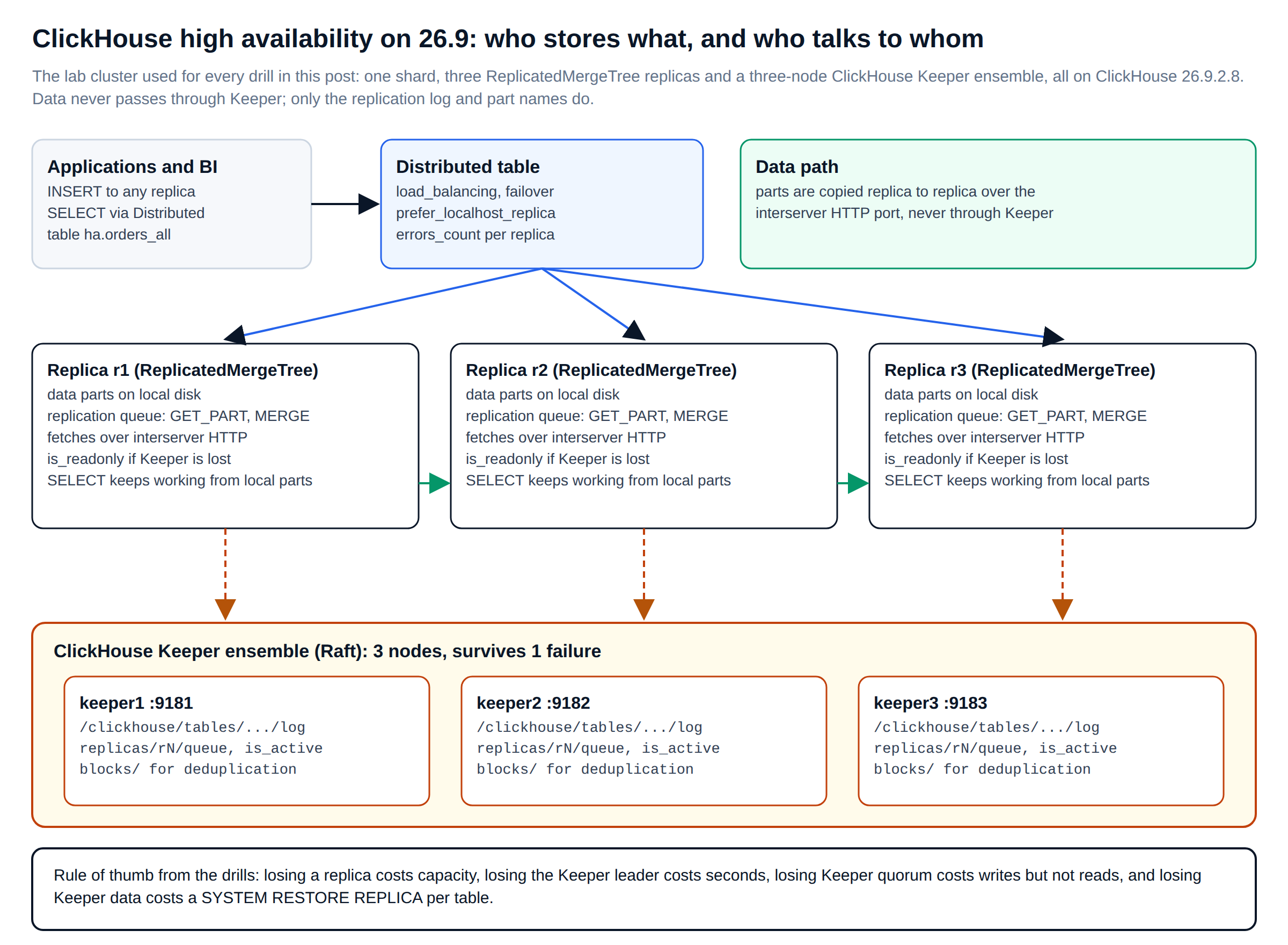
That split explains most of what follows. A replica can be lost and rebuilt from its peers. The Keeper leader can be lost and replaced in about a second. Keeper quorum can be lost for a while: reads keep working from local parts, and writes wait. Even Keeper data can be lost and rebuilt from the parts on disk. Each of those statements is backed by a drill below.
Latest release
What ClickHouse 26.9 changes for high availability
ClickHouse 26.9 is the current release, published on 21 September 2026. The latest patch at the time of writing was 26.9.10.4, released on 4 October. The changelog has no headline HA feature, but it fixes several replication and Keeper problems that a ClickHouse support team would otherwise meet in production. These are the entries we flagged for customers, quoted in substance from the ClickHouse changelog:
| Change in 26.9 | Why it matters for ClickHouse high availability |
|---|---|
| Fixed potential data loss when an INSERT into ReplicatedMergeTree was cancelled or timed out while the server was recovering an uncertain Keeper commit | The most important fix in the release for write durability. Our drills below produced exactly this kind of uncertain commit. |
| Fixed a replication queue that could get stuck forever after a new replica was added by cloning an existing one | Duplicate ALTER_METADATA entries made later ALTERs wait indefinitely and SYSTEM SYNC REPLICA time out. |
mutations_sync = 3, lightweight_deletes_sync = 3 and alter_sync = 3 now wait for all replicas | Before the fix they returned without waiting. Scripts that relied on them to confirm a change everywhere were not getting that confirmation. |
| Fixed a Keeper crash when a removed member is added back without restarting its process | That member could also replay entries it had already applied. This matters during ensemble reconfiguration. |
| Fixed Keeper aborting when memory stays near its limit and old changelogs could not be moved to object storage | The local log disk could fill up and take the ensemble down. |
TRUNCATE TABLE on ReplicatedMergeTree no longer blocks DROP, RENAME and other DDL on the same table | Fewer stalls when data is removed while maintenance is running. |
| Default network compression changed from LZ4 to ZSTD(3) for client-server and server-server traffic | Part fetches between replicas are now compressed differently. This trades CPU for bandwidth during catch-up; compatibility restores LZ4 over HTTP. |
Our advice to support customers is to stay on the latest patch of either the 26.8 LTS line or the current stable line, and to read the replication and Keeper entries in each changelog before upgrading. Release coverage on both lines is part of every ClickHouse support plan we run.
The lab
A ClickHouse high availability cluster you can rebuild in ten minutes
The lab runs on one 2 vCPU host with 8 GiB of RAM: three ClickHouse Keeper processes and three ClickHouse servers, all version 26.9.2.8. Running everything on one host makes the timings pessimistic and removes real network failures, which we come back to at the end. It does exercise the same code paths as a production cluster. This is the Keeper configuration for node 1; nodes 2 and 3 differ only in server_id, ports and paths.
<!-- keeper1.xml: one member of a three-node ClickHouse Keeper ensemble (ClickHouse high availability lab) -->
<clickhouse>
    <listen_host>127.0.0.1</listen_host>
    <keeper_server>
        <tcp_port>9181</tcp_port>                      <!-- clients (ClickHouse servers) connect here -->
        <server_id>1</server_id>                       <!-- unique per member, must match raft_configuration -->
        <log_storage_path>/var/lib/clickhouse-keeper/log</log_storage_path>
        <snapshot_storage_path>/var/lib/clickhouse-keeper/snap</snapshot_storage_path>
        <coordination_settings>
            <operation_timeout_ms>10000</operation_timeout_ms>
            <session_timeout_ms>30000</session_timeout_ms>   <!-- how long a dead client stays "active" -->
            <raft_logs_level>information</raft_logs_level>
        </coordination_settings>
        <raft_configuration>                                   <!-- identical on all three members -->
            <server><id>1</id><hostname>keeper1</hostname><port>9234</port></server>
            <server><id>2</id><hostname>keeper2</hostname><port>9234</port></server>
            <server><id>3</id><hostname>keeper3</hostname><port>9234</port></server>
        </raft_configuration>
    </keeper_server>
</clickhouse>
Each ClickHouse server needs three things: where Keeper is, which replica it is, and which servers make up the cluster. Macros keep the table DDL identical on every replica, which matters later when a replica has to be rebuilt from scratch.
<!-- config.d/replication.xml: ClickHouse replication settings on replica r1 (r2 and r3 change only the replica macro) -->
<clickhouse>
    <zookeeper>                                         <!-- the section name is historical; it points at Keeper -->
        <node><host>keeper1</host><port>9181</port></node>
        <node><host>keeper2</host><port>9181</port></node>
        <node><host>keeper3</host><port>9181</port></node>
        <session_timeout_ms>30000</session_timeout_ms>
        <operation_timeout_ms>10000</operation_timeout_ms>
    </zookeeper>
    <macros>
        <cluster>ha</cluster>
        <shard>01</shard>
        <replica>r1</replica>                        <!-- unique per server -->
    </macros>
    <interserver_http_port>9009</interserver_http_port>  <!-- part fetches between replicas -->
    <remote_servers>
        <ha>
            <shard>
                <internal_replication>true</internal_replication>  <!-- let ReplicatedMergeTree copy, not Distributed -->
                <replica><host>ch-r1</host><port>9000</port></replica>
                <replica><host>ch-r2</host><port>9000</port></replica>
                <replica><host>ch-r3</host><port>9000</port></replica>
            </shard>
        </ha>
    </remote_servers>
</clickhouse>
The table and its Distributed front end are created once, with ON CLUSTER, so every replica gets the same definition.
-- ClickHouse replication: one logical table, three physical replicas
CREATE DATABASE IF NOT EXISTS ha ON CLUSTER ha;

CREATE TABLE IF NOT EXISTS ha.orders ON CLUSTER ha
(
    order_id    UInt64,
    tenant_id   UInt32,
    created_at  DateTime64(3),
    amount      Decimal(18, 2),
    status      LowCardinality(String)
)
ENGINE = ReplicatedMergeTree(
    '/clickhouse/tables/{cluster}/{shard}/ha/orders',   -- Keeper path, shared by all replicas of the shard
    '{replica}'                                         -- this server's name under that path
)
PARTITION BY toYYYYMM(created_at)
ORDER BY (tenant_id, created_at, order_id)
SETTINGS index_granularity = 8192;

-- Reads go through the Distributed table, which knows all three replicas
CREATE TABLE IF NOT EXISTS ha.orders_all ON CLUSTER ha AS ha.orders
ENGINE = Distributed('ha', 'ha', 'orders', rand());
The drills
Eight ways we broke a ClickHouse 26.9 cluster, and what survived
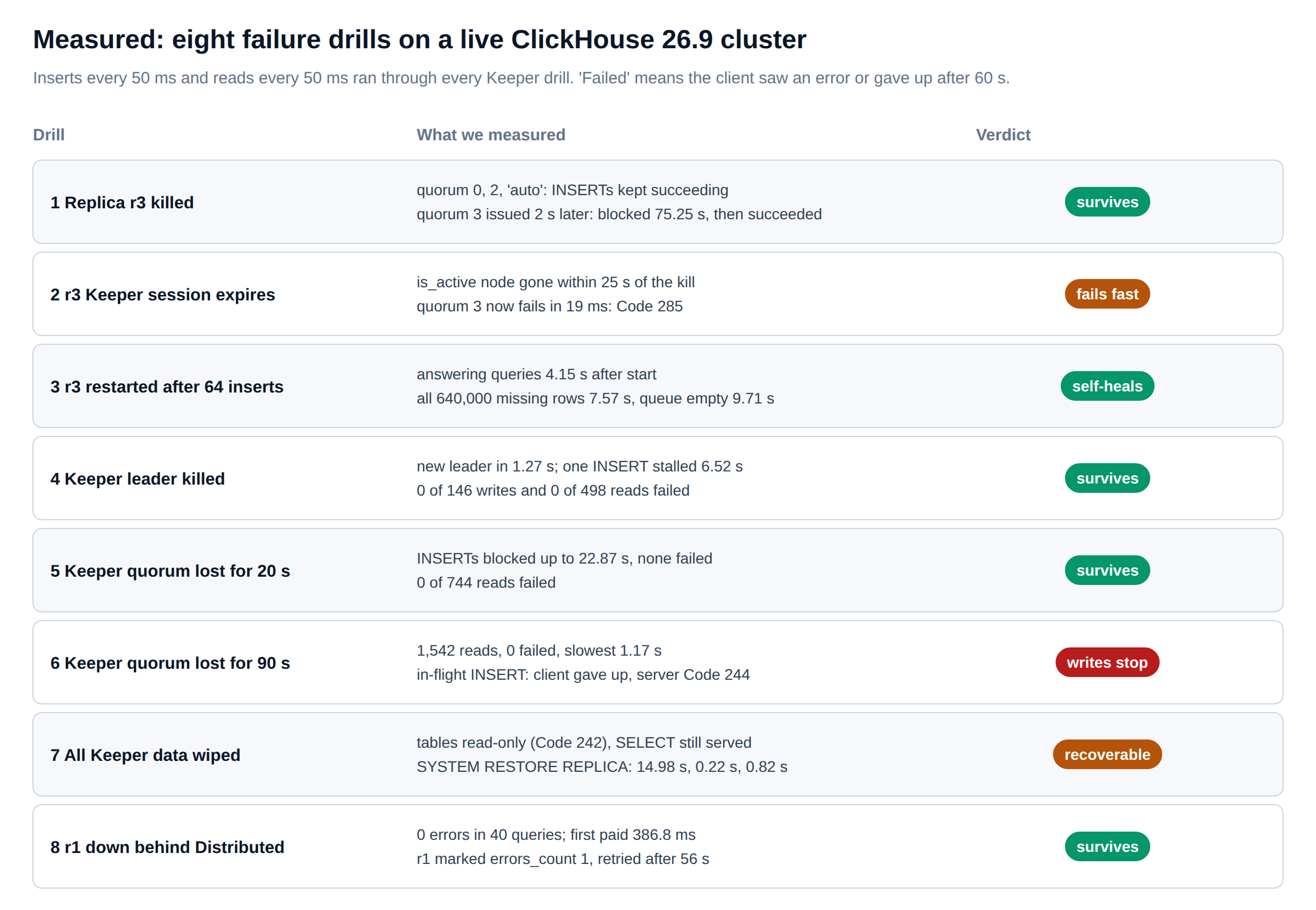
Each Keeper drill ran with two background loops: an INSERT of 1,000 rows every 50 ms into replica r2, and a SELECT every 50 ms against replica r1. We counted a request as failed if the client got an error or gave up after 60 seconds. Figure 3 summarises the results before we go through them one at a time.
Drills 1 and 2 · a replica dies
Losing a replica: what insert_quorum really promises
By default an INSERT is acknowledged as soon as the replica that received it has written the part and registered it in Keeper. The other replicas copy it a moment later. If the receiving replica’s disk dies inside that window, the acknowledged rows are gone. insert_quorum closes the window: the INSERT returns only after the given number of replicas hold the part. 'auto' means a majority, two of three here.
First we measured what that costs on a healthy cluster: 100 INSERTs of 10,000 rows per mode, interleaved so every mode saw the same background noise.
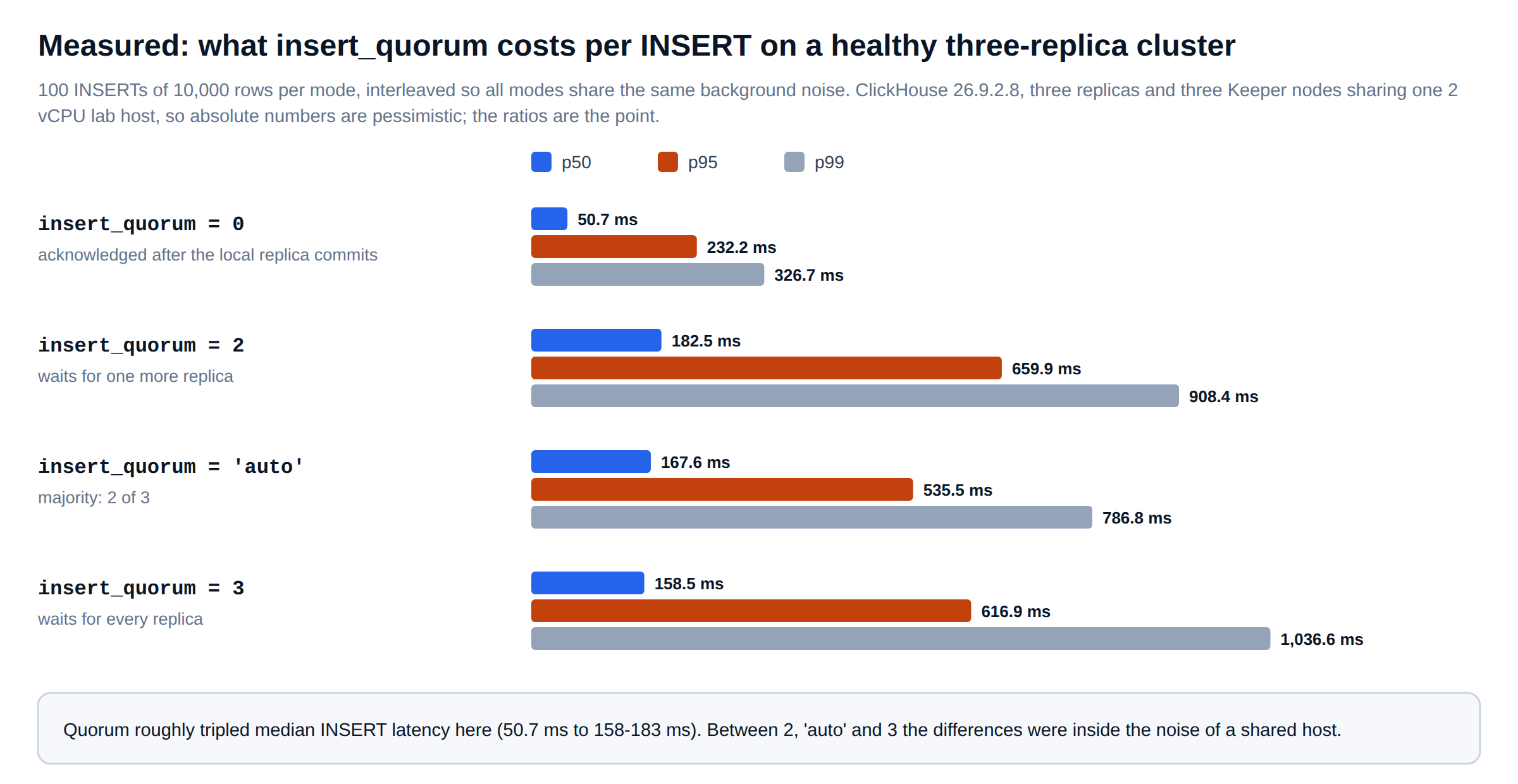
Quorum roughly tripled median latency, from 50.7 ms to between 158 and 183 ms. The three quorum modes were within noise of each other because all replicas shared one host. On a real network, waiting for every replica costs more than waiting for a majority, because you always wait for the slowest one.
Then we killed replica r3 with SIGKILL and sent one INSERT in each mode two seconds later. Quorum 0, 2 and 'auto' all succeeded, in 104 to 158 ms. Quorum 3 did not return. Our client gave up after 60 seconds. The server’s query log showed what had really happened:
-- ClickHouse support check: what happened to an INSERT the client gave up on?
SELECT
    event_time,
    type,
    query_duration_ms,
    written_rows,
    exception_code
FROM system.query_log
WHERE query_kind = 'Insert'
  AND Settings['insert_quorum'] = '3'
  AND query_duration_ms > 2000
ORDER BY event_time;

-- event_time            type         query_duration_ms  written_rows  exception_code
-- 2026-10-05 12:42:04   QueryFinish  75250              10000         0
The INSERT waited 75.25 seconds and then succeeded, once r3 came back and fetched the part. The client had already reported it as a failure. At the moment of the INSERT, Keeper still listed r3 as active, because its session had not timed out yet. So ClickHouse accepted the quorum and waited for a replica that was dead.
That is the most useful finding in this post for anyone writing ingestion code. A client timeout does not mean the write failed. The only safe response is to retry the identical block and let deduplication discard the copy, which we test further down.
In drill 2 we waited for the dead replica’s Keeper session to expire. Its is_active node was still present 15 seconds after the kill and gone by 25 seconds. From then on, quorum 3 failed in 19 ms with a clear error:
Code: 285. DB::Exception: Number of alive replicas (2) is less than requested quorum (3/3).
(TOO_FEW_LIVE_REPLICAS) (version 26.9.2.8 (official build))
With three replicas, quorum 3 turns any single replica failure into a write outage. That is the opposite of ClickHouse high availability. Use 'auto' when acknowledged rows must exist on more than one server, and quorum 0 with retries for everything else.
Drill 3 · the replica comes back
ClickHouse replication catch-up after a replica restart
While r3 was down, we sent 64 more INSERT blocks to r1: 640,000 rows that r3 had never seen. Then we restarted r3 and polled system.replicas on it every 250 ms.
-- ClickHouse replication progress on the returning replica
SELECT
    (SELECT count() FROM ha.orders)  AS rows_here,
    queue_size,                      -- entries still to replay
    inserts_in_queue,                -- GET_PART fetches outstanding
    merges_in_queue,
    absolute_delay,                  -- seconds behind the freshest replica
    is_readonly
FROM system.replicas
WHERE database = 'ha'
  AND table = 'orders';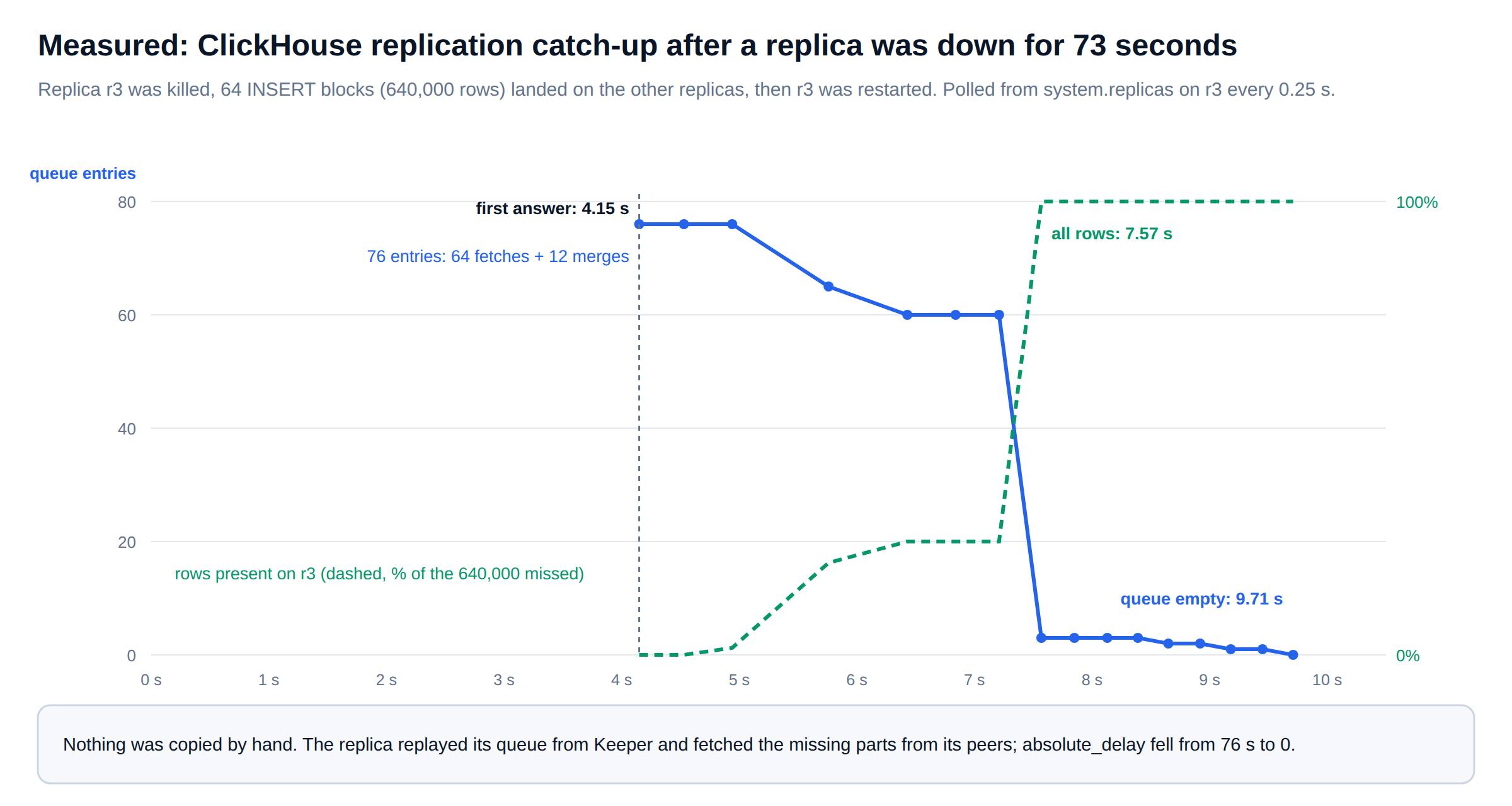
The server answered queries 4.15 seconds after it was started. At that point its queue held 76 entries, 64 fetches and 12 merges, and absolute_delay was 73 seconds. All 640,000 rows were present at 7.57 seconds. The queue was empty at 9.71 seconds. Nothing was copied by hand.
There is one support detail here. The returning replica served queries from 4.15 seconds onwards, while it was still missing rows. A Distributed query can be sent to a lagging replica unless max_replica_delay_for_distributed_queries rules it out. That setting defaults to 300 seconds, far longer than this outage. Dashboards that must not show missing rows need a tighter value.
Drill 4 · the Keeper leader dies
ClickHouse high availability when the Keeper leader fails: 1.27 seconds
With writes and reads running, we found the Keeper leader with the mntr four-letter command and killed it.
# ClickHouse high availability check: Keeper role of each member (four-letter commands are on the Keeper client port)
for port in 9181 9182 9183; do
    printf 'mntr' | nc -w 1 127.0.0.1 "${port}" | grep -E 'zk_server_state|zk_version'
done
# zk_server_state   follower
# zk_server_state   follower
# zk_server_state   leader      <- keeper3, killed with SIGKILL
A surviving member reported itself as leader 1.27 seconds after the kill. Across the 40-second drill, none of 146 writes and none of 498 reads failed. One INSERT, already in flight when the leader died, took 6.52 seconds instead of the usual 170 ms. The client library reconnected to another Keeper member without any help from us. For a three-node ensemble, losing the leader costs seconds of write latency and nothing else.
Drills 5 and 6 · Keeper loses quorum
When Keeper loses quorum, ClickHouse reads keep working
Next we killed two of the three Keeper members, which leaves no quorum. We ran this twice: once for 20 seconds and once for 90 seconds.
20-second outage. Nothing failed. INSERTs simply waited: the longest took 22.87 seconds and completed once quorum returned. Across the 60-second drill, 744 reads ran with no errors. Inserts ride out short outages because of Keeper retries. On 26.9 an INSERT retries Keeper operations up to insert_keeper_max_retries = 20 times, with backoff growing to insert_keeper_retry_max_backoff_ms = 10000.
90-second outage. Reads were still unaffected: 1,542 ran across the drill, none failed, and the slowest took 1.17 seconds. Replicas serve SELECTs from local parts and do not need Keeper for that. Writes were another story. The INSERT in flight at the moment of the kill hit our 60-second client timeout. On the server it kept retrying until Keeper came back, then ended with an error:
Code: 244. DB::Exception: Unexpected logical error while adding block 976 with ID '':
Bad version, path /clickhouse/tables/ha/01/ha/orders/replicas/r2/host. (UNEXPECTED_ZOOKEEPER_ERROR)
In an earlier attempt at the same drill, two quorum INSERTs ended with a different code, and it is the one every ClickHouse support engineer should recognise:
Code: 319. DB::Exception: Unknown quorum status. The data was inserted in the local replica,
but we could not verify the quorum. Reason: Replica became inactive
Code 319 means the rows are on one replica and their quorum is unknown. Treat it like the timeout in drill 1: retry the identical block. After every drill we compared row counts and a cityHash64 checksum of every row on all three replicas. They matched every time, and lost_part_count stayed at zero.
The first INSERT after Keeper came back finished 4.25 seconds later. Our reading is that Keeper quorum loss is a write outage that applications must buffer and retry through. It is not a read outage and not a data-loss event.
Drill 7 · Keeper data is gone
Keeper metadata loss and SYSTEM RESTORE REPLICA
This is the drill most teams never rehearse. We stopped all three Keeper members, deleted their logs and snapshots, and started them empty. That is what happens after a bad restore of Keeper, or when someone recreates the ensemble with fresh volumes.
The first surprise came from Keeper. It refused the ClickHouse servers’ sessions, and its log said why:
Refusing session as the client has seen zxid 18709 while our last processed zxid is 0.Keeper detected that its clients had seen newer state than it now held, and refused them. That safety check is deliberate. The ClickHouse servers stayed read-only until we restarted them, 11.1 seconds for all three. After the restart the tables were still read-only, because their metadata no longer existed:
Code: 242. DB::Exception: Table is in readonly mode since table metadata was not found in zookeeper:
replica_path=/clickhouse/tables/ha/01/ha/orders/replicas/r1. (TABLE_IS_READ_ONLY)
SELECTs kept working throughout and returned all 6,649,002 rows. SYSTEM RESTORE REPLICA rebuilds the metadata from the parts each replica has on disk, as described in the SYSTEM statements reference. Parts that were already present are attached and registered, not fetched again over the network. This is the runbook our ClickHouse support team uses, with a check before and after each step.
-- ClickHouse support runbook: rebuild replication metadata after Keeper data loss
-- Blast radius: one table at a time. Rollback: none needed; RESTORE only registers local parts.
-- Gate: run ONLY when is_readonly = 1 because metadata is missing, never on a healthy table.

-- 1. Verify: which replicated tables are read-only, and is Keeper reachable?
SELECT database, table, replica_name, is_readonly, is_session_expired, zookeeper_exception
FROM clusterAllReplicas('ha', system.replicas)
WHERE is_readonly;

-- 2. ClickHouse replication baseline: row counts and a checksum per replica before touching anything
SELECT hostName(), count(), sum(cityHash64(order_id, amount))
FROM clusterAllReplicas('ha', ha.orders)
GROUP BY hostName();

-- 3. ClickHouse support step: restore one replica first; it recreates the shared table path in Keeper
SYSTEM RESTORE REPLICA ha.orders;            -- on r1: 14.98 s in our lab

-- 4. Then each remaining replica, one at a time
SYSTEM RESTORE REPLICA ha.orders;            -- on r2: 0.22 s
SYSTEM RESTORE REPLICA ha.orders;            -- on r3: 0.82 s

-- 5. ClickHouse support validation: writable again, all replicas active, counts and checksums identical
SELECT replica_name, is_readonly, queue_size, active_replicas, total_replicas, lost_part_count
FROM clusterAllReplicas('ha', system.replicas)
WHERE database = 'ha' AND table = 'orders';
The first replica took longest because it recreated the table’s path in Keeper and registered every part. The others only had to join. A quorum INSERT straight after the restore succeeded in 768 ms. All three replicas then reported 6,650,002 rows with identical checksums. Run this per table; on a cluster with hundreds of replicated tables, script it and run it per database. For databases using the Replicated engine, SYSTEM RESTORE DATABASE REPLICA is the equivalent.
Drill 8 · reads behind a Distributed table
ClickHouse high availability for reads behind a Distributed table
Finally we killed r1 and queried the Distributed table from r2, with load_balancing = 'in_order' so that r1, listed first, was the preferred replica. We set prefer_localhost_replica = 0. Without it, r2 would have answered from its own local replica and the test would have proved nothing; our first run made exactly that mistake.
-- ClickHouse high availability for reads: how does the Distributed table see its replicas?
SELECT host_name, port, errors_count, estimated_recovery_time
FROM system.clusters
WHERE cluster = 'ha';

-- host_name  port  errors_count  estimated_recovery_time
-- 127.0.0.1  9101  1             56          <- r1, marked bad after one failed connection
-- 127.0.0.1  9102  0             0
-- 127.0.0.1  9103  0             0
Forty queries ran with r1 down and none failed. The first one paid for the failed connection, at 386.8 ms. r2 then recorded an error against r1 and stopped choosing it until the estimated recovery time ran out. On a real network a dead host can hang instead of refusing the connection. In that case each attempt can cost up to connect_timeout_with_failover_ms, which is 1,000 ms by default. On localhost a refusal is instant, so this drill understates that cost.
The safety net
Retries are safe because ClickHouse deduplicates blocks
Several drills ended with the same advice: retry the identical block. That is only safe if a retry cannot insert the same rows twice. ReplicatedMergeTree stores a hash of each inserted block in Keeper and drops a block it has already seen. On 26.9 the window is the last replicated_deduplication_window = 10000 blocks or replicated_deduplication_window_seconds = 3600. The switch is now deduplicate_insert, which defaults to enable and supersedes the older insert_deduplicate. We tested it directly:
-- ClickHouse replication deduplication: send the same block three times
INSERT INTO ha.orders VALUES
    (990000001, 7, '2026-10-05 10:00:00.000', 125.50, 'paid'),
    (990000002, 7, '2026-10-05 10:00:01.000',  75.25, 'paid');   -- attempt 1 on r1
-- attempt 2: the identical statement again on r1
-- attempt 3: the identical statement on r2, a different replica

-- result: 2 rows added in total, not 6
The third attempt went to a different replica and was still dropped, because the block hashes live in Keeper and every replica shares them. Two conditions apply. The retry must contain the same rows in the same order, because the hash covers the block contents. And it has to arrive inside the window. Clients that rebuild batches from a queue on retry should set insert_deduplication_token so the identity survives a reshuffle.
INSERT ... SELECT follows a separate rule on 26.9. deduplicate_insert_select defaults to enable_when_possible, which deduplicates only when the SELECT is stable: it ends in ORDER BY ALL with a single output stream, or the INSERT carries an insert_deduplication_token. Our generated INSERT ... SELECT FROM numbers() batches were not stable, and they were not deduplicated. When we reran a drill script that regenerated the same order IDs, the rows were stored again. If your ingestion uses INSERT SELECT, give each batch a token.
Choosing the guarantee
ClickHouse high availability settings and what they cost
No single setting makes ClickHouse highly available. Each one trades write latency, write availability and read freshness against each other. Figure 5 is how our ClickHouse support engineers explain the choice to customers, with the lab numbers next to each option.
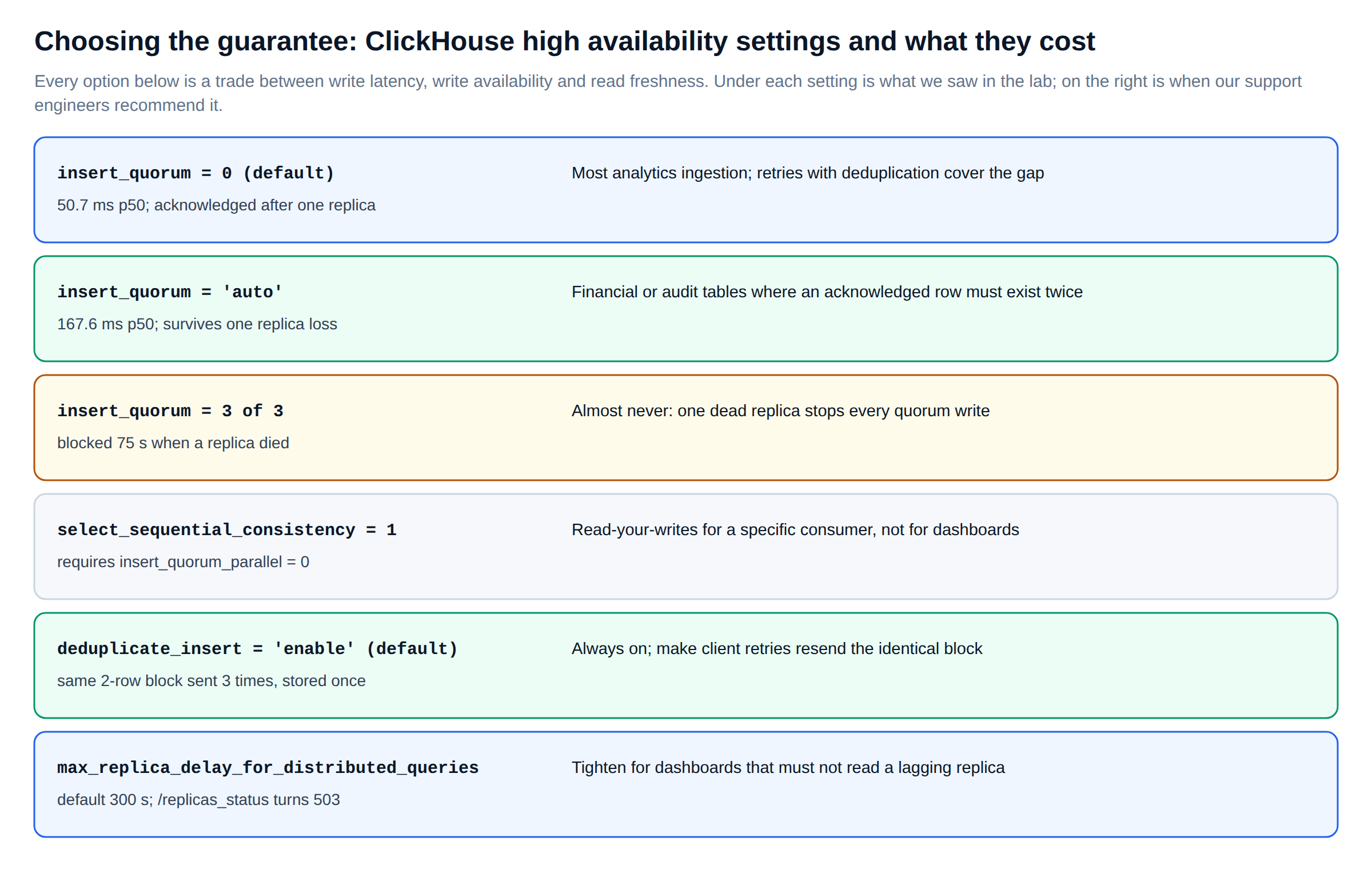
We usually set these per role in a settings profile rather than per query. Profiles stop one application from changing the guarantees for everyone else. The values below are the starting point we use for a three-replica shard. The descriptions of insert_quorum, insert_quorum_parallel and select_sequential_consistency are in the settings reference.
<!-- users.d/ha-profiles.xml: ClickHouse high availability guarantees per workload -->
<clickhouse>
    <profiles>
        <!-- ClickHouse replication for bulk analytics ingestion: fast acknowledgement, retries made safe by deduplication -->
        <ingest>
            <insert_quorum>0</insert_quorum>
            <deduplicate_insert>enable</deduplicate_insert>
            <insert_keeper_max_retries>20</insert_keeper_max_retries>   <!-- rides out short Keeper outages -->
        </ingest>

        <!-- ClickHouse replication for ledger, billing or audit rows: an acknowledged row must exist on two replicas -->
        <ingest_durable>
            <insert_quorum>auto</insert_quorum>                        <!-- majority: 2 of 3 -->
            <insert_quorum_timeout>60000</insert_quorum_timeout>       <!-- fail in 60 s, not the 600 s default -->
            <deduplicate_insert>enable</deduplicate_insert>
        </ingest_durable>

        <!-- ClickHouse high availability for dashboards: never read from a replica that is far behind -->
        <dashboards>
            <max_replica_delay_for_distributed_queries>30</max_replica_delay_for_distributed_queries>
            <fallback_to_stale_replicas_for_distributed_queries>1</fallback_to_stale_replicas_for_distributed_queries>
            <load_balancing>nearest_hostname</load_balancing>
        </dashboards>
    </profiles>
</clickhouse>
The dashboard profile keeps fallback_to_stale_replicas_for_distributed_queries on. If every replica is lagging, a slightly stale answer beats an error page. Turn it off only for consumers that would rather fail than read old data. On a 26.9 server, check what a profile actually resolves to with SELECT name, value FROM system.settings WHERE changed under that user.
What ClickHouse support watches
Monitoring ClickHouse high availability: the queries our support team runs
Every drill above showed up in system.replicas before anything else noticed. This is the first query our ClickHouse support engineers run on a cluster, across every replica at once. It returns only replicas that need attention. Pass --param_show_all=1 to list all of them.
-- ClickHouse support health check: replicated tables that need attention, cluster-wide
SELECT
    database,
    table,
    replica_name,
    is_readonly,                 -- 1: no Keeper session or no metadata, writes rejected
    is_session_expired,
    queue_size,                  -- replication entries waiting on this replica
    inserts_in_queue,
    merges_in_queue,
    absolute_delay,              -- seconds behind the freshest replica
    active_replicas,
    total_replicas,
    lost_part_count,             -- parts no replica has any more: escalate immediately
    last_queue_update_exception
FROM clusterAllReplicas('ha', system.replicas)
WHERE is_readonly
   OR is_session_expired
   OR absolute_delay > 30
   OR queue_size > 100
   OR active_replicas < total_replicas
   OR lost_part_count > 0
   OR 1 = {show_all:UInt8}
ORDER BY absolute_delay DESC, queue_size DESC;
A growing queue on one replica is the second thing we look for. system.replication_queue shows the entries that keep failing and why. A fetch postponed hundreds of times usually means a missing part, a full disk, or an interserver port blocked by a firewall change.
-- ClickHouse replication entries that are stuck, with the reason ClickHouse gives
SELECT
    database,
    table,
    type,                                    -- GET_PART, MERGE_PARTS, MUTATE_PART, ALTER_METADATA ...
    new_part_name,
    num_tries,
    num_postponed,
    substring(postpone_reason, 1, 60)  AS postpone_reason,
    substring(last_exception, 1, 80)   AS last_exception,
    create_time
FROM clusterAllReplicas('ha', system.replication_queue)
WHERE num_tries > 10
   OR create_time < now() - INTERVAL 10 MINUTE
ORDER BY num_tries DESC
LIMIT 20;
The Keeper side gets its own check. system.zookeeper_connection shows which Keeper member each server is connected to and for how long. If every server is connected to the same member, that member has become a single point of load, even though the ensemble looks healthy.
-- ClickHouse high availability: Keeper sessions as seen from each ClickHouse server
SELECT
    hostName()                         AS server,
    host                               AS keeper_host,
    port,
    connected_time,
    session_uptime_elapsed_seconds,
    is_expired
FROM clusterAllReplicas('ha', system.zookeeper_connection);
For load balancers and orchestrators, every ClickHouse server answers /replicas_status on its HTTP port. It returns 200 with Ok. when replicas are current and 503 when one lags beyond max_replica_delay_for_distributed_queries, as described in the monitoring guide. With ?verbose=1 it lists the delay per table.
# ClickHouse high availability health endpoint for a load balancer: 200 when current, 503 when lagging
curl -s -w ' [%{http_code}]\n' "http://ch-r1:8123/replicas_status"
# Ok. [200]

curl -s "http://ch-r1:8123/replicas_status?verbose=1"
# ha.orders:	Absolute delay: 0. Relative delay: 0.
For alerting, these are the ClickHouse high availability rules we put on every cluster under managed ClickHouse operations. They use series from the built-in Prometheus endpoint. Every metric named here exists on our 26.9 lab server. The thresholds are starting points to tune against each cluster’s own baseline.
# prometheus/rules/clickhouse-ha.yml: ClickHouse high availability alerts (starting thresholds)
groups:
  - name: clickhouse-high-availability
    rules:
      # ClickHouse support page: a replicated table is read-only: Keeper session lost or metadata missing (drills 5 to 7)
      - alert: ClickHouseReadonlyReplica
        expr: ClickHouseMetrics_ReadonlyReplica > 0
        for: 1m
        labels: { severity: page }

      # ClickHouse replication: a replica is falling behind its peers (drill 3)
      - alert: ClickHouseReplicaDelay
        expr: ClickHouseAsyncMetrics_ReplicasMaxAbsoluteDelay > 60
        for: 5m
        labels: { severity: ticket }

      # ClickHouse replication queue growing: fetches or merges not keeping up
      - alert: ClickHouseReplicationQueue
        expr: ClickHouseAsyncMetrics_ReplicasMaxQueueSize > 200
        for: 10m
        labels: { severity: ticket }

      # No Keeper session at all on this server
      - alert: ClickHouseNoKeeperSession
        expr: ClickHouseMetrics_ZooKeeperSession == 0
        for: 1m
        labels: { severity: page }
Honest notes
What this lab cannot tell you
All six processes shared one 2 vCPU host. A dead replica therefore refused connections instantly instead of hanging, and network partitions, packet loss and slow disks were not tested at all. Real clusters lose hosts in messier ways, and timeouts, not refusals, decide how long reads stall. Treat the timings as the floor, not the expectation.
Three things caught us out while running the drills, and each one is also a production lesson.
First, during a quorum loss, mntr on the surviving Keeper member kept reporting leader although it could not commit anything. Do not use the reported role alone to decide whether Keeper is healthy. Check that a write succeeds, or that zk_synced_followers on the leader is above zero.
Second, when a drill script was killed by a timeout on our side, the INSERTs it had started kept running on the servers for over a minute and finished with Codes 319 and 244. The client’s view and the server’s view of the same write differed. system.query_log is the record to trust.
Third, after we wiped Keeper, the servers could not reconnect until they were restarted, because of the zxid check. On a real cluster that turns a Keeper rebuild into a rolling restart of every ClickHouse server. Plan for it in the runbook rather than finding out during the incident.
Readiness review
The ClickHouse high availability checklist we use in support onboarding
| Check | How we verify it | Pass when |
|---|---|---|
| Keeper has an odd number of members on separate hosts | mntr on each member; raft_configuration in each config | 3 or 5 members, no two on the same host or rack |
| Every shard has at least two replicas | system.clusters, total_replicas in system.replicas | No replicated table with total_replicas = 1 |
| Ingestion retries are safe | Client code review; deduplicate_insert and tokens for INSERT SELECT | A timed-out batch is resent unchanged |
| Quorum matches the data’s value | Settings profiles per role | 'auto' for ledger-type tables, never quorum equal to the replica count |
| Stale reads are bounded | max_replica_delay_for_distributed_queries on dashboard roles | Lower than the staleness the business accepts |
| Replication health is alerted | Prometheus rules above | Read-only, delay, queue and Keeper session alerts all firing in a test |
| Keeper loss is rehearsed | The drill 7 runbook on a staging copy | Team has run SYSTEM RESTORE REPLICA and the rolling restart at least once |
| Backups exist outside the cluster | BACKUP to object storage, with a restore test | A restore has been done in the last quarter |
The last row matters because replication is not a backup. A bad mutation, a lightweight DELETE or a TRUNCATE replicates to every replica in seconds, exactly as designed. High availability keeps the service up; backups and restore drills keep the data.
FAQ
ClickHouse high availability and ClickHouse support: common questions
How many replicas and Keeper nodes does ClickHouse high availability need?
At least two replicas per shard and three ClickHouse Keeper members on separate hosts. Three Keeper members survive one failure; five survive two. Our drills showed a three-member ensemble electing a new leader in 1.27 seconds without a single failed request.
What happens to ClickHouse when Keeper is down?
Reads keep working from local parts: 1,542 reads during a 90-second quorum loss in our lab, none failed. Writes wait and retry, and fail if the outage outlasts the retries. Applications should buffer and resend identical blocks.
Should I use insert_quorum in ClickHouse?
Use insert_quorum = 'auto' for data where an acknowledged row must exist on two servers. In our lab it roughly tripled median INSERT latency. Never set quorum equal to the replica count: one dead replica then stalls or fails every quorum write.
How do I recover ClickHouse replicas after Keeper data loss?
Restart the ClickHouse servers so they reconnect to the rebuilt Keeper, then run SYSTEM RESTORE REPLICA per table, one replica at a time. It registers the parts already on disk without fetching them again. It took 14.98 seconds for the first replica in our lab and under a second for the others.
What does a ClickHouse support team check first during a replication incident?
We check system.replicas across all replicas for read-only tables, delay and queue size. Then system.replication_queue for entries that keep failing, then Keeper sessions in system.zookeeper_connection. The queries are in this post, and our 24×7 ClickHouse support engineers run them in the first minutes of every Severity 1 call.
Further reading
Related ChistaDATA guides and sources
From our blog: ClickHouse performance observability on 26.9, advanced ClickHouse troubleshooting and how ClickHouse query execution works.
ClickHouse documentation used for this guide: data replication, ClickHouse Keeper, SYSTEM statements, session settings, monitoring and the changelog.
Test every setting, query and runbook in this guide on a staging copy of your own cluster before applying it to production. Keep tested backups and a restore path outside the cluster, because high availability is not a substitute for disaster recovery.
Measurements: ChistaDATA lab, one 2 vCPU host with 8 GiB of RAM, three ClickHouse 26.9.2.8 servers and three ClickHouse Keeper 26.9.2.8 members, one shard with three replicas, October 2026. Failures were injected with SIGKILL; network faults were not tested. Timings vary between runs. Release facts are from clickhouse.com.
ChistaDATA
Want these drills run on your own ClickHouse cluster?
ChistaDATA provides 24×7×365 ClickHouse support and managed operations on 100% open-source ClickHouse. That includes ClickHouse high availability reviews with live failure drills on staging, Keeper sizing and placement, replication monitoring and alerting, Keeper-loss and replica-rebuild runbooks, and upgrade planning across the 26.x stable and LTS lines. Severity 1 response is 15 minutes.
Running ClickHouse in production? ChistaDATA provides ClickHouse consulting for architecture, performance and migrations, and 24×7 ClickHouse support with a 15-minute S1 response. For day-to-day operations see ClickHouse DBA services and ClickHouse managed services.
