ClickHouse release notes arrive every month, and the archive in this category has followed them release by release since 2022: what each version added, what it changed, what it deprecated, and what it meant for a production cluster. This page is the guide to reading them.
It explains the release cadence and the LTS lines that operators actually run, how a monthly changelog is read for upgrade risk rather than for features, the compatibility mechanism that makes crossing several versions safe, and the specific boundaries in the last few years where behaviour changed enough to need a plan. It ends with a version-by-version index into the archive.
The cadence behind ClickHouse release notes
ClickHouse ships a feature release every month, numbered YY.M, and designates two of them each year as long-term support: the March release (YY.3) and the August release (YY.8). A feature release receives bug-fix patch versions (YY.M.N) for roughly three months; an LTS release receives them for about a year. Production clusters run LTS lines, and the practical consequence for anyone reading ClickHouse release notes is that a monthly release between two LTS versions is a preview of what the next LTS will contain, not a target to upgrade to.
The archive reflects this: the monthly posts from 22.5 through 24.2 record each release as it landed, and the LTS posts (23.8 LTS, 26.8 LTS) are the ones that map to upgrade decisions. The 26.x feature post tracks the current line between LTS points.
| Line | LTS releases | Notable boundary (see below) | Archive coverage |
|---|---|---|---|
| 22.x | 22.3, 22.8 | native BACKUP/RESTORE; Keeper production-ready; async inserts stable | monthly 22.5 to 22.12 |
| 23.x | 23.3, 23.8 | query cache; lightweight DELETE stable; inverted index experimental | monthly 23.1 to 23.12, 23.8 LTS post |
| 24.x | 24.3, 24.8 | new analyzer default (24.3); parts_to_delay_insert default raised | 24.1, 24.2 posts |
| 25.x | 25.3, 25.8 | vector_similarity stable; JSON type production; text index form | referenced in 26.x post |
| 26.x | 26.3, 26.8 | text index maturing; Iceberg writes; QBit | 26.8 LTS post, 26.x feature post |
Version-specific claims in the table are as recorded in the archive posts and the official changelog at the time; confirm any of them against the running version before acting, because features move between experimental and stable across releases and defaults change.
How to read ClickHouse release notes for upgrade risk
A changelog has sections, and an operator reads them in a different order from a developer. First, Backward Incompatible Change: every entry is a potential behaviour change in production, and each one is checked against the cluster’s settings, schemas and query shapes before anything else is read. Second, Upgrade Notes where present, which name the compatibility settings and any required order of operations.
Third, Performance Improvement, which is where a query that got faster or slower after an upgrade is usually explained. Fourth, Bug Fix, scanned for the components the cluster depends on (Kafka engine, S3 disk, Keeper, a specific codec). Only then New Feature and Experimental Feature, which are the sections everyone else reads first.
The archive posts follow this order for each release, and the monthly posts from 2023 are worth reading even for a cluster far past them, because the backward-incompatible entries accumulate: a cluster upgrading from 23.3 to 25.3 crosses every one of them between.
-- before reading any release notes: what is the cluster actually running, and what has been changed from default?
SELECT hostName() AS host, version() AS version;

SELECT name, value, default, description
FROM system.settings
WHERE changed
ORDER BY name;

SELECT name, value, default
FROM system.merge_tree_settings
WHERE changed
ORDER BY name;

SELECT name, value, default
FROM system.server_settings
WHERE changed
ORDER BY name;
-- every changed setting is checked by name against the Backward Incompatible section of each release crossed
The compatibility setting: the mechanism that makes ClickHouse release notes survivable
Since 22.x, ClickHouse carries a compatibility setting: set it to the version the cluster came from (compatibility = '23.8') and every setting whose default changed after that version keeps its old default. This turns an upgrade into two steps that can be separated by weeks: first move the binary and keep behaviour pinned, verify that nothing regressed, then lift the pin one setting at a time with the query log as the judge. The archive’s upgrade guide builds the rolling procedure around it; the release-notes reading feeds the list of settings to review when the pin is lifted.
-- users.xml or a settings profile, applied before the binary upgrade
<profiles>
    <default>
        <compatibility>24.8</compatibility>
    </default>
</profiles>

-- after the upgrade, what the pin is holding back
SELECT name, value, default
FROM system.settings
WHERE changed AND name != 'compatibility'
ORDER BY name;
-- lift the pin, then re-run: the rows that appear are the defaults that moved between 24.8 and the new version
The pin is not a reason to postpone reading; it is what makes the reading actionable at a pace the cluster can absorb. Two things the compatibility setting does not cover. Server-level settings in config.xml (system.server_settings) and MergeTree settings (system.merge_tree_settings) are pinned separately or not at all, so their changed defaults are read from the release notes and set explicitly. And the analyzer switch is a semantic change, not a default change, so it is handled on its own, as the next section describes.
The boundaries that need a plan, as the ClickHouse release notes recorded them
Crossing 24.3: the new analyzer. The query analyzer became the default in 24.3 (allow_experimental_analyzer, later enable_analyzer). Most queries are unaffected; the ones that are involve alias resolution, scoping in subqueries and ARRAY JOIN, and some GROUP BY alias cases. The plan is to run the top query shapes under both analyzers on staging, compare results and EXPLAIN output, and keep the old analyzer selectable per profile through the transition. The query parser hub covers the mechanics.
Crossing 24.x: parts thresholds. parts_to_delay_insert rose from 150 to 1,000 and parts_to_throw_insert from 300 to 3,000. A cluster that had been protected by the low thresholds can accumulate far more parts before inserts are refused, which is safer for ingestion and worse for queries; the parts-per-partition check on the DBA script hub is the compensating control.
Crossing 23.x: lightweight deletes and the query cache. DELETE FROM became stable in 23.3 and changed how deleted rows are handled at read time (a mask applied until merge); the query cache arrived in 23.1 and is off by default, but a profile that enabled it needs its transactional-inconsistency semantics understood. The 23.x monthly posts record both.
Crossing 22.x: Keeper and backups. ClickHouse Keeper became the recommended coordinator and native BACKUP/RESTORE arrived; clusters that upgraded through 22.x without moving off ZooKeeper or off external backup tooling are still running on the older mechanisms, which work but are no longer where fixes land. The reliability hub treats both moves as controls.
Crossing into 25.x and 26.x: index types and the JSON type. The experimental inverted index was renamed and reworked into the text index; vector_similarity replaced the earlier annoy and usearch index types; the JSON type went from experimental Object('json') to a production type with a different on-disk layout. Tables created with the earlier forms need a migration, and the release notes for each line name the path. The search hub covers the index side.
Experimental features and the ClickHouse release notes lifecycle
A feature enters behind an allow_experimental_* setting, is renamed or reshaped over several releases, becomes stable when the setting is removed or defaulted on, and occasionally is dropped. Reading ClickHouse release notes month by month makes the lifecycle visible: the inverted index took two years and a rename to reach its current form, the analyzer took about eighteen months from opt-in to default, and the JSON type was reimplemented rather than promoted.
The operational rule that follows is simple and has held across the archive’s coverage: an experimental feature is not used in a table that must survive the next LTS without a migration plan, and every allow_experimental_* setting enabled on a cluster is listed in the settings baseline with the release it was enabled in, so that the release notes crossing can find it.
-- experimental features currently enabled on this cluster: each one is a line item in the next upgrade plan
SELECT name, value
FROM system.settings
WHERE name LIKE 'allow_experimental%' AND value = '1'
ORDER BY name;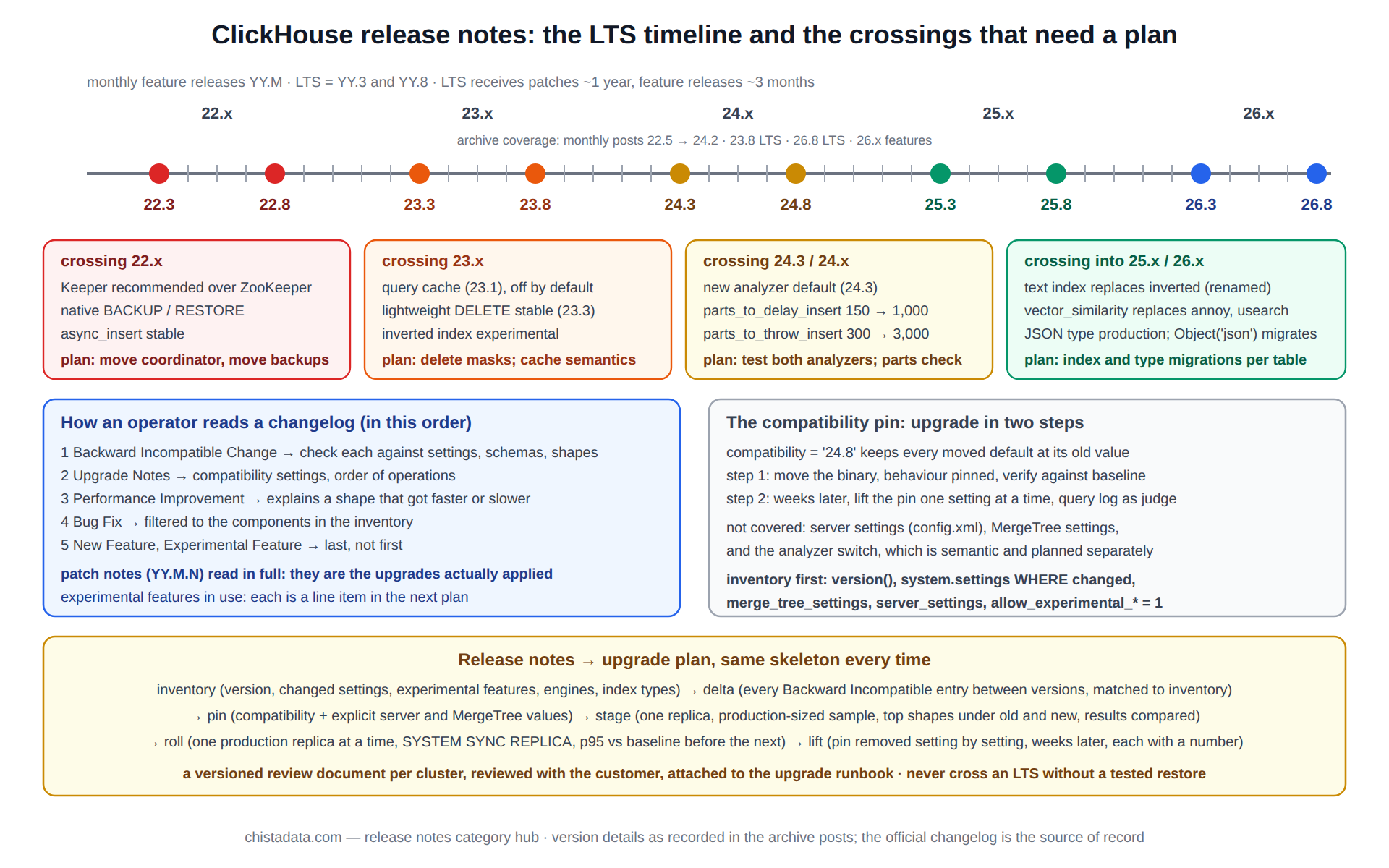
Patch releases: the ClickHouse release notes nobody reads
Between feature releases, the LTS lines receive patch versions (24.8.14, 25.3.9) that contain only bug fixes, and their notes are short enough to read in full. They matter more than the monthly notes for a production cluster on an LTS line, because a patch is the upgrade that actually gets applied between LTS moves, and because a patch occasionally fixes a data-affecting bug (a codec, a merge algorithm, a Keeper edge case) whose absence is the reason a cluster has been behaving oddly.
The rule is to track the patch stream for the line in use, apply patches on the same rolling procedure as a feature upgrade but on a shorter cycle, and read each patch note for the components in the inventory. A cluster more than two or three patches behind its line is carrying known bugs for no reason.
-- how far behind the line's latest patch is this cluster? (compare with the changelog's latest YY.M.N for the line)
SELECT
    hostName()                                 AS host,
    version()                                  AS running,
    splitByChar('.', version())[1]             AS major,
    splitByChar('.', version())[2]             AS minor,
    splitByChar('.', version())[3]             AS patch
FROM system.one;
-- run on every replica; a mixed set of patch versions across replicas is itself a finding
Managed services and ClickHouse release notes
ClickHouse Cloud and other managed offerings run versions and, in Cloud’s case, storage engines (SharedMergeTree) that differ from the open-source line, and their upgrade timing is the provider’s. The monthly notes still apply, but the compatibility mechanism, the rolling procedure and the pin-then-lift discipline above are open-source ClickHouse practices; on a managed platform the equivalent is the provider’s maintenance window and release channel settings.
Teams running both should read each release twice: once for the self-managed clusters where they control the crossing, and once for the managed ones where they control only the timing. The DBaaS archive covers the managed side.
Turning ClickHouse release notes into an upgrade plan
The plan for any upgrade has the same skeleton regardless of the versions, and the reading above supplies every input to it. Inventory: the current version, every changed setting, every experimental feature, every table engine and index type in use. Delta: every Backward Incompatible entry between the current and target versions, matched against the inventory, producing a list of items that need action and a list that do not. Pin: the compatibility setting at the current version, plus explicit values for the server and MergeTree settings whose defaults moved.
Stage: the target binary on one replica of a staging cluster loaded with a production-sized sample, the top query shapes run under old and new with results compared. Roll: one production replica at a time, SYSTEM SYNC REPLICA before and after, the p95 of the top shapes compared with the baseline before the next replica. Lift: the pin removed setting by setting, weeks later, each with a before-and-after number. The upgrade guide is that skeleton written out as a runbook.
What a release-notes review produces for a customer
The output of reading a release is a short, versioned document per cluster, not a summary of the release. It lists the versions being crossed, every Backward Incompatible entry with a verdict (applies, does not apply, needs a test) against that cluster’s inventory, the settings whose defaults move with the value to pin, the experimental features in use and their fate in the target line, the bug fixes relevant to the cluster’s components, and the staging test list of query shapes to compare.
It is reviewed with the customer before the upgrade is scheduled and attached to the upgrade runbook, so that when the pin is lifted months later the reasoning is still on record. A release the review finds has nothing that applies is still recorded, because the absence of findings is the evidence that the crossing is safe.
Deprecations, and the release where they bite
ClickHouse release notes announce removals well ahead: a setting is marked obsolete and ignored for several releases before it is removed, a syntax form is warned about before it is rejected, a table engine or function is deprecated a line before it disappears. The obsolete-settings list on the running server (system.settings where the description says obsolete, and the server log’s warning at start-up) is the cheapest early signal, and the review adds each obsolete setting the cluster still sets to the plan with the release it will stop being accepted.
Old-style MergeTree(date, key, granularity) syntax, the Object('json') type and the earlier vector index types are the examples from the archive’s period where a deprecation eventually became a required migration.
Reading the ClickHouse release notes archive by version
The archive is a chronological record, and the most useful way to read it is from the version a cluster runs forward to the version it is going to, collecting the backward-incompatible entries on the way. The posts are short enough that a two-year span is an afternoon’s reading.
For a cluster on 22.x planning to move: read the 22.8 through 22.12 monthly posts for the Keeper and backup changes, then the 23.x posts in order. For a cluster on 23.x: the 23.8 LTS post is the baseline, the 23.9 through 23.12 and 24.1, 24.2 posts cover the approach to the analyzer boundary.
For a cluster on 24.x or 25.x: the 26.8 LTS post and the 26.x feature post are the current targets, and the search hub covers the index-type migration. For anyone: the upgrade guide is the procedure the ClickHouse release notes feed into, and the 26.8 performance settings post is the current settings reference.
Version notes
This page describes the release cadence and the boundaries as the archive recorded them; it is not itself a changelog, and the official ClickHouse changelog is the source of record for any specific release. LTS designation and support windows are ClickHouse’s published policy and can change. Every version-pinned claim on this page should be confirmed against the changelog for the exact versions being crossed before it is used in an upgrade plan.
ChistaDATA reads every monthly release for its 24×7 support customers and produces the delta against each customer’s inventory as part of managed services; consulting engagements build the upgrade plan above for teams who run their own. Test every upgrade on staging with a production-sized sample, keep the compatibility pin until the query log says it can go, and never cross an LTS boundary without a tested restore.