A ClickHouse materialized view is an insert trigger, not a cached query. That single fact explains almost every surprise teams hit with it: why it never sees data that was already in the source table, why a WHERE clause in the view definition filters rows on the way in rather than on the way out, why a bad view can make an unrelated INSERT fail, and why the aggregate you see in the target table is not the final answer until you finish the aggregation at query time.
This page explains the mechanism, then catalogues the eight mistakes we correct most often when reviewing client schemas, each with the query that exposes it and the fix.
The posts filed under this category go deeper on specific designs; this page is the reference to read before any of them.
What a ClickHouse materialized view does on every INSERT
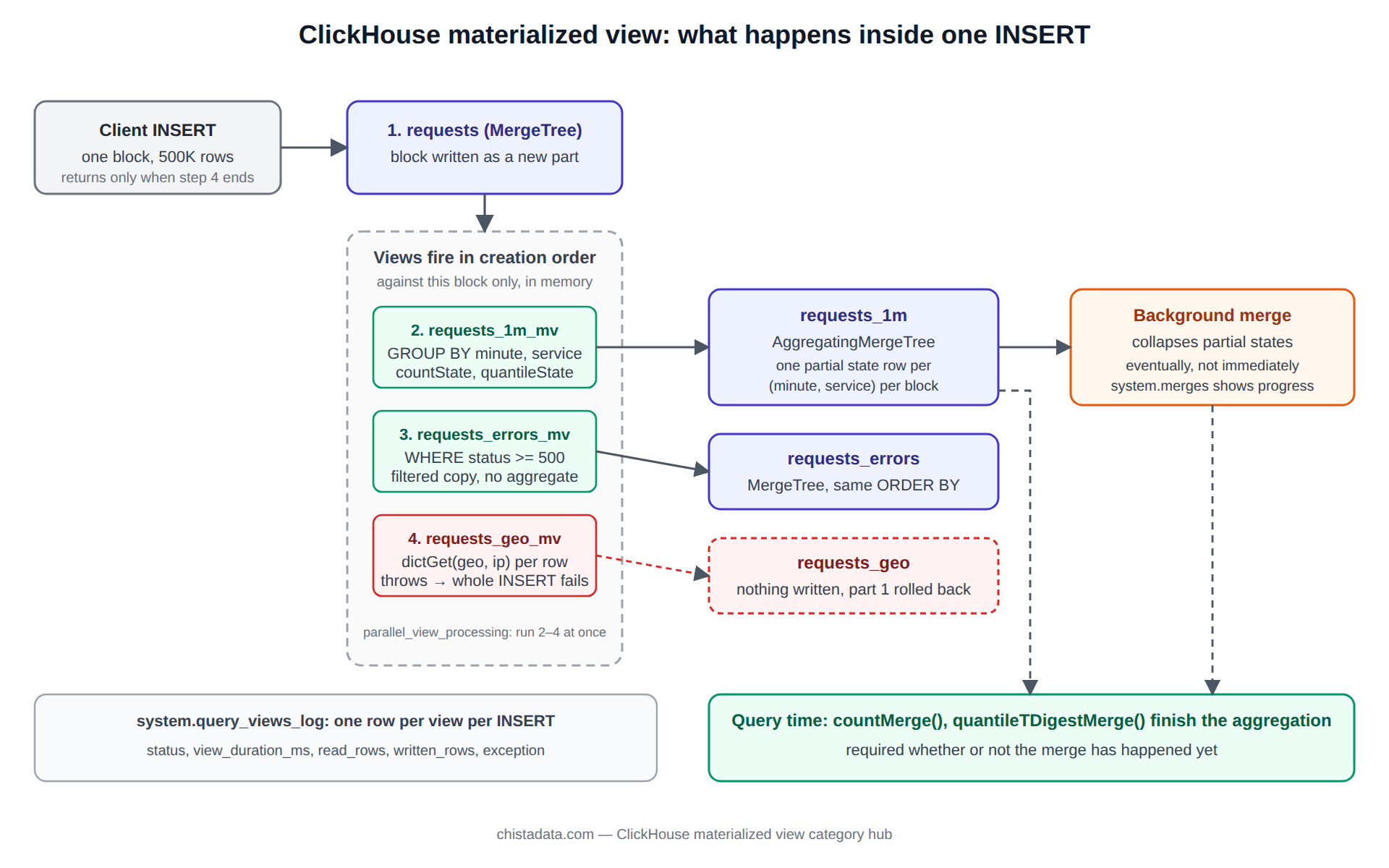
When a block of rows is inserted into a source table, ClickHouse runs the view’s SELECT against that block only, in memory, and inserts the result into the target table. The target is either a table you created and named with the TO clause, or an implicit .inner. table the view owns. Nothing is stored in the view itself. There is no periodic refresh, no dependency on what is already in the source, and no visibility of rows from other blocks in the same statement.
Because the transformation runs inside the insert, the source insert does not return until every attached view has finished. The views run sequentially in creation order. If any view throws, the insert fails, including the write to the source table, and the client sees the error. Views are therefore part of the write path’s reliability, not a background concern.
CREATE TABLE requests
(
    ts          DateTime64(3, 'UTC'),
    service     LowCardinality(String),
    endpoint    LowCardinality(String),
    status      UInt16,
    latency_ms  Float32
)
ENGINE = MergeTree
PARTITION BY toYYYYMMDD(ts)
ORDER BY (service, endpoint, ts);

CREATE TABLE requests_1m
(
    minute      DateTime,
    service     LowCardinality(String),
    endpoint    LowCardinality(String),
    requests    AggregateFunction(count),
    errors      AggregateFunction(countIf, UInt8),
    p95_latency AggregateFunction(quantileTDigest(0.95), Float32)
)
ENGINE = AggregatingMergeTree
PARTITION BY toYYYYMM(minute)
ORDER BY (service, endpoint, minute);

CREATE MATERIALIZED VIEW requests_1m_mv TO requests_1m AS
SELECT
    toStartOfMinute(ts)                       AS minute,
    service,
    endpoint,
    countState()                              AS requests,
    countIfState(status >= 500)               AS errors,
    quantileTDigestState(0.95)(latency_ms)    AS p95_latency
FROM requests
GROUP BY minute, service, endpoint;
The GROUP BY in that view groups within a single insert block. If a minute’s rows arrive across ten blocks, the target receives ten partial aggregate rows for that minute. AggregatingMergeTree merges them in the background, eventually, but the query must always finish the job with -Merge combinators, because a merge may not have happened yet.
SELECT
    minute,
    service,
    countMerge(requests)          AS requests,
    countIfMerge(errors)          AS errors,
    quantileTDigestMerge(0.95)(p95_latency) AS p95_ms
FROM requests_1m
WHERE minute >= now() - INTERVAL 1 HOUR
GROUP BY minute, service
ORDER BY minute, service;
-Merge combinators.Mistake one: expecting the ClickHouse materialized view to backfill
The view begins receiving data at the moment it is created. Rows already in the source are ignored. The POPULATE keyword appears to fix this, and it does insert existing rows once, but it does so without coordinating with concurrent inserts, so rows arriving during the populate are lost. It also cannot be combined with the TO clause.
The correct backfill is an explicit insert that uses the same expression as the view, bounded by a time range that ends before the view was created, followed by a reconciliation query across the boundary.
INSERT INTO requests_1m
SELECT
    toStartOfMinute(ts)                       AS minute,
    service,
    endpoint,
    countState()                              AS requests,
    countIfState(status >= 500)               AS errors,
    quantileTDigestState(0.95)(latency_ms)    AS p95_latency
FROM requests
WHERE ts = '2026-09-18 09:59:00' AND ts < '2026-09-18 10:01:00') AS raw_rows,
    (SELECT countMerge(requests) FROM requests_1m
      WHERE minute IN ('2026-09-18 09:59:00', '2026-09-18 10:00:00'))   AS rolled_rows;
Mistake two: aggregating in the view with plain functions
A view that writes count() or avg(latency_ms) into a plain MergeTree or SummingMergeTree target produces a number per insert block, and those numbers are then summed or averaged again at query time. Sums survive this; averages, quantiles and distinct counts do not. Use -State functions into an AggregatingMergeTree, or SimpleAggregateFunction columns for the handful of functions that are safe to re-apply, such as sum, max, min and any.
The test that exposes this mistake is a direct comparison for one key against the raw table. If avg in the target disagrees with avg over the raw rows, the target has been averaging averages.
Mistake three: chains that hide a failure in the third view
Views can be attached to a target table that is itself fed by a view, and the chain fires within the same insert. The archive post Materialized views in ClickHouse, part 2 walks through such a chain. The risk is diagnostic: when the third view fails, the error surfaces on the insert into the first table, naming a view the client never heard of. Keep system.query_views_log enabled so each view’s status, rows and duration are recorded per insert.
SELECT
    event_time,
    view_name,
    view_type,
    status,
    view_duration_ms,
    read_rows,
    written_rows,
    exception
FROM system.query_views_log
WHERE event_date = today()
  AND status != 'QueryFinish'
ORDER BY event_time DESC
LIMIT 50;
That table also answers the capacity question a chain raises: view_duration_ms summed across the chain is the latency the view stack adds to every insert. When it approaches the insert interval of a streaming source, the source falls behind.
Mistake four: the ClickHouse materialized view that filters with a JOIN
A JOIN inside a view is executed on every insert block against the full right-hand table. For a small dimension table that is fine. For a large one it turns every insert into a heavy query, and because the join happens on the write path, the cost shows up as insert latency and memory rather than as a slow SELECT. The alternatives, in order of preference, are a Dictionary with dictGet in the view, an Array or Map column carried on the source rows, or doing the join at query time against the rollup.
The same applies to subqueries that read the source table inside the view. They see the full source table, not the block, and they run once per insert.
Mistake five: relying on the implicit .inner. table
A view created without TO owns a hidden target named .inner.<uuid> under Atomic databases. It cannot be altered independently, it disappears if the view is dropped, and its name changes between servers, which makes replication paths and backup manifests brittle. Always create the target table explicitly and use TO. The one capability lost is POPULATE, which mistake one already argued against.
Mistake six: forgetting that ALTER on the source breaks the view silently
Renaming or dropping a source column that the view references does not fail the ALTER. It fails the next insert. Adding a column the view needs does not update the view; it keeps selecting the old column list. Every schema change on a source table must be followed by ALTER TABLE ... MODIFY QUERY on each dependent view, available since 21.x, and a test insert.
ALTER TABLE requests_1m_mv MODIFY QUERY
SELECT
    toStartOfMinute(ts)                       AS minute,
    service,
    endpoint,
    countState()                              AS requests,
    countIfState(status >= 500)               AS errors,
    quantileTDigestState(0.95)(latency_ms)    AS p95_latency
FROM requests
GROUP BY minute, service, endpoint;

-- List every view that depends on a source table before altering it
SELECT database, name, engine
FROM system.tables
WHERE has(dependencies_table, 'requests')
  AND database = currentDatabase();
Mistake seven: parallel view execution without checking memory
Since ClickHouse 22.x, parallel_view_processing = 1 runs the views attached to a table concurrently instead of sequentially. It cuts insert latency on wide fan-outs, and it multiplies peak memory on the insert by roughly the number of views. Enable it per user with a matching max_memory_usage and confirm with system.query_log that memory_usage for inserts stays inside the node’s headroom. The archive post on real-time analytics on ClickHouse 26.8 shows the settings in context.
Mistake eight: using an insert-triggered view where a refreshable one belongs
Some rollups do not want to be incremental: a daily top-N, a report that joins three large tables, a deduplicated snapshot. Refreshable materialized views, experimental in 23.12 and generally available in 24.x, run a full query on a schedule and atomically replace the target. They cost a full recompute per refresh and give you a consistent snapshot in return. Choosing between the two is a question of freshness versus cost, and the answer is different for a metrics dashboard and a month-end report.
CREATE MATERIALIZED VIEW top_endpoints_daily
REFRESH EVERY 1 DAY OFFSET 1 HOUR
TO top_endpoints_daily_t AS
SELECT
    toDate(minute)                 AS day,
    service,
    endpoint,
    countMerge(requests)           AS requests
FROM requests_1m
WHERE minute >= today() - 1 AND minute < today()
GROUP BY day, service, endpoint
ORDER BY requests DESC
LIMIT 100 BY service;

SELECT view, status, last_success_time, next_refresh_time, exception
FROM system.view_refreshes;
Choosing the target engine for a ClickHouse materialized view
The view is only the transformation; the target engine decides what happens to the rows after they land, and it is where most of the design freedom sits. The table below is the short version of the decision we make with clients. The recurring error is picking SummingMergeTree because it is simpler, then discovering six months later that a distinct-count or a percentile was silently wrong the whole time.
| Target engine | Merges rows how | Safe for | Not safe for | Query-time step |
|---|---|---|---|---|
| MergeTree | No merging of duplicates | Filtered or reshaped copies of the source | Any aggregation | None |
| SummingMergeTree | Sums numeric columns with the same key | Counts, sums, byte totals | Averages, quantiles, uniques | GROUP BY with sum() |
| AggregatingMergeTree | Merges aggregate states | Every aggregate function | Nothing, at the cost of state storage | -Merge combinators |
| ReplacingMergeTree | Keeps the latest version per key | Latest-state snapshots, CDC | Additive metrics | FINAL or argMax |
| CollapsingMergeTree | Cancels +1 and -1 sign pairs | Mutable counters from a stateful producer | Sources that cannot emit the cancel row | sum(sign) filters |
The ORDER BY of the target is part of the same decision. For the aggregating engines it defines the merge key, so every column in the view’s GROUP BY must appear in it, and its order should follow the dashboard’s filters from most to least selective. A target keyed (minute, service) when every query filters on service first reads far more granules than one keyed (service, minute).
Replicated and distributed targets
On a replicated cluster, create the view on every replica that receives inserts, with a Replicated*MergeTree target; the view fires on the replica that takes the insert and the target’s own replication distributes the result. Do not point a view at a Distributed table as its source: the view would fire only on the initiator node with the block it happens to receive, and the sharded rows would never be aggregated locally where they land.
The clean pattern is a local view on each shard writing to a local target, plus a Distributed table over the targets for reads. With ON CLUSTER DDL and macros this is four statements and it behaves identically on one node and on twelve. The exception is a Kafka engine source, which lives on specific replicas; the ClickHouse Kafka archive covers where to attach the views in that topology.
Testing a ClickHouse materialized view before it goes live
Because a view executes inside the write path, a mistake in it is a production insert failure, not a slow report. We stage every new view as a shadow: create the target and the view on the production source, but with the view’s SELECT wrapped in a WHERE that admits only a sample of tenants or a single service. Run for a day, compare the rollup against the raw table for that slice with the reconciliation query from mistake one, check system.query_views_log for duration and memory, then MODIFY QUERY to remove the filter.
-- Shadow stage: admit one service only
CREATE MATERIALIZED VIEW requests_1m_mv TO requests_1m AS
SELECT
    toStartOfMinute(ts) AS minute, service, endpoint,
    countState() AS requests,
    countIfState(status >= 500) AS errors,
    quantileTDigestState(0.95)(latency_ms) AS p95_latency
FROM requests
WHERE service = 'checkout'
GROUP BY minute, service, endpoint;

-- Promote after validation
ALTER TABLE requests_1m_mv MODIFY QUERY
SELECT
    toStartOfMinute(ts) AS minute, service, endpoint,
    countState() AS requests,
    countIfState(status >= 500) AS errors,
    quantileTDigestState(0.95)(latency_ms) AS p95_latency
FROM requests
GROUP BY minute, service, endpoint;
The shadow stage also reveals a cost that is invisible in a design review: the memory the view’s GROUP BY needs per insert block. A block of 500 thousand rows grouped by a high-cardinality endpoint column can allocate hundreds of megabytes inside the insert. system.query_log records it as memory_usage on the parent insert, and that number, multiplied by concurrent inserters, must fit inside max_memory_usage with room for merges.
Promotion is followed by the backfill for the services the shadow excluded. That order, shadow then promote then backfill, is the only sequence that never loses a row and never double-counts one.
Measuring what a ClickHouse materialized view costs
Three measurements decide whether a rollup is worth keeping. Write amplification is the ratio of bytes written to all targets over bytes written to the source, visible per insert in system.query_log as written_bytes for the parent query and its views. Storage is system.parts per target table. Read benefit is the difference in read_rows and query_duration_ms for the dashboard query against the rollup versus the raw table. A rollup that is written a thousand times a day and read twice is a cost, not an optimisation.
SELECT
    tables[1]                       AS target,
    count()                         AS inserts_today,
    sum(written_rows)               AS rows_written,
    formatReadableSize(sum(written_bytes)) AS bytes_written,
    avg(query_duration_ms)          AS avg_ms
FROM system.query_log
WHERE event_date = today()
  AND type = 'QueryFinish'
  AND query_kind = 'Insert'
  AND has(views, 'default.requests_1m_mv')
GROUP BY target;
The ClickHouse performance archive covers the merge and disk side of this measurement, including how many partial states an AggregatingMergeTree holds before a merge collapses them.
Design rules we apply to every ClickHouse materialized view
One: explicit target tables with TO, always. Two: -State functions into AggregatingMergeTree for anything that is not a plain sum, and -Merge at query time. Three: no joins against large tables in the view; use dictionaries. Four: a backfill script committed next to the view DDL, with the reconciliation query. Five: system.query_views_log enabled and alerted on. Six: the view’s ORDER BY on the target matches the dashboard’s WHERE and GROUP BY, in that order of selectivity.
Seven: schema changes on any source table are gated on a list of dependent views from system.tables. Eight: every rollup has a documented consumer; if nobody can name the dashboard or the report that reads it, it is dropped. The official reference for syntax and settings is the ClickHouse materialized view documentation; version-specific behaviour, especially around refreshable views, should be confirmed against the release your cluster runs.
Reading the archive
Start with Materialized views in ClickHouse, part 2 and part 3 for worked examples of chained rollups, then Real-time payments analytics on ClickHouse for a complete streaming design where the views are the product. For a review of an existing view topology, or help turning a slow dashboard into a rollup with measured write cost, ChistaDATA’s ClickHouse consulting team does this work weekly, and 24×7 support covers the incidents that a mis-designed view chain causes. Validate every view change on staging with a replayed insert stream, and keep the backfill and reconciliation scripts under version control with the DDL.