A ClickHouse Kafka pipeline has two halves that fail for different reasons. The Kafka half is about partitions, consumer groups, offsets and delivery semantics. The ClickHouse half is about insert block size, part creation, merge pressure and the materialized views that turn a raw stream into queryable tables. Most production incidents we see on this integration come from tuning one half without understanding what it does to the other.
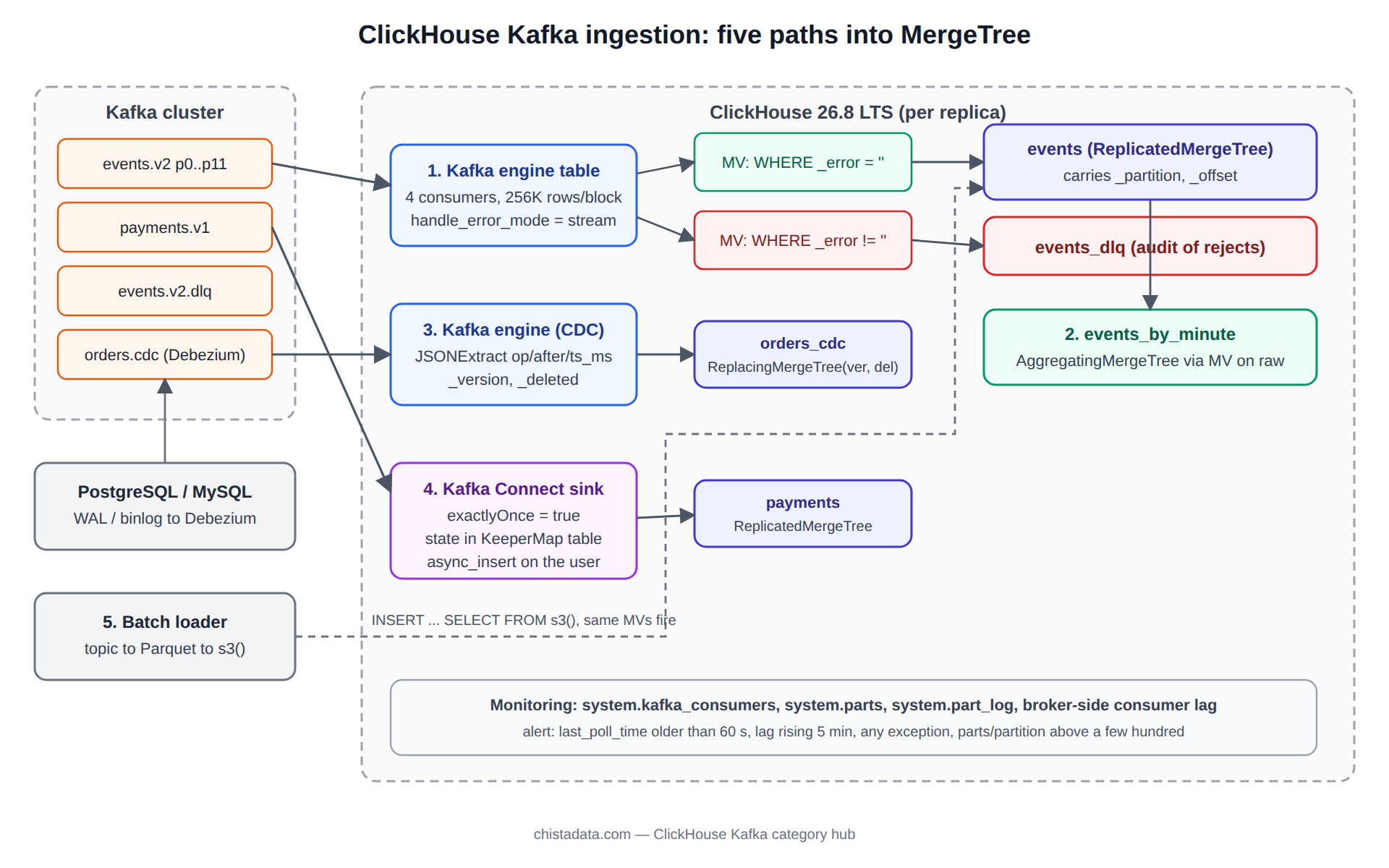
This page lays out the five ClickHouse Kafka ingestion patterns we run for clients, the settings that govern each, and the system tables that tell you whether the pipeline is healthy before your dashboards do.
The posts in this archive cover the individual pieces: the Kafka table engine walkthroughs, the PostgreSQL-to-ClickHouse CDC series built on Debezium, the fintech streaming case, and a producer memory-leak monitor. This page is the map that connects them.
How the ClickHouse Kafka table engine actually consumes
The Kafka table engine is not a table. It is a consumer group wrapper that exposes a topic as a streaming source you can SELECT from exactly once per message. Reading from it directly commits offsets, so the only sane production use is behind a materialized view that moves each consumed block into a MergeTree table.
Inside a ClickHouse Kafka engine table, the engine spawns kafka_num_consumers librdkafka consumers, each pulling messages until either kafka_max_block_size rows or kafka_poll_timeout_ms elapses, then hands the block to every attached materialized view in one transaction-like step.
That step is where delivery semantics are decided. Offsets are committed after the materialized views have inserted the block. If ClickHouse crashes between the insert and the commit, the block is consumed again after restart, which is at-least-once. If a view throws, the whole block is retried, which is why one malformed message can stall a topic unless you handle errors explicitly.
CREATE TABLE kafka_events_src
(
    event_time   DateTime64(3, 'UTC'),
    tenant_id    UInt32,
    event_type   LowCardinality(String),
    payload      String
)
ENGINE = Kafka
SETTINGS
    kafka_broker_list        = 'kafka-1:9092,kafka-2:9092,kafka-3:9092',
    kafka_topic_list         = 'events.v2',
    kafka_group_name         = 'clickhouse-events-v2',
    kafka_format             = 'JSONEachRow',
    kafka_num_consumers      = 4,
    kafka_max_block_size     = 262144,
    kafka_poll_timeout_ms    = 500,
    kafka_flush_interval_ms  = 7500,
    kafka_thread_per_consumer = 1,
    kafka_handle_error_mode  = 'stream';
Two settings deserve a sentence each. kafka_thread_per_consumer = 1 makes each consumer flush independently, which raises throughput on wide topics at the cost of more, smaller parts. kafka_handle_error_mode = 'stream' routes unparseable messages into the virtual columns _error and _raw_message instead of failing the block, so a dead-letter view can capture them while good rows flow on.
Pattern one: engine plus materialized view, the baseline ClickHouse Kafka topology
The baseline is one Kafka engine table, one MergeTree destination, and one materialized view between them. It is the right answer for most topics below a few hundred thousand messages per second per node, and it should be the starting point even when you expect to outgrow it, because every other pattern is a variation on it.
CREATE TABLE events
(
    event_time   DateTime64(3, 'UTC'),
    event_date   Date MATERIALIZED toDate(event_time),
    tenant_id    UInt32,
    event_type   LowCardinality(String),
    payload      String,
    _topic       LowCardinality(String),
    _partition   UInt32,
    _offset      UInt64
)
ENGINE = ReplicatedMergeTree('/clickhouse/tables/{shard}/events', '{replica}')
PARTITION BY toYYYYMM(event_date)
ORDER BY (tenant_id, event_type, event_time)
SETTINGS index_granularity = 8192;

CREATE MATERIALIZED VIEW events_mv TO events AS
SELECT
    event_time,
    tenant_id,
    event_type,
    payload,
    _topic,
    _partition,
    _offset
FROM kafka_events_src
WHERE _error = '';

CREATE MATERIALIZED VIEW events_dlq_mv TO events_dlq AS
SELECT
    now64(3)      AS seen_at,
    _topic, _partition, _offset,
    _raw_message  AS raw,
    _error        AS error
FROM kafka_events_src
WHERE _error != '';
Carrying _partition and _offset into the destination costs almost nothing after compression and pays for itself the first time you need to prove which messages landed. The dead-letter view is not optional in a regulated environment; it is the audit trail for rejected input.
Pattern two: fan-out to aggregates without reading the topic twice
Each materialized view attached to a Kafka engine table receives the same consumed block, so fan-out is free on the Kafka side. The mistake is attaching aggregate views directly to the engine table, because then a slow aggregate insert delays the offset commit for the raw table too. Attach the aggregate views to the raw MergeTree table instead; they then trigger on the raw insert, which has already succeeded, and the Kafka commit is not held hostage by rollup cost.
CREATE TABLE events_by_minute
(
    minute      DateTime,
    tenant_id   UInt32,
    event_type  LowCardinality(String),
    events      AggregateFunction(count),
    tenants_seen AggregateFunction(uniq, UInt32)
)
ENGINE = ReplicatedAggregatingMergeTree('/clickhouse/tables/{shard}/events_by_minute', '{replica}')
PARTITION BY toYYYYMM(minute)
ORDER BY (tenant_id, event_type, minute);

CREATE MATERIALIZED VIEW events_by_minute_mv TO events_by_minute AS
SELECT
    toStartOfMinute(event_time) AS minute,
    tenant_id,
    event_type,
    countState()      AS events,
    uniqState(tenant_id) AS tenants_seen
FROM events
GROUP BY minute, tenant_id, event_type;
The ClickHouse materialized view category covers the failure modes of chained views in depth. The one that matters here is ordering: views on the raw table fire in the order they were created, and a failure in any of them fails the raw insert, which fails the Kafka block. Keep the chain short and idempotent.
Pattern three: Debezium CDC from PostgreSQL or MySQL into ReplacingMergeTree
Change data capture is where the ClickHouse Kafka combination earns its keep for operational reporting. Debezium writes one message per row change with op set to c, u, d or r, plus before and after images.
The two-part series in this archive, Streaming data from PostgreSQL to ClickHouse using Kafka and Debezium, part 1 and part 2, walks through the connector setup. The design decision they lead to is the destination engine.
Use ReplacingMergeTree keyed on the source primary key with a version column derived from the Debezium ts_ms or the source LSN, and a is_deleted column populated from op = 'd'. Since ClickHouse 23.2 the engine accepts an explicit is_deleted parameter, and since 23.10 SELECT ... FINAL respects it, so deletes are handled without a second table.
CREATE TABLE orders_cdc
(
    order_id    UInt64,
    customer_id UInt64,
    status      LowCardinality(String),
    amount      Decimal(18, 2),
    updated_at  DateTime64(3, 'UTC'),
    _version    UInt64,
    _deleted    UInt8
)
ENGINE = ReplicatedReplacingMergeTree(
    '/clickhouse/tables/{shard}/orders_cdc', '{replica}', _version, _deleted)
ORDER BY order_id;

CREATE MATERIALIZED VIEW orders_cdc_mv TO orders_cdc AS
SELECT
    JSONExtractUInt(payload, 'after', 'order_id')            AS order_id,
    JSONExtractUInt(payload, 'after', 'customer_id')         AS customer_id,
    JSONExtractString(payload, 'after', 'status')            AS status,
    toDecimal64(JSONExtractFloat(payload, 'after', 'amount'), 2) AS amount,
    fromUnixTimestamp64Milli(JSONExtractUInt(payload, 'ts_ms')) AS updated_at,
    JSONExtractUInt(payload, 'ts_ms')                        AS _version,
    JSONExtractString(payload, 'op') = 'd'                   AS _deleted
FROM kafka_orders_cdc_src;
Queries against the table should use FINAL only where correctness demands it and rely on argMax aggregation elsewhere; the performance difference at scale is large and is measured in the ClickHouse performance archive.
Pattern four: the Kafka Connect sink when exactly-once is a requirement
The table engine gives at-least-once. When a client needs exactly-once, the official clickhouse-kafka-connect sink is the supported path. It stores per-partition offset state in a KeeperMap table inside ClickHouse and deduplicates on retry, so a replayed batch does not double-insert. The cost is a Kafka Connect cluster to operate, and inserts that arrive as ordinary HTTP inserts rather than as engine blocks, which changes how you size parts.
{
  "name": "clickhouse-events-sink",
  "config": {
    "connector.class": "com.clickhouse.kafka.connect.ClickHouseSinkConnector",
    "tasks.max": "4",
    "topics": "events.v2",
    "hostname": "clickhouse-lb.internal",
    "port": "8443",
    "ssl": "true",
    "database": "analytics",
    "username": "${CH_USER}",
    "password": "${CH_PASSWORD}",
    "exactlyOnce": "true",
    "value.converter": "org.apache.kafka.connect.json.JsonConverter",
    "value.converter.schemas.enable": "false",
    "errors.tolerance": "all",
    "errors.deadletterqueue.topic.name": "events.v2.dlq"
  }
}
Pair the sink with async_insert = 1 and wait_for_async_insert = 1 on the ClickHouse user so that small connector batches are buffered server-side into properly sized parts. Without that, four tasks flushing every second produce four small parts per second per table, and merges fall behind within hours.
Pattern five: bulk backfill and replay through a batch loader
Replaying a topic from the beginning through the streaming path is the slowest possible way to backfill. For historical loads, read the topic with a batch consumer, write Parquet or native-format files, and insert them with INSERT ... SELECT FROM s3() or clickhouse-client --query "INSERT ... FORMAT Native". The archive post How to set up real-time streaming bulk data loading from Kafka to ClickHouse covers the streaming side; the batch side is a few lines of Python.
from confluent_kafka import Consumer, TopicPartition
import pyarrow as pa, pyarrow.parquet as pq, json

c = Consumer({"bootstrap.servers": "kafka-1:9092",
              "group.id": "backfill-events-v2",
              "enable.auto.commit": False})
tp = TopicPartition("events.v2", 0, 0)      # partition 0 from offset 0
c.assign([tp])
rows = []
while True:
    msgs = c.consume(num_messages=50000, timeout=5.0)
    if not msgs:
        break
    rows.extend(json.loads(m.value()) for m in msgs if m.error() is None)
    if len(rows) >= 2_000_000:
        pq.write_table(pa.Table.from_pylist(rows), f"events_p0_{msgs[-1].offset()}.parquet")
        rows.clear()
Load the files with a bounded number of parallel inserts and let the same materialized views on the raw table build the aggregates. Because the views attach to the MergeTree table rather than to the engine, backfilled rows populate rollups identically to streamed rows.
Sizing a ClickHouse Kafka pipeline: consumers, partitions and parts
Three numbers must agree in any ClickHouse Kafka deployment. The topic partition count bounds parallelism; a consumer beyond the partition count idles. kafka_num_consumers per engine table, multiplied by replicas that host the engine, should not exceed partitions. And each flush creates one part per destination table, so flushes per second across all consumers is your part creation rate, which merges must absorb.
A rule that has held across engagements: keep flushes per table under about two per second per node, target blocks of 100 thousand to 500 thousand rows, and watch system.parts for active part counts climbing above a few hundred per partition. The archive’s fintech write-up, Integrating Kafka with ClickHouse for real-time stream processing in fintech, shows what the numbers look like on a payments feed.
SELECT
    table,
    partition,
    count()                     AS active_parts,
    sum(rows)                   AS rows,
    formatReadableSize(sum(bytes_on_disk)) AS on_disk
FROM system.parts
WHERE active AND database = 'analytics'
GROUP BY table, partition
ORDER BY active_parts DESC
LIMIT 20;
Monitoring: system.kafka_consumers and consumer lag
Since ClickHouse 23.8 the system.kafka_consumers table exposes per-consumer assignment, last poll time, committed offsets and the last exception. Together with the broker-side lag from kafka-consumer-groups.sh or Burrow, it answers the three questions an on-call engineer asks: is the consumer alive, is it keeping up, and is it erroring.
SELECT
    database, table, consumer_id,
    assignments.topic, assignments.partition_id, assignments.current_offset,
    num_messages_read,
    last_poll_time,
    num_commits,
    last_commit_time,
    exceptions.text[-1] AS last_exception
FROM system.kafka_consumers
ARRAY JOIN assignments
ORDER BY database, table, consumer_id;
kafka-consumer-groups.sh --bootstrap-server kafka-1:9092 \
  --describe --group clickhouse-events-v2
# LAG per partition should trend toward zero; a partition with a
# stuck CURRENT-OFFSET and growing LAG is a consumer holding a bad block.
Record both views of lag side by side in your metrics system. Broker-side lag tells you how far behind the group is; num_messages_read deltas from the ClickHouse side tell you whether the engine is draining it. When the first rises and the second is flat, the problem is in ClickHouse, not in Kafka.
Alert on three conditions: last_poll_time older than a minute on any consumer, lag rising for more than five minutes, and any non-empty exceptions. The archive’s Python script to monitor Kafka producer memory leak covers the producer side, which is out of ClickHouse’s sight but often the real source of a lag spike.
Failure modes we see repeatedly on ClickHouse Kafka integrations
Rebalance storms after a ClickHouse restart are the most common ClickHouse Kafka incident. Every engine consumer rejoins the group at once, and with several engine tables on the same group name they steal partitions from each other. Give each engine table its own kafka_group_name.
Poison messages stalling a topic. Without kafka_handle_error_mode = 'stream', a single malformed JSON row fails the block forever. Use the streaming error mode and a dead-letter view.
Offsets lost on DETACH and re-ATTACH with a new group name. The new group starts from auto.offset.reset, which defaults to latest in librdkafka; set kafka.auto_offset_reset = 'earliest' in the engine’s named collection if you need replay.
Schema drift. A new field in the producer breaks JSONEachRow only if input_format_skip_unknown_fields = 0; set it to 1 on the engine and capture unknown fields into a String column via _raw_message until the destination schema is updated. The archive’s introduction, How to use Kafka with ClickHouse, is the right starting point for teams new to the format settings.
Security boundaries on the Kafka side
Broker credentials belong in a named collection, not in the DDL. Since ClickHouse 22.x, CREATE NAMED COLLECTION stores SASL and TLS parameters server-side and the engine references them by name, which keeps secrets out of system.tables and out of SHOW CREATE TABLE. The ClickHouse security archive covers the ClickHouse side; on the Kafka side, use SASL/SCRAM or mTLS, a dedicated principal per engine group, and ACLs that permit only Read on the topics the engine consumes.
CREATE NAMED COLLECTION kafka_prod AS
    kafka_broker_list = 'kafka-1:9093,kafka-2:9093,kafka-3:9093',
    kafka_security_protocol = 'SASL_SSL',
    kafka_sasl_mechanism = 'SCRAM-SHA-512',
    kafka_sasl_username = '${KAFKA_USER}',
    kafka_sasl_password = '${KAFKA_PASSWORD}';
Choosing between the five ClickHouse Kafka patterns
The choice is driven by three requirements: the delivery guarantee the consumer of the data actually needs, the freshness target, and who operates the moving parts. The table below is the one we walk through with clients at the start of a ClickHouse Kafka engagement; it is deliberately blunt about operational cost, because the streaming path that looks cheapest on day one is rarely the cheapest to run for three years.
| Pattern | Delivery | Freshness | Extra components | Best fit |
|---|---|---|---|---|
| Engine plus materialized view | At-least-once | Seconds | None | Event streams, logs, metrics where duplicates are tolerable or deduplicated downstream |
| Fan-out to aggregates | Same as source | Seconds | None | Dashboards needing pre-aggregated minute and hour rollups |
| Debezium CDC into ReplacingMergeTree | At-least-once, idempotent by key | Sub-minute | Debezium, Kafka Connect | Operational reporting on OLTP tables |
| Kafka Connect sink | Exactly-once | Seconds to a minute | Kafka Connect cluster | Financial and billing data where a duplicate row is an incident |
| Batch loader | Controlled by operator | Hours | Object storage | Backfills, replays, migrations |
A ClickHouse Kafka deployment often ends up with two of these side by side: the engine for the high-volume telemetry topics and a Connect sink for the handful of topics where exactly-once is contractual. That is a reasonable outcome. What is not reasonable is a single group name shared by both, or a rollup view chain that only the streaming path populates; both are common, and both show up as reconciliation gaps months later.
Version notes for ClickHouse Kafka features
kafka_handle_error_mode and the _error virtual column arrived in 22.x. system.kafka_consumers is available since 23.8. Keeper-stored offsets for the engine, which make consumption survive replica loss without duplicate blocks, appeared behind allow_experimental_kafka_offsets_storage_in_keeper in 24.x and should be treated as experimental until your target LTS lists it as stable. ReplacingMergeTree’s is_deleted parameter is 23.2 and later. Confirm the exact server version before relying on any of these; the official reference is the Kafka table engine documentation.
Reading the archive
Start with the ClickHouse Kafka engine introduction, then the two-part Debezium CDC series if you are feeding ClickHouse from an OLTP database. The fintech and consumer-goods posts, Real-time analytics for consumer goods: four ClickHouse plus Kafka patterns and Real-time payments analytics on ClickHouse, show complete topologies.
For a review of an existing pipeline, or to design one against a throughput and freshness target, ChistaDATA’s ClickHouse consulting and 24×7 ClickHouse support teams run these patterns in production for clients across fintech, adtech and telemetry. Test every ClickHouse Kafka setting change on a staging cluster against a replayed topic before it reaches production, and keep a tested restore path for the destination tables.