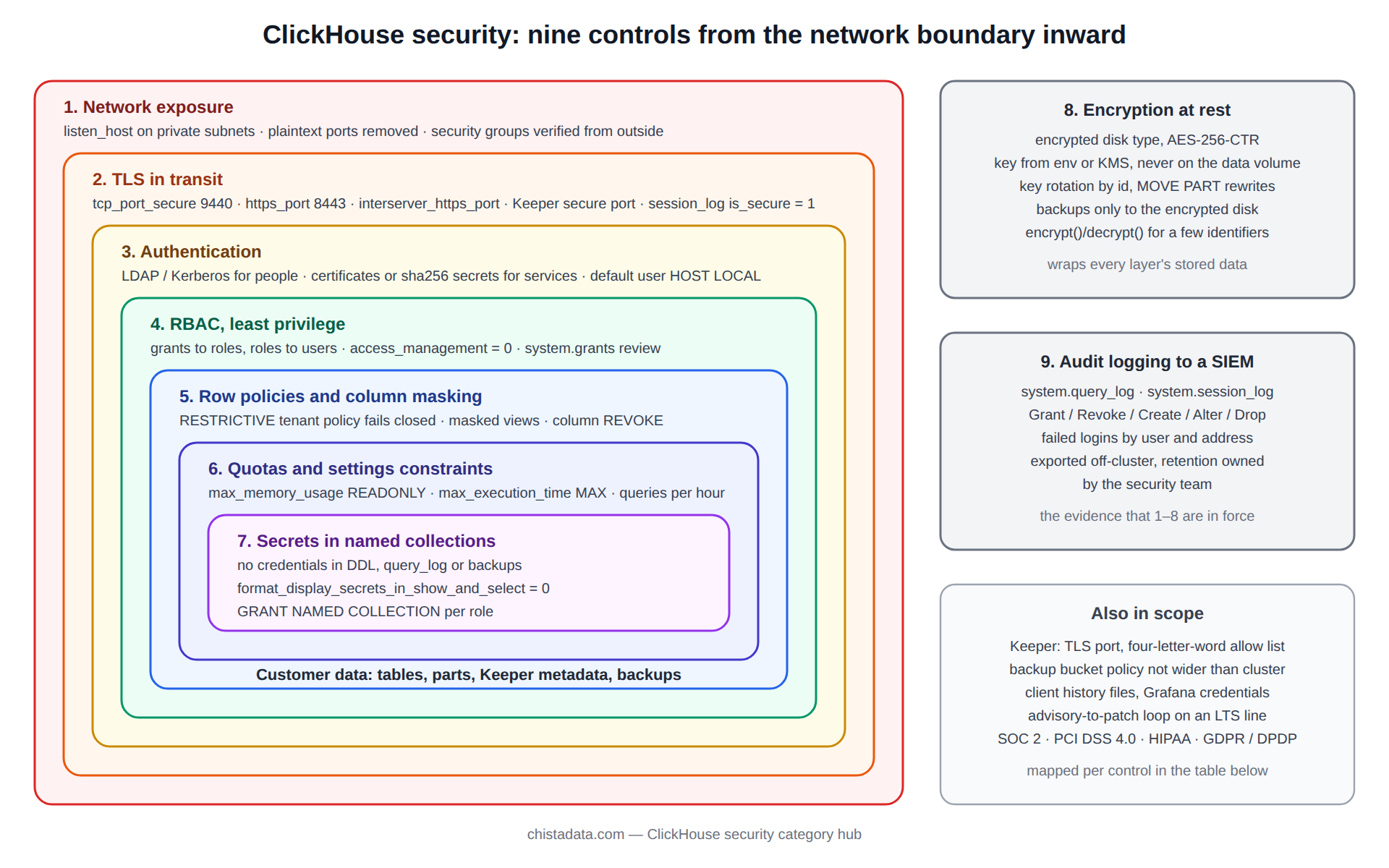
ClickHouse security is nine controls, applied in a fixed order, and a cluster is as exposed as the weakest one it skipped. Because ClickHouse ships with a passwordless default user, listens on plain HTTP by default, and stores everything an analyst could want in one place, the gap between a lab install and a production-grade one is wide and mostly invisible until an audit or an incident.
This page is the control set we apply on every ClickHouse security engagement, ordered from the network inward, with the configuration for each, the query that proves it is in force, and the compliance requirement it satisfies.
The posts in this archive go deeper on individual controls: RBAC, row policies, LDAP and Kerberos, TLS, encryption at rest, data masking, audit logging and vulnerability remediation. This page is the framework they fit into.
Control one: network exposure and listen addresses
The first ClickHouse security decision is which interfaces the server binds. The default configuration binds ::1 and 127.0.0.1, and the common first mistake is to set listen_host to 0.0.0.0 to make a client work. The native port 9000, HTTP port 8123, the interserver port 9009 and the Keeper ports should be reachable only from the subnets that need them, enforced by a security group or firewall and then confirmed from outside.
<clickhouse>
    <listen_host>10.20.0.15</listen_host>
    <listen_host>127.0.0.1</listen_host>
    <tcp_port remove="remove"/>
    <http_port remove="remove"/>
    <tcp_port_secure>9440</tcp_port_secure>
    <https_port>8443</https_port>
    <interserver_https_port>9010</interserver_https_port>
    <interserver_http_port remove="remove"/>
    <mysql_port remove="remove"/>
    <postgresql_port remove="remove"/>
</clickhouse>
Removing the plaintext ports rather than merely leaving them unused is what makes the control auditable: ss -ltnp | grep clickhouse on the host should list only the TLS ports. The MySQL and PostgreSQL wire-protocol ports are enabled in some distributions’ default configs and are rarely needed; each is another authentication surface.
Control two: ClickHouse security in transit, TLS on every port including interserver
Client TLS is the obvious half. The half that is missed is interserver: replica-to-replica part fetches on port 9009 carry table data in the clear unless interserver_https_port is configured with a certificate, and Keeper traffic is unencrypted unless Keeper’s own secure port is enabled. The archive post Setting up TLS and SSL for ClickHouse server covers certificate placement; the check below confirms that every session is actually secure.
SELECT
    user,
    client_address,
    interface,
    is_secure,
    count() AS sessions
FROM system.session_log
WHERE event_date >= today() - 7
  AND type = 'LoginSuccess'
GROUP BY user, client_address, interface, is_secure
HAVING is_secure = 0
ORDER BY sessions DESC;
An empty result over seven days is the evidence an auditor asks for. system.session_log is off by default and must be enabled in the server config; it is also the source for control nine.
Control three: authentication, and retiring the default user
ClickHouse supports plaintext, SHA-256 and double-SHA1 passwords, LDAP, Kerberos, SSL certificate authentication, and since 24.x HTTP-header and JWT-based schemes. The rule for ClickHouse security is that human users authenticate through the directory and service accounts through certificates or long random SHA-256 passwords held in a secrets manager. The default user must either be given a password and restricted to localhost, or have its access management rights removed entirely.
CREATE USER svc_ingest
    IDENTIFIED WITH sha256_password BY '${CH_INGEST_PASSWORD}'
    HOST IP '10.20.1.0/24'
    SETTINGS PROFILE 'ingest_profile';

CREATE USER 'CN=grafana.internal'
    IDENTIFIED WITH ssl_certificate CN 'grafana.internal'
    HOST IP '10.20.2.0/24';

ALTER USER default
    IDENTIFIED WITH sha256_password BY '${CH_DEFAULT_PASSWORD}'
    HOST LOCAL;

-- Prove nothing still authenticates without a password
SELECT name, auth_type, host_ip, host_names
FROM system.users
WHERE auth_type = 'no_password';
The archive post ClickHouse authentication implemented with LDAP and Kerberos covers directory integration, including role_mapping, which assigns roles from LDAP groups so that leavers lose access when the directory removes them.
Control four: ClickHouse security through RBAC and least privilege
SQL-driven access control replaced users.xml grants in 20.x and should be the only mechanism in use; access_management stays at zero for every user except a named administrator role. Grants go to roles, roles go to users, and every role is scoped to a database or a table list. The archive post ClickHouse role-based access control walks through the model; the queries below are the periodic review.
CREATE ROLE analyst_ro;
GRANT SELECT ON analytics.* TO analyst_ro;
REVOKE SELECT(card_number, email) ON analytics.customers FROM analyst_ro;

CREATE ROLE ingest_rw;
GRANT INSERT ON analytics.events TO ingest_rw;
GRANT SELECT ON analytics.events TO ingest_rw;

GRANT analyst_ro TO 'CN=grafana.internal';
GRANT ingest_rw TO svc_ingest;

-- Review: who holds anything beyond SELECT/INSERT
SELECT user_name, role_name, access_type, database, table, column
FROM system.grants
WHERE access_type NOT IN ('SELECT', 'INSERT', 'SHOW')
ORDER BY user_name, role_name;

-- Review: who can manage access
SELECT name FROM system.users WHERE name IN
  (SELECT user_name FROM system.grants WHERE access_type = 'ACCESS MANAGEMENT');
Control five: row policies and column masking
Where a multi-tenant table must serve several customers, row policies enforce tenant isolation in the engine rather than in every client’s WHERE clause. A policy applies to a table for a list of users or roles and adds its condition to every SELECT those principals run; since 22.x policies compose with AS PERMISSIVE and AS RESTRICTIVE. Column-level masking is done with column grants plus a view that exposes a hashed or truncated value, as in the archive’s ClickHouse data masking for data security and Implementing data-level security in ClickHouse.
CREATE ROW POLICY tenant_isolation ON analytics.events
    AS RESTRICTIVE
    FOR SELECT USING tenant_id = toUInt32(getSetting('SQL_tenant_id'))
    TO tenant_readers;

CREATE VIEW analytics.customers_masked AS
SELECT
    customer_id,
    concat(substring(email, 1, 2), '***@', splitByChar('@', email)[2]) AS email_masked,
    sha256(card_number)                                                 AS card_hash,
    country
FROM analytics.customers;

GRANT SELECT ON analytics.customers_masked TO analyst_ro;

-- Review: every policy in force
SELECT name, database, table, select_filter, is_restrictive, apply_to_list
FROM system.row_policies;
A restrictive policy with no matching setting returns zero rows rather than all rows, which is the fail-closed behaviour a tenant isolation control needs. Test it by connecting as a member of tenant_readers without the setting and confirming an empty result.
Control six: quotas and settings constraints as a security boundary
ClickHouse security includes availability. A single user issuing an unbounded SELECT can exhaust memory for every other session, which is a denial of service whether or not it is intentional. Settings profiles with CONSTRAINT clauses stop users raising their own limits, and quotas cap queries, errors and bytes per interval. The archive’s User management in ClickHouse: security enhancements covers the mechanics.
CREATE SETTINGS PROFILE analyst_profile SETTINGS
    max_memory_usage = 8000000000 READONLY,
    max_execution_time = 120 MAX 300,
    max_rows_to_read = 2000000000 MAX 5000000000,
    readonly = 1 READONLY;

CREATE QUOTA analyst_quota
    FOR INTERVAL 1 HOUR MAX queries = 2000, errors = 100, read_rows = 50000000000
    TO analyst_ro;

ALTER USER 'CN=grafana.internal' SETTINGS PROFILE 'analyst_profile';
Control seven: secrets out of DDL, into named collections
Every integration engine and table function accepts credentials inline: S3 keys, Kafka SASL passwords, PostgreSQL and MySQL connection strings. Inline credentials end up in system.tables, in SHOW CREATE TABLE output, in system.query_log, and in backups. Named collections, introduced in 22.x and manageable via SQL since 23.x, hold the secret server-side and expose only the collection name. The format_display_secrets_in_show_and_select setting, off by default, keeps them masked even from administrators.
CREATE NAMED COLLECTION s3_archive AS
    url = 'https://s3.eu-west-1.amazonaws.com/acme-ch-archive/',
    access_key_id = '${AWS_ACCESS_KEY_ID}',
    secret_access_key = '${AWS_SECRET_ACCESS_KEY}';

GRANT NAMED COLLECTION ON s3_archive TO ingest_rw;

CREATE TABLE archive_events AS analytics.events
ENGINE = S3(s3_archive, filename = 'events/*.parquet', format = 'Parquet');

-- Review: any DDL still carrying an inline secret
SELECT database, name
FROM system.tables
WHERE create_table_query ILIKE '%secret_access_key%'
   OR create_table_query ILIKE '%password%';
Control eight: ClickHouse security at rest, encryption and key management
ClickHouse encrypts at rest through the encrypted disk type, which wraps any other disk with AES-128-CTR, AES-192-CTR or AES-256-CTR and a key supplied from the config, from an environment variable, or from a key file. Since 23.x, keys can be rotated by adding a new key with a new id and re-writing parts through ALTER TABLE ... MOVE PART. The archive’s ClickHouse data-at-rest encryption and How to encrypt data at rest in ClickHouse cover the setup.
The operational rule is that the key never lives on the same volume as the data and is never in a config file checked into a repository.
<clickhouse>
  <storage_configuration>
    <disks>
      <nvme_raw><path>/var/lib/clickhouse/nvme/</path></nvme_raw>
      <nvme_enc>
        <type>encrypted</type>
        <disk>nvme_raw</disk>
        <path>enc/</path>
        <algorithm>AES_256_CTR</algorithm>
        <key_hex from_env="CH_DISK_KEY_HEX_V2" id="2"/>
        <key_hex from_env="CH_DISK_KEY_HEX_V1" id="1"/>
        <current_key_id>2</current_key_id>
      </nvme_enc>
    </disks>
    <policies>
      <encrypted_default><volumes><main><disk>nvme_enc</disk></main></volumes></encrypted_default>
    </policies>
  </storage_configuration>
</clickhouse>
Column-level encryption with encrypt() and decrypt() functions is the complement for fields that must stay encrypted even from a database administrator; the trade-off is that encrypted columns cannot be filtered or indexed, which is why it is reserved for a handful of identifiers rather than applied broadly.
Control nine: audit logging, the ClickHouse security evidence trail
The proof that the other eight ClickHouse security controls hold is a log nobody inside the cluster can edit. system.query_log, system.session_log and, since 24.x, the access-control changes recorded in system.query_log with query_kind values such as Grant and Create are the sources. They live in ClickHouse and are therefore not tamper-evident on their own; the control is a materialized view or a scheduled export that ships them to an external system with retention the security team owns. The archive’s Implementing auditing log capture in ClickHouse shows one export path.
-- Daily review: privilege changes and failed logins
SELECT event_time, user, query_kind, query
FROM system.query_log
WHERE event_date >= today() - 1
  AND type = 'QueryFinish'
  AND query_kind IN ('Grant', 'Revoke', 'Create', 'Alter', 'Drop')
  AND (query ILIKE '%USER%' OR query ILIKE '%ROLE%' OR query ILIKE '%POLICY%' OR query ILIKE '%QUOTA%')
ORDER BY event_time DESC;

SELECT user, client_address, count() AS failures, any(auth_failure_reason) AS reason
FROM system.session_log
WHERE event_date >= today() - 1
  AND type = 'LoginFailure'
GROUP BY user, client_address
HAVING failures > 5
ORDER BY failures DESC;
Keeper, backups and the surfaces outside the server process
Three components sit outside clickhouse-server and are routinely left out of a ClickHouse security review. ClickHouse Keeper holds replication metadata and, with the KeeperMap engine, application data; its client port should be TLS-only with certificate authentication, and its four_letter_word_white_list should be reduced to the commands your monitoring actually issues. Backups made with BACKUP TO S3(...) or Disk(...) contain every table in the clear unless the destination is an encrypted disk or the bucket enforces server-side encryption; a backup bucket with a broader read policy than the cluster is the most common data-exposure finding we write up.
The third surface is the operator’s own tooling: clickhouse-client history files on jump hosts, Grafana data-source credentials, and CI pipelines that carry a cluster password as an environment variable. Each is a place a credential can be read without ever touching the server, and each should use a certificate or a short-lived token rather than a shared password.
<clickhouse>
  <keeper_server>
    <tcp_port_secure>9281</tcp_port_secure>
    <tcp_port remove="remove"/>
    <four_letter_word_white_list>ruok,mntr,srvr</four_letter_word_white_list>
  </keeper_server>
  <backups>
    <allowed_disk>backup_enc</allowed_disk>
    <allowed_path>/var/lib/clickhouse/backups/</allowed_path>
  </backups>
</clickhouse>
-- Backups should target the encrypted disk only
BACKUP DATABASE analytics TO Disk('backup_enc', 'analytics-2026-09-18.zip')
SETTINGS compression_method = 'zstd', compression_level = 3;

SELECT id, name, status, error, start_time, end_time,
       formatReadableSize(total_size) AS size
FROM system.backups
ORDER BY start_time DESC
LIMIT 5;
Applying the nine controls to a cluster that is already in production
On a new cluster the controls go in top to bottom before the first byte of customer data. On a running cluster the order is dictated by what can break clients. We start with control nine, audit logging, because it is invisible to applications and it produces the inventory of who connects from where with which credentials, which every later step needs. Control three follows: every principal in system.session_log gets a named user with the right authentication type, and the default user is restricted only after seven days of logs show nothing else using it.
Controls four, five and six are then applied per role with the application owners in the room, because a missing grant is an outage. Controls one and two are scheduled as a maintenance window, since removing the plaintext ports disconnects every client that has not yet moved to TLS. Control seven is a rolling change table by table. Control eight, encryption at rest, is last, applied by moving parts onto the encrypted disk with a storage policy change and verified by reading a sample of parts from the raw device.
-- Inventory before any change: who connects, how, from where
SELECT
    user,
    interface,
    auth_type,
    client_address,
    min(event_time) AS first_seen,
    max(event_time) AS last_seen,
    count()         AS sessions
FROM system.session_log
WHERE event_date >= today() - 7
  AND type = 'LoginSuccess'
GROUP BY user, interface, auth_type, client_address
ORDER BY user, sessions DESC;
Each step has the same shape: a verification query before, the change, a validation query after, and a rollback that is nothing more than the previous config file. The whole sequence takes three to six weeks on a cluster with a dozen applications, most of it waiting for client teams, and none of it requires downtime beyond the single port-removal window.
Mapping the ClickHouse security controls to compliance frameworks
Auditors do not ask about ClickHouse; they ask about controls, and the mapping is direct. The table is the one we hand to a client’s compliance team at the start of an engagement, and the review queries above are the evidence collected for each row.
| Control | SOC 2 | PCI DSS 4.0 | HIPAA | GDPR / DPDP |
|---|---|---|---|---|
| 1. Network exposure | CC6.6 | 1.3, 1.4 | 164.312(e) | Art. 32 integrity |
| 2. TLS everywhere | CC6.7 | 4.2 | 164.312(e)(1) | Art. 32 encryption |
| 3. Authentication | CC6.1 | 8.2, 8.3 | 164.312(d) | Art. 32 access |
| 4. RBAC least privilege | CC6.3 | 7.2, 7.3 | 164.308(a)(4) | Art. 25 by design |
| 5. Row policies and masking | CC6.1 | 3.4, 3.5 | 164.514 de-identification | Art. 5 minimisation |
| 6. Quotas and constraints | A1.1 availability | n/a | 164.312(b) | Art. 32 resilience |
| 7. Secrets management | CC6.1 | 8.6 | 164.312(a)(2) | Art. 32 |
| 8. Encryption at rest | CC6.7 | 3.5 | 164.312(a)(2)(iv) | Art. 32 encryption |
| 9. Audit logging | CC7.2 | 10.2, 10.3 | 164.312(b) | Art. 30 records |
Vulnerability response and version discipline
ClickHouse publishes security advisories on its GitHub repository and fixes land in the current stable releases and in the supported LTS lines. A ClickHouse security posture includes a documented path from advisory to patched cluster inside a defined window, which in practice means running an LTS line, tracking its point releases, and rehearsing the rolling upgrade so that a critical fix is a routine operation rather than a project. The archive’s ClickHouse security: vulnerability remediation describes how we run that loop.
The official advisory list is the source to subscribe to. Version-pin every claim above against the release your cluster runs; named collections, restrictive row policies, JWT authentication and key rotation each arrived in a specific version.
Reading the archive
Read Data governance and security implementation in ClickHouse for the governance framing, then the RBAC, row-policy and masking posts for tenant isolation, and the TLS, LDAP and encryption posts for the infrastructure layer. For regulated deployments, ClickHouse BYOC with ChistaDATA describes running the whole stack inside a client’s own cloud account, which removes an entire class of data-residency questions.
ChistaDATA’s ClickHouse consulting team runs the nine-control review as a fixed-scope security assessment with a findings report mapped to the frameworks above, and 24×7 ClickHouse support covers the advisory-to-patch loop for supported clusters. Apply every control on a staging cluster first, confirm that existing clients still authenticate, and keep a tested restore path before enabling encryption at rest on a production volume.