The ClickHouse columnstore is evaluated by architects who already know what a column store is and want the answers to a narrower set of questions: whether it handles their update pattern, how it connects to the languages and tools they run, what search and data-science work looks like on it, and what a move from Redshift or a warehouse involves. Those questions arrive in roughly the same order in every evaluation, and the answers rarely change.
This page is written as that evaluation: twelve questions architects ask first about the ClickHouse columnstore, then the evaluation that settles them, each answered with the mechanism, a short example, and the archive post that covers it in full. The columnar databases hub explains the storage mechanics that make the answers true; this page assumes them and gets to the decisions.
The archive under this category holds the real-time architecture and banking designs, the ReplacingMergeTree and indexing references, the named-collections and Ruby connectivity posts, the Manticore and inverted-index search posts, the Redshift migration case, the Black-Scholes data-science example, and two release posts from the 23.x line.
Question 1: what does the ClickHouse columnstore do with updates and deletes?
It does not update rows in place; it writes new versions and reconciles them at merge time or read time. For a table that receives corrections, ReplacingMergeTree keyed on the business identifier keeps the newest version per key, with FINAL or argMax at read time until merges catch up. For rows that must disappear, lightweight DELETE (stable since 23.3) writes a mask and the rows vanish from reads immediately while the physical removal happens at merge. Bulk corrections and backfills use ALTER TABLE … UPDATE mutations, which rewrite parts and are scheduled, not immediate.
The ReplacingMergeTree explained post covers the version column, is_deleted, and the read-time cost of FINAL; the MergeTree hub covers the collapsing variants for event-sourced updates.
CREATE TABLE accounts
(
    account_id  UInt64,
    status      LowCardinality(String),
    balance     Decimal(18, 2),
    updated_at  DateTime64(3),
    is_deleted  UInt8 DEFAULT 0
)
ENGINE = ReplacingMergeTree(updated_at, is_deleted)
ORDER BY account_id;

-- correct a row: insert the new version, never UPDATE
INSERT INTO accounts VALUES (1001, 'frozen', 250.00, now64(3), 0);

-- read the current state
SELECT account_id, status, balance FROM accounts FINAL WHERE account_id = 1001;

-- remove a row for good: lightweight delete, immediate from the reader's view
DELETE FROM accounts WHERE account_id = 1002;
Question 2: how fresh is the data, really?
As fresh as the insert path allows: rows are queryable the moment the insert returns, with no commit lag and no refresh job. What limits freshness is batching, because a part per insert forces batches of thousands of rows or async inserts with a flush window of a few hundred milliseconds. End to end, a Kafka-fed ClickHouse columnstore serves events one to five seconds after they were produced; the real-time analytics architecture post shows the reference design, and the real-time analytics in modern banking post applies it to fraud and position monitoring where those seconds matter.
-- freshness as a number: age of the newest row, checked every minute by the platform's own alerting
SELECT dateDiff('second', max(event_time), now()) AS freshness_s
FROM transactions
WHERE event_date >= today() - 1;
Question 3: which indexes exist, and which one do most tables need?
The primary index is the sort key and does most of the work; most tables need it and nothing else, provided the key starts with the columns every query filters on. Skip indexes (minmax, set, Bloom filter, token and n-gram filters, and the text and vector indexes in recent versions) cover predicates on columns outside the key, and each fires only for specific predicate shapes. The ClickHouse indexing FAQs and best practices post answers the questions that follow this one; the index hub is the full taxonomy.
-- the question that decides whether a second index is needed: how many granules does the key leave?
EXPLAIN indexes = 1
SELECT count() FROM transactions WHERE account_id = 1001 AND event_time >= today() - 7;
-- Granules 96/40960 (0.2 %): the key is doing its job; no skip index required for this shape
Question 4: can the ClickHouse columnstore do full-text search?
For token and substring filtering over log lines, URLs and identifiers, yes, with the Bloom-filter indexes and, since 25.x, the exact text index; for relevance-ranked search with stemming, synonyms and scoring, no, and the honest answer is to pair ClickHouse with a search engine. The archive holds both halves: the implementing inverted indexes for fast search post covers the in-engine route as it stood in 23.x, and the Manticore full-text search with a plain index post shows the paired design where Manticore ranks and ClickHouse aggregates. The search hub compares the mechanisms.
-- in-engine: token filter for operational log search
ALTER TABLE app_logs ADD INDEX idx_msg_tok message TYPE tokenbf_v1(65536, 3, 0) GRANULARITY 4;
SELECT ts, level, message FROM app_logs
WHERE hasToken(message, 'timeout') AND ts >= now() - INTERVAL 1 HOUR
ORDER BY ts DESC LIMIT 100;
-- ranked search over product text: a search engine, with ClickHouse holding the events about those products
Question 5: how do applications connect, and in which languages?
Over the native TCP protocol (port 9000) for the official and community drivers, over HTTP (port 8123) for everything else, and over the MySQL and PostgreSQL wire protocols for tools that speak only those. Official clients exist for Java, Go, Python, JavaScript, C++ and Rust; community clients cover Ruby, PHP, .NET and more. The connecting to ClickHouse with Ruby post is the archive’s worked example for a community driver, and the pattern (HTTP interface, session settings, streaming inserts in batches) transfers to any language.
# HTTP interface, any language: a batched insert and a query, credentials from the environment
curl -sS "https://${CH_HOST}:8443/?query=INSERT%20INTO%20events%20FORMAT%20JSONEachRow" \
     -u "${CH_USER}:${CH_PASSWORD}" --data-binary @events_batch.jsonl

curl -sS "https://${CH_HOST}:8443/" -u "${CH_USER}:${CH_PASSWORD}" \
     --data-binary "SELECT toStartOfHour(ts) AS h, count() FROM events WHERE ts >= now() - INTERVAL 1 DAY GROUP BY h FORMAT JSON"
Question 6: how are external sources and credentials managed?
Named collections hold the connection details for S3 buckets, Kafka clusters, PostgreSQL and MySQL sources and remote ClickHouse servers in one place, defined in server config or by SQL, so that table definitions and queries refer to a name rather than repeating endpoints and secrets. It is the ClickHouse columnstore’s answer to the credential sprawl that federated queries otherwise create, and it is what makes s3(), postgresql() and remote() usable under access control. The understanding named collections post covers definition, permissions and overrides.
CREATE NAMED COLLECTION crm_pg AS
    host = '${PG_HOST}', port = 5432, database = 'crm',
    user = '${PG_USER}', password = '${PG_PASSWORD}';

-- a dimension read straight from PostgreSQL by name; no credentials in the query
SELECT c.region, count()
FROM events AS e
JOIN postgresql(crm_pg, table = 'customers') AS c ON c.id = e.customer_id
WHERE e.ts >= today()
GROUP BY c.region;
Question 7: what does a migration from Redshift or a warehouse involve?
Three things: schema translation (distribution and sort keys become the sort key and partition expression, chosen from the query log rather than copied), a bulk load from Parquet in object storage through the s3() table function, and a period of dual running with row-count and checksum verification per day before cutover. The cost case is usually the driver: the four reasons to migrate from AWS Redshift post sets out the four that recur, and the ColumnStore versus modern data warehousing post explains where the ClickHouse columnstore model and the warehouse model each win.
-- Redshift DISTKEY(account_id) SORTKEY(event_time) becomes:
CREATE TABLE transactions
(
    event_time  DateTime64(3),
    account_id  UInt64,
    kind        LowCardinality(String),
    amount      Decimal(18, 2)
)
ENGINE = MergeTree
PARTITION BY toYYYYMM(event_time)
ORDER BY (account_id, kind, event_time);    -- the query log, not the Redshift DDL, decides this order

INSERT INTO transactions
SELECT * FROM s3('https://${BUCKET}.s3.amazonaws.com/unload/transactions/*.parquet',
                 '${AWS_ACCESS_KEY_ID}', '${AWS_SECRET_ACCESS_KEY}', 'Parquet')
SETTINGS max_insert_threads = 16;
Question 8: can data scientists work on the ClickHouse columnstore directly?
For feature computation, aggregation and anything expressible in SQL with ClickHouse’s function library, yes, and it is usually faster than moving the data out. The archive’s example is deliberately far from typical analytics: the Black-Scholes model on ClickHouse post computes option prices in SQL over a positions table using the engine’s numeric and statistical functions. Model training still happens in Python; the ClickHouse columnstore supplies the features through the Python client or Arrow export, and stores the predictions back.
-- feature computation in place: 30-day rolling statistics per account, exported once to the training job
SELECT
    account_id,
    avg(amount)                                      AS mean_30d,
    stddevPop(amount)                                AS sd_30d,
    quantileTDigest(0.95)(amount)                    AS p95_30d,
    uniqCombined64(kind)                             AS kinds_30d,
    countIf(kind = 'chargeback') / count()           AS chargeback_rate
FROM transactions
WHERE event_time >= now() - INTERVAL 30 DAY
GROUP BY account_id
FORMAT Parquet;
Question 9: how is the platform run day to day?
Through the system tables, which is the part of the ClickHouse columnstore that most surprises teams arriving from managed warehouses: there is no separate console to learn, because the engine describes itself in SQL. They which expose parts, merges, mutations, replication queues, query history and resource use as ordinary tables that ordinary SQL can alert on, and the same queries run on a laptop cluster and a forty-node estate.
Day-to-day operation is a short list of numbers watched continuously: parts per partition, merge backlog, replica delay, query p95 by shape, memory per query, and freshness. The ChistaDATA Cloud architecture post describes how those numbers are packaged in a managed platform; the monitoring hub covers them for a self-run cluster.
Question 10: what does the ClickHouse columnstore cost to run, and where does the money go?
Cost is dominated by three lines: the hot-tier storage (local NVMe for the window that is queried constantly), the compute that serves the concurrent query load, and the operations effort. Object-storage tiering after the hot window is what keeps the first line flat as retention grows; compression ratios of 8 to 15× on event data (illustrative) are what keep it small in the first place; and the fixed-node model is what keeps the second line predictable when a dashboard refreshes every 30 seconds. A warehouse charging per scan or per compute-second inverts the picture: cheap when idle, expensive when busy.
The evaluation therefore records the cost per query shape per month on both models from the same workload contract, rather than comparing list prices. The ColumnStore versus modern data warehousing post sets out that method, and the analytics hub carries the workload-property table that decides which model fits.
-- the input to the cost model: bytes scanned per shape per month, which is what a warehouse bills for
SELECT
    normalized_query_hash                              AS shape,
    count()                                            AS runs_30d,
    formatReadableSize(sum(read_bytes))                AS scanned_30d,
    round(sum(read_bytes) / 1e12 * 5, 2)               AS warehouse_usd_at_5_per_tb   -- illustrative rate
FROM system.query_log
WHERE type = 'QueryFinish' AND query_kind = 'Select' AND event_time >= now() - INTERVAL 30 DAY
GROUP BY shape
ORDER BY sum(read_bytes) DESC
LIMIT 20;
Question 11: what changes between versions, and how often?
Monthly feature releases and two LTS releases a year, with LTS patched for about a year; defaults move at LTS boundaries and experimental features graduate or are renamed. The two release posts in this category, ClickHouse 23.8 LTS and ClickHouse 23.9, are a snapshot of what one cycle looked like; the release notes hub keeps the LTS timeline current and explains the compatibility pin that makes upgrades two-step.
Question 12: when is the ClickHouse columnstore the wrong choice?
When the workload is row-level transactions with strict consistency, point lookups by primary key at thousands per second, many-way joins over a normalised schema with frequent updates, or relevance-ranked search. ChistaDATA gives this answer in evaluations even though it sells ClickHouse services, because a column store placed under an OLTP workload fails slowly and expensively. The usual right answer for those workloads is PostgreSQL or MySQL, with ClickHouse fed by CDC for the analytics.
The reverse mistake also exists: keeping an analytics workload on the transactional database because the column store seemed like another system to run. The banking post above is the usual illustration of the split: analytical scans leave the OLTP replica, land on the ClickHouse columnstore, and the transactional database stops paying for them.
The evaluation itself: two weeks, the customer’s data, twelve numbers
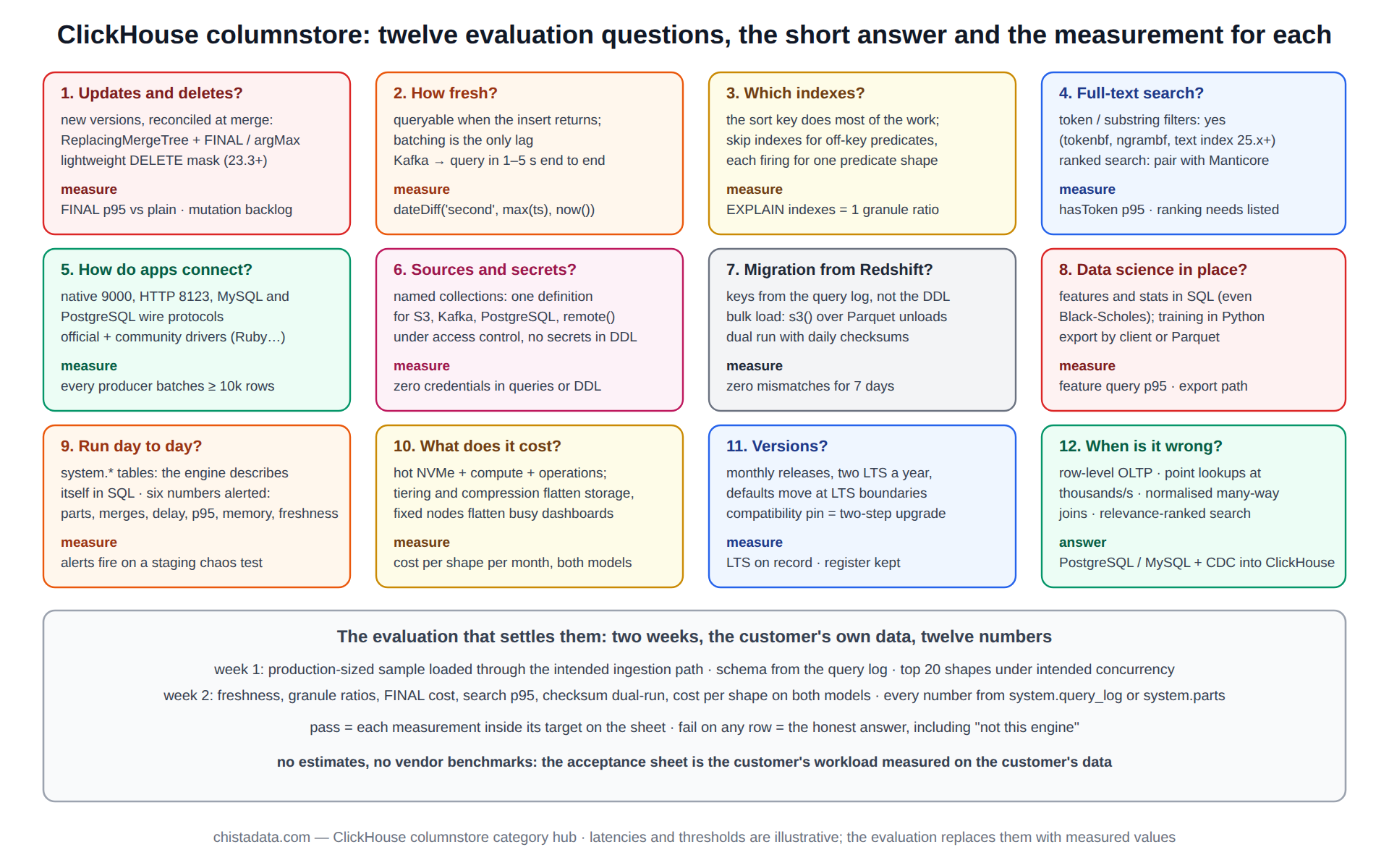
Two weeks, with the customer’s own data and query shapes: a production-sized sample loaded through the intended ingestion path, the top twenty shapes run under the intended concurrency, and the numbers recorded against the targets. The table below is the acceptance sheet ChistaDATA uses; every row is a measurement from system.query_log or system.parts, not an estimate.
| Question | Measured by | Passes when (illustrative) | Archive post |
|---|---|---|---|
| 1. Updates and deletes | FINAL p95 vs plain read; mutation backlog | FINAL within 3× plain; mutations clear within an hour | ReplacingMergeTree explained |
| 2. Freshness | age of newest row | under 5 s at peak insert rate | real-time architecture |
| 3. Indexes | EXPLAIN granule ratio per shape | top shapes under 5 % of granules | indexing FAQs |
| 4. Search | hasToken p95; ranking needs | token search sub-second; ranking delegated | Manticore, inverted indexes |
| 5. Connectivity | driver per language, batched inserts | every producer batches ≥ 10k rows | Ruby connectivity |
| 6. Sources and secrets | named collections in place | no credentials in DDL or queries | named collections |
| 7. Migration | daily counts and checksums both sides | zero mismatches for 7 days | Redshift migration |
| 8. Data science | feature query p95, export path | features in SQL; training in Python | Black-Scholes on ClickHouse |
| 9. Operations | six numbers alerted | alerts fire on staging chaos test | Cloud architecture |
| 10. Cost | bytes scanned per shape per month, node cost | cost per shape modelled on both platforms | ColumnStore vs warehousing |
| 11. Versions | LTS on record, register kept | compatibility pin documented | 23.8 LTS, 23.9 |
Version notes
The archive posts span 23.x to 26.x, so a few syntax details have moved under them; the notes below record the boundaries that matter for the answers above.
Lightweight DELETE has been stable since 23.3 and is_deleted on ReplacingMergeTree since 23.2. Named collections by SQL are 22.x and later. The inverted index of 23.x was renamed text with a new format in 25.x, so the search post’s syntax needs updating on current versions. The interfaces documentation is the source for the connectivity answers; confirm driver versions against the running server.
Reading the archive
Read in question order. Updates: ReplacingMergeTree explained. Freshness: the real-time architecture and banking posts. Indexes and search: the indexing FAQs, the inverted-index post and the Manticore post. Connectivity and sources: the Ruby and named-collections posts. Migration and platform choice: the Redshift and ColumnStore-versus-warehousing posts. Data science: Black-Scholes. Operations and versions: the Cloud architecture post and the two release posts.
ChistaDATA runs the two-week evaluation above as a fixed-scope ClickHouse consulting engagement and carries the resulting design into migration and managed services. Every answer on this page is to be verified on staging with the customer’s own data before it is relied on, with a tested backup and restore path in place from the first load.


