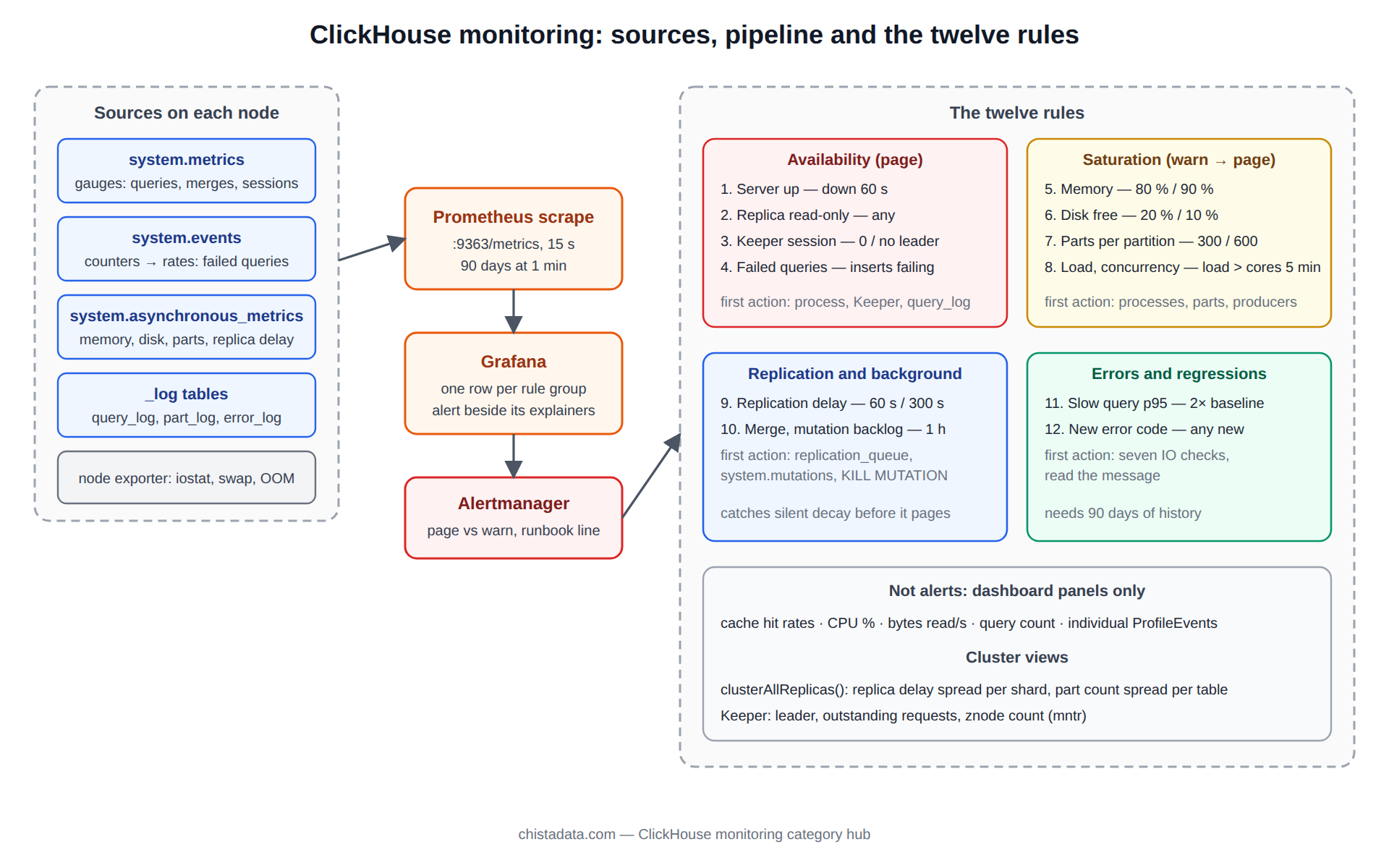
ClickHouse monitoring done well is a short list of metrics with a threshold and a runbook line for each, not a dashboard with two hundred panels. ClickHouse exposes several thousand counters through system.metrics, system.events and system.asynchronous_metrics, and the Prometheus endpoint will happily export all of them. The engineering work is deciding which twelve matter for a given cluster, where the line is, and what the on-call engineer does when it is crossed. This page is that list as we install it on client clusters, with the source of each metric, the alert expression, and the first action.
The posts in this category cover the individual mechanisms: disk and memory alerting, thread contention, blocked queries, CPU, load, I/O patterns, and integrations with Percona Monitoring and Management and an open observability stack. This page is the rulebook that ties them together.
Where ClickHouse monitoring data comes from
Four tables carry almost everything a ClickHouse monitoring stack needs. system.metrics holds current gauges such as running queries, active merges and open connections. system.events holds monotonic counters since server start, such as bytes read, cache misses and failed inserts, which a scraper turns into rates. system.asynchronous_metrics holds values sampled every second by a background thread, including memory, cache sizes, disk space and replication delay. And the _log tables, query_log, part_log, text_log and error_log, hold per-event history for anything that needs a window rather than a point.
<clickhouse>
  <prometheus>
    <endpoint>/metrics</endpoint>
    <port>9363</port>
    <metrics>true</metrics>
    <events>true</events>
    <asynchronous_metrics>true</asynchronous_metrics>
    <errors>true</errors>
  </prometheus>
</clickhouse>
That block, in config.d, exposes everything to a Prometheus scraper on a port that should be reachable only from the monitoring network. The archive post Open observability stack for ClickHouse observability builds the Grafana side; Add ClickHouse to Percona Monitoring and Management covers teams already on PMM.
Availability: the four ClickHouse monitoring rules that page someone
1. Server up. Source: the Prometheus up series for the endpoint, or a SELECT 1 probe over the native port. Alert when down for 60 seconds. First action: check whether the process is alive and whether it is restarting in a loop from system.text_log after it returns. This rule is deliberately simple; every other rule assumes it is green.
2. Replica read-only. Source: system.replicas, column is_readonly. Alert immediately on any table. A replica goes read-only when it loses its Keeper session, and inserts to it fail while reads continue, which is invisible from the application unless it writes to that replica. First action: check Keeper connectivity, then SYSTEM RESTART REPLICA on the affected table.
3. Keeper session. Source: ClickHouseMetrics_ZooKeeperSession and the Keeper mntr output. Alert when the session count drops to zero or when Keeper reports no leader. First action: Keeper quorum before anything else, because every replicated table depends on it.
4. Failed queries rate. Source: ClickHouseProfileEvents_FailedQuery, FailedSelectQuery and FailedInsertQuery as rates. Alert when failed inserts exceed a few per minute or failed selects exceed a small share of total. First action: system.query_log filtered on exception_code, grouped, which usually names one table or one user.
SELECT
    exception_code,
    substring(exception, 1, 90) AS example,
    count()                     AS n,
    any(query_id)               AS sample_query_id,
    any(user)                   AS sample_user
FROM system.query_log
WHERE event_time >= now() - INTERVAL 15 MINUTE
  AND type IN ('ExceptionBeforeStart', 'ExceptionWhileProcessing')
GROUP BY exception_code, example
ORDER BY n DESC
LIMIT 10;
Saturation: the four ClickHouse monitoring rules that predict the page
5. Memory. Source: ClickHouseAsyncMetrics_MemoryResident against OSMemoryTotal, and ClickHouseMetrics_MemoryTracking. Warn at 80 percent of RAM, page at 90. First action: the top queries by memory_usage in system.processes, then KILL QUERY if one is runaway. The archive post ClickHouse disk and memory alerting has the full rule set, and the ClickHouse memory hub explains where the memory goes.
6. Disk free. Source: ClickHouseAsyncMetrics_DiskAvailable_default and DiskUsed_default, per disk. Warn at 20 percent free, page at 10. A merge needs free space equal to the parts it is merging, so a disk at 5 percent free stops merging long before it stops accepting inserts, and the part count then climbs. First action: system.parts by partition to find what can be dropped or moved, and the TTL rules on the largest tables.
7. Parts per partition. Source: ClickHouseAsyncMetrics_MaxPartCountForPartition. Warn at 300, page at 600; the server itself delays inserts at 1,000 and rejects at 3,000 with default settings. First action: identify the table and the inserting client, because this is always an ingestion batching problem, as the ClickHouse ingestion hub describes.
8. Concurrency and threads. Source: ClickHouseMetrics_Query, GlobalThreadActive, BackgroundMergesAndMutationsPoolTask, and OS load average from ClickHouseAsyncMetrics_LoadAverage1. Warn when running queries stay above the profile’s max_concurrent_queries for a minute, or when load average exceeds core count for five minutes. First action: system.processes for what is running, then the thread contention post’s checks.
# Prometheus alert rules, ClickHouse exporter names as of 26.x
groups:
- name: clickhouse-saturation
  rules:
  - alert: ClickHouseMemoryHigh
    expr: ClickHouseAsyncMetrics_MemoryResident / ClickHouseAsyncMetrics_OSMemoryTotal > 0.90
    for: 2m
    labels: {severity: page}
    annotations: {runbook: "system.processes ORDER BY memory_usage DESC; KILL QUERY if runaway"}
  - alert: ClickHouseDiskLow
    expr: ClickHouseAsyncMetrics_DiskAvailable_default
          / (ClickHouseAsyncMetrics_DiskAvailable_default + ClickHouseAsyncMetrics_DiskUsed_default)  600
    for: 10m
    labels: {severity: page}
  - alert: ClickHouseLoadHigh
    expr: ClickHouseAsyncMetrics_LoadAverage1 > ClickHouseAsyncMetrics_OSNumberOfCores
    for: 5m
    labels: {severity: warn}
Replication and background work: ClickHouse monitoring for silent decay
9. Replication delay. Source: ClickHouseAsyncMetrics_ReplicasMaxAbsoluteDelay and system.replicas columns absolute_delay and queue_size. Warn at 60 seconds, page at 300. A lagging replica serves stale reads and, if the healthy replica fails, becomes the source of truth with data missing. First action: system.replication_queue for the stuck entry and its last_exception.
10. Merge and mutation backlog. Source: ClickHouseMetrics_Merge, ClickHouseMetrics_PartMutation, and system.mutations where is_done = 0. Warn when any mutation has been running for more than an hour, or when merges have been continuously active for thirty minutes with parts per partition still rising. First action: system.merges for the largest running merge and system.mutations for the oldest incomplete one; a stuck mutation with a latest_fail_reason should be killed with KILL MUTATION, not waited on.
SELECT
    database, table, mutation_id, command,
    create_time,
    parts_to_do,
    is_done,
    latest_fail_reason
FROM system.mutations
WHERE is_done = 0
ORDER BY create_time
LIMIT 10;

SELECT database, table, absolute_delay, queue_size, inserts_in_queue, merges_in_queue, last_queue_update_exception
FROM system.replicas
WHERE absolute_delay > 30 OR queue_size > 100
ORDER BY absolute_delay DESC;
11. Slow query rate. Source: system.query_log, queries over a threshold per minute, or the p95 of query_duration_ms per user computed by the scraper. Warn when the p95 for the dashboard user doubles against its seven-day baseline. First action: the diagnosing slow queries post and the ClickHouse performance IO hub’s seven checks.
12. Log errors. Source: system.error_log, available since 24.x, which records every error code with a count per minute, and system.text_log at Error level. Warn on any new error code that has not appeared in the previous day. First action: read the message; this rule exists to catch the categories nobody wrote a rule for.
SELECT
    error,
    code,
    sum(value)            AS occurrences_1h,
    max(event_time)       AS last_seen
FROM system.error_log
WHERE event_time >= now() - INTERVAL 1 HOUR
GROUP BY error, code
ORDER BY occurrences_1h DESC
LIMIT 20;
The ClickHouse monitoring rulebook in one table
| # | Rule | Source | Warn | Page | First action |
|---|---|---|---|---|---|
| 1 | Server up | Prometheus up, native probe | — | down 60 s | Process state, text_log for restart loop |
| 2 | Replica read-only | system.replicas.is_readonly | — | any | Keeper session, RESTART REPLICA |
| 3 | Keeper session | ZooKeeperSession, Keeper mntr | — | 0 sessions or no leader | Keeper quorum |
| 4 | Failed queries | FailedInsertQuery, FailedSelectQuery rates | rising | inserts failing | query_log by exception_code |
| 5 | Memory | MemoryResident / OSMemoryTotal | 80 % | 90 % | processes by memory_usage, KILL |
| 6 | Disk free | DiskAvailable_* | 20 % | 10 % | parts by partition, TTL, MOVE |
| 7 | Parts per partition | MaxPartCountForPartition | 300 | 600 | Find the small-batch producer |
| 8 | Concurrency, load | Query, LoadAverage1 | load > cores 5 min | queries at limit | system.processes, isolate workloads |
| 9 | Replication delay | ReplicasMaxAbsoluteDelay | 60 s | 300 s | replication_queue last_exception |
| 10 | Merge, mutation backlog | system.mutations, system.merges | mutation > 1 h | parts rising with merges saturated | KILL MUTATION, merge pool size |
| 11 | Slow query rate | query_log p95 per user | 2× baseline | — | Seven IO checks |
| 12 | New error codes | system.error_log | new code | — | Read the message |
What ClickHouse monitoring should not alert on
Cache hit rates, CPU percentage, bytes read per second and query count are dashboard panels, not alerts: they have no threshold that is wrong on its own, only trends that explain a rule that fired. The same applies to individual ProfileEvents counters; the archive posts Essential ClickHouse metrics and Monitoring disk I/O metrics in ClickHouse explain which of them belong on the dashboard and why. An alert set that pages on more than the twelve rules above trains the on-call engineer to ignore it, which is worse than having no ClickHouse monitoring at all.
Host-level ClickHouse monitoring
The server’s own view of memory and disk is not the OS’s view. The node exporter, or the scripts in this archive’s Linux disk I/O matrix and process memory matrix posts, should sit beside the ClickHouse exporter on every node, and the two should be on the same dashboard. The three host metrics worth a rule are iostat device utilisation and await, which the performance IO hub covers; swap activity, which should be zero on a ClickHouse node; and the kernel OOM killer, whose one log line is the only evidence a server did not crash on its own.
# The three host checks, on the node
vmstat 1 5 | awk 'NR>2 {print "swap_in="$7, "swap_out="$8, "io_wait="$16}'
iostat -xm 1 3 | awk '/^nvme|^md/ {print $1, "r_await="$6, "w_await="$12, "util="$NF}'
journalctl -k --since "-24h" | grep -i -E "out of memory|oom-kill" || echo "no OOM events in 24h"
Retention for the log tables
The _log tables are ClickHouse’s own history and they grow without bound unless told otherwise. query_log on a busy cluster adds gigabytes per day. Set a TTL on each through the server config so that 30 days of query_log, 7 days of text_log and 90 days of part_log is the steady state, and export anything with longer retention requirements to the observability stack, where the security team already keeps the audit copy.
<clickhouse>
  <query_log>
    <database>system</database>
    <table>query_log</table>
    <engine>ENGINE = MergeTree PARTITION BY toYYYYMM(event_date)
            ORDER BY (event_date, event_time) TTL event_date + INTERVAL 30 DAY DELETE</engine>
    <flush_interval_milliseconds>7500</flush_interval_milliseconds>
  </query_log>
</clickhouse>
Cluster-level ClickHouse monitoring across shards and replicas
Every rule above is per node, and a cluster of twelve nodes needs the same twelve rules evaluated twelve times plus a small number of cluster-level views. The clusterAllReplicas() table function runs a query on every node and unions the result, which turns any of the per-node queries on this page into a cluster query without an external tool.
The two cluster views worth a dashboard panel are the spread of replication delay across replicas of the same shard, and the spread of active part counts across shards for the same table, because an uneven spread points at a sharding key or a routing problem rather than at ClickHouse.
SELECT
    hostName()              AS host,
    database, table,
    absolute_delay,
    queue_size,
    is_readonly
FROM clusterAllReplicas('analytics_cluster', system.replicas)
WHERE absolute_delay > 10 OR is_readonly
ORDER BY absolute_delay DESC;

SELECT
    hostName()              AS host,
    table,
    count()                 AS active_parts,
    sum(rows)               AS rows
FROM clusterAllReplicas('analytics_cluster', system.parts)
WHERE active AND database = 'analytics'
GROUP BY host, table
ORDER BY table, host;
Keeper is part of ClickHouse monitoring too, with its own three panels: leader status, outstanding requests and znode count, all from the four-letter mntr command or the system.zookeeper table. Keeper is small, quiet and easy to forget, and it is the one component whose failure takes every replicated table read-only at once.
Dashboards that explain the alerts
A rule tells the on-call engineer that something crossed a line; the dashboard tells them what else was happening. The layout that has worked across engagements is one row per rule group, with the alerting metric on the left and its explanatory neighbours to the right. Memory sits beside running queries and merges; disk free sits beside bytes inserted and bytes merged; parts per partition sits beside inserts per minute and rows per part; replication delay sits beside queue size and network throughput.
That adjacency is what makes a page at three in the morning a two-minute diagnosis rather than a twenty-minute one, and it is what the archive’s real-time performance monitoring for ClickHouse post lays out panel by panel.
Testing the ClickHouse monitoring rules before trusting them
Every rule is tested by causing the condition on staging and confirming the page arrives with the right runbook line. Memory: a deliberately unbounded GROUP BY on a large table with a raised max_memory_usage. Parts: a loop of single-row inserts. Replication delay: SYSTEM STOP FETCHES on one replica for five minutes. Replica read-only: stop one Keeper node beyond quorum on a three-node ensemble, then restore it. Failed queries: a query against a missing table in a loop.
Each test takes minutes, and a rule that has never fired in a test cannot be trusted to fire in an incident. Record the test date next to the rule, and repeat the set after every ClickHouse upgrade, because metric names and defaults change between releases.
-- Trigger rule 9 on staging, then restore
SYSTEM STOP FETCHES analytics.events;
-- wait five minutes, confirm the page, then:
SYSTEM START FETCHES analytics.events;
SYSTEM SYNC REPLICA analytics.events;
Version notes
system.error_log is 24.x and later; before that, rule 12 has to be built on system.errors, which is a snapshot rather than a history. The Prometheus endpoint has been in the server since 20.x and the exporter metric names carry the ClickHouseMetrics_, ClickHouseProfileEvents_ and ClickHouseAsyncMetrics_ prefixes since then. Confirm the exact names against your version with a single scrape of the endpoint; the official list of asynchronous metrics is in the ClickHouse system tables documentation.
Reading the archive
Start with Essential ClickHouse metrics and the disk and memory alerting post, then the observability stack post to build the pipeline. The 26.8 LTS performance audit and troubleshooting techniques posts are the two we hand to engineers joining a rotation.
Retention also applies to the metrics themselves: keep at least ninety days at one-minute resolution, because the baseline comparisons in rules 11 and 12 need history, and a capacity review needs a quarter.
Two closing rules from the field. Alert thresholds belong in version control next to the cluster’s configuration, because a threshold changed in a Grafana panel at midnight is invisible the next morning. And every rule needs an owner, a person whose name is on it, because a rule without an owner is muted within a quarter and nobody notices until the incident it would have caught.
ChistaDATA’s ClickHouse managed services run exactly this rulebook for clients, with the twelve rules wired to a 24×7 rotation and an S1 response inside fifteen minutes, and ClickHouse consulting installs it on clusters the client operates themselves. Roll out alert rules on staging first with thresholds set loose, tighten them against a week of real data, and keep the runbook line for each rule where the on-call engineer will see it at three in the morning.