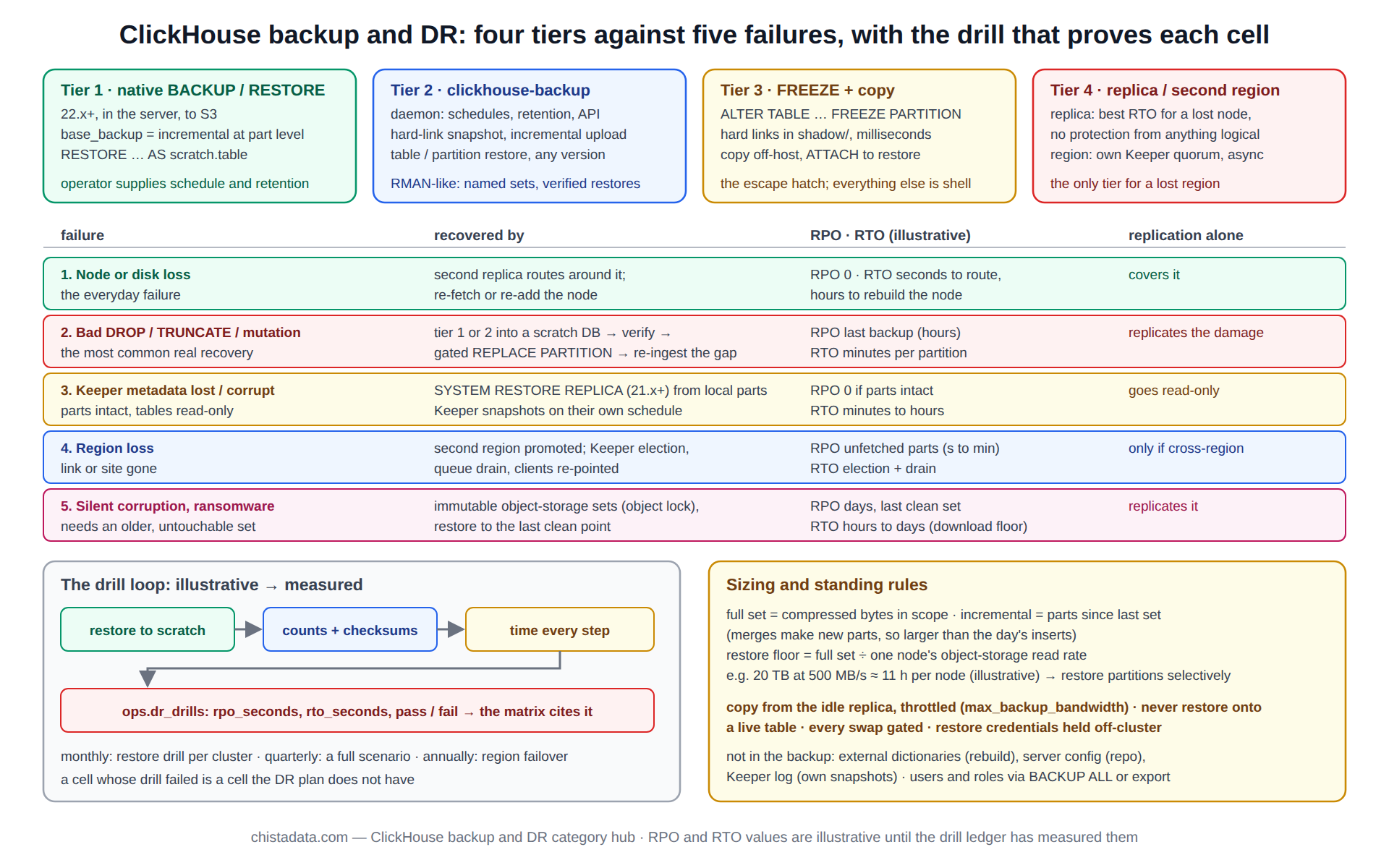
A ClickHouse backup is judged by one question: which failure does it get the cluster back from, and how fast? Replication protects against a node dying and against nothing else, because a bad DROP, a wrong mutation or a corrupted Keeper tree is replicated as faithfully as a good insert. The backup tiers that sit above replication each cover a different set of failures, and the disaster recovery plan is the matrix of tiers against failures, with an RPO and RTO in every cell that has been proven by a drill.
This page is that matrix. It sets out four backup tiers with what each captures and what it costs, five failure scenarios with the tier that recovers each, the restore procedures behind the cells, and the drill cadence that keeps the numbers honest. The replication hub covers the layer underneath; the reliability hub covers the SLO the RPO and RTO feed.
The archive holds the ClickHouse-backup tool guide, the RMAN-like backup toolkit, disaster recovery drill design, checkpointing internals, recovery from Keeper (ZooKeeper) metadata corruption, clickhouse-copier for data copies, the 26.8 LTS HA changes, and the inverted-index post that sits here for its restore-and-rebuild section.
What a ClickHouse backup has to capture
A MergeTree table is a set of immutable parts plus metadata: the table definition, the partition and part list, and for replicated tables the Keeper tree that says which parts exist and where. A consistent backup captures the parts of a moment and enough metadata to re-attach them; because parts never change after they are written, a backup can be incremental at part level, copying only parts created since the last one.
That property is what every tier below relies on, and the how checkpointing works post explains why there is no redo log to replay: the parts are the checkpoint.
-- what a backup of one table consists of, right now
SELECT partition, count() AS parts, sum(rows) AS rows, formatReadableSize(sum(bytes_on_disk)) AS on_disk,
       min(modification_time) AS oldest_part, max(modification_time) AS newest_part
FROM system.parts
WHERE active AND table = 'events'
GROUP BY partition ORDER BY partition;

-- parts written since the last backup: the incremental set
SELECT count(), formatReadableSize(sum(bytes_on_disk))
FROM system.parts WHERE active AND table = 'events' AND modification_time > '${LAST_BACKUP_TS}';
Tier 1: native BACKUP and RESTORE, the built-in ClickHouse backup to object storage
Since 22.x the server itself writes backups: BACKUP TABLE … TO S3(...) copies parts and metadata to a bucket, base_backup makes the next one incremental, and RESTORE brings a table, a database or the whole server back into place or into a scratch database. It runs inside the server with no agent, respects storage policies, and can back up from one replica while the others serve. It is the first tier on any cluster from 22.x up, and its limits are that it knows nothing about schedules or retention, which the operator supplies.
-- full, then incremental against it; both to the same bucket prefix
BACKUP TABLE events TO S3('https://${BUCKET}.s3.amazonaws.com/ch-backups/events/2026-09-14-full', '${AWS_ACCESS_KEY_ID}', '${AWS_SECRET_ACCESS_KEY}');

BACKUP TABLE events TO S3('https://${BUCKET}.s3.amazonaws.com/ch-backups/events/2026-09-19-incr', '${AWS_ACCESS_KEY_ID}', '${AWS_SECRET_ACCESS_KEY}')
SETTINGS base_backup = S3('https://${BUCKET}.s3.amazonaws.com/ch-backups/events/2026-09-14-full', '${AWS_ACCESS_KEY_ID}', '${AWS_SECRET_ACCESS_KEY}');

-- status and history
SELECT id, name, status, error, start_time, end_time, formatReadableSize(total_size) AS size, num_files
FROM system.backups ORDER BY start_time DESC LIMIT 10;
Tier 2: clickhouse-backup, the scheduled and retained ClickHouse backup
The Altinity clickhouse-backup tool wraps the same part-level model in a daemon with schedules, retention, remote storage drivers, and an API, and it predates the native statements, so it runs on every version in production. It creates local snapshots by hard-linking parts (instant, no extra space until parts diverge), uploads them incrementally, and restores by the reverse path, with table-level and partition-level selection. The using ClickHouse-backup for comprehensive backup and restore post is the operating guide, and the backup toolkit, an Oracle RMAN-like approach post frames it as a catalogue-driven system with named backup sets and verified restores.
# daily full on Sunday, incremental otherwise, 14 days retained remotely (config.yml excerpt)
general:
  remote_storage: s3
  backups_to_keep_local: 2
  backups_to_keep_remote: 14
s3:
  bucket: ${BACKUP_BUCKET}
  path: ch-prod/{shard}
  access_key: ${AWS_ACCESS_KEY_ID}
  secret_key: ${AWS_SECRET_ACCESS_KEY}

# operate
clickhouse-backup create_remote --diff-from-remote=$(clickhouse-backup list remote | tail -1 | awk '{print $1}') events_$(date +%F)
clickhouse-backup list remote
clickhouse-backup restore_remote --schema --data --table 'default.events' events_2026-09-19
Tier 3: partition freeze and copy, the manual ClickHouse backup
ALTER TABLE … FREEZE hard-links a table’s or partition’s parts into shadow/, which is a consistent snapshot in milliseconds that costs nothing until merges replace the linked parts. It is the escape hatch when neither tier above is available (an old version, an air-gapped host) and the basis of the older toolchains.
What it lacks is everything around the snapshot: copying it elsewhere, cataloguing it, and restoring it are shell work, and the clickhouse-copier post covers the tool that used to move the resulting data between clusters (deprecated in 24.x; the per-partition INSERT … SELECT FROM remote() pattern replaces it).
ALTER TABLE events FREEZE PARTITION '202609' WITH NAME 'pre_change_202609';
-- snapshot lands under /var/lib/clickhouse/shadow/pre_change_202609/ as hard links, then is copied off-host
-- restore: copy parts into detached/, then
ALTER TABLE events ATTACH PARTITION '202609';
Tier 4: the replica that is not a backup, and the region that is
A second replica recovers a lost node in the time it takes to route around it, which is the best RTO on the matrix and the reason every shard has two. It recovers nothing logical: the drop, the mutation and the Keeper corruption arrive on every replica within seconds.
A second region with its own Keeper quorum and asynchronous replication recovers a lost region at the RPO of the unfetched parts, and is the only tier for that scenario; the 26.8 LTS performance and HA changes post lists what changed for cross-region operation, and the horizontal scaling hub covers the topology.
The five failure scenarios, and the tier that recovers each
The matrix below is the disaster recovery plan in one table. Each cell’s RPO and RTO are illustrative starting points; the drill section explains how they become measured values for a given cluster.
| Failure | Recovered by | RPO (illustrative) | RTO (illustrative) | What replication alone does |
|---|---|---|---|---|
| 1. Node or disk loss | second replica; re-fetch or re-add | 0 | seconds to route; hours to rebuild the node | covers it |
| 2. Bad DROP, TRUNCATE, wrong mutation | tier 1 or 2 restore into a scratch DB, then partition swap | last backup (hours) | minutes per partition | replicates the damage |
| 3. Keeper metadata corruption or loss | SYSTEM RESTORE REPLICA from local parts; Keeper snapshot | 0 if parts intact | minutes to hours | tables go read-only |
| 4. Region loss | second region, promoted | unfetched parts (seconds to minutes) | Keeper election + queue drain | only if cross-region |
| 5. Silent corruption, ransomware | immutable object-storage backups, older point | days, to the last clean set | hours to days | replicates it |
Scenario 2 in detail: undoing a bad DROP with a ClickHouse backup
The most common real recovery. A table or partition is dropped or wrongly mutated, every replica follows, and the fix is a restore of the affected partitions from the last backup into a scratch database, verification against what is known about the lost data, and a partition swap into the live table. Rows written between the backup and the drop are re-ingested from the upstream source where one exists. The restore never targets the live table directly, and the swap is gated.
-- 1. restore the affected partition into a scratch database
CREATE DATABASE IF NOT EXISTS restore_scratch;
RESTORE TABLE default.events AS restore_scratch.events PARTITION '202609'
FROM S3('https://${BUCKET}.s3.amazonaws.com/ch-backups/events/2026-09-19-incr', '${AWS_ACCESS_KEY_ID}', '${AWS_SECRET_ACCESS_KEY}');

-- 2. verify: rows and the newest timestamp, against the ingestion ledger
SELECT count(), max(ts) FROM restore_scratch.events WHERE toYYYYMM(ts) = 202609;

-- 3. CONFIRMATION GATE: counts recorded, gap to re-ingest identified
ALTER TABLE default.events REPLACE PARTITION '202609' FROM restore_scratch.events;

-- 4. re-ingest the gap from the source, then validate
SELECT count(), max(ts) FROM default.events WHERE toYYYYMM(ts) = 202609;
Scenario 3 in detail: Keeper metadata gone, parts intact
When the Keeper tree for a table is lost or corrupted, the replicas still hold every part on disk but refuse writes because the coordination state is gone. Since 21.x, SYSTEM RESTORE REPLICA rebuilds the Keeper metadata from the local parts and re-attaches the replica; before that the procedure was to convert to a non-replicated table, recreate the replicated one and re-attach parts by hand. The restore ClickHouse after ZooKeeper metadata corruption post is the archive’s runbook for the older path, and the check that decides which path applies is whether the parts are still active on disk.
-- the symptom
SELECT database, table, is_readonly, zookeeper_exception FROM system.replicas WHERE is_readonly;

-- parts are intact?  then the modern path
SELECT count(), sum(rows) FROM system.parts WHERE table = 'events' AND active;
SYSTEM RESTORE REPLICA events;
SYSTEM SYNC REPLICA events;

-- Keeper itself: keep snapshots of the coordination log too (keeper_server.snapshot_storage_path), on a schedule
The ClickHouse backup drill: how illustrative RPO and RTO become measured ones
A ClickHouse backup that has not been restored is a hope. The drill restores a real backup set into a scratch database on a schedule, compares counts and checksums with production for the same partitions, times every step, and records the RPO and RTO actually achieved against the matrix; a cell whose drill fails is a cell the DR plan does not have. The disaster recovery drills: frequency, scope and evidence post sets out the cadence ChistaDATA runs: a restore drill monthly per cluster, a full failure-scenario drill quarterly, a region failover annually, each with a written result.
-- drill ledger: one row per drill, the evidence the matrix cites
CREATE TABLE ops.dr_drills
(
    drill_date   Date,
    cluster      LowCardinality(String),
    scenario     LowCardinality(String),   -- 'restore', 'bad_drop', 'keeper_loss', 'region', 'corruption'
    backup_set   String,
    rows_restored UInt64,
    checksum_match UInt8,
    rpo_seconds  UInt32,
    rto_seconds  UInt32,
    result       LowCardinality(String),   -- 'pass' | 'fail'
    notes        String
)
ENGINE = MergeTree ORDER BY (cluster, scenario, drill_date);

-- the question the review asks every quarter
SELECT cluster, scenario, max(drill_date) AS last_drill, argMax(result, drill_date) AS last_result, argMax(rto_seconds, drill_date) AS last_rto_s
FROM ops.dr_drills GROUP BY cluster, scenario ORDER BY cluster, scenario;
ClickHouse backup retention, immutability and the fifth scenario
Scenarios 1 to 4 need the latest ClickHouse backup; scenario 5 needs an older one that the attacker or the bug could not reach. Object-storage backups with versioning and an immutability policy (object lock, retention mode) keep the last clean set beyond the reach of the credentials the cluster uses, and a retention schedule that keeps dailies for two weeks, weeklies for three months and monthlies for a year gives a point to return to. The backup credentials are write-only from the cluster’s side; the restore credentials live elsewhere.
What a ClickHouse backup does not capture
Dictionaries loaded from external sources are rebuilt from those sources, not from the backup; users, roles and quotas defined in SQL are backed up with BACKUP ALL or exported separately; server configuration lives in the configuration repository, not in the data directory; and the Keeper coordination log is its own backup. The inverted indexes post sits in this category for a reason of this kind: some index formats changed across versions, and a restore onto a newer server rebuilds them rather than reading them.
Sizing the backup: bytes, windows and where the copy runs
Three numbers size the tiers. The full set is the compressed bytes of every table in scope, which the system.parts query above gives per table; the daily incremental is the bytes of parts written since the last set, which on a merge-heavy table is larger than the day’s inserts because merged parts are new parts; and the restore window is the full set divided by the object-storage read throughput of one node, since a restore is a download.
A cluster whose full set is 20 TB and whose nodes pull 500 MB/s from object storage has an eleven-hour full-restore floor per node (illustrative), which is the RTO the matrix has to accept for scenario 5 or the reason to restore partitions selectively.
The copy runs from one replica per shard, chosen for its idle capacity, never from the replica that serves the heaviest reads, and it is throttled with max_backup_bandwidth so that it does not compete with merges for disk. The monitoring hub covers watching the backup window alongside the merge budget.
-- the three sizing numbers, per table
SELECT
    table,
    formatReadableSize(sum(bytes_on_disk))                                                        AS full_set,
    formatReadableSize(sumIf(bytes_on_disk, modification_time > now() - INTERVAL 1 DAY))          AS incremental_1d,
    round(sum(bytes_on_disk) / 500e6 / 3600, 1)                                                   AS restore_hours_at_500MBps
FROM system.parts
WHERE active AND database = currentDatabase()
GROUP BY table ORDER BY sum(bytes_on_disk) DESC;

SET max_backup_bandwidth = 200000000;   -- 200 MB/s per backup, leaving disk for merges
The ClickHouse backup runbook: what the on-call engineer opens
The matrix, the schedule and the drill ledger are useless at 03:00 unless they are one document. The runbook ChistaDATA keeps per cluster has five sections in the order they are needed: which scenario this is (the symptom table from the replication hub), which backup set to use (the newest set whose drill passed, from the ledger), the restore procedure for that scenario with its verification and gate, the re-ingestion step for the gap, and the validation that closes the incident.
It is versioned, reviewed after every drill, and stored somewhere that survives the cluster it describes, with the restore credentials held by the people who will run it rather than by the cluster.
-- the first query in the runbook: which set is the newest that a drill has passed?
SELECT b.backup_set, b.drill_date, b.rpo_seconds, b.rto_seconds
FROM ops.dr_drills AS b
WHERE cluster = 'ch_prod' AND scenario = 'restore' AND result = 'pass'
ORDER BY drill_date DESC LIMIT 1;
Version notes
Native BACKUP and RESTORE are 22.x and later, with S3 and incremental support maturing through 23.x. SYSTEM RESTORE REPLICA is 21.x and later. clickhouse-copier was deprecated in 24.x. clickhouse-backup tracks server versions closely; match its release to the server before relying on a new server feature. The backup and restore documentation is the source for the native statements; confirm behaviour on the running version before the drill that proves it.
Reading the archive
The archive was written across 22.x to 26.8, before and after the native statements arrived, so the older posts describe tier 3 and the copier as primary methods where a current design would start at tier 1 or 2.
Read checkpointing first for why parts are the ClickHouse backup unit, then the ClickHouse-backup guide and the RMAN-like toolkit post for tier 2 in practice, the metadata-corruption runbook for scenario 3, and the drills post for turning the matrix into evidence. The copier post is historical context for tier 3; the 26.8 HA post covers the cross-region tier.
ChistaDATA builds the matrix, the backup schedule and the drill calendar as a ClickHouse consulting deliverable and runs the drills under managed services, with every restore landing in a scratch database first. No restore on this page targets a live table directly, every swap is gated, and the plan is only as real as its last drill result.