Google BigQuery is a serverless, columnar analytical warehouse that bills on bytes scanned or on reserved slot capacity, and for a large share of workloads it is exactly the right tool. The archive below collects our BigQuery work at ChistaDATA: a machine-learning case using BigQuery ML, a benchmarking comparison against ClickHouse, and a migration series for teams whose economics or latency requirements have outgrown the platform. This page frames when each of those applies, using the seven measurable signals we check before advising any team to stay on Google BigQuery, tune it, or move an analytical workload to ClickHouse.
Nothing here is a blanket recommendation. The decision is workload-shaped, and the sections below tell you which query to run against INFORMATION_SCHEMA to see where your own workload sits.
What Google BigQuery does well, stated without hedging
A decision guide that only lists a platform’s weaknesses is marketing. These are the strengths that make BigQuery the correct answer for many of the teams that ask us about ClickHouse.
Zero-operations elasticity. There is no cluster to size, no merge backlog to watch, no Keeper quorum to protect. A query that needs 2,000 slots for ninety seconds gets them, then releases them. For bursty, low-concurrency analyst workloads this is close to unbeatable, and it is the single largest reason not to migrate.
Storage economics for cold data. Long-term storage pricing drops automatically for partitions untouched for ninety days, and physical-storage billing (compressed bytes) can cut the storage line substantially for compressible datasets. Petabyte-scale retention with negligible operational cost is a real advantage over any self-managed cluster.
SQL-native machine learning. BigQuery ML trains K-means, logistic regression, boosted trees, ARIMA_PLUS and more with a CREATE MODEL statement, inside the governance boundary of the warehouse. Our fintech revenue-optimization piece linked below is a worked example of exactly this: K-means segmentation for fintech revenue optimization in Google BigQuery. Nothing in ClickHouse replaces this cleanly; you would move training out to Python.
Ecosystem gravity. Looker, Dataform, Dataflow, Pub/Sub streaming inserts, BI Engine, the Storage Read API, and IAM-integrated row and column policies all arrive configured. A team already inside Google Cloud pays a real integration cost to leave.
The seven signals that decide the question
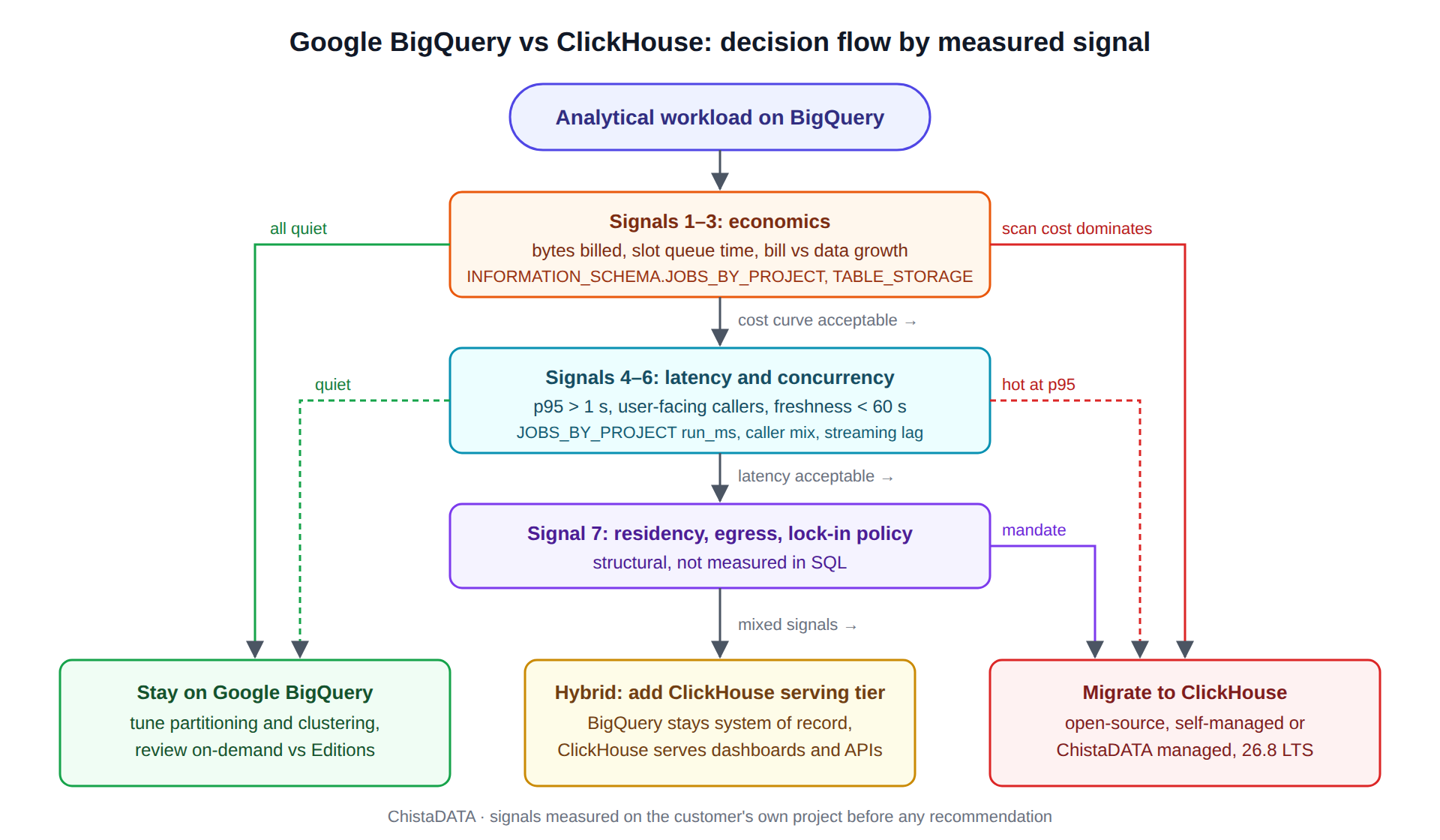
We look at these in order. The first three are economic, the next three are latency and concurrency, and the last is architectural. Each one names the catalog view that measures it.
Signal 1: bytes billed per query is dominated by full scans
BigQuery’s on-demand model charges per TiB scanned. Partition and cluster pruning reduce the scanned volume, but many real workloads have predicates that pruning cannot serve: high-cardinality lookups, joins on non-clustered columns, or dashboards that filter on a column nobody clustered on. The query below shows the distribution of bytes billed and the ratio of billed to processed bytes over the last thirty days.
SELECT
    DATE(creation_time)                                         AS run_date,
    COUNT(*)                                                    AS job_count,
    ROUND(SUM(total_bytes_billed) / POW(1024, 4), 2)            AS tib_billed,
    ROUND(APPROX_QUANTILES(total_bytes_billed, 100)[OFFSET(95)]
          / POW(1024, 3), 2)                                    AS p95_gib_billed_per_query,
    ROUND(SUM(total_slot_ms) / 1000 / 3600, 1)                  AS slot_hours
FROM `region-us`.INFORMATION_SCHEMA.JOBS_BY_PROJECT
WHERE creation_time >= TIMESTAMP_SUB(CURRENT_TIMESTAMP(), INTERVAL 30 DAY)
  AND job_type = 'QUERY'
  AND statement_type != 'SCRIPT'
GROUP BY run_date
ORDER BY run_date DESC;
If p95 bytes billed per query is measured in tens of GiB and the same queries repeat all day, you are paying the scan tax on every refresh. In ClickHouse a MergeTree table with a sort key matching the dominant predicate reads only the granules that match; there is no per-byte charge, so the cost of a repeated dashboard query is CPU time on hardware you already own. The mechanism is different, not just the pricing: BigQuery scans column blocks in Colossus and relies on Dremel’s tree to parallelize; ClickHouse skips granules using the primary index and skip indexes before any I/O happens.
Signal 2: slot contention shows up as queue time
With capacity reservations (Editions), queries wait when the reservation is saturated. The timeline field in JOBS_TIMELINE and the difference between creation_time and start_time reveal the wait.
SELECT
    job_id,
    user_email,
    TIMESTAMP_DIFF(start_time, creation_time, MILLISECOND)   AS queue_ms,
    TIMESTAMP_DIFF(end_time, start_time, MILLISECOND)        AS run_ms,
    total_slot_ms,
    reservation_id
FROM `region-us`.INFORMATION_SCHEMA.JOBS_BY_PROJECT
WHERE creation_time >= TIMESTAMP_SUB(CURRENT_TIMESTAMP(), INTERVAL 7 DAY)
  AND job_type = 'QUERY'
  AND TIMESTAMP_DIFF(start_time, creation_time, MILLISECOND) > 2000
ORDER BY queue_ms DESC
LIMIT 50;
Queue time above a couple of seconds at peak, repeated daily, means the reservation is undersized or the workload has a concurrency shape that slot-based scheduling handles poorly. Autoscaling slots fix the symptom at a cost. A ClickHouse cluster serving the same dashboards runs each query on a fixed thread pool with no admission queue; concurrency is bounded by max_concurrent_queries and CPU, and the measurement to compare against is query_duration_ms in system.query_log at p95 under load.
Signal 3: the monthly bill is growing faster than the data
Plot bytes billed per month against logical bytes stored per month. If the first curve is steeper than the second, the workload is becoming more query-intensive over the same data, which is the pattern where a fixed-cost cluster wins. If the curves track each other, BigQuery’s pricing is doing what it should and a migration would mostly relocate cost rather than remove it.
Signal 4: p95 latency for interactive queries exceeds one second
BigQuery’s floor for a trivial query is typically several hundred milliseconds of scheduling and metadata overhead before any data is read, and BI Engine accelerates only what fits in its reserved memory. User-facing analytics, embedded dashboards, and operational monitoring generally need sub-second p95 with hundreds of concurrent viewers. That is the regime where MergeTree’s granule skipping and ClickHouse’s vectorized execution were designed to live, and it is what our comparative benchmark measured: ChistaDATA Cloud for ClickHouse versus Google BigQuery, comparative benchmarking. Read the methodology section before the results; the numbers are scoped to the tested dataset and query set, not to every workload.
Signal 5: query concurrency is user-facing, not analyst-facing
Ten analysts running ad-hoc SQL is BigQuery’s home ground. Ten thousand tenants each refreshing a dashboard every thirty seconds is not, because each refresh is a job with scheduling overhead and a scan charge. Count distinct callers and job rate per minute from JOBS_BY_PROJECT; if the top callers are service accounts behind an application, the workload has already become a serving workload.
Signal 6: freshness requirement is under one minute
Streaming inserts and the Storage Write API make new rows queryable quickly, but sustained high-rate streaming carries its own pricing line and the streaming buffer has query-planning implications. ClickHouse ingests from Kafka or Pulsar directly into MergeTree parts with async_insert batching, and materialized views maintain rollups on insert. For pipelines where seconds of lag matter, the ClickHouse side is simpler to reason about, and the lag is observable in system.kafka_consumers or the equivalent consumer metrics.
Signal 7: data residency, egress, or lock-in policy
This one is not measured in SQL. Teams with in-VPC or on-premises mandates, multi-cloud strategies, or a policy against proprietary query engines have a structural reason to run open-source ClickHouse regardless of the cost curves above. BigQuery Omni narrows the residency gap but does not eliminate the engine dependency.
Decision flow
The diagram summarizes the order in which we apply the signals. Economic signals are checked first because they are cheapest to measure and most often decisive.
Decision matrix by workload profile
| Workload profile | Typical signals | Our default advice |
|---|---|---|
| Ad-hoc analyst exploration, bursty, low concurrency | Signals 1 and 2 quiet; p95 latency tolerance in seconds | Stay on Google BigQuery; tune partitioning and clustering, review on-demand vs Editions |
| Scheduled ELT and reporting over petabytes | Storage-dominated bill; predictable slot usage | Stay; consider Editions with baseline slots and cold-storage tiering |
| Embedded, customer-facing dashboards | Signals 4 and 5 hot; scan cost per refresh visible | Move the serving layer to ClickHouse; keep BigQuery as the system of record if ML or governance needs it |
| Real-time event analytics (clickstream, telemetry, fintech ticks) | Signals 4, 5 and 6 hot | ClickHouse with Kafka/Pulsar ingestion and materialized-view rollups |
| BigQuery ML dependent pipelines | Models trained in SQL, features in the warehouse | Stay for training; optionally serve scored results from ClickHouse |
| Residency or lock-in constraint | Signal 7 | Self-managed or ChistaDATA-managed open-source ClickHouse |
The hybrid pattern most teams end up with
A full rip-and-replace is rarer than the migration literature suggests. The common landing state keeps Google BigQuery as the governed system of record and analyst workbench, and adds a ClickHouse serving tier for the queries that are latency-sensitive or repeated at high volume. Data flows one way, via scheduled exports to Cloud Storage as Parquet, or via the same Kafka topics that feed BigQuery, and the ClickHouse tables are treated as rebuildable projections.
The cheapest way to test this hypothesis on your own data is a Parquet export and a direct read through the s3 or gcs table function, no pipeline required:
-- BigQuery: export one partition to GCS as Parquet
EXPORT DATA
OPTIONS (
    uri = 'gs://${GCS_BUCKET}/events/dt=2026-09-01/*.parquet',
    format = 'PARQUET',
    compression = 'SNAPPY'
) AS
SELECT *
FROM `${PROJECT}.analytics.events`
WHERE event_date = DATE '2026-09-01';

-- ClickHouse 26.x: query the export in place, then measure
SELECT
    toStartOfHour(event_ts) AS h,
    count()                 AS events,
    uniqExact(user_id)      AS users
FROM gcs(
    'https://storage.googleapis.com/${GCS_BUCKET}/events/dt=2026-09-01/*.parquet',
    '${GCS_HMAC_KEY}',
    '${GCS_HMAC_SECRET}',
    'Parquet'
)
GROUP BY h
ORDER BY h;

SELECT
    query_duration_ms,
    read_rows,
    formatReadableSize(read_bytes) AS read,
    formatReadableSize(memory_usage) AS mem
FROM system.query_log
WHERE type = 'QueryFinish'
  AND query_kind = 'Select'
ORDER BY event_time DESC
LIMIT 1;
Once the exported data is in a MergeTree table with a sort key chosen for the dashboard predicates, rerun the same dashboard queries and compare query_duration_ms p95 against the BigQuery run_ms distribution from Signal 2. That comparison, on your data, is the only benchmark that matters for the decision.
Running the Google BigQuery cost model in one working session
Everything needed for Signals 1 through 3 is in INFORMATION_SCHEMA, and a single analyst session produces a defensible picture. The storage side comes from TABLE_STORAGE, which reports logical and physical bytes and the split between active and long-term storage; the query side comes from the JOBS_BY_PROJECT view already used above.
SELECT
    table_schema,
    table_name,
    ROUND(active_logical_bytes / POW(1024, 3), 1)     AS active_logical_gib,
    ROUND(long_term_logical_bytes / POW(1024, 3), 1)  AS long_term_logical_gib,
    ROUND(total_physical_bytes / POW(1024, 3), 1)     AS physical_gib,
    ROUND(total_logical_bytes / NULLIF(total_physical_bytes, 0), 1) AS compression_ratio
FROM `region-us`.INFORMATION_SCHEMA.TABLE_STORAGE
WHERE project_id = '${PROJECT}'
ORDER BY total_logical_bytes DESC
LIMIT 25;
Join that against bytes billed per referenced table from JOBS_BY_PROJECT.referenced_tables and the result is a per-table ratio of scan cost to storage cost. Tables with high ratios are the candidates for a ClickHouse serving tier; tables with low ratios are cheap to leave in Google BigQuery indefinitely. Compression ratio matters for the ClickHouse sizing too: MergeTree with per-column codecs usually compresses telemetry and event data harder than BigQuery’s Capacitor format, so physical bytes in BigQuery are an upper bound on the NVMe you will need.
The query-plan side is worth an hour as well. Google BigQuery exposes per-stage execution detail in job_stages, including shuffle output bytes and records read per stage. A plan whose middle stages write far more shuffle bytes than the final stage returns is a join or a GROUP BY on a high-cardinality key doing distributed repartitioning; those are the queries whose latency profile changes most when moved to a ClickHouse table sorted on that key, because the repartition disappears.
SELECT
    job_id,
    stage.name                                          AS stage_name,
    stage.records_read,
    stage.records_written,
    ROUND(stage.shuffle_output_bytes / POW(1024, 3), 2) AS shuffle_gib,
    stage.slot_ms
FROM `region-us`.INFORMATION_SCHEMA.JOBS_BY_PROJECT,
UNNEST(job_stages) AS stage
WHERE job_id = '${JOB_ID}'
ORDER BY stage.start_ms;
Two cautions on interpreting Google BigQuery numbers. Bytes billed on an on-demand project are rounded up to a 10 MB minimum per table referenced, so a workload of many tiny queries over many tables reports inflated scan figures; correct for it before comparing to ClickHouse read bytes. And total_slot_ms on an Editions reservation is a capacity metric, not a cost metric, until multiplied by the reservation’s effective slot-hour price after autoscaling; the on-demand and Editions models produce different cost curves for the same job history and both should be modelled.
What a ClickHouse serving tier looks like for a Google BigQuery shop
Teams that keep Google BigQuery as the system of record and add ClickHouse for serving typically land on one of two shapes. In the batch shape, a scheduled query in BigQuery writes daily or hourly Parquet exports to Cloud Storage, and a ClickHouse table function or a scheduled INSERT ... SELECT FROM gcs(...) loads them; freshness is the export interval, operational complexity is low, and reconciliation is a count per partition on both sides. In the streaming shape, the Pub/Sub or Kafka topic that feeds BigQuery’s Storage Write API is also consumed by ClickHouse’s Kafka engine or by a consumer using async inserts, so both systems receive the same events and the BigQuery copy remains authoritative for audits and ML while ClickHouse serves the dashboards. The streaming shape is the one where dual-write consistency has to be designed rather than assumed, and a nightly reconciliation query on both sides is part of the deployment, not an afterthought.
What migration actually involves
Our migration series covers the mechanics in depth, starting with Migrating from Google BigQuery to ChistaDATA Cloud for ClickHouse, Part 1. The short version of the hard parts, in the order they bite:
Type mapping. BigQuery NUMERIC and BIGNUMERIC map to Decimal(38, 9) and Decimal(76, 38); STRUCT and ARRAY<STRUCT> flatten to Tuple or Nested, and the choice affects query rewrites; TIMESTAMP becomes DateTime64(6, 'UTC') and every implicit timezone assumption has to be made explicit.
Sort-key design. BigQuery clustering is advisory and forgiving; the MergeTree ORDER BY is the physical layout and the primary index. Getting it wrong is the single most common cause of a migration that “benchmarks slower than BigQuery.” Sort keys are chosen from the predicate profile in JOBS_BY_PROJECT.referenced_tables and the query text, not from the schema.
Query rewrites. ARRAY_AGG, UNNEST, SAFE_DIVIDE, QUALIFY, and BigQuery’s window-function defaults all have ClickHouse equivalents, but not always one-to-one. ClickHouse 26.x has QUALIFY, arrayJoin, and divideOrNull, which cover most cases.
Governance parity. Row-level policies, column masking, and audit logging must be rebuilt with ClickHouse row policies, column-level grants and system.query_log retention before the first production user connects.
Where this guidance does not apply
We do not advise moving off Google BigQuery when the workload is dominated by BigQuery ML training, when the organization’s data governance model is built on Dataplex and Google IAM with no capacity to replicate it, or when the team has no operational ownership of infrastructure and no appetite for a managed ClickHouse service. In all three cases the total cost of a migration exceeds the scan-cost savings for years.
Version boundaries matter here too. BigQuery’s pricing model, Editions tiers, and BI Engine limits change; verify the current figures on Google’s BigQuery pricing page before running the cost model. ClickHouse function names and settings cited above are accurate for ClickHouse 26.8 LTS and should be checked against the release notes for other versions.
Posts in this archive
Three pieces sit under the Google BigQuery category. The fintech K-means revenue-optimization walkthrough shows BigQuery ML doing what it does best. The comparative benchmark against ChistaDATA Cloud for ClickHouse is the measured basis for Signals 4 and 5. The migration series, Part 1 is the execution guide once the decision is made. If you want the seven signals run against your own project by an engineer who has done it before, our ClickHouse migration services page describes how we scope that engagement, and the ClickHouse consulting page covers ongoing architecture work. Test any change on a staging project before touching production, and keep the BigQuery dataset intact until the ClickHouse tier has served a full billing cycle.


