A ClickHouse index does not point at rows. It records, per block of granules, something about the values inside, and a query uses that record to skip blocks that cannot match. The primary index records the sort-key range; a minmax skip index records a column’s range; a set index records the distinct values; a Bloom-filter index records a probabilistic membership set; a text index records tokens; a vector index records an approximate neighbourhood graph. Which one fires for a given predicate, and whether it fires at all, follows from that.
This page is the taxonomy: eight kinds of ClickHouse index, what each records, the predicate shapes that can use it, the cost it adds to inserts and merges, and the EXPLAIN line that proves whether it was used. It closes with the troubleshooting sequence for an index that exists but does nothing, which is the most common index ticket ChistaDATA sees.
The archive under this category covers the practical guide to indexes, data-skipping index configuration, index selection and troubleshooting, granularity tuning, the underutilised-index case, LowCardinality’s effect on indexing, inverted and vector indexes, and the sort and index-scan internals.
Kind 1: the primary index, the only ClickHouse index that orders data
The primary index is built from the ORDER BY (or explicit PRIMARY KEY) expression: one entry per granule holding the first row’s key values, kept in memory, consulted for every query. It is the only index that changes how data is laid out, which is why it is the most important decision in a table definition and the one that cannot be changed without rewriting the table. A predicate uses it when it constrains a prefix of the key columns with equality or a range.
The practical guide to using indexes post starts here, and the SORT operation and index scan post explains how the sorted layout also removes the sort step from queries that order by a key prefix.
CREATE TABLE events
(
    ts          DateTime64(3),
    tenant_id   UInt32,
    event_type  LowCardinality(String),
    user_id     UInt64,
    url         String,
    payload     String
)
ENGINE = MergeTree
PARTITION BY toYYYYMM(ts)
ORDER BY (tenant_id, event_type, ts)          -- the primary index: prefix-ordered
SETTINGS index_granularity = 8192;

-- fires: prefix constrained
EXPLAIN indexes = 1 SELECT count() FROM events WHERE tenant_id = 42 AND event_type = 'purchase';
-- does not fire: prefix skipped
EXPLAIN indexes = 1 SELECT count() FROM events WHERE event_type = 'purchase';
-- PrimaryKey ... Granules: 61440/61440
Kind 2: minmax, the cheapest ClickHouse index to add
A minmax skip index stores the minimum and maximum of a column per block of GRANULARITY granules. It is a few bytes per block, costs almost nothing at insert time, and fires for range and equality predicates on columns whose values are correlated with the sort order: a secondary timestamp, a monotonically assigned identifier, a sequence number. On a column whose values are scattered uniformly across the table, every block’s range covers the whole domain and the index skips nothing, which is the case the underutilised index post diagnoses.
ALTER TABLE events ADD INDEX idx_user_minmax user_id TYPE minmax GRANULARITY 4;
ALTER TABLE events MATERIALIZE INDEX idx_user_minmax;     -- backfills existing parts, per partition if large

-- check selectivity before trusting it: how spread are the values inside a block?
SELECT
    intDiv(rowNumberInAllBlocks(), 8192 * 4)  AS block,
    min(user_id), max(user_id), uniq(user_id)
FROM events WHERE tenant_id = 42
GROUP BY block ORDER BY block LIMIT 10;      -- wide ranges in every block = minmax will not skip
Kind 3: set, the ClickHouse index for low-cardinality columns off the key
A set(max_rows) index stores the distinct values of a column per block, up to max_rows of them (0 means unlimited). It fires for equality and IN predicates and is the right ClickHouse index for a column with a few hundred distinct values that is not in the sort key: a status, a country, an error code. Above a few thousand distinct values per block the set is large and the check is slow; that is Bloom-filter territory.
ALTER TABLE events ADD INDEX idx_type_set event_type TYPE set(100) GRANULARITY 2;
-- fires for: WHERE event_type IN ('refund', 'chargeback')
-- skipped when a block contains more than 100 distinct values (index stores nothing for it)
Kind 4: bloom_filter, equality on high-cardinality columns
A bloom_filter(false_positive_rate) index stores a probabilistic membership set per block. It answers “this value is definitely not in this block” with certainty and “it may be” with the configured false-positive rate; it fires for equality, IN and has() predicates on high-cardinality columns such as user identifiers, order numbers and session keys. It never fires for ranges. The data-skipping indexes post measures the read reduction on a user-id lookup, and the index selection and troubleshooting post covers choosing between set and Bloom filter.
ALTER TABLE events ADD INDEX idx_user_bf user_id TYPE bloom_filter(0.01) GRANULARITY 4;
ALTER TABLE events MATERIALIZE INDEX idx_user_bf IN PARTITION 202609;

EXPLAIN indexes = 1
SELECT ts, event_type FROM events WHERE tenant_id = 42 AND user_id = 7781234;
-- Skip  Name: idx_user_bf  Type: bloom_filter  Parts: 3/3  Granules: 48/8400
Kind 5 and 6: tokenbf_v1 and ngrambf_v1, the substring ClickHouse index pair
tokenbf_v1(size_bytes, hashes, seed) splits a string on non-alphanumeric characters and puts each token in a Bloom filter; it fires for hasToken(), and for LIKE '%word%' and = when the pattern is a whole token. ngrambf_v1(n, size_bytes, hashes, seed) puts every n-character substring in the filter and fires for arbitrary LIKE '%abc%' substrings of at least n characters. Both are sized explicitly, and an undersized filter saturates and stops skipping without any error, so the false-positive behaviour is measured rather than assumed. The search hub covers the pair in depth alongside the text index.
-- URLs: tokens are path segments and query keys
ALTER TABLE events ADD INDEX idx_url_tok url TYPE tokenbf_v1(32768, 3, 0) GRANULARITY 4;
-- payload: arbitrary substrings, 4-grams
ALTER TABLE events ADD INDEX idx_payload_ng payload TYPE ngrambf_v1(4, 65536, 3, 0) GRANULARITY 4;

-- fires
SELECT count() FROM events WHERE hasToken(url, 'checkout');
SELECT count() FROM events WHERE payload LIKE '%ERR-4031%';
-- does not fire: pattern shorter than n, or a leading wildcard on a tokenbf column with a partial token
SELECT count() FROM events WHERE payload LIKE '%ER%';
Kind 7: the text index (formerly inverted)
The full-text index stores, per block, a posting list of tokens; unlike the Bloom variants it is exact, supports token, phrase-adjacent and prefix queries, and is considerably larger. It was introduced as the experimental inverted index in 23.x and renamed text in 25.x with a different on-disk format; tables created with the old name must be re-indexed after that boundary. The inverted indexes in ClickHouse post covers the original design and its trade-offs, which still hold for the renamed index.
-- 25.x and later
SET allow_experimental_full_text_index = 1;
ALTER TABLE events ADD INDEX idx_payload_text payload TYPE text(tokenizer = 'default') GRANULARITY 1;

SELECT count() FROM events WHERE hasToken(payload, 'timeout');   -- exact posting-list lookup
Kind 8: vector_similarity, the approximate-nearest-neighbour ClickHouse index
The vector index builds an HNSW graph over an Array(Float32) column so that ORDER BY cosineDistance(embedding, [..]) LIMIT k reads a neighbourhood rather than the whole table. It replaced the earlier annoy and usearch types in 25.x; the graph is built at merge time, which makes it the most expensive index on the insert path, and it is only consulted for the exact ORDER BY distance LIMIT shape. The optimising the vector search index post covers the build parameters and the recall-versus-latency trade.
SET allow_experimental_vector_similarity_index = 1;
ALTER TABLE docs ADD INDEX idx_emb embedding TYPE vector_similarity('hnsw', 'cosineDistance', 768)
    GRANULARITY 100000000;

SELECT id, cosineDistance(embedding, ${QUERY_VECTOR}) AS d
FROM docs
ORDER BY d ASC
LIMIT 10;   -- with a WHERE clause the index may be bypassed; check EXPLAIN indexes = 1
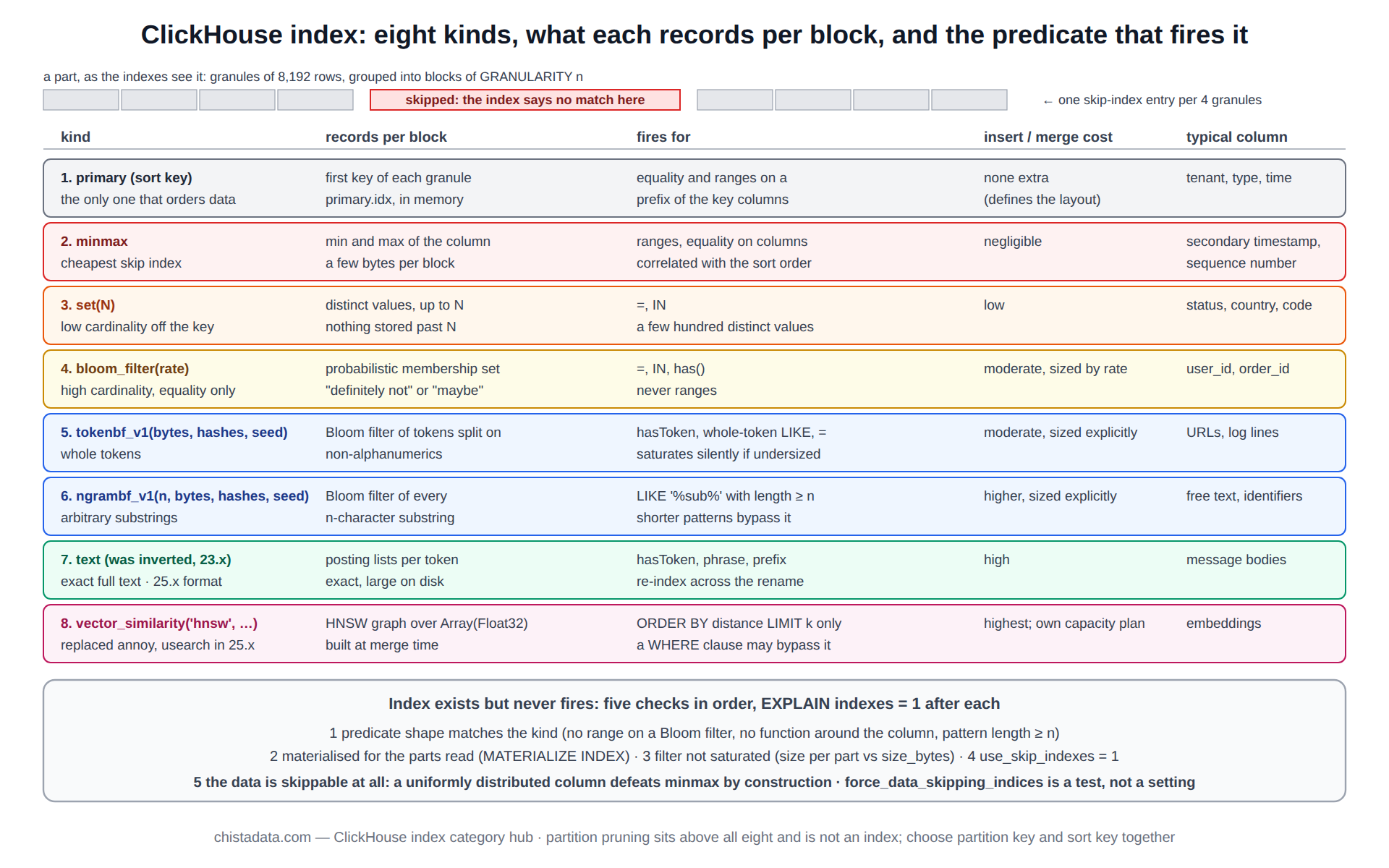
The ClickHouse index taxonomy in one table
The table reads left to right as a decision: start from the predicate shape a query uses, find the row whose “fires for” column matches it, check that the column’s cardinality fits the kind, and only then weigh the insert cost.
Two kinds often qualify; the cheaper one is tried first and the EXPLAIN granule count decides whether the more expensive one is needed. Partition pruning sits above all eight kinds and is not an index at all: a predicate on the partition expression removes whole parts before any index is consulted, which is why the partition key and the sort key are chosen together.
| Kind | Records per block | Fires for | Insert and merge cost | Typical column |
|---|---|---|---|---|
| 1. primary | first key of each granule | prefix equality and ranges | none extra (defines the sort) | tenant, type, time |
| 2. minmax | min and max | ranges, equality on correlated columns | negligible | secondary timestamp, sequence |
| 3. set | distinct values up to N | =, IN on low cardinality | low | status, country, code |
| 4. bloom_filter | probabilistic membership | =, IN, has() on high cardinality | moderate, sized by rate | user_id, order_id |
| 5. tokenbf_v1 | token Bloom filter | hasToken, whole-token LIKE | moderate, sized explicitly | URLs, log lines |
| 6. ngrambf_v1 | n-gram Bloom filter | LIKE ‘%sub%’ with len ≥ n | higher, sized explicitly | free text, identifiers |
| 7. text | exact posting lists | hasToken, phrase, prefix | high; large on disk | message bodies |
| 8. vector_similarity | HNSW graph | ORDER BY distance LIMIT k | highest; built at merge | embeddings |
GRANULARITY and index_granularity: two ClickHouse index settings often confused
index_granularity is a table setting: rows per granule, the unit of the primary index, 8,192 by default and adaptive by bytes. GRANULARITY n on a skip index is how many of those granules one skip-index entry covers. A skip index with GRANULARITY 4 on an 8,192-row table has one entry per 32,768 rows; smaller values skip more precisely and cost more to store and check.
The index granularity tuning post covers the table setting; the rule for the skip-index value is to start at 4, measure granules skipped in EXPLAIN, and halve it only when the index is firing but coarse.
Why a ClickHouse index exists but does not fire
The troubleshooting sequence for a ClickHouse index that is never used has five checks, in order. First, does the predicate shape match the kind: a range on a Bloom filter, a substring shorter than n on an n-gram filter, a function wrapped around the column, or a predicate on a different column than the one indexed. Second, is the index materialised for the parts being read: an index added by ALTER exists only for parts written afterwards until MATERIALIZE INDEX runs.
Third, is the filter saturated: an undersized Bloom filter returns “maybe” for every block.
Fourth, is use_skip_indexes on (it is by default) and is the predicate in PREWHERE or WHERE rather than a JOIN condition. Fifth, is the data skippable at all: a uniformly distributed column defeats minmax by construction.
The underutilised index post walks the sequence on a real table, and the index selection post covers choosing a different kind when the first check fails.
-- 1. what the planner did with each index for this query
EXPLAIN indexes = 1 SELECT count() FROM events WHERE tenant_id = 42 AND user_id = 7781234;

-- 2. which parts carry the index at all
SELECT name, secondary_indices_compressed_bytes, rows
FROM system.parts
WHERE active AND table = 'events' AND secondary_indices_compressed_bytes = 0;

-- 3. index size per part as a saturation signal (a Bloom filter near its size_bytes on every part is saturated)
SELECT table, name, type, formatReadableSize(data_compressed_bytes) AS on_disk, marks
FROM system.data_skipping_indices
WHERE table = 'events';

-- 4. the setting
SELECT name, value FROM system.settings WHERE name IN ('use_skip_indexes', 'force_data_skipping_indices');
-- SET force_data_skipping_indices = 'idx_user_bf' makes the query FAIL if the index is not used: a test, not a production setting
ClickHouse index cost on the insert path
Every ClickHouse index of the skip kind is computed for every new part and recomputed for every merge, so a table with eight indexes on a high-velocity stream pays for them continuously. The optimising indexes for high-velocity ingestion post measures the cost per kind; the practical rule is that minmax and set are free, Bloom variants cost a few percent of insert CPU each, and text and vector indexes need their own capacity plan.
Indexes that EXPLAIN shows firing for no query in the log are dropped, and the indexing and SQL engineering post gives the query-log review that finds them.
-- merge time attributable to indexes: compare before and after adding one, same partition
SELECT table, round(avg(duration_ms)) AS avg_merge_ms, count() AS merges
FROM system.part_log
WHERE event_type = 'MergeParts' AND table = 'events' AND event_time > now() - INTERVAL 1 DAY
GROUP BY table;
LowCardinality, materialised columns and projections as index alternatives
Three things that are not indexes often do the index’s job better. LowCardinality turns a string comparison into an integer comparison and makes a set index unnecessary on most enumeration columns; the complete guide to LowCardinality and the LowCardinality query speed post cover it.
A materialised column extracts the hot attribute from a JSON payload so that a cheap index can be built on it instead of an n-gram filter on the payload. A projection stores a second copy of the table with a different sort key, which is the right ClickHouse index for a second high-selectivity access path that the primary key cannot serve. The materialized view performance post covers the pre-aggregation route, and the seven performance pitfalls post lists the index mistakes seen most often.
-- a second access path by user, without a second table
ALTER TABLE events ADD PROJECTION by_user
(
    SELECT ts, tenant_id, event_type, user_id, url
    ORDER BY (user_id, ts)
);
ALTER TABLE events MATERIALIZE PROJECTION by_user IN PARTITION 202609;

-- the planner picks the projection when it prunes better; verify:
EXPLAIN indexes = 1 SELECT ts, url FROM events WHERE user_id = 7781234 ORDER BY ts DESC LIMIT 50;
Version notes
Skip indexes of kinds 2 to 6 have been stable since 20.x. The inverted index appeared experimentally in 23.x and was renamed text with a new format in 25.x. annoy and usearch vector indexes were replaced by vector_similarity in 25.x. Projections have been stable since 22.x. The conflicting configuration variables post covers the settings that interact with index use across versions, and the data-skipping index documentation is the source for the syntax above; confirm on the running version.
Reading the archive
Start with the practical guide and the data-skipping indexes post for kinds 1 to 4, then the index selection post for choosing between them. Read granularity tuning and the underutilised-index post before adding anything to a production table. Take the inverted-index and vector-index posts as the entry to kinds 7 and 8, and the ingestion-optimisation and indexing-and-SQL-engineering posts for the cost side. The fast data loops post shows the indexes in a transformation pipeline.
ChistaDATA reviews index design from the customer’s own query log in ClickHouse consulting engagements and keeps the index set under review in 24×7 support. Every ADD INDEX and MATERIALIZE INDEX on this page changes the write path of a production table: test on staging with production-shaped data, materialise one partition at a time, and keep a tested backup before the first change.