ChistaDATA · ClickHouse Architecture Reference · Updated 2026
Understanding ClickHouse: The 2026 Architecture and Operations Guide
Understanding ClickHouse begins with one architectural fact: it is a true column-oriented, vectorized OLAP database engineered to scan billions of rows per second and return analytical results in sub-second latency. This engineering reference explains how the storage layer, MergeTree engine, query pipeline and distributed topology actually work — and what each design decision costs you in production.
On this page
- What ClickHouse Is
- OLAP vs. OLTP Workload Boundary
- Architecture: Why It Is Fast
- MergeTree: Parts, Merges, Sparse Index
- Sharding, Replication and Keeper
- Where ClickHouse Fits — and Does Not
- Deployment Options Compared
- Production Engineering Checklist
- How ChistaDATA Engineers ClickHouse
- Frequently Asked Questions
The Definition
Understanding ClickHouse as a Column-Oriented OLAP Database
ClickHouse is an open-source, column-oriented SQL database management system built for online analytical processing. It was created at Yandex to power Yandex.Metrica, a web analytics platform operating at a scale where row-oriented engines were structurally incapable of meeting the latency requirement, and it has been open source under the Apache 2.0 licence since 2016.
Understanding ClickHouse properly means resisting the summary that it is simply fast. The distinction that matters is not that ClickHouse is fast — it is that ClickHouse is fast for a specific shape of work. A row-store writes all columns of a record contiguously, so a query touching three columns of a two-hundred-column table still pays the I/O cost of reading every column. ClickHouse stores each column in its own file, sorted and compressed independently. An analytical scan therefore reads only the bytes it needs, and because a column contains values of a single type with high local similarity, compression ratios routinely land between 5:1 and 30:1 on real telemetry, event and log data.
That single decision cascades through the entire engine, which is why understanding ClickHouse storage layout explains almost everything else about it. Less data read means less I/O; better compression means more of the working set fits in page cache; uniform column types mean the execution engine can process values in batches using SIMD instructions rather than one row at a time. Understanding ClickHouse means understanding that these are not independent optimizations — they are one architectural commitment expressed at four different layers.
Engineering note. ClickHouse is available as open-source software you self-host and as commercially managed services. ChistaDATA operates exclusively on 100% open-source ClickHouse, so nothing in this guide depends on a proprietary fork or a cloud-only feature. Where behaviour diverges between open-source ClickHouse and ClickHouse Cloud, we call it out explicitly.
Workload Boundary
OLAP vs. OLTP: Understanding ClickHouse’s Design Envelope
Understanding ClickHouse’s workload boundary prevents the most expensive category of mistake. Most ClickHouse failures we are called into are not tuning problems. They are workload-placement problems — an OLTP access pattern pushed onto an OLAP engine, or an analytical workload left on a transactional engine long past the point where it stopped fitting.
| Dimension | OLTP (PostgreSQL, MySQL, SQL Server) | OLAP (ClickHouse) |
|---|---|---|
| Unit of work | Single row or small row set, located by index | Column ranges spanning millions to billions of rows |
| Write pattern | High-frequency single-row INSERT / UPDATE / DELETE | Large batched inserts; updates and deletes are asynchronous mutations |
| Storage layout | Row-oriented pages, B-tree secondary indexes | Column files sorted by primary key, sparse index, data-skipping indexes |
| Transactions | Full ACID, multi-statement, row-level locking | Atomic per-insert; no general multi-table transactions |
| Concurrency profile | Thousands of short-lived concurrent sessions | Tens to low hundreds of concurrent heavy scans, governed by max_threads and workload quotas |
| Typical latency target | Sub-millisecond point lookup | Sub-second aggregation over billions of rows |
| Failure mode when misapplied | Analytical scans cause bloat, replication lag, buffer-cache eviction | Row-at-a-time inserts cause part explosion and merge-queue saturation |
The practical rule for understanding ClickHouse placement decisions: if the query reads a handful of rows identified by a key, keep it on the OLTP engine. If it aggregates across a large fraction of a table, ClickHouse will typically outperform a general-purpose engine by one to two orders of magnitude on the same hardware. A large share of production estates run both, with change data capture streaming from PostgreSQL or MySQL into ClickHouse for the analytical half of the workload.
Read our deeper comparison of columnar stores versus row-based databases.
Core Architecture
Understanding ClickHouse Architecture: Six Reasons It Is Fast
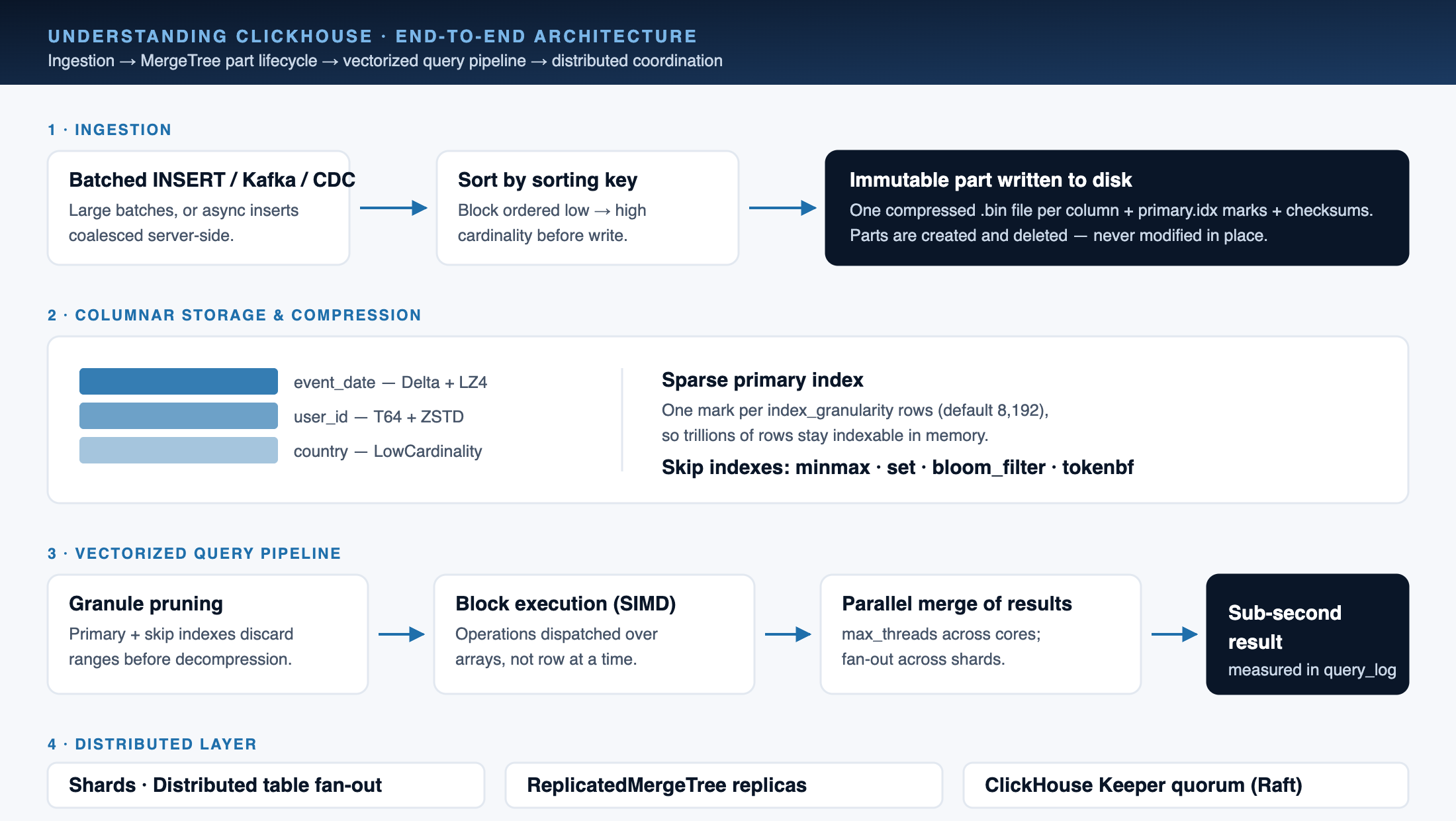
Understanding ClickHouse performance means rejecting the idea of a single trick. Six mechanisms compound, and each one is measurable in system.query_log, system.parts and EXPLAIN PIPELINE output rather than taken on faith.
True Column-Oriented Storage
Each column is persisted in its own .bin file with no per-value row overhead. A billion UInt8 values occupy roughly one gigabyte uncompressed. Queries touching four of two hundred columns read four columns’ worth of bytes — not the whole table.
Vectorized Query Execution
The executor processes data in blocks of many thousands of values, dispatching operations over arrays rather than per row. This amortizes interpretation overhead and lets the compiler and CPU apply SIMD instructions across the batch.
Sorted Storage and Sparse Indexing
Data inside every part is physically ordered by the table’s sorting key, and the primary index stores one mark per index_granularity rows (8,192 by default). Range predicates on the leading key columns prune whole granules before any decompression happens.
Data-Skipping Indexes
Secondary indexes in ClickHouse do not point at rows. Minmax, set, bloom-filter and token indexes record aggregate properties of a granule range so the engine can prove no row can match and skip the read entirely.
Aggressive, Type-Aware Compression
General-purpose codecs (LZ4 by default, ZSTD where CPU allows) combine with specialised codecs — Delta, DoubleDelta, Gorilla, T64 — that exploit the numeric and temporal structure of a column before the general codec runs.
Multi-Core and Multi-Node Parallelism
A single query is decomposed across CPU cores via max_threads, and across shards and replicas in a cluster. Concurrency control and workload scheduling keep a heavy analytical query from starving interactive traffic.
These are the mechanisms; the discipline is measuring them. Every recommendation ChistaDATA issues is anchored to a named system table — part counts from system.parts, merge pressure from system.merges, thread-level hotspots from system.trace_log, and per-query read volume from system.query_log. Further reading: why ClickHouse is so fast and ClickHouse vectorized query processing.
On benchmark claims. Published throughput figures are only meaningful alongside hardware, dataset, cardinality and concurrency. Rather than quote a number, we recommend reproducing the public ClickBench methodology against your own schema and data volume. ChistaDATA runs that exercise as part of a ClickHouse performance audit.
Storage Engine
Understanding ClickHouse MergeTree: Parts, Merges and the Sparse Primary Index
Understanding ClickHouse storage means understanding MergeTree, the engine family that carries essentially all production ClickHouse data. Everything that determines query latency, ingestion throughput and storage cost is decided here — in the sorting key, the partitioning expression and the granularity settings.
How a MergeTree Part Is Written
Understanding ClickHouse writes begins with what an insert is not. An INSERT does not append to an existing structure. ClickHouse sorts the incoming block by the table’s sorting key, writes it as a new immutable part on disk — a directory containing one compressed file per column plus index and checksum files — and makes it atomically visible. Background threads then select parts and merge them into larger sorted parts, which is where the engine gets its name.
Parts are never modified in place. They are created and eventually deleted. That immutability is what makes crash recovery cheap and replication straightforward, and it is also why UPDATE and DELETE are expressed as asynchronous mutations that rewrite affected parts rather than as row-level operations. Lightweight deletes mark rows logically and are materialised at merge time.
The operational consequence is the single most common ClickHouse incident we are paged for: too many parts. Frequent small inserts create parts faster than background merges can consolidate them, the merge queue saturates, and inserts eventually fail outright. The fix is architectural — batch on the client, or enable asynchronous inserts so the server buffers and coalesces small writes — not a matter of raising the limit.
Understanding ClickHouse’s Sparse Primary Index
Understanding ClickHouse indexing requires unlearning B-tree intuition: ClickHouse does not index every row. It stores the primary-key value of every N-th row, where N is index_granularity, default 8,192. The resulting index is small enough to stay resident in memory even for tables holding trillions of rows on a single server, and it is used to identify which granules could possibly contain matching rows.
This is why the sorting key is the highest-leverage decision in a ClickHouse schema. Order columns from lowest to highest cardinality, lead with the columns your filters actually use, and keep the key short. A sorting key that does not match the query pattern cannot be compensated for later by hardware. Our MergeTree engineering reference covers the selection method in depth.
MergeTree Family Engines
| Engine | Behaviour at Merge Time | Typical Use |
|---|---|---|
MergeTree | Sorts and consolidates parts; retains all rows | General event, log and fact tables |
ReplacingMergeTree | Keeps the last row per sorting key, by version column | Upsert semantics, CDC sink tables |
SummingMergeTree | Sums numeric columns sharing a sorting key | Pre-aggregated counters and rollups |
AggregatingMergeTree | Combines aggregate function states | Materialized-view targets for complex aggregates |
CollapsingMergeTree / VersionedCollapsingMergeTree | Cancels row pairs using a sign column | Mutable state modelled as an append-only stream |
ReplicatedMergeTree (prefix) | Adds multi-replica coordination through ClickHouse Keeper | Every production table requiring high availability |
SharedMergeTree | Separates compute from shared object storage | ClickHouse Cloud only — not available in open-source ClickHouse |
Deduplication caveat worth stating plainly: ReplacingMergeTree guarantees eventual deduplication, not immediate. Until a merge runs, duplicates are visible. Queries that require correctness now must use FINAL or an explicit aggregation pattern, and both carry a cost you should measure before committing to the design.
Distributed Layer
Understanding ClickHouse at Scale: Sharding, Replication and Keeper
Understanding ClickHouse at cluster scale starts with a restraint: a single ClickHouse node handles a great deal more than most teams assume. Scale horizontally when you have a measured reason — storage ceiling, ingestion ceiling, or an availability requirement — not on principle, because every added node adds coordination cost and operational surface.
Sharding and Distributed Tables
Understanding ClickHouse sharding starts with the distribution function. Data is partitioned across shards by a sharding expression; a Distributed table presents the cluster as one logical table, fans a query out to every shard in parallel and merges the partial results. Sharding key skew is the usual cause of one node saturating while the rest idle — check row distribution in system.parts per shard before blaming the query.
ReplicatedMergeTree
Replication is per table, asynchronous and multi-master: any replica accepts writes and the others fetch the resulting parts. Replicas provide both fault tolerance and read scale-out. Lag is observable in system.replication_queue and system.replicas, and should be alerted on as a first-class SLO.
ClickHouse Keeper
Keeper is the built-in Raft-based coordination service that replaces ZooKeeper for replication metadata and distributed DDL. New deployments should standardise on Keeper. Size the quorum at three or five nodes, place it on low-latency storage, and treat it as the cluster’s hard dependency — when Keeper degrades, replication stops.
Tiered and Object Storage
Storage policies move older parts from NVMe to slower disks or to S3-compatible object storage on a TTL schedule. This is the primary lever for cutting storage spend on multi-year retention while keeping recent data on fast media. Model the query latency impact on cold tiers before committing.
Availability and DR posture. Replication is not a backup, and a multi-replica cluster inside one availability zone is not a disaster-recovery plan. Define explicit RPO and RTO targets, back up with a tool that understands MergeTree part semantics, and rehearse restore and failover on a scheduled cadence — ChistaDATA runs these as quarterly drills under ClickHouse managed services. Test everything in a non-production environment before applying it to a live cluster.
Vendor-Neutral Assessment
Where ClickHouse Fits — and Where It Does Not
Understanding ClickHouse also means knowing its limits. ChistaDATA is a ClickHouse specialist, and we will still tell you when ClickHouse is the wrong engine for the workload in front of you. An honest fit assessment is cheaper than a migration you have to reverse.
Strong Fit
- Real-time product and user analytics — high-cardinality event streams queried interactively.
- Observability at scale — logs, metrics and traces where retention economics matter as much as query speed.
- AdTech and clickstream — sustained high-volume ingestion with sub-second reporting.
- Security analytics and SIEM — long retention windows over semi-structured event data.
- Time-series and IoT telemetry — specialised codecs make numeric series compress exceptionally well.
- Customer-facing embedded analytics — dashboards where p95 latency is a product requirement.
- Warehouse offload — migrating heavy query workloads off Redshift, BigQuery, Snowflake, Druid, Elasticsearch or Vertica for cost and latency reasons.
Poor Fit — Choose Another Engine
- Transactional systems of record requiring multi-statement ACID and row-level locking. Use PostgreSQL, MySQL or SQL Server.
- High-frequency single-row updates and deletes as the primary access pattern — mutations are rewrite operations, not row edits.
- Key-value point lookups at very high QPS, where Redis, Valkey or a purpose-built KV store is orders of magnitude more efficient.
- Complex many-table normalised joins as the dominant pattern. ClickHouse joins have improved substantially, but denormalised and pre-aggregated models remain materially faster.
- Small datasets where an existing PostgreSQL instance with correct indexing already meets the latency target — adding a second engine adds operational cost with no return.
If you are evaluating a move, a structured assessment ahead of any commitment is the cheapest step in the whole programme. See ClickHouse migration services and high-performance real-time analytics.
Deployment
Understanding ClickHouse Deployment Options
Understanding ClickHouse deployment economics comes down to three viable paths with genuinely different cost, control and lock-in profiles. The right answer depends on your data-gravity constraints, compliance posture and how much database engineering capacity you want to own.
Self-Managed Open Source
Full control, no licence cost, no vendor lock-in, deployable on bare metal, any cloud VM, or Kubernetes. You own capacity planning, upgrades, Keeper operations, backup and DR. Best where data residency, cost predictability or deep customisation dominate.
ClickHouse Cloud
Managed service with compute–storage separation via the proprietary SharedMergeTree engine. Fastest to start and operationally light. The trade-offs are consumption-based cost at scale and a feature surface that is not identical to open-source ClickHouse — verify engine compatibility before designing against it.
ChistaDATA Managed ClickHouse
100% open-source ClickHouse running in your cloud account or data centre, operated by our engineers under a 24×7×365 SLA. You keep the infrastructure, the data and the exit path; we carry the operational load.Explore managed services
Understanding ClickHouse release cadence matters in all three models. Whichever path you choose, pin your version deliberately and track the release line. ClickHouse ships frequently, and staying current on a supported line is a security and stability requirement, not a preference. Upgrade rehearsal on a clone of production is a standing part of our ClickHouse DBA support.
Operations
Understanding ClickHouse in Production: Engineering Checklist
Understanding ClickHouse in a proof of concept is not the same as running it as a platform, and the whole gap sits in this list. Each item below maps to a system table or metric you can verify rather than an opinion you have to accept.
Schema and Table Design
- Choose the sorting key from real query predicates; order low to high cardinality.
- Partition by month or day — not by a high-cardinality column. Aim for tens to low hundreds of active parts per table.
- Use the narrowest correct types; prefer
LowCardinalityfor repetitive strings. - Apply skip indexes and projections only after proving the access pattern in
system.query_log. - Set TTL policies for retention and tier movement at table-creation time.
Ingestion
- Batch inserts — tens of thousands of rows or more per statement.
- Enable asynchronous inserts when clients cannot batch.
- Prefer the native protocol or a well-tuned Kafka pipeline over row-at-a-time HTTP.
- Watch
system.mergesand part counts as leading indicators of ingestion distress. - Design materialized views as ingestion-time transforms, and account for their write amplification.
Reliability and Security
- Define SLOs for query latency, ingestion lag and replication lag; alert on error budget burn.
- Back up with MergeTree-aware tooling and rehearse restores on a schedule.
- Enforce RBAC, row and column policies, and per-user quotas.
- Enable audit logging and retain it for your compliance window.
- Capture
system.query_logandsystem.trace_logcentrally — you cannot tune what you did not record.
Standing caveat. Every setting, schema change and storage policy above should be validated in a non-production environment against your own data volume and query mix before it reaches production, and no change should be applied to a live cluster without a documented rollback path and a maintained disaster-recovery posture.
ChistaDATA Engineering
How ChistaDATA Engineers ClickHouse for Enterprises
Understanding ClickHouse conceptually is the starting point, and understanding ClickHouse operationally is where enterprises actually spend their engineering budget. Running it as a tier-one platform — under load, under compliance obligations, at 3 a.m. — is a separate discipline. ChistaDATA delivers that discipline as consulting, consultative support, platform engineering and fully managed operations on 100% open-source ClickHouse.
ClickHouse Consulting
Architecture, capacity planning, schema and sort-key design, sharding and replication topology, and cluster sizing built around your actual workload profile.ClickHouse consulting
Performance Engineering
Query and pipeline optimization anchored in system.query_log, EXPLAIN PIPELINE and trace-level profiling — targeting p95 and p99 latency and ingestion throughput as measured outcomes.Performance tuning
24×7 Consultative Support
Enterprise support with a 15-minute Severity 1 response commitment, delivered by senior ClickHouse engineers rather than a triage tier.ClickHouse support
Remote DBA and Managed Services
Day-to-day operations, upgrades, backup and restore verification, Keeper health, capacity and cost management under an explicit SLA.ClickHouse DBA support
Migration Engineering
Structured migrations into ClickHouse from Redshift, Snowflake, BigQuery, Druid, Pinot, Vertica, Teradata, Hadoop and Elasticsearch, with dual-run validation and a defined rollback path.ClickHouse migration
Performance Audit and Health Check
A measured baseline of your cluster — schema, merges, memory, disk, replication and query hotspots — delivered as a prioritised remediation plan.Performance audit
More references for understanding ClickHouse: real-time analytics with ClickHouse, Data SRE practice, archiving data to ClickHouse, and ChistaDATA University. Official upstream documentation is maintained at clickhouse.com/docs and the source is on GitHub.
FAQ
Understanding ClickHouse: Frequently Asked Questions
The questions enterprise architecture and platform teams ask us most often — each answer a shortcut to understanding ClickHouse in production.
What is ClickHouse used for?
Understanding ClickHouse starts with its workload class. ClickHouse is used for online analytical processing: real-time product and user analytics, observability platforms handling logs, metrics and traces, clickstream and AdTech reporting, security analytics and SIEM, time-series and IoT telemetry, customer-facing embedded dashboards, and as a cost-efficient replacement for heavier data warehouses. Its design target is aggregating across very large row counts with sub-second response, not transactional record-keeping.
Is ClickHouse free and open source?
Yes, and understanding ClickHouse licensing is straightforward. ClickHouse is released under the Apache 2.0 licence and the source is public on GitHub. You can self-host it on bare metal, cloud instances or Kubernetes with no licence fee. Commercial managed offerings exist alongside the open-source project, and ChistaDATA deliberately operates only on the 100% open-source distribution so customers retain a clean exit path and zero vendor lock-in.
Why is ClickHouse so much faster than a traditional database for analytics?
Understanding ClickHouse speed comes down to four compounding reasons: column-oriented storage means a query reads only the columns it references; type-aware compression shrinks that I/O further; vectorized execution processes values in large batches using SIMD instructions rather than row at a time; and the sparse primary index plus data-skipping indexes let the engine discard whole ranges of data before decompressing anything. On analytical scans this typically yields one to two orders of magnitude improvement over a row-store on identical hardware.
Can ClickHouse replace PostgreSQL or MySQL?
For analytical workloads, frequently yes. As a transactional system of record, no. ClickHouse does not provide general multi-statement ACID transactions or efficient row-level updates and deletes. The common production pattern is to keep PostgreSQL or MySQL as the OLTP system and stream changes into ClickHouse through change data capture, so each engine handles the workload it was designed for.
What is the MergeTree engine and why does it matter?
MergeTree is the storage engine family behind essentially all production ClickHouse tables, and understanding ClickHouse performance is impossible without it. Inserts create immutable, sorted parts; background threads merge those parts into larger ones. The sorting key, partitioning expression and index granularity you choose at table creation determine query latency, ingestion throughput and storage cost more than any other decision, and they are expensive to change later.
What causes the “too many parts” error in ClickHouse?
This is the most common incident in production, and understanding ClickHouse ingestion mechanics explains it. Small, frequent inserts create new parts faster than background merges can consolidate them. The merge queue saturates and inserts are eventually rejected. The correct remedy is to batch inserts on the client side, enable asynchronous inserts so the server coalesces small writes, and review whether the partitioning expression is too granular — raising the part-count limit only postpones the failure.
How does high availability work in ClickHouse?
Understanding ClickHouse high availability means understanding two components. Availability comes from ReplicatedMergeTree tables coordinated by ClickHouse Keeper, the built-in Raft-based service that has replaced ZooKeeper for new deployments. Replication is asynchronous and multi-master: any replica accepts writes, and the others fetch the resulting parts. Keeper quorum sizing, replication-lag alerting on system.replicas, and rehearsed failover procedures are what turn that mechanism into an actual availability guarantee.
Is replication a substitute for backups?
No — and understanding ClickHouse replication semantics is what prevents this assumption from becoming an outage. Replication protects against node loss; it faithfully propagates accidental drops, bad mutations and application-level corruption to every replica. A production ClickHouse estate needs MergeTree-aware backups, defined RPO and RTO targets, and restore drills performed on a scheduled cadence — not just a healthy replication queue.
What is the difference between open-source ClickHouse and ClickHouse Cloud?
Understanding ClickHouse Cloud versus the open-source distribution matters for portability. ClickHouse Cloud is a managed service built on a proprietary SharedMergeTree engine that separates compute from shared object storage. That engine is not available in the open-source distribution, and the feature surface between the two is not identical. If portability matters to you, design against open-source engines and verify compatibility before adopting Cloud-only capabilities.
Does ChistaDATA support ClickHouse in our own cloud account?
Yes. ChistaDATA operates 100% open-source ClickHouse inside your AWS, Azure, GCP or on-premises environment, under 24×7×365 coverage with a 15-minute Severity 1 response SLA. You retain the infrastructure, the data and the ability to take operations back in-house at any time.
How do we know whether ClickHouse is the right choice for our workload?
Start with a measured assessment rather than a proof of concept built on synthetic data. Understanding ClickHouse in the abstract will not answer the question; profiling your workload will. ChistaDATA profiles your current query mix, data volumes, cardinality, concurrency and latency targets, then models the outcome on ClickHouse — and tells you if another engine is the better answer. Vendor neutrality is a standing principle, including on engines we sell services for.
ChistaDATA Inc.
Put an Expert ClickHouse Engineering Team Behind Your Platform
Understanding ClickHouse is where it starts; operating it is what we do. Architecture reviews, performance engineering, migrations and 24×7×365 consultative support on 100% open-source ClickHouse — delivered by senior engineers, with a 15-minute Severity 1 response commitment and zero vendor lock-in.