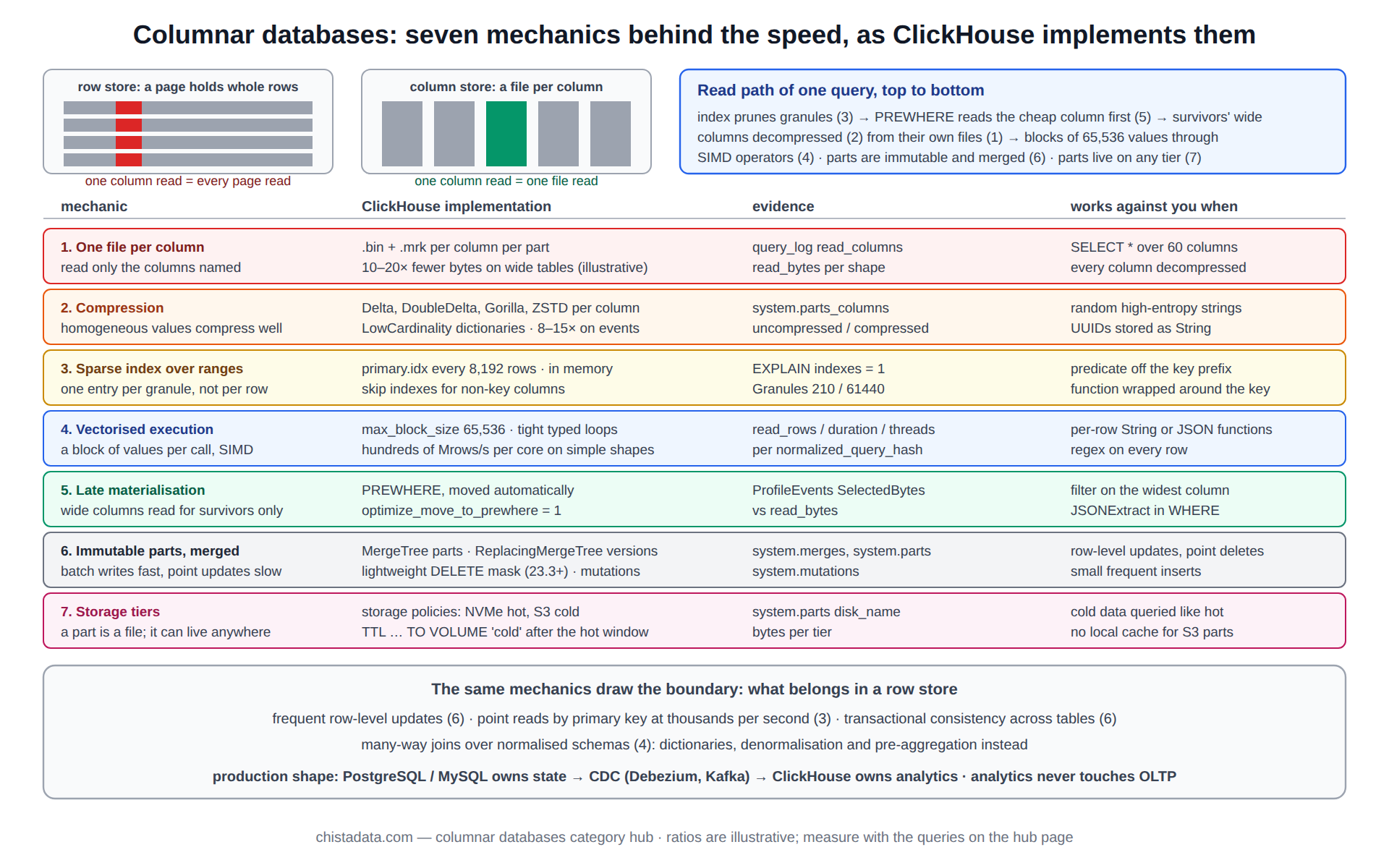
Columnar databases are fast for analytics because of a handful of concrete mechanics, and slow for transactions because of the same ones. A column store writes each column to its own file, compresses runs of similar values, indexes ranges rather than rows, executes on vectors of values rather than one row at a time, and rewrites data in immutable batches rather than in place. Every advantage and every limitation of ClickHouse follows from those choices.
This page explains the seven mechanics with the ClickHouse implementation of each, the measurement that shows it working, and the case where it works against the workload. It then covers how a column store differs from a cloud data warehouse, and what a migration from BigQuery, Snowflake or SQL Server actually involves.
The archive under this category holds the comparison posts (columnar versus row-based, columnstore versus warehousing, the CTO’s guide), the internals posts on granularity, vectorised execution and ReplacingMergeTree, and the migration runbooks from BigQuery, Snowflake and Microsoft SQL Server.
Mechanic 1: one file per column, so a query pays only for the columns it names
A row store keeps every column of a row together on a page; reading one column means reading the whole page. A column store keeps each column in its own file (in ClickHouse, a .bin per column per part, with a .mrk mark file beside it), so a query over four of sixty columns opens four files and never touches the other fifty-six. For a wide event table this alone is a 10 to 20× reduction in bytes read, before compression.
The columnar versus row-based databases post is the archive’s ground-level explanation; the measurement is read_bytes and read_columns in system.query_log for the same query on both layouts.
-- what one part looks like on disk: a file pair per column
SELECT name, formatReadableSize(data_compressed_bytes) AS compressed,
       formatReadableSize(data_uncompressed_bytes) AS uncompressed,
       round(data_uncompressed_bytes / data_compressed_bytes, 1) AS ratio
FROM system.parts_columns
WHERE active AND table = 'events' AND partition = '202609'
GROUP BY name, data_compressed_bytes, data_uncompressed_bytes
ORDER BY data_compressed_bytes DESC
LIMIT 10;

-- what a query actually read
SELECT read_columns, formatReadableSize(read_bytes), read_rows
FROM system.query_log
WHERE type = 'QueryFinish' AND query_id = '${QUERY_ID}';
Mechanic 2: compression works because a column is homogeneous
Adjacent values in a column file are the same type and usually similar: timestamps that increase by milliseconds, status codes drawn from a dozen values, identifiers that repeat. General-purpose compressors (LZ4, ZSTD) already do well on that; specialised codecs do better, and columnar databases stack them: Delta before ZSTD for timestamps, DoubleDelta for counters, Gorilla for floats, LowCardinality dictionary encoding for enumerations. Ratios of 8 to 15× on event data are routine; the row-store equivalent is 2 to 3×.
Compression is also why columnar databases are I/O-efficient rather than merely disk-efficient: fewer bytes read from disk per row means the disk is rarely the bottleneck. The compression hub covers codec selection and measurement.
CREATE TABLE events
(
    ts         DateTime64(3)           CODEC(Delta(8), ZSTD(1)),
    tenant_id  UInt32                  CODEC(ZSTD(1)),
    status     LowCardinality(String),
    latency_ms Float32                 CODEC(Gorilla, ZSTD(1)),
    counter    UInt64                  CODEC(DoubleDelta, ZSTD(1)),
    payload    String                  CODEC(ZSTD(3))
)
ENGINE = MergeTree
PARTITION BY toYYYYMM(ts)
ORDER BY (tenant_id, status, ts);
Mechanic 3: a sparse index over sorted ranges, not a B-tree over rows
Row stores index rows: a B-tree entry per key value pointing at a page. Columnar databases built on a sorted layout index ranges: ClickHouse keeps one primary-index entry per granule of index_granularity rows (8,192 by default), and a query’s predicate on the sort key selects the granules whose range can contain matches. The index for a billion rows is about 120,000 entries and lives in memory; the cost is that pruning is coarse, and a predicate that does not follow the sort-key prefix prunes nothing.
The index granularity tuning post and its e-commerce case cover the trade-off between finer granules (better pruning, larger index, more marks) and coarser ones. The index hub covers the skip indexes that supplement the primary index for non-key columns.
-- how much of the table a predicate leaves: the PrimaryKey line is the columnar equivalent of an index seek
EXPLAIN indexes = 1
SELECT count() FROM events
WHERE tenant_id = 42 AND ts >= '2026-09-01' AND ts < '2026-09-08';
-- PrimaryKey  Keys: tenant_id, ts  Condition: ...  Parts: 3/41  Granules: 210/61440
Mechanic 4: vectorised execution, the CPU side of columnar databases
Reading fewer bytes only matters if the CPU can keep up. Row-at-a-time execution calls a function per value with branches and type dispatch on every call; vectorised execution processes a block of thousands of values per call, in tight loops that the compiler turns into SIMD instructions and the CPU keeps in cache. ClickHouse’s block size (max_block_size, 65,536 rows by default) is the unit of that work, and the throughput difference is one to two orders of magnitude for filters and aggregates.
The introduction to vectorised query processing post explains the pipeline; the measurement is rows processed per second per core, visible as read_rows / query_duration_ms / max_threads in the query log, which on a well-shaped query reaches hundreds of millions of rows per second per core.
-- rows per second per thread: the number that says whether the CPU side is keeping up
SELECT
    normalized_query_hash,
    round(avg(read_rows) / (avg(query_duration_ms) / 1000) / avg(length(thread_ids)) / 1e6, 1) AS mrows_per_s_per_thread,
    count() AS runs
FROM system.query_log
WHERE type = 'QueryFinish' AND event_time > now() - INTERVAL 1 DAY AND read_rows > 1e7
GROUP BY normalized_query_hash
ORDER BY mrows_per_s_per_thread ASC
LIMIT 10;   -- the slowest per-thread shapes are usually String or JSON work per row
Mechanic 5: late materialisation and PREWHERE
Because columns are separate, the engine can evaluate a filter on one small column and read the wide columns only for the rows that survived. ClickHouse does this automatically by moving the most selective cheap predicate into PREWHERE; the effect is that a query returning 0.1 percent of rows reads 0.1 percent of the wide columns, not all of them. Row stores cannot do this at all, because the wide columns arrive with the row.
The long integer query optimisation post shows the effect on wide numeric tables. The check is ProfileEvents['SelectedBytes'] against read_bytes, and EXPLAIN showing which predicate was moved.
Mechanic 6: immutable parts and merges, why columnar databases dislike updates
A column file is compressed and sorted, so a single-row update in place would mean decompressing, editing and recompressing a block of thousands of values per column. Columnar databases therefore write immutable batches (parts) and merge them in the background, which makes inserts of large batches very fast and makes point updates and deletes expensive. ClickHouse handles updates three ways: ReplacingMergeTree keeps the latest version by key and deduplicates on merge; lightweight DELETE (stable since 23.3) writes a mask; ALTER … UPDATE mutations rewrite whole parts.
The ReplacingMergeTree explained post is the archive’s treatment of the most common pattern, including the FINAL cost and the is_deleted column (23.x and later). The design rule that follows from this mechanic is that transactional state belongs in a row store and reaches the column store by CDC.
-- upsert semantics without in-place updates
CREATE TABLE orders_current
(
    order_id    UInt64,
    status      LowCardinality(String),
    amount      Decimal(18, 2),
    updated_at  DateTime64(3),
    is_deleted  UInt8 DEFAULT 0
)
ENGINE = ReplacingMergeTree(updated_at, is_deleted)
ORDER BY order_id;

-- read the latest version per key; FINAL is correct but costs a merge at read time
SELECT order_id, status, amount FROM orders_current FINAL WHERE order_id IN (1001, 1002);

-- cheaper for aggregates: argMax collapses versions without FINAL
SELECT status, count() FROM (SELECT order_id, argMax(status, updated_at) AS status FROM orders_current GROUP BY order_id) GROUP BY status;
Mechanic 7: storage tiers and the separation of hot from cold
Because parts are immutable files, they can live anywhere a file can: local NVMe for the hot window, object storage for the rest, with the table unchanged. This is what lets columnar databases keep years of history at object-storage prices while serving the last month from local disk. The storage policies and load balancing post covers volumes, policies and the TTL clause that moves parts between them.
| Mechanic | ClickHouse implementation | Evidence it is working | Works against you when |
|---|---|---|---|
| 1. Column files | .bin + .mrk per column per part | read_columns, read_bytes | SELECT * over wide tables |
| 2. Compression | codecs per column, LowCardinality | system.parts_columns ratio | random high-entropy strings |
| 3. Sparse index | primary.idx per granule | EXPLAIN indexes = 1 granules | predicates off the key prefix |
| 4. Vectorisation | blocks of 65,536 values, SIMD | rows/s per thread | per-row String or JSON functions |
| 5. Late materialisation | PREWHERE, automatic | SelectedBytes vs read_bytes | filter on the widest column |
| 6. Immutable parts | MergeTree merges, ReplacingMergeTree | system.merges, parts count | row-level updates, point deletes |
| 7. Tiering | storage policies, TTL TO VOLUME | system.parts disk_name | cold data queried like hot |
Columnar databases versus cloud data warehouses
Snowflake, BigQuery and Redshift are also columnar; the difference is not storage format but architecture and pricing. A warehouse separates compute from storage completely, scales compute elastically per query, and charges for compute seconds or bytes scanned; a ClickHouse cluster runs on fixed nodes with local caches and charges nothing per query. The warehouse wins on bursty, infrequent, very large scans and on zero operations; the fixed cluster wins on continuous sub-second workloads, freshness in seconds, and predictable cost at high utilisation.
The ColumnStore versus modern data warehousing post and the CTO’s guide to columnstores versus row-based databases for real-time analytics set out the decision from the buyer’s side; the analytics hub covers the platform design once the choice is made.
Migrating into columnar databases from BigQuery, Snowflake and SQL Server
A migration is mostly schema translation and load engineering. Types map cleanly for numerics and dates and need care for semi-structured data (BigQuery STRUCT and ARRAY, Snowflake VARIANT) which become Nested, Map, Array or the JSON type. Clustering and partitioning keys become the sort key and partition expression, with the sort key chosen from the query log rather than copied. Loads run in parallel from exported Parquet in object storage using the s3 or gcs table functions, at hundreds of megabytes per second per node.
The archive has runbooks for each source: Google BigQuery to ClickHouse, Snowflake to ClickHouse, and Microsoft SQL Server to ClickHouse, the last of which covers the row-store-to-column-store schema changes that the warehouse migrations do not need.
-- parallel load from Parquet exported by the source warehouse
INSERT INTO events
SELECT
    toDateTime64(event_ts, 3)              AS ts,
    toUInt32(tenant_id)                    AS tenant_id,
    toLowCardinality(event_type)           AS event_type,
    toUInt64(user_id)                      AS user_id,
    toDecimal64(amount, 2)                 AS amount,
    attrs                                  AS payload
FROM s3('https://${BUCKET}.s3.amazonaws.com/export/events/*.parquet',
        '${AWS_ACCESS_KEY_ID}', '${AWS_SECRET_ACCESS_KEY}', 'Parquet')
SETTINGS max_insert_threads = 16, input_format_parallel_parsing = 1,
         max_insert_block_size = 1048576;

-- verification: row counts and a column checksum per day, both sides
SELECT toDate(ts) AS d, count(), sum(cityHash64(user_id, amount)) AS checksum
FROM events GROUP BY d ORDER BY d;
Joins in columnar databases: dictionaries, denormalisation and the small side
The mechanics favour wide, denormalised fact tables read by a few columns at a time, and they penalise the star-schema habit of joining a fact table to five dimensions per query, because every join builds a hash table on one side and probes it row by row, outside the vectorised fast path. Columnar databases therefore lean on three substitutes: denormalising slowly changing attributes into the fact table at insert time, in-memory dictionaries (dictGet) for small dimensions that change, and pre-aggregation so that the join runs over thousands of rows instead of billions.
Where a join is unavoidable, the small table goes on the right, the fact side is filtered and aggregated first, and join_algorithm is chosen for the sizes involved. The query performance hub covers the rewrite patterns; the measurement is memory_usage for the join shape and the build-side row count in EXPLAIN PIPELINE.
-- a dimension as a dictionary: no join, a hash lookup per row inside the vectorised pipeline
CREATE DICTIONARY tenant_dim
(
    tenant_id  UInt32,
    tenant_name String,
    region     String
)
PRIMARY KEY tenant_id
SOURCE(POSTGRESQL(host '${PG_HOST}' port 5432 user '${PG_USER}' password '${PG_PASSWORD}' db 'crm' table 'tenants'))
LAYOUT(HASHED())
LIFETIME(MIN 300 MAX 600);

SELECT dictGet('tenant_dim', 'region', tenant_id) AS region, count()
FROM events
WHERE ts >= today() - 7
GROUP BY region;
When a row store is the right answer
The mechanics above make the boundary clear. Workloads with frequent row-level updates, point reads by primary key at thousands per second, strict transactional consistency across tables, or many-way joins over normalised schemas belong in PostgreSQL, MySQL or SQL Server, and ChistaDATA says so in reviews even though it sells ClickHouse services. The usual production shape is both: the row store owns transactional state, CDC through Debezium and Kafka feeds the column store, and analytics never touches the OLTP database.
The real-time analytics architecture post shows that two-store design end to end.
Reading the mechanics from a running cluster
A short review script tells whether a cluster is getting the benefit of each mechanic: compression ratio per table, granules read versus total for the top shapes, per-thread throughput, PREWHERE usage, part counts and merge backlog, and the share of bytes on each storage tier. Any mechanic that is not paying off points at a schema or query decision rather than at the engine.
-- one row per table: are the seven mechanics paying off?
SELECT
    table,
    round(sum(data_uncompressed_bytes) / sum(data_compressed_bytes), 1)   AS compression,     -- mechanic 2
    count()                                                               AS active_parts,    -- mechanic 6
    countDistinct(disk_name)                                              AS tiers,           -- mechanic 7
    formatReadableSize(sumIf(bytes_on_disk, disk_name != 'default'))      AS on_cold_tier
FROM system.parts
WHERE active AND database = currentDatabase()
GROUP BY table
ORDER BY sum(bytes_on_disk) DESC;

-- mechanics 1, 3, 4 per query shape, last 24 h
SELECT
    normalized_query_hash                                                 AS shape,
    round(avg(length(read_columns)))                                      AS cols_read,       -- mechanic 1
    round(avg(read_rows) / greatest(avg(result_rows), 1))                 AS rows_per_result, -- mechanic 3
    round(avg(read_rows) / (avg(query_duration_ms) / 1000) / 1e6, 1)      AS mrows_per_s      -- mechanic 4
FROM system.query_log
WHERE type = 'QueryFinish' AND query_kind = 'Select' AND event_time > now() - INTERVAL 1 DAY
GROUP BY shape ORDER BY count() DESC LIMIT 20;
Also filed under columnar databases
A few archive posts sit here for historical reasons rather than subject: the ClickHouse 23.1 release notes (now covered by the release notes hub), the ChistaDATA Cloud getting-started post, the vulnerability remediation post (see the security hub), and a 2023 company announcement.
Version notes
Lightweight DELETE has been stable since 23.3; the is_deleted argument to ReplacingMergeTree is 23.2 and later. The JSON type is production-ready since 25.x. Adaptive granularity (index_granularity_bytes) has been the default since 19.x. The MergeTree engine documentation is the source for the storage layout described above; confirm behaviour on the running version.
Reading the archive
For the concepts: columnar versus row-based, the CTO’s guide, and columnstore versus warehousing. For the mechanics: index granularity and its e-commerce case, vectorised query processing, ReplacingMergeTree, long-integer optimisation, and storage policies. For migration: the BigQuery, Snowflake and SQL Server runbooks, in that order of difficulty.
ChistaDATA runs platform selection and migration as ClickHouse consulting engagements, and the migration service follows the runbooks linked above. Test every schema and load pattern on staging against production-sized data, keep the source system live until the verification queries agree on both sides, and confirm a tested restore of the target before cutover.