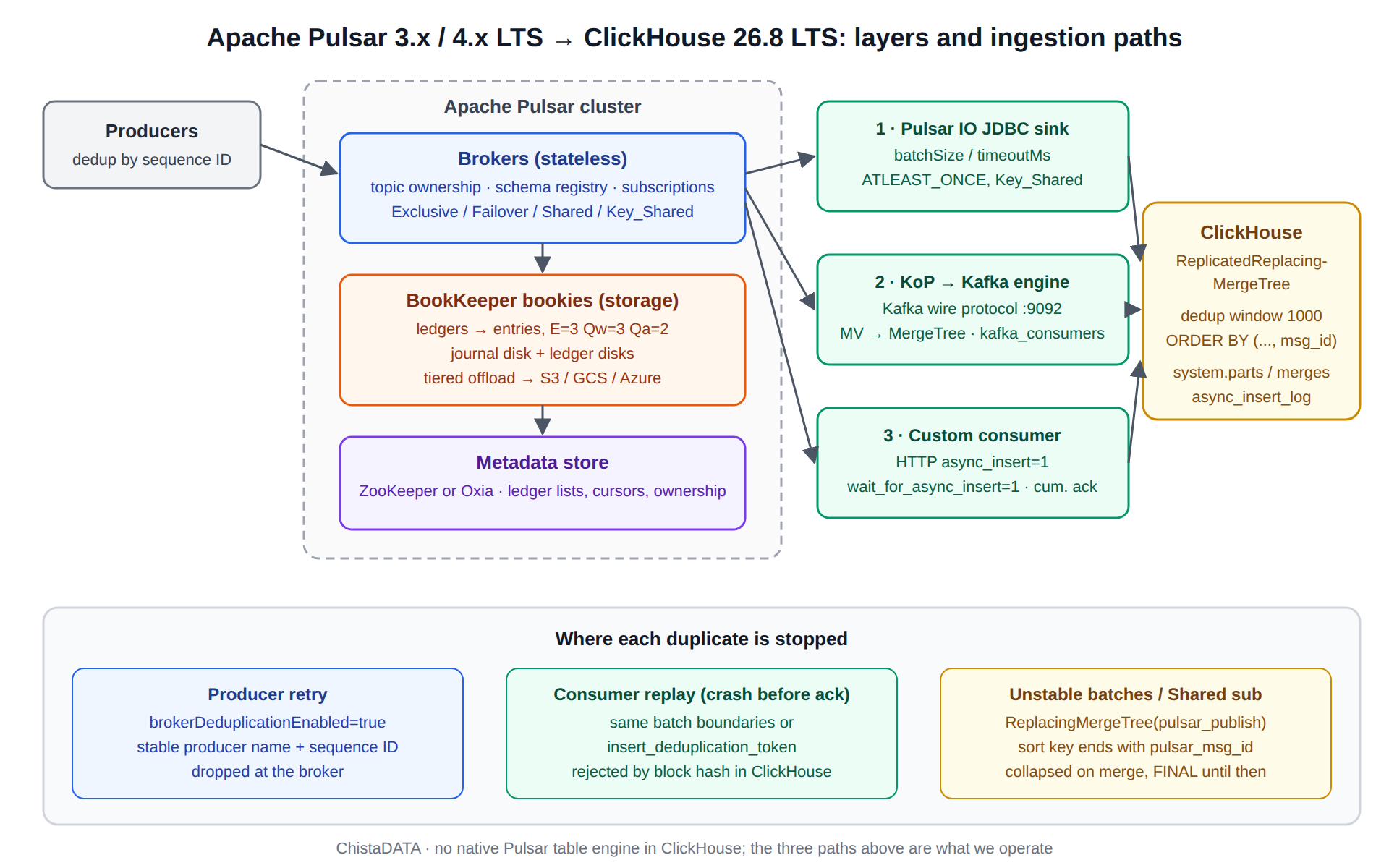
Apache Pulsar separates message serving from message storage: stateless brokers own topics and serve clients, Apache BookKeeper bookies persist the data as replicated ledgers, and a metadata store (ZooKeeper, or Oxia since Pulsar 3.x) holds ownership and cursor state. That split is why Pulsar can scale storage and serving independently, rebalance a failed broker in seconds without copying data, and offload cold ledgers to object storage. It is also why Pulsar behaves differently from Kafka under exactly the conditions that matter for feeding an analytical database. This page explains the Apache Pulsar architecture at the level an operator needs, then walks through the three patterns we run for landing Pulsar topics in ClickHouse, with DDL, sink configuration, and the verification queries for each.
The archive under this category currently holds our field guide to the storage layer, Apache Pulsar segmented storage and BookKeeper: seven field lessons for operators. This page is the architectural context around it and the ingestion side that the guide does not cover.
The three-layer architecture and what each layer owns
A Pulsar cluster answers three different questions with three different components, and most operational confusion comes from assuming one component does another’s job.
Brokers own topic bundles, terminate client connections, enforce schema and authorization, and maintain in-memory managed-ledger state for the topics they serve. They hold no durable data. When a broker dies, the load manager reassigns its bundles to surviving brokers, which reopen the affected ledgers from BookKeeper metadata. There is no partition copy, which is the mechanism behind fast broker failover.
Bookies are BookKeeper storage servers. A topic is a sequence of ledgers; each ledger is a sequence of entries striped across an ensemble of bookies. Three numbers govern durability per ledger: ensemble size (E, how many bookies the ledger is spread over), write quorum (Qw, how many copies of each entry are written), and ack quorum (Qa, how many bookies must fsync before the write is acknowledged). A common production setting is E=3, Qw=3, Qa=2, which tolerates one bookie failure with no data loss and no availability loss. The trade-off between these numbers, journal placement, and ledger-disk layout is the subject of the segmented-storage guide linked above.
Metadata store holds tenant, namespace and topic configuration, ledger lists per topic, subscription cursors, and broker ownership. ZooKeeper has been the default since the project began; Oxia is the horizontally scalable replacement introduced for large-topic-count deployments. Cursor updates are frequent, so metadata-store latency is a first-order factor in end-to-end acknowledgement latency.
Subscription semantics, and why they decide your ClickHouse table engine
Apache Pulsar consumers attach to a topic through a named subscription. The subscription type determines ordering and parallelism, and the choice constrains which ClickHouse deduplication strategy you can rely on.
Exclusive and Failover subscriptions deliver a partition’s messages to one consumer in order. Ordering is preserved, throughput is bounded by one consumer per partition, and a single insert stream per partition maps naturally onto ClickHouse’s insert deduplication for identical blocks.
Shared subscriptions round-robin messages across consumers. Throughput scales with consumer count, ordering is lost, and redelivery after a consumer failure can interleave with new messages. If you land a Shared subscription into ClickHouse, deduplication must be content-based: a ReplacingMergeTree keyed on the message ID or a business key, with FINAL or an argMax pattern at query time.
Key_Shared subscriptions hash on the message key so that all messages for a key reach the same consumer, in order. This is the subscription type we default to for ClickHouse ingestion when per-entity ordering matters (a device, an account, a session), because it gives Shared-level parallelism with Failover-level ordering within a key.
Acknowledgement is either individual or cumulative. Cumulative acknowledgement (everything up to message ID X is done) is cheap on the metadata store and is what a batching consumer should use after a successful ClickHouse insert. Individual acknowledgement produces one cursor mutation per message and will show up as metadata-store write pressure at high rates.
Exactly-once from producer to ClickHouse: what is real and what is not
Apache Pulsar offers producer-side deduplication: with brokerDeduplicationEnabled=true (or the namespace-level equivalent), the broker tracks the last sequence ID per producer name and drops replays. Combined with a stable producer name and monotonically increasing sequence IDs, this makes a retried publish idempotent at the topic. Transactions across topics and acknowledgements (see the Apache Pulsar documentation for the current semantics) are available in Pulsar 2.8+ and are stable in the 3.x and 4.x LTS lines.
None of that extends into ClickHouse. The consumer that reads from Pulsar and inserts into ClickHouse can fail between a successful insert and the acknowledgement, and on restart it will re-read and re-insert. Two mechanisms on the ClickHouse side close the gap.
The first is insert-block deduplication. For ReplicatedMergeTree (and for non-replicated MergeTree when non_replicated_deduplication_window is set), ClickHouse hashes each inserted block and rejects a block whose hash it has seen within replicated_deduplication_window blocks. If the consumer always inserts the same batch boundaries, a replayed batch is a no-op. Setting insert_deduplication_token to a value derived from the Pulsar message-ID range of the batch makes this explicit and robust to batch content that is not byte-identical.
The second is ReplacingMergeTree with a version column, for cases where batch boundaries are not stable. The table below uses both.
CREATE TABLE events_raw
(
    event_ts        DateTime64(3, 'UTC')  CODEC(DoubleDelta, ZSTD(1)),
    tenant_id       UInt32,
    device_id       String,
    event_type      LowCardinality(String),
    payload         String                CODEC(ZSTD(3)),
    pulsar_msg_id   String,
    pulsar_publish  DateTime64(3, 'UTC')
)
ENGINE = ReplicatedReplacingMergeTree(
    '/clickhouse/tables/{shard}/events_raw',
    '{replica}',
    pulsar_publish
)
PARTITION BY toYYYYMMDD(event_ts)
ORDER BY (tenant_id, device_id, event_ts, pulsar_msg_id)
TTL toDateTime(event_ts) + INTERVAL 90 DAY
SETTINGS
    index_granularity = 8192,
    replicated_deduplication_window = 1000,
    replicated_deduplication_window_seconds = 86400;
The sort key ends with pulsar_msg_id so that two deliveries of the same message collapse on merge, and pulsar_publish is the version so that the later delivery wins if payloads ever differ. The deduplication window is widened from its default so that a consumer replay after an outage of up to a day is still absorbed.
Pattern one: the Pulsar IO JDBC sink for ClickHouse
Apache Pulsar IO ships a ClickHouse flavour of its JDBC sink connector. It runs inside Pulsar Functions workers, consumes from a topic through a subscription, and issues batched inserts over JDBC. It is the lowest-code path and the right first choice when message rates are moderate and the schema is flat.
{
  "tenant": "analytics",
  "namespace": "ingest",
  "name": "events-to-clickhouse",
  "archive": "connectors/pulsar-io-jdbc-clickhouse-${PULSAR_VERSION}.nar",
  "inputs": ["persistent://analytics/ingest/events"],
  "parallelism": 4,
  "processingGuarantees": "ATLEAST_ONCE",
  "subscriptionType": "KEY_SHARED",
  "configs": {
    "jdbcUrl": "jdbc:clickhouse://${CH_HOST}:8123/analytics",
    "userName": "${CH_USER}",
    "password": "${CH_PASSWORD}",
    "tableName": "events_raw",
    "batchSize": 5000,
    "timeoutMs": 2000,
    "insertMode": "INSERT"
  }
}
pulsar-admin sinks create --sink-config-file events-to-clickhouse.json
# verify the sink is running and consuming
pulsar-admin sinks status --tenant analytics --namespace ingest --name events-to-clickhouse
pulsar-admin topics stats persistent://analytics/ingest/events | jq '.subscriptions'The two settings that matter are batchSize and timeoutMs. Together they define the insert block size that reaches ClickHouse, and ClickHouse’s part-creation cost is paid per insert. Batches of a few thousand rows every one to two seconds keep system.parts growth and merge pressure manageable; batches of ten rows every ten milliseconds will drive Too many parts errors within hours. Measure with:
SELECT
    toStartOfMinute(event_time) AS m,
    count()                     AS inserts,
    sum(written_rows)           AS rows,
    round(avg(written_rows))    AS avg_rows_per_insert
FROM system.query_log
WHERE type = 'QueryFinish'
  AND query_kind = 'Insert'
  AND tables = ['analytics.events_raw']
  AND event_time > now() - INTERVAL 1 HOUR
GROUP BY m
ORDER BY m DESC
LIMIT 20;

SELECT
    partition,
    count()             AS active_parts,
    sum(rows)           AS rows,
    formatReadableSize(sum(bytes_on_disk)) AS size
FROM system.parts
WHERE table = 'events_raw'
  AND active
GROUP BY partition
ORDER BY partition DESC
LIMIT 10;
The sink’s limitation is that it maps message fields to columns one-to-one. Nested JSON payloads, type coercion, and enrichment are better handled by the next two patterns.
Pattern two: Kafka-on-Pulsar, reading Apache Pulsar through the ClickHouse Kafka engine
ClickHouse has no native Apache Pulsar table engine. It does have a mature Kafka engine, and Pulsar’s KoP protocol handler exposes Pulsar topics over the Kafka wire protocol. When KoP is enabled on the brokers, ClickHouse consumes a Pulsar topic exactly as it would a Kafka topic, and the whole Kafka-engine toolbox applies: materialized views into MergeTree, kafka_num_consumers for parallelism, kafka_max_block_size for batch control, and system.kafka_consumers for lag.
CREATE TABLE events_queue
(
    event_ts    DateTime64(3, 'UTC'),
    tenant_id   UInt32,
    device_id   String,
    event_type  String,
    payload     String
)
ENGINE = Kafka
SETTINGS
    kafka_broker_list        = '${PULSAR_KOP_HOST}:9092',
    kafka_topic_list         = 'persistent://analytics/ingest/events',
    kafka_group_name         = 'clickhouse-events',
    kafka_format             = 'JSONEachRow',
    kafka_num_consumers      = 4,
    kafka_max_block_size     = 65536,
    kafka_poll_timeout_ms    = 1000,
    kafka_handle_error_mode  = 'stream';

CREATE MATERIALIZED VIEW events_queue_mv TO events_raw AS
SELECT
    event_ts,
    tenant_id,
    device_id,
    event_type,
    payload,
    concat(_topic, ':', toString(_partition), ':', toString(_offset)) AS pulsar_msg_id,
    _timestamp_ms                                                      AS pulsar_publish
FROM events_queue;
Under KoP, a Pulsar partitioned topic appears as a Kafka topic with the same partition count, and the Kafka consumer group maps to a Pulsar subscription. Offsets map to Pulsar message IDs internally, which is why the synthetic pulsar_msg_id above uses topic, partition and offset: it is stable across restarts. Lag is visible from both sides.
SELECT
    table,
    consumer_id,
    assignments.topic     AS topic,
    assignments.partition_id AS partition_id,
    assignments.current_offset AS current_offset,
    num_messages_read,
    last_poll_time,
    num_rebalance_revocations
FROM system.kafka_consumers
WHERE table = 'events_queue';
This is the pattern we prefer when the team already operates ClickHouse Kafka-engine pipelines, because the operational runbook is identical. Its cost is the KoP dependency on the broker side and the fact that Pulsar-specific features (Key_Shared ordering guarantees, schema registry enforcement) are not visible to the ClickHouse consumer.
Pattern three: a custom consumer with async inserts
For high message rates, nested payloads, or enrichment, a purpose-built consumer using the Pulsar client and ClickHouse’s HTTP interface with async_insert gives the most control. The consumer reads with a Key_Shared subscription, transforms, posts rows in JSONEachRow format, and acknowledges cumulatively after ClickHouse confirms the write.
import pulsar, requests, json, os

client = pulsar.Client(os.environ["PULSAR_URL"])
consumer = client.subscribe(
    "persistent://analytics/ingest/events",
    subscription_name="clickhouse-async",
    consumer_type=pulsar.ConsumerType.KeyShared,
    receiver_queue_size=10000,
)

CH_URL = f"http://{os.environ['CH_HOST']}:8123/"
CH_AUTH = (os.environ["CH_USER"], os.environ["CH_PASSWORD"])
PARAMS = {
    "query": "INSERT INTO analytics.events_raw FORMAT JSONEachRow",
    "async_insert": 1,
    "wait_for_async_insert": 1,       # block until the buffer is flushed to a part
    "async_insert_busy_timeout_ms": 1000,
    "async_insert_max_data_size": 10_000_000,
}

batch, last_msg = [], None
while True:
    msg = consumer.receive(timeout_millis=500)
    row = json.loads(msg.data())
    row["pulsar_msg_id"] = str(msg.message_id())
    row["pulsar_publish"] = msg.publish_timestamp()
    batch.append(json.dumps(row)); last_msg = msg
    if len(batch) >= 5000:
        r = requests.post(CH_URL, params=PARAMS, auth=CH_AUTH,
                          data="\n".join(batch).encode())
        r.raise_for_status()
        consumer.acknowledge_cumulative(last_msg)
        batch.clear()
wait_for_async_insert = 1 is the line that makes the acknowledgement honest: the HTTP call returns only after ClickHouse has written the buffered data into a part, so a cumulative acknowledgement after it cannot lose messages. With wait_for_async_insert = 0 the insert is acknowledged on buffer receipt and a ClickHouse crash before flush loses the batch; that setting belongs only with a Pulsar subscription that can be rewound by time.
Async inserts also solve the small-batch problem from Pattern one at the server: many small client batches are coalesced into one part by ClickHouse, governed by async_insert_busy_timeout_ms and async_insert_max_data_size. Watch system.asynchronous_inserts for buffer state and system.asynchronous_insert_log for flush history.
Retention, tiered storage, and replaying into ClickHouse
Apache Pulsar’s tiered storage offloads closed ledgers to S3, GCS or Azure Blob once a topic’s backlog crosses a size or age threshold, while the topic remains readable end-to-end. For a ClickHouse pipeline this means a rebuild after a schema change can replay weeks of history from a subscription reset without the data ever having left Pulsar:
# offload policy: keep 20 GiB hot on bookies, offload the rest
pulsar-admin namespaces set-offload-threshold analytics/ingest --size 20G
pulsar-admin namespaces set-offload-policies analytics/ingest \
    --driver s3 --bucket ${OFFLOAD_BUCKET} --region ${AWS_REGION}

# rewind the ClickHouse subscription to a point in time for a replay
pulsar-admin topics reset-cursor persistent://analytics/ingest/events \
    --subscription clickhouse-async --time 7d
Because the ClickHouse table above deduplicates on pulsar_msg_id, a replay overlapping already-ingested data produces duplicates only until the next merge, and FINAL hides them until then. Verify the replay converged with a row-count comparison per day between events_raw FINAL and the subscription’s backlog statistics.
Schema handling between Apache Pulsar and ClickHouse
Apache Pulsar carries a schema registry in the broker. Producers register Avro, JSON, Protobuf or primitive schemas per topic, and the broker enforces compatibility on publish according to the namespace’s schema-compatibility-strategy. That enforcement is the reason an Apache Pulsar pipeline into ClickHouse can be made safe against the most common breakage, a producer adding or renaming a field without telling the consumer.
Set the namespace to BACKWARD or FORWARD_TRANSITIVE compatibility before the first ClickHouse consumer attaches, and map Pulsar schema types to ClickHouse types deliberately: Avro long with the timestamp-millis logical type becomes DateTime64(3), Avro bytes with the decimal logical type becomes Decimal(P, S) with the precision taken from the schema, Avro unions of null and a type become Nullable only if the null case is real in the data, and maps become Map(String, String) or a flattened set of columns depending on whether keys are bounded. New optional fields added upstream should be added to the ClickHouse table with a DEFAULT before the producer deploys; ClickHouse’s input_format_skip_unknown_fields setting is a safety net for the interval between, not a design.
pulsar-admin namespaces set-schema-compatibility-strategy analytics/ingest \
    --compatibility BACKWARD_TRANSITIVE
pulsar-admin schemas get persistent://analytics/ingest/events | jq '.data' | jq -r . | head -40
Monitoring the Apache Pulsar side of the pipeline
A ClickHouse ingestion pipeline is only as observable as its slowest side. On the Apache Pulsar side, four numbers per topic and subscription are enough to catch every failure mode we have seen. Backlog size (msgBacklog in topics stats) rising while ClickHouse insert rate is flat means the consumer is stuck or ClickHouse is rejecting inserts. Unacked message count rising with backlog flat means a consumer received messages and never acknowledged, usually a crash-loop between insert and ack. Storage size per topic growing beyond the offload threshold with no offload activity means the offloader credentials or bucket policy broke. And bookie-level write latency (bookie_ADD_ENTRY percentiles in the BookKeeper metrics) rising is the early sign of a journal disk problem that will surface as producer timeouts an hour later.
pulsar-admin topics stats persistent://analytics/ingest/events \
  | jq '{msgRateIn, msgRateOut, storageSize, backlogSize,
         subs: (.subscriptions | to_entries | map({key, backlog: .value.msgBacklog,
                                                    unacked: .value.unackedMessages}))}'

pulsar-admin topics stats-internal persistent://analytics/ingest/events \
  | jq '{numberOfEntries, totalSize, ledgers: (.ledgers | length), cursors: (.cursors | keys)}'
Pair these with system.asynchronous_insert_log or system.kafka_consumers on the ClickHouse side and a single dashboard shows where the lag lives. Alert on backlog age rather than backlog size where possible; Apache Pulsar exposes msgBacklogNoDelayed and the oldest unacked publish time, and a backlog age SLO maps directly onto the freshness the dashboards promise.
Operational boundaries and version notes
Everything above is scoped to Apache Pulsar 3.0 LTS and 4.0 LTS with Apache BookKeeper as shipped in those releases, and to ClickHouse 26.8 LTS. The Kafka-engine settings and system.kafka_consumers columns have changed across ClickHouse releases; confirm against the release notes for your version. KoP is a separate protocol-handler component whose compatibility matrix is maintained by StreamNative; check it before pairing versions. The JDBC sink’s ClickHouse driver version determines which ClickHouse data types it can bind, and Decimal, DateTime64 and Map columns are where mismatches surface first.
Three failure modes recur across the estates we support. First, a Shared subscription landing into a plain MergeTree table with no deduplication key, which silently double-counts after every consumer restart. Second, sink batch sizes tuned for Pulsar throughput rather than ClickHouse part creation, which presents as merge backlog in system.merges and eventually as insert rejections. Third, cursor acknowledgement before the ClickHouse write is durable, which loses data on ClickHouse restarts and is invisible until someone reconciles counts. All three are prevented by the choices in the DDL and consumer code above.
Reading the archive
The storage-layer companion piece, Apache Pulsar segmented storage and BookKeeper: seven field lessons for operators, goes into ledger lifecycle, journal and ledger disk separation, ensemble changes on bookie failure, and the tiered-storage offloader. The ingestion patterns here assume that layer is healthy. For teams operating Apache Pulsar and ClickHouse together in production, ChistaDATA’s 24×7 ClickHouse support covers the ClickHouse side of these pipelines, and our ClickHouse consulting practice designs the landing schemas and materialized-view topology. Test every DDL and sink configuration in staging with a replayed subscription before deploying to production, and keep a verified backup of the ClickHouse target before the first replay.