ChistaDATA Fabric · ClickHouse as the archival tier for PostgreSQL and MySQL
RDBMS archival is the practice of moving historical rows out of the transactional database into a column store that is built for them, then routing every historical or analytical read to that store so the row store serves only what it is good at: short, indexed, ACID transactions on recent data. ChistaDATA Fabric makes that split transparent to the application, and open-source ClickHouse makes the archive cheaper to hold and far faster to query.
This page is the engineering version of RDBMS archival: how bloat and analytical scans degrade PostgreSQL and MySQL at hundreds of terabytes, how Fabric classifies and routes statements, how the archive is kept in sync through CDC, what the ClickHouse schema should look like, and how the purge from the row store is gated so nothing is lost.
On this page
- Why the row store slows down before RDBMS archival
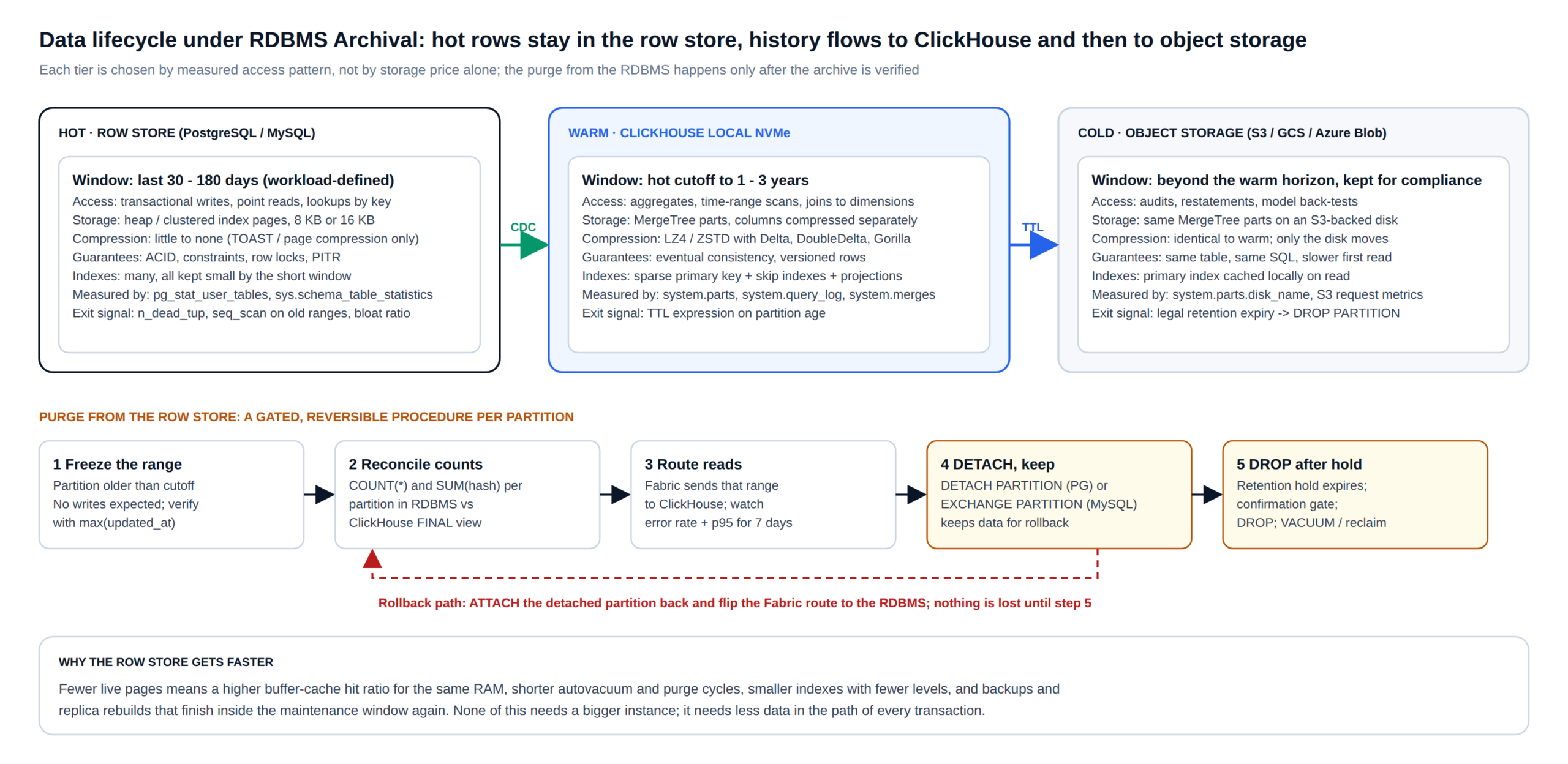
- The RDBMS archival pattern
- Reference architecture with Fabric and ClickHouse
- Step 1 · Measure and classify tables for RDBMS archival
- Step 2 · Design the ClickHouse archive schema
- Step 3 · Sync continuously with oltp-archiver
- Step 4 · Route reads through Fabric
- Step 5 · RDBMS archival purge from the row store, with gates
- Unified observability plane
- Trade-offs and when not to use RDBMS archival
- RDBMS archival FAQ
Problem statement
Why PostgreSQL and MySQL slow down before RDBMS archival
ChistaDATA is a spinoff from MinervaDB, which has provided enterprise-class consultative support and managed services for open-source transactional databases such as PostgreSQL, MySQL, MariaDB and MyRocks for more than a decade, to hundreds of enterprises including Fox Media, PayPal, Nike, National Geographic, GE, Caterpillar and Unilever. Across that estate the same failure pattern repeats once a transactional cluster grows past a few tens of terabytes, and it has two distinct mechanisms.
Mechanism 1: the working set outgrows the machine
A row store keeps every column of a row together on an 8 KB (PostgreSQL) or 16 KB (InnoDB) page. As history accumulates, the share of pages that any transaction actually needs keeps shrinking, but the indexes that transactions traverse keep growing.
A B-tree on a 5 TB table has more levels, more internal pages and a colder leaf layer than the same index on a 300 GB table; each extra level is another random read on every lookup that misses the buffer cache. On PostgreSQL the symptom shows up as a falling blks_hit / (blks_hit + blks_read) ratio in pg_stat_database while shared_buffers has not changed; on MySQL it is a falling Innodb_buffer_pool_read_requests to Innodb_buffer_pool_reads ratio and rising Innodb_data_reads.
The maintenance side degrades at the same time. Autovacuum has to scan more heap and index pages to remove the same number of dead tuples, so n_dead_tup in pg_stat_user_tables stays high for longer and the table bloats; in InnoDB the purge thread lags behind and the history list length (SHOW ENGINE INNODB STATUS) climbs. WAL and binlog volume per transaction rises because index pages that used to stay resident are now written back after every eviction. Backups, replica rebuilds and pg_upgrade or in-place upgrade windows stretch in proportion to the total size, not to the size of the data anyone still writes.
The usual response, sharding or a larger instance, treats the symptom. Row-store compression is weak by construction: PostgreSQL compresses only TOAST-able values with pglz or lz4, InnoDB page compression typically yields modest gains on mixed-type rows, so every extra shard or replica multiplies the raw storage bill. The root cause is that data which is no longer transactional still lives in the transactional path.
Mechanism 2: analytical reads on a row store
Most enterprises still run a meaningful share of reporting and analytics against the primary or a streaming replica. An analytical query typically wants three or four columns across millions of rows spanning months; a row store must read every page those rows occupy, which means pulling every column into memory to use a few. The cost shows up in pg_stat_statements as fingerprints with very high shared_blks_read per call, or in performance_schema.events_statements_summary_by_digest as digests with SUM_ROWS_EXAMINED several orders of magnitude above SUM_ROWS_SENT.
Those scans evict the transactional working set from the buffer cache, hold snapshots that block vacuum from removing dead tuples, and on a replica they either stall replay (with hot_standby_feedback off) or push bloat back to the primary (with it on). One badly shaped report can take the p99 of an order-insert path from milliseconds to seconds, and a runaway one can take the cluster down. A row store is the wrong engine for that workload, and no amount of tuning changes the page format it reads.
The pattern
What RDBMS archival changes, and what it deliberately leaves alone
There are two honest ways to respond to the pattern above, and they are complementary. The first is dataset-specific tuning: kernel, storage, configuration, indexing and SQL engineering, capacity planning and careful horizontal scale-out. That is MinervaDB’s daily work on PostgreSQL and MySQL estates, and it has kept clusters of several hundred terabytes serving transactions comfortably. The second is to stop asking the row store to hold data that only analytical queries read. That is what the rest of this page describes.
RDBMS archival, as ChistaDATA implements it, has four parts that always travel together. Historical partitions are continuously replicated into ClickHouse through change data capture, so the archive is never a one-off export that drifts. ChistaDATA Fabric sits in front of both engines as a wire-protocol-aware gateway and routes each statement to the engine that should execute it, so applications keep one connection string. Once the archive is verified and reads are flowing to ClickHouse, the corresponding partitions are detached and, after a hold period, dropped from the row store. And both engines, plus the gateway’s query log, report into one observability plane so the effect is measured rather than assumed.
What the pattern leaves alone is just as important. The system of record for every write stays the RDBMS, with its constraints, locks, transactions, backups and failover exactly as they were. The archive is not ACID; it is an eventually consistent, versioned copy that is correct after merges settle, which is the right guarantee for reporting and the wrong one for a ledger write. That boundary is enforced at the gateway, not by convention.
Reference architecture
RDBMS archival reference architecture: Fabric, the row store and ClickHouse
The diagram below is the topology we deploy. Applications connect to Fabric on the PostgreSQL or MySQL port. Fabric terminates TLS, authenticates the client, classifies each statement and opens or reuses a pooled connection to one of three backends: the RDBMS primary, an RDBMS replica, or the ClickHouse cluster. Behind the scenes, the oltp-archiver pipeline reads the primary’s logical log through Debezium, publishes row events to Kafka and writes them into ClickHouse archive tables. Metrics and query logs from every tier land in ClickHouse and are visualised in Grafana.
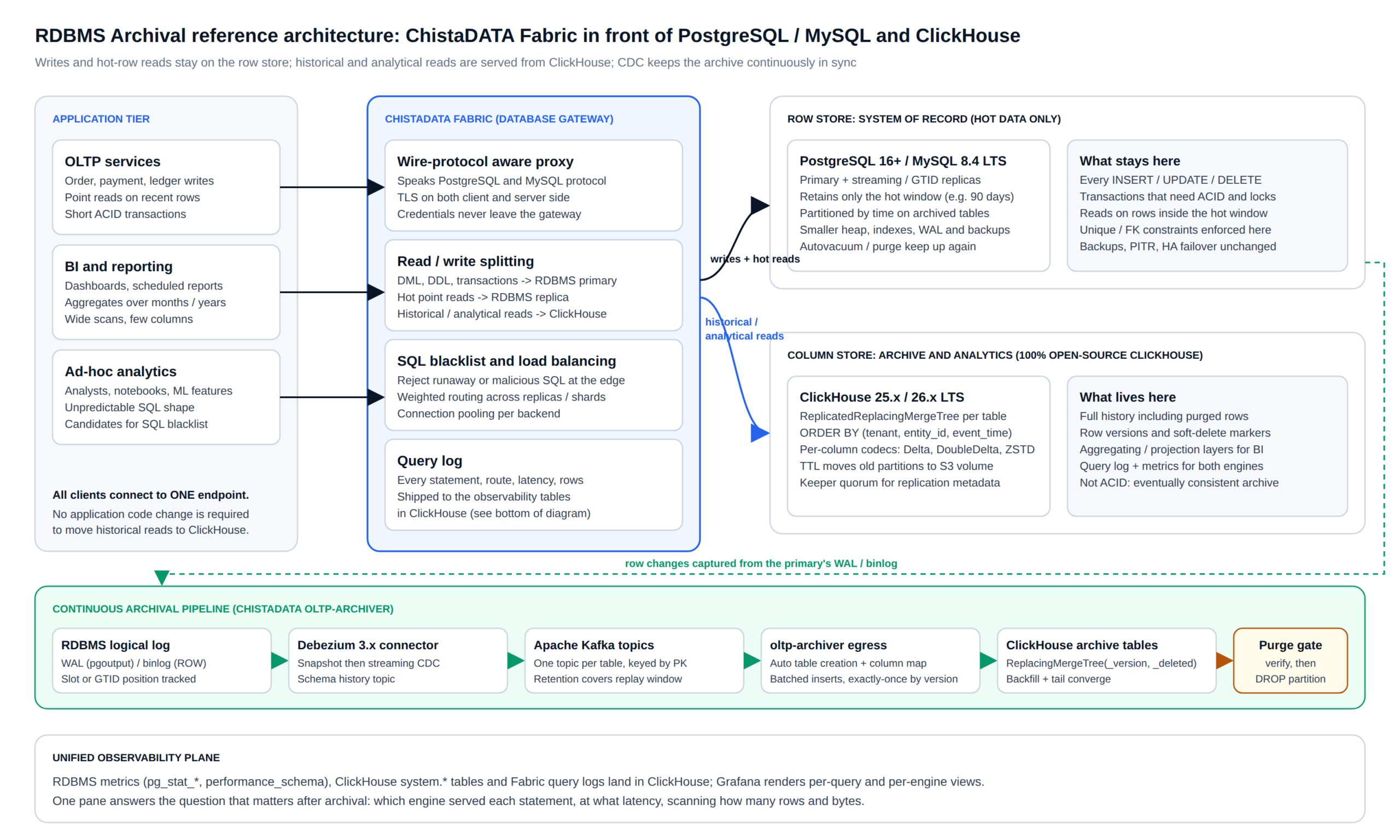
Three properties of this topology matter more than any individual component. First, the archive map is explicit: only tables with a verified ClickHouse counterpart are eligible for routing, so the rollout proceeds one table at a time and everything else behaves exactly as before.
Second, Fabric never lets a statement that needs the row store’s guarantees leave it: DML, DDL, anything inside an explicit transaction, anything that takes a lock, and any read that follows a write in the same session is pinned to the primary. Third, the purge from the row store is the last step, not the first, and it is reversible until the final drop.
Step 1 · Measure
Classify tables by bytes and staleness before any RDBMS archival decision
RDBMS archival candidates are found in the catalog, not in a workshop. The useful ranking is bytes multiplied by staleness: large tables whose old rows are almost never touched by DML and mostly touched by wide scans. On PostgreSQL the following query gives the first cut; the staleness column comes from the table’s own timestamp column in a second pass.
-- PostgreSQL 16+: RDBMS archival candidates by size, churn and scan profile
SELECT
    s.relname,
    pg_size_pretty(pg_total_relation_size(s.relid))            AS total_size,
    s.n_live_tup,
    s.n_dead_tup,
    ROUND(100.0 * s.n_dead_tup / NULLIF(s.n_live_tup + s.n_dead_tup, 0), 1) AS dead_pct,
    s.seq_scan,
    s.seq_tup_read,
    s.idx_scan,
    s.n_tup_ins + s.n_tup_upd + s.n_tup_del                    AS dml_ops,
    s.last_autovacuum
FROM pg_stat_user_tables AS s
ORDER BY pg_total_relation_size(s.relid) DESC
LIMIT 25;
-- RDBMS archival staleness: how much of the table is older than a candidate cutoff?
SELECT
COUNT(*) FILTER (WHERE created_at < now() - INTERVAL '90 days') AS rows_cold,
COUNT(*) AS rows_total,
MAX(updated_at) FILTER (WHERE created_at < now() - INTERVAL '90 days') AS last_write_to_cold
FROM orders;On MySQL 8.4 LTS the equivalent comes from sys.schema_table_statistics for I/O and row counts, information_schema.TABLES for DATA_LENGTH and INDEX_LENGTH, and the same staleness query against the table. The query fingerprints that touch those tables are then pulled from pg_stat_statements or performance_schema.events_statements_summary_by_digest and bucketed into three classes: point lookups on recent keys, range reads inside the hot window, and everything else. The last class is what moves to ClickHouse.
-- PostgreSQL: RDBMS archival fingerprints, statements that scan the most blocks per call
SELECT
    queryid,
    calls,
    ROUND(mean_exec_time::numeric, 2)                          AS mean_ms,
    ROUND((shared_blks_hit + shared_blks_read) / calls::numeric) AS blocks_per_call,
    LEFT(query, 120)                                           AS query_head
FROM pg_stat_statements
WHERE query ILIKE '%orders%'
ORDER BY (shared_blks_hit + shared_blks_read) / calls DESC
LIMIT 20;
The exit gate for this step is a written RDBMS archival baseline: per-table sizes, p95 and p99 per fingerprint class, buffer-cache hit ratio, autovacuum or purge lag, WAL bytes per hour, and backup duration. Every later claim of improvement is measured against this file.
Step 2 · Design
The ClickHouse schema behind RDBMS archival
An RDBMS archival table in ClickHouse has to absorb inserts, updates and deletes arriving out of order from CDC, answer the analytical fingerprints from Step 1 with as few read bytes as possible, and age gracefully to object storage. ReplacingMergeTree with a version column and a soft-delete marker does the first job; the sort key and codecs do the second; a TTL move rule does the third. The following DDL is the shape we start from for a typical orders table; the engine parameters are always written out in full.
-- ClickHouse 25.x / 26.x LTS: RDBMS archival table for the orders history
CREATE TABLE archive.orders ON CLUSTER '{cluster}'
(
    order_id        UInt64,
    tenant_id       UInt32,
    customer_id     UInt64,
    status          LowCardinality(String),
    total           Decimal(18, 2),
    currency        LowCardinality(String),
    created_at      DateTime64(3, 'UTC')  CODEC(DoubleDelta, ZSTD(3)),
    updated_at      DateTime64(3, 'UTC')  CODEC(DoubleDelta, ZSTD(3)),
    payload         String                CODEC(ZSTD(6)),
    _version        UInt64,      -- source LSN / GTID sequence from Debezium
    _deleted        UInt8        -- 1 when the source row was deleted
)
ENGINE = ReplicatedReplacingMergeTree(
    '/clickhouse/tables/{shard}/archive/orders',
    '{replica}',
    _version,
    _deleted
)
PARTITION BY toYYYYMM(created_at)
ORDER BY (tenant_id, customer_id, created_at, order_id)
TTL toDateTime(created_at) + INTERVAL 24 MONTH TO VOLUME 'cold'
SETTINGS
    index_granularity = 8192,
    storage_policy    = 'tiered',
    min_age_to_force_merge_seconds = 3600;
A few decisions inside that DDL deserve explanation. The sort key leads with the columns that the analytical fingerprints filter on most selectively, then time, then the primary key last so that duplicates from CDC collapse correctly during merges. Partitioning by month keeps each partition small enough for OPTIMIZE ... FINAL per partition and lines up with the TTL move and the row-store purge, which also happens per month.
Timestamps use DoubleDelta because sequential timestamps compress to almost nothing under it; free-form payloads use a higher ZSTD level because they are written once and read rarely. The is_deleted form of ReplacingMergeTree has been available since ClickHouse 23.2 and, combined with FINAL or the final = 1 setting on reads, gives a correct point-in-time view without a separate deletes table.
Two more layers usually follow. A projection or an AggregatingMergeTree materialized view serves the dashboards that hit the same GROUP BY every minute, and a skip index (minmax on updated_at, a bloom filter on a status or reference code) covers filters that are not in the sort key. Both are validated against the top twenty analytical statements from Step 1 with EXPLAIN PIPELINE and EXPLAIN indexes = 1 before the pipeline is switched on; the exit gate for this step is that every one of those statements reads a small fraction of the table’s parts.
Step 3 · Sync
Continuous archival with ChistaDATA oltp-archiver
oltp-archiver is the ChistaDATA service that keeps the RDBMS archival tier in step with the source. It is built for continuous synchronisation from an OLTP database using change data capture: today it supports MySQL and PostgreSQL through Debezium and Kafka on the ingress side and ClickHouse on the egress side, it creates archive tables and maps columns automatically, and its ingress and egress connectors are modular so further sources can be added without touching the core. The pipeline has three stages, each with one lag metric that goes on the dashboard.
The source stage is Debezium reading the logical log: the pgoutput plugin on a PostgreSQL replication slot, or the row-format binlog on MySQL with GTID positions. Debezium performs an initial consistent snapshot and then streams changes, publishing one Kafka topic per table keyed by primary key so that all events for a row land on the same partition in order. Kafka retention has to cover the longest replay we might need, which in practice means the time to rebuild an archive table from scratch plus a safety margin.
{
  "name": "orders-pg-source",
  "config": {
    "connector.class": "io.debezium.connector.postgresql.PostgresConnector",
    "database.hostname": "${PG_HOST}",
    "database.user": "${PG_CDC_USER}",
    "database.password": "${PG_CDC_PASSWORD}",
    "database.dbname": "shop",
    "topic.prefix": "shop",
    "plugin.name": "pgoutput",
    "slot.name": "oltp_archiver",
    "publication.name": "oltp_archiver_pub",
    "table.include.list": "public.orders,public.order_items",
    "snapshot.mode": "initial",
    "heartbeat.interval.ms": "10000",
    "tombstones.on.delete": "false"
  }
}
The egress stage consumes those topics and writes to ClickHouse in batches. Each event carries the source position, which becomes _version; deletes become rows with _deleted = 1. Because ReplacingMergeTree keeps the highest version per sort key, a replayed batch is idempotent: re-delivering the same events after a consumer restart cannot double-count anything. Batches are sized to the table’s ingestion rate so that ClickHouse receives a small number of large inserts rather than many small ones, which keeps system.parts healthy and merges cheap.
Reconciliation is the exit gate for RDBMS archival sync. For every closed partition, row counts and a content hash are compared between the row store and a FINAL read of the archive; mismatches must be zero for seven consecutive days before any read is routed. The comparison query is simple on both sides and is retained as a scheduled check for the life of the archive.
-- RDBMS archival reconciliation, row store side (PostgreSQL)
SELECT
    date_trunc('month', created_at)                  AS month,
    COUNT(*)                                          AS row_count,
    SUM(hashtext(order_id::text || status || total::text)) AS content_hash
FROM orders
WHERE created_at >= '2025-01-01' AND created_at < '2025-02-01'
GROUP BY 1;

-- Archive (ClickHouse)
SELECT
    toStartOfMonth(created_at)                         AS month,
    count()                                            AS row_count,
    sum(cityHash64(toString(order_id), status, toString(total))) AS content_hash
FROM archive.orders FINAL
WHERE created_at >= '2025-01-01' AND created_at < '2025-02-01'
  AND _deleted = 0
GROUP BY month;Step 4 · Route
How Fabric routes reads once RDBMS archival is live
Fabric is a lightweight, secure reverse proxy that understands the wire protocols of PostgreSQL, MySQL and ClickHouse. It provides read/write splitting, SQL blacklisting, load balancing across backends, connection pooling and per-statement query logging, and because clients see a normal database endpoint, nothing in the application changes when a table’s historical reads move to ClickHouse. The decision path for each statement is shown below.
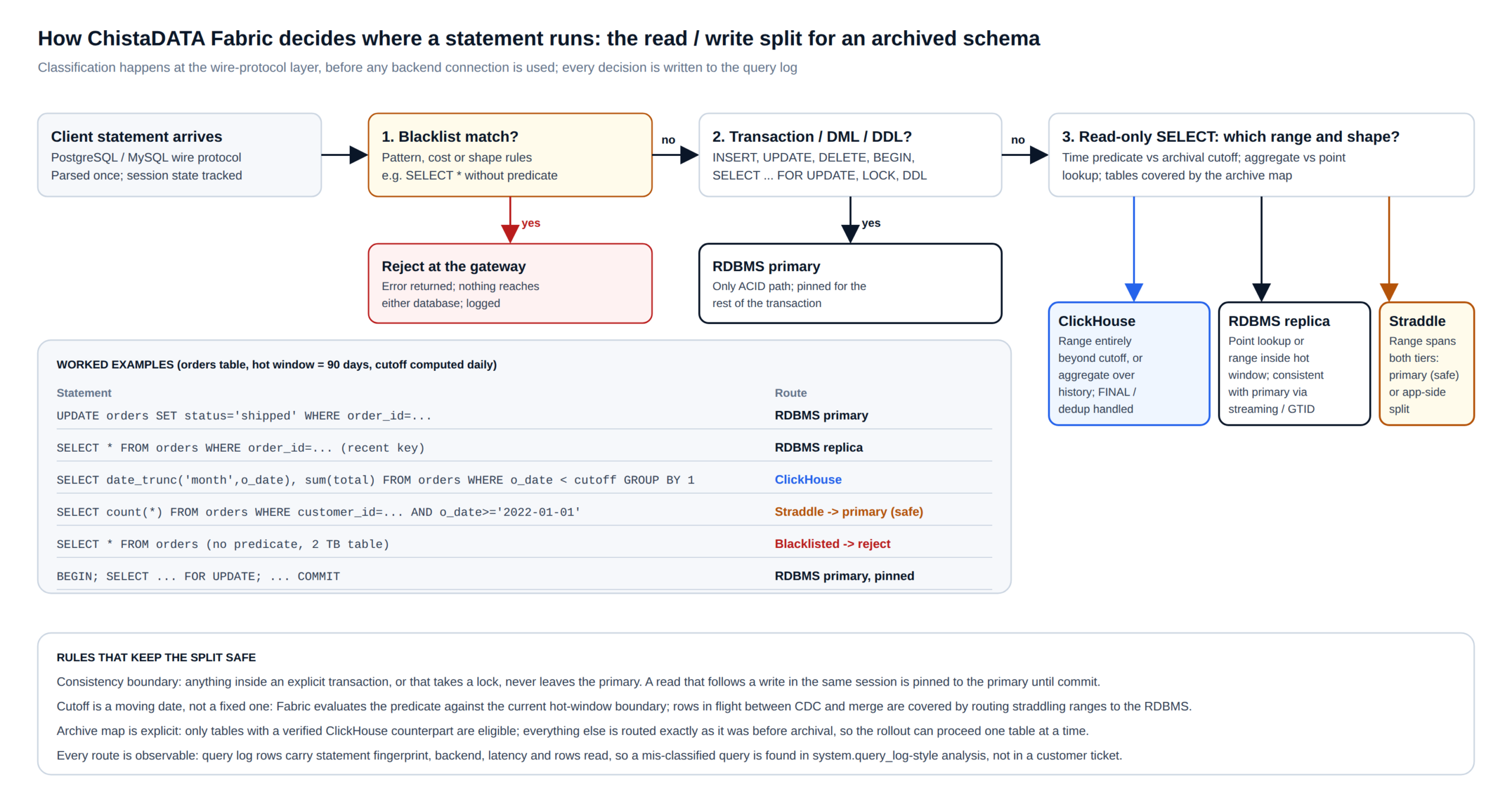
The classification is conservative by design. A blacklist rule is evaluated first, so a statement that matches a banned shape (a full scan without a predicate on a multi-terabyte table, a pattern associated with injection) is rejected at the gateway and never reaches either engine.
Anything that writes, defines schema, takes a lock or opens a transaction goes to the primary, and the session stays pinned there until commit so that a read after a write sees the write. Only a read-only SELECT is considered for the archive, and only if the tables it references are in the archive map and its time predicate lies entirely beyond the current hot-window cutoff. A range that straddles the cutoff is sent to the primary, which is always correct even if slower.
Teams that want the straddling case served from both tiers split it in the application, and Fabric logs how often that case occurs so the decision is data-driven.
RDBMS archival routing is enabled per table and per fingerprint class, starting with a canary share of traffic. The exit gate compares the routed reads’ p95 against the Step 1 baseline and checks that RDBMS CPU, I/O wait and buffer-cache misses have fallen. On the ClickHouse side, system.query_log shows what each routed statement actually cost.
-- ClickHouse: RDBMS archival read cost profile over the last 24 hours
SELECT
    normalizedQueryHash(query)                       AS fingerprint,
    count()                                          AS runs,
    quantile(0.95)(query_duration_ms)                AS p95_ms,
    formatReadableSize(avg(read_bytes))              AS avg_read,
    avg(read_rows)                                   AS avg_rows,
    any(substring(query, 1, 100))                    AS sample
FROM system.query_log
WHERE type = 'QueryFinish'
  AND event_time > now() - INTERVAL 1 DAY
  AND http_user_agent LIKE 'chistadata-fabric%'
GROUP BY fingerprint
ORDER BY runs * p95_ms DESC
LIMIT 20;
Reads that land on ClickHouse benefit from everything the engine was built for: a sparse primary index that skips whole granules, column-level codecs that shrink read bytes before decompression, vectorised execution over those columns, skip indexes and projections for the filters that the sort key does not cover, and parallel execution across cores and replicas. ClickBench, the public benchmark maintained by ClickHouse Inc., publishes storage size and query latency across a large set of systems on the same dataset; we recommend reproducing the relevant comparison on your own data rather than quoting its headline ratios, and our explanation of why ClickHouse is fast covers the internals in detail.
Step 5 · Purge
Purging from the row store without risk
The row store gets leaner only when the archived partitions leave it, and this is the one irreversible step, so it is wrapped in gates. The procedure runs per partition, per month, and it is the same on both engines apart from syntax. The partition must be older than the cutoff and show no writes (the MAX(updated_at) check from Step 1), reconciliation must have been clean for the hold period, Fabric must already be serving that range from ClickHouse, and the operator must pass an explicit confirmation gate before the drop.
-- PostgreSQL 16+: RDBMS archival purge, verification query BEFORE detaching
SELECT COUNT(*) AS rows_in_partition, MAX(updated_at) AS last_write
FROM orders_2025_01;

-- Detach keeps the data on disk; nothing is lost yet
ALTER TABLE orders DETACH PARTITION orders_2025_01 CONCURRENTLY;

-- Validation query AFTER: the parent no longer sees the range,
-- the detached table still holds every row
SELECT COUNT(*) FROM orders WHERE created_at >= '2025-01-01' AND created_at < '2025-02-01';
SELECT COUNT(*) FROM orders_2025_01;

-- After the retention hold and an explicit confirmation gate:
-- DROP TABLE orders_2025_01;   -- CONFIRM: reconciled, routed, hold expired
-- MySQL 8.4 LTS: RDBMS archival purge, swap the partition into a holding table first
CREATE TABLE orders_2025_01_hold LIKE orders;
ALTER TABLE orders_2025_01_hold REMOVE PARTITIONING;
ALTER TABLE orders EXCHANGE PARTITION p202501 WITH TABLE orders_2025_01_hold;
-- Validation: the live table's partition is empty, the hold table is full
SELECT COUNT(*) FROM orders PARTITION (p202501);
SELECT COUNT(*) FROM orders_2025_01_hold;
-- After the hold and a confirmation gate:
-- DROP TABLE orders_2025_01_hold; -- CONFIRM: reconciled, routed, hold expiredRDBMS archival rollback until the final drop is a single statement: ATTACH PARTITION on PostgreSQL or a reverse EXCHANGE PARTITION on MySQL, followed by flipping the Fabric route for that range back to the row store. After the drop, the space is reclaimed with VACUUM (or pg_repack on tables that were bloated before archival started) and OPTIMIZE TABLE on InnoDB, and the daily job that enforces the hot window takes over: each new month, one more partition follows the same path.
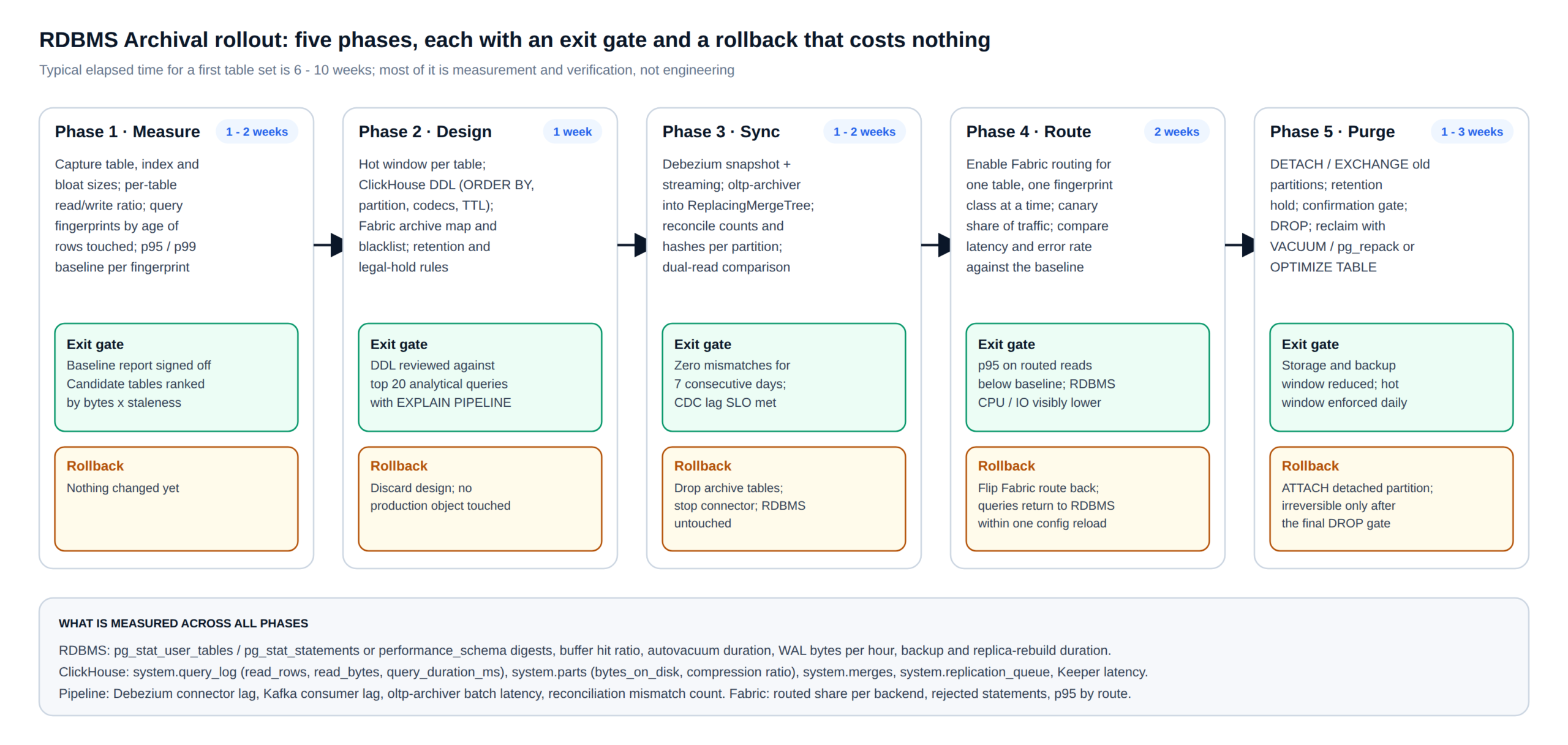
What the baseline file shows afterwards is a smaller heap and smaller indexes, a higher buffer-cache hit ratio for the same memory, autovacuum or purge cycles that keep up, less WAL per transaction, and backups and replica rebuilds that fit inside the maintenance window again. None of that required a larger instance; it required less data in the path of every transaction.
Observability
One plane for both engines and the gateway
Fabric’s query log records every statement with its fingerprint, the backend it was routed to, latency, rows and bytes, and the reason for the route. Those records, together with metrics scraped from pg_stat_* or performance_schema on the row store and from system.* tables on ClickHouse, are written into ClickHouse and visualised in Grafana. The result is a single pane that answers the questions that matter after RDBMS archival: what share of reads each engine serves, how the p95 of each fingerprint class moved against the baseline, how far behind the CDC pipeline is, and whether any statement is being misrouted.
The same plane carries the safety signals. SQL blacklisting stops resource-intensive or malicious statements at the gateway, and because Fabric holds the backend credentials and encrypts every connection, applications never receive database passwords directly; combined with load balancing across replicas, that improves both the security and the resilience of the whole system. Dashboards are customised per customer, but the four panels we always start with are the routed share per backend, CDC lag in seconds, reconciliation mismatch count, and RDBMS buffer-cache hit ratio against the baseline line.
Row store health after RDBMS archival
Buffer-cache hit ratio, n_dead_tup and autovacuum duration, InnoDB history list length, WAL or binlog bytes per hour, backup and replica-rebuild duration.
Archive health
system.parts bytes on disk and compression ratio per partition, system.merges backlog, system.replication_queue, Keeper request latency, TTL moves completed.
Pipeline and gateway
Debezium and Kafka consumer lag, oltp-archiver batch latency, reconciliation mismatches, Fabric routed share, rejected statements and p95 by route.
Trade-offs
When RDBMS archival is the wrong answer
The RDBMS archival tier is not ACID. A row is visible in ClickHouse a few seconds after it commits in the row store and only becomes a single version after merges settle; reads use FINAL or an equivalent to hide that. Any workload that needs read-your-own-writes on historical rows, or that updates old rows frequently, does not belong in the archive, and the hot window should be widened rather than the semantics bent. Foreign keys and unique constraints are not enforced in ClickHouse; the row store enforced them when the rows were written, and the archive inherits that state.
Some estates should not start RDBMS archival at all yet. If the row store’s problem is a handful of missing indexes or a misconfigured autovacuum, dataset-specific tuning fixes it in days for a fraction of the effort; we say so when that is the case. If the historical data is small, or nobody queries it, a plain partition drop with a cold backup is enough. And if the analytical workload is a few reports a day that can tolerate an hour of latency, a nightly export to object storage may be adequate; the CDC pipeline earns its keep when reports need to be current and the row store is visibly suffering. The table below summarises where each option fits.
| Situation | Recommended approach | Why |
|---|---|---|
| Bloat and slow lookups, data still transactional | Tuning, partitioning, index engineering | Row store is the right engine; fix the configuration and schema first |
| Large cold history, analytical reads on the primary | RDBMS archival with Fabric and ClickHouse | Removes both the bloat and the analytical load; reports get faster |
| Cold history that nobody queries | Partition drop with cold backup, no RDBMS archival tier | No serving tier is needed; keep a restorable copy for compliance |
| Frequent updates to old rows, read-your-writes required | Widen the hot window; do not archive those tables | Eventual consistency in the archive would surface as wrong answers |
| Multi-source analytics beyond one database | Real-time analytics platform on ClickHouse | Archival is a subset of a broader ClickHouse migration design |
FAQ
RDBMS archival questions we hear most often
Does RDBMS archival require changes to the application?
No. Applications connect to Fabric on the same wire protocol they use today; routing to ClickHouse is configured per table and per statement class at the gateway. The only application-side change some teams choose to make is splitting a range query that straddles the hot-window cutoff into two queries, and Fabric reports how often that case occurs before anyone decides.
How current is the RDBMS archival copy?
Under normal load, seconds: Debezium streams from the logical log, Kafka adds milliseconds, and oltp-archiver writes in batches sized to the table’s ingest rate. Lag is a first-class metric on the dashboard and has an alert threshold; while it is above threshold, Fabric can be configured to route the affected range back to the row store.
Which databases does the RDBMS archival pipeline (oltp-archiver) support?
MySQL and PostgreSQL as sources through Debezium and Kafka, and ClickHouse as the destination. The ingress and egress connectors are modular, so additional sources are added without changing the core service.
What happens to the archive during a ClickHouse upgrade or a row-store failover?
The archive tables are replicated (ReplicatedReplacingMergeTree with ClickHouse Keeper), so a rolling ClickHouse upgrade keeps at least one replica serving. A row-store failover moves the Debezium connector to the new primary at the last confirmed position; events are idempotent by version, so a small replay is harmless. Both cases are rehearsed in the quarterly failover drills we run for support customers.
Can RDBMS archival run in our own cloud account or on-premises?
Yes. The whole stack, Fabric, Kafka, Debezium, oltp-archiver and ClickHouse, is deployed wherever the row store already is: on-premises, inside your VPC, or in the public cloud, with no dependency on a vendor-managed service.
Is this the same as ClickHouse Cloud or a managed offering?
No. The archive tier is 100% open-source ClickHouse that you own and can move. ChistaDATA provides consulting, 24×7 support and managed services around it, so the trade-off between self-managed and managed is an operational one, not a lock-in one.
Next step
Start with the measurement, not the migration
An RDBMS archival assessment from ChistaDATA begins with the Step 1 baseline on your own cluster: table ranking, fingerprint classes, and the p95 and cost numbers that decide whether archival, tuning or both is the right move. If the numbers say archival, the same team designs the ClickHouse schema, runs the CDC pipeline and Fabric rollout with you, and stays on as 24×7 support with a 15-minute Severity 1 response. Wherever your data lives, on-premises, in your VPC or in the public cloud, the goal is the same: a leaner, faster, more secure and more fault-tolerant database stack.
Further reading: ReplacingMergeTree documentation · Debezium PostgreSQL connector · PostgreSQL table partitioning · ClickBench
Running ClickHouse in production? ChistaDATA provides ClickHouse consulting for architecture, performance and migrations, and 24×7 ClickHouse support with a 15-minute S1 response. For day-to-day operations see ClickHouse DBA services and ClickHouse managed services.
