ChistaDATA · ClickHouse as the archive store for PostgreSQL and MySQL
Archiving data to ClickHouse is the most reliable way we know to make a transactional database smaller and faster without losing a single historical row. The history moves to a columnar store that compresses it well and answers analytical questions over it in milliseconds; the source keeps only the window that transactions still touch. This guide covers the mechanics end to end for PostgreSQL 16+ and MySQL 8.4 LTS sources on ClickHouse 25.x and 26.x LTS.
It is written for the engineer who has to do the work: which rows to move, the three ways to move them and when each applies, how to shape the archive table, how to prove the copy before anything is deleted, how retention works inside ClickHouse, and how to keep seven years of history queryable without scanning seven years.
On this page
- Why archiving data to ClickHouse works
- Selecting what to archive
- Three paths for archiving data to ClickHouse
- Shaping the table before archiving data to ClickHouse
- Archiving data to ClickHouse: the actual statements
- Proving the archive: reconciliation and cutover
- Retention after archiving data to ClickHouse
- Querying years of history quickly
- Banking pattern: real-time analytics on the archive
- Mistakes in archiving data to ClickHouse
- Archiving data to ClickHouse: FAQ
Why ClickHouse
Why archiving data to ClickHouse beats a cold bucket or a bigger primary
ClickHouse is known for real-time analytics, but the same properties make it an unusually good archive store for transactional systems. Columnar storage with per-column codecs means historical rows, which are mostly repetitive timestamps, enumerations and identifiers, compress far better than they do in a row store’s heap pages. The sparse primary index and partition pruning mean a query over one customer’s seven-year history reads a few granules, not a table scan. Replication through ClickHouse Keeper and tiered storage to object storage give the archive durability and a cost profile close to cold storage, while keeping it queryable with plain SQL.
The alternative most teams start with is a cold bucket of CSV or Parquet exports. It is cheap and it is not queryable; every audit or restatement becomes a re-import project. The other alternative, keeping everything in the primary and buying a larger instance, treats the symptom: the working set still competes with dead history for cache, and every index, backup and vacuum grows with data nobody writes to. Archiving data to ClickHouse removes the history from the transactional path and gives it a home where analytical reads are the native workload.
ChistaDATA runs this pattern for customers as a one-off backfill, as a scheduled monthly job, and as a continuous pipeline through ChistaDATA Fabric and oltp-archiver. The mechanics below are the same in all three cases; only the transport differs.
Selection
Which rows are candidates for archiving data to ClickHouse
The right candidates are found in the catalog, not in a meeting: large tables whose old rows are almost never written and mostly read by wide scans. On PostgreSQL the first pass is size and churn per table; the second pass is how much of each table lies beyond a candidate cutoff and when it was last written.
-- PostgreSQL 16+: tables ranked for archiving data to ClickHouse
SELECT
    s.relname,
    pg_size_pretty(pg_total_relation_size(s.relid))     AS total_size,
    s.n_live_tup,
    s.n_dead_tup,
    s.seq_scan,
    s.idx_scan,
    s.n_tup_upd + s.n_tup_del                            AS writes_to_existing_rows,
    s.last_autovacuum
FROM pg_stat_user_tables AS s
ORDER BY pg_total_relation_size(s.relid) DESC
LIMIT 20;

-- Staleness of one candidate against a 12-month cutoff
SELECT
    COUNT(*) FILTER (WHERE created_at < now() - INTERVAL '12 months') AS rows_beyond_cutoff,
    COUNT(*)                                                           AS rows_total,
    MAX(updated_at) FILTER (WHERE created_at < now() - INTERVAL '12 months') AS last_write_beyond_cutoff
FROM orders;
-- MySQL 8.4 LTS: the same two questions before archiving data to ClickHouse
SELECT table_name,
ROUND((data_length + index_length) / 1024 / 1024 / 1024, 1) AS size_gb,
table_rows
FROM information_schema.tables
WHERE table_schema = 'shop'
ORDER BY data_length + index_length DESC
LIMIT 20;
SELECT SUM(created_at < NOW() - INTERVAL 12 MONTH) AS rows_beyond_cutoff,
COUNT(*) AS rows_total,
MAX(CASE WHEN created_at < NOW() - INTERVAL 12 MONTH THEN updated_at END) AS last_write_beyond_cutoff
FROM orders;A table qualifies when the rows beyond the cutoff are a large share of its size and last_write_beyond_cutoff is comfortably older than the cutoff. A table where old rows keep receiving updates is not a candidate yet; widen the window or archive with continuous CDC so the archive follows the updates. The query fingerprints that touch the table, from pg_stat_statements or performance_schema.events_statements_summary_by_digest, tell you which reads will move to the archive and therefore what the archive’s sort key must serve.
Transport
Three paths for archiving data to ClickHouse
There are three ways to move rows from a row store into ClickHouse, and the choice is decided by volume, network and whether the archive must stay current. They share the same archive DDL, the same reconciliation and the same purge; only the transport differs.
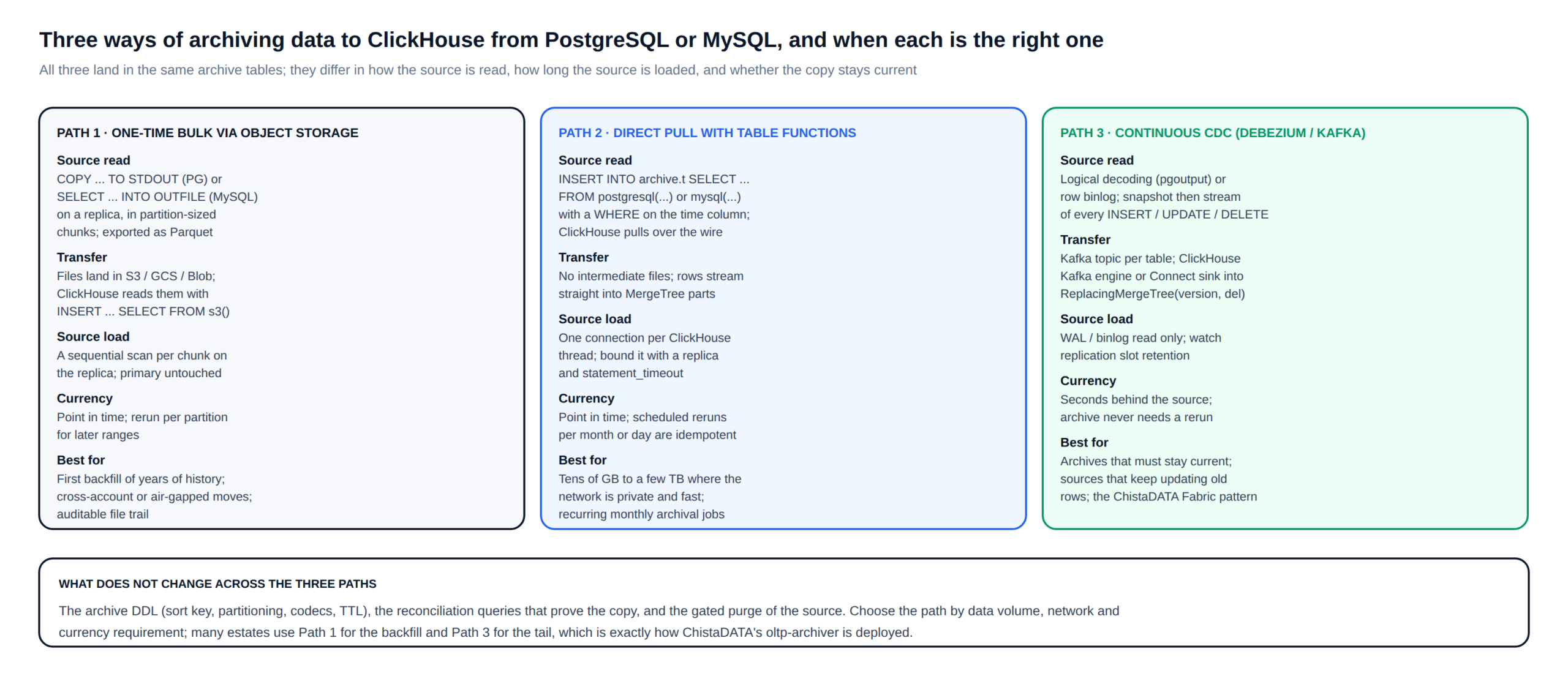
Path 1 exports partition-sized chunks from a replica to Parquet on object storage and loads them with s3(). It leaves an auditable file trail, works across accounts and air gaps, and is the right way to move years of history the first time. Path 2 has ClickHouse pull rows directly over the wire with the postgresql() or mysql() table functions; it needs no intermediate files and suits recurring monthly jobs on a private network. Path 3 streams every change through Debezium and Kafka into a ReplacingMergeTree table; it is the only path whose copy stays seconds behind the source, and it is how oltp-archiver works.
Most estates use Path 1 for the backfill and Path 3 for the tail.
Physical design
Shaping the archive table before archiving data to ClickHouse
The archive table is not a copy of the source schema. Each column is mapped by type, nullability and codec, and the sort key and partitioning are derived from how the archive will be queried and purged, not from the transactional primary key. The mapping below is for a typical orders table; the rules under it are the ones we apply on every engagement.
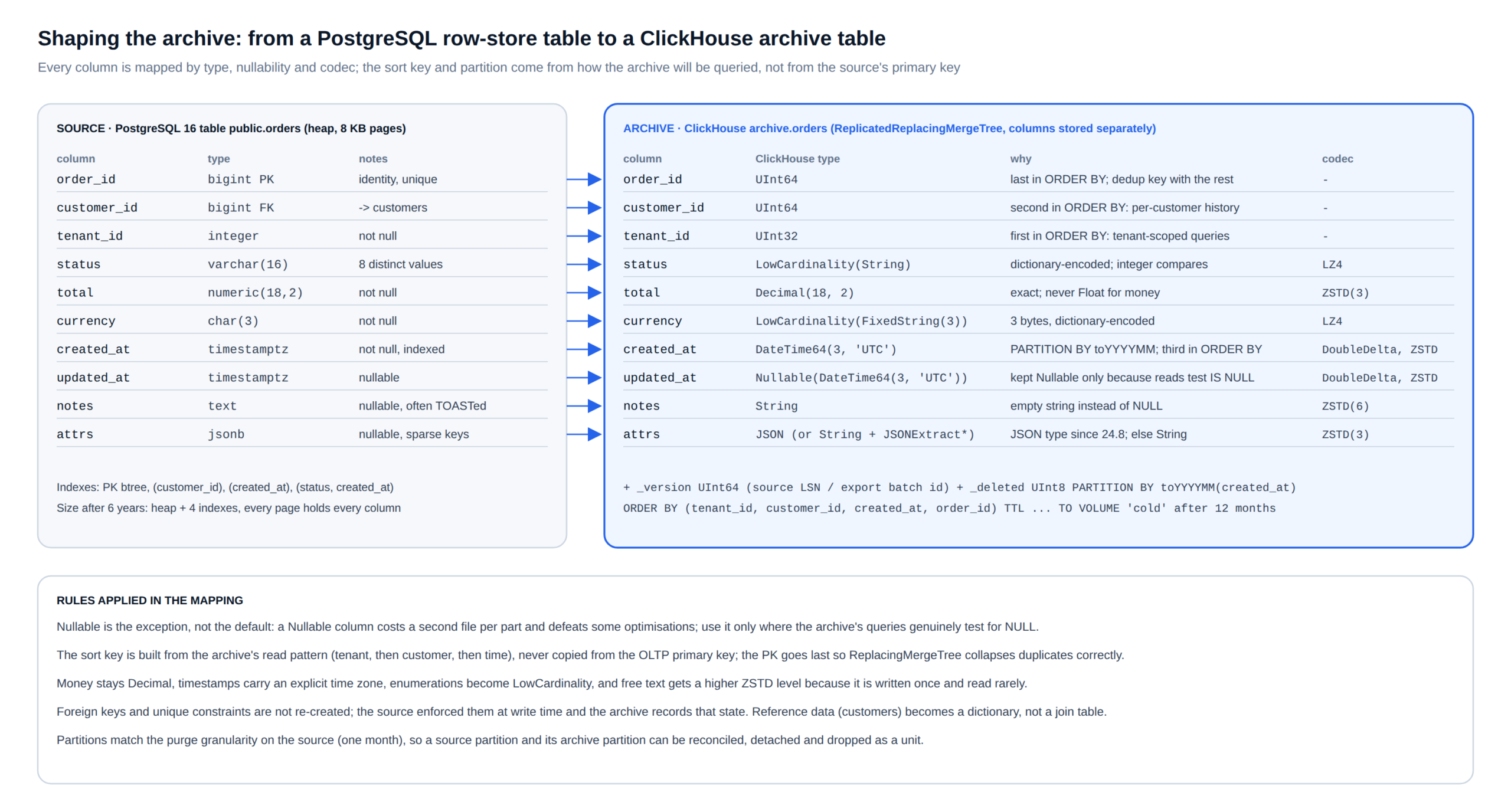
-- ClickHouse 25.x / 26.x LTS: target table for archiving data to ClickHouse (engine parameters in full)
CREATE TABLE archive.orders ON CLUSTER '{cluster}'
(
    order_id     UInt64,
    customer_id  UInt64,
    tenant_id    UInt32,
    status       LowCardinality(String),
    total        Decimal(18, 2)                CODEC(ZSTD(3)),
    currency     LowCardinality(FixedString(3)),
    created_at   DateTime64(3, 'UTC')          CODEC(DoubleDelta, ZSTD(3)),
    updated_at   Nullable(DateTime64(3, 'UTC')) CODEC(DoubleDelta, ZSTD(3)),
    notes        String                        CODEC(ZSTD(6)),
    attrs        String                        CODEC(ZSTD(3)),   -- or JSON on 24.8+ once validated
    _version     UInt64,                                          -- source LSN / GTID, or export batch id
    _deleted     UInt8 DEFAULT 0
)
ENGINE = ReplicatedReplacingMergeTree(
    '/clickhouse/tables/{shard}/archive/orders',
    '{replica}',
    _version,
    _deleted
)
PARTITION BY toYYYYMM(created_at)
ORDER BY (tenant_id, customer_id, created_at, order_id)
TTL toDateTime(created_at) + INTERVAL 12 MONTH TO VOLUME 'cold',
    toDateTime(created_at) + INTERVAL 84 MONTH DELETE
SETTINGS
    index_granularity = 8192,
    storage_policy    = 'tiered';

-- Reference data becomes a dictionary, not a second archived table
CREATE DICTIONARY archive.dim_customer ON CLUSTER '{cluster}'
(
    customer_id UInt64,
    segment     String,
    country     String
)
PRIMARY KEY customer_id
SOURCE(POSTGRESQL(NAME crm_pg TABLE 'customers'))
LAYOUT(HASHED())
LIFETIME(MIN 3600 MAX 4200);
Three decisions in that DDL do most of the work. The sort key leads with the columns the archive’s queries filter on most selectively, in order of cardinality, then time, then the primary key last so duplicates collapse correctly during merges. Monthly partitions match the granularity at which the source will be purged, so a source partition and its archive partition are reconciled, detached and dropped as a unit. And ReplacingMergeTree with a version and a delete marker is used even for a one-time backfill, because it makes every reload idempotent: loading the same month twice cannot double-count.
Loading
The statements that do the archiving data to ClickHouse work
Path 1: Parquet through object storage
-- On a PostgreSQL replica: export one month as Parquet (psql + DuckDB or pg2parquet; illustrative)
\copy (SELECT * FROM orders WHERE created_at >= '2025-01-01' AND created_at < '2025-02-01')
      TO PROGRAM 'duckdb -c "COPY (SELECT * FROM read_csv(''/dev/stdin'')) TO ''s3://${LAKE_BUCKET}/orders/2025-01.parquet'' (FORMAT PARQUET)"' CSV HEADER;

-- Archiving data to ClickHouse, path 1: load the month; the WHERE guards against a mis-named file
INSERT INTO archive.orders
SELECT order_id, customer_id, tenant_id, status, total, currency,
       created_at, updated_at, coalesce(notes, '') AS notes, coalesce(attrs, '{}') AS attrs,
       20250101 AS _version, 0 AS _deleted
FROM s3('https://${LAKE_BUCKET}.s3.${AWS_REGION}.amazonaws.com/orders/2025-01.parquet', 'Parquet')
WHERE toYYYYMM(created_at) = 202501
SETTINGS max_threads = 16, max_insert_block_size = 1048576;
Path 2: direct pull with a table function
-- Named collection keeps the credentials out of every statement
CREATE NAMED COLLECTION shop_pg AS
    host = '${PG_REPLICA_HOST}', port = 5432, database = 'shop',
    user = '${PG_RO_USER}', password = '${PG_RO_PASSWORD}';

-- Archiving data to ClickHouse, path 2: one month per run; rerunnable because the archive is ReplacingMergeTree
INSERT INTO archive.orders
SELECT order_id, customer_id, tenant_id, status, total, currency,
       created_at, updated_at, coalesce(notes, ''), coalesce(attrs::String, '{}'),
       toUnixTimestamp(now()) AS _version, 0 AS _deleted
FROM postgresql(shop_pg, table = 'orders')
WHERE created_at >= '2025-01-01' AND created_at < '2025-02-01'
SETTINGS max_threads = 4;   -- bound the number of source connections
For archiving data to ClickHouse from MySQL the statement is identical with mysql(shop_my, table = 'orders'). The pull runs against a replica with a statement timeout set on the source role, and the archive job’s own SETTINGS max_threads bounds the connections it opens. Pulls larger than a few terabytes are better served by Path 1, which parallelises on the export side and leaves files to audit.
Path 3: continuous CDC
Debezium reads the logical log (pgoutput on PostgreSQL, the row-format binlog on MySQL), performs an initial snapshot and then streams changes to one Kafka topic per table. ClickHouse consumes with the Kafka engine or the official Connect sink; each event’s source position becomes _version and deletes become rows with _deleted = 1. The full connector configuration, the Kafka engine DDL and the dead-letter handling are on the ChistaDATA Fabric archival page; the archive table above is the one they write into.
Verification
Proving the archive before a source row is removed
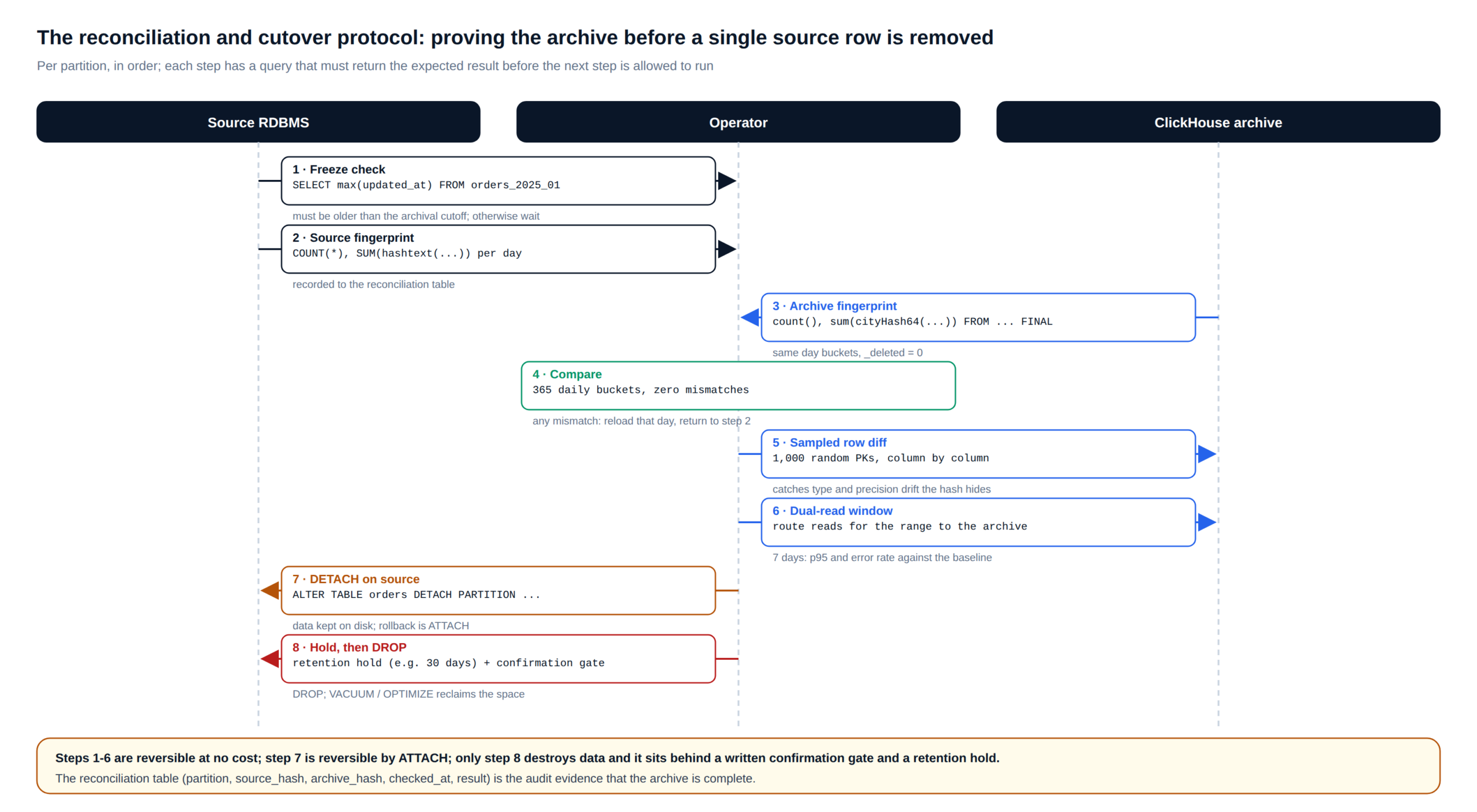
Archiving data to ClickHouse only earns the purge of the source once the copy is proven, and proof is a protocol, not a feeling. Per partition, in order: freeze check, source fingerprint, archive fingerprint, comparison, sampled row diff, a dual-read window, detach, and only then a drop behind a retention hold and a written confirmation gate.
-- Archiving data to ClickHouse, proof step 2: source fingerprint per day (PostgreSQL)
SELECT date_trunc('day', created_at)::date                      AS d,
       COUNT(*)                                                  AS n,
       SUM(hashtext(order_id::text || status || total::text))    AS h
FROM orders
WHERE created_at >= '2025-01-01' AND created_at < '2025-02-01'
GROUP BY 1 ORDER BY 1;

-- Archive fingerprint per day (ClickHouse), deduplicated view of the same month
SELECT toDate(created_at)                                       AS d,
       count()                                                   AS n,
       sum(cityHash64(toString(order_id), status, toString(total))) AS h
FROM archive.orders FINAL
WHERE toYYYYMM(created_at) = 202501 AND _deleted = 0
GROUP BY d ORDER BY d;

-- Sampled row diff: 1,000 random keys pulled from both sides and compared column by column
SELECT a.order_id, a.status = s.status AS status_ok, a.total = s.total AS total_ok,
       a.created_at = s.created_at AS created_ok
FROM archive.orders FINAL AS a
INNER JOIN postgresql(shop_pg, table = 'orders') AS s USING (order_id)
WHERE a.order_id IN (SELECT order_id FROM archive.orders WHERE toYYYYMM(created_at) = 202501 ORDER BY rand() LIMIT 1000)
  AND NOT (status_ok AND total_ok AND created_ok);   -- must return zero rows
The day-bucketed counts must match exactly; the hashes are compared within each side across runs to detect drift, since a byte-identical cross-engine hash is rarely worth the type-normalisation effort. The sampled diff catches what hashes hide: precision loss on decimals, time-zone shifts on timestamps, trailing-space differences on fixed-width strings. The dual-read window routes production reads for the range to the archive for seven days, through ChistaDATA Fabric or the application, and compares p95 and error rate against the baseline.
-- Step 7 on PostgreSQL 16+: verification BEFORE, detach, validation AFTER
SELECT COUNT(*) AS rows_in_partition, MAX(updated_at) AS last_write FROM orders_2025_01;
ALTER TABLE orders DETACH PARTITION orders_2025_01 CONCURRENTLY;
SELECT COUNT(*) FROM orders WHERE created_at >= '2025-01-01' AND created_at < '2025-02-01';  -- expect 0
SELECT COUNT(*) FROM orders_2025_01;                                                             -- expect original count

-- Step 8, after the retention hold and an explicit confirmation gate:
-- DROP TABLE orders_2025_01;   -- CONFIRM: reconciled, sampled, dual-read clean, hold expired
-- VACUUM (VERBOSE) orders;      -- or pg_repack if the table was bloated before archival
On MySQL 8.4 the equivalent is EXCHANGE PARTITION into a holding table, the same before and after counts, and DROP TABLE of the holding table after the hold. The reconciliation table, one row per partition with source hash, archive hash, timestamps and result, is the audit evidence that the archive is complete, and it is what a regulator or an auditor is shown.
Retention
Retention after archiving data to ClickHouse: what happens over the data’s lifetime
The archive is not the end of the data’s life; it is where the retention policy is actually enforced. Fresh partitions land on local NVMe, age to object storage through a TTL move rule, and are deleted by a TTL delete rule when the retention period expires, all inside one table with one SQL surface. Legal holds and erasure requests are handled with the same primitives.
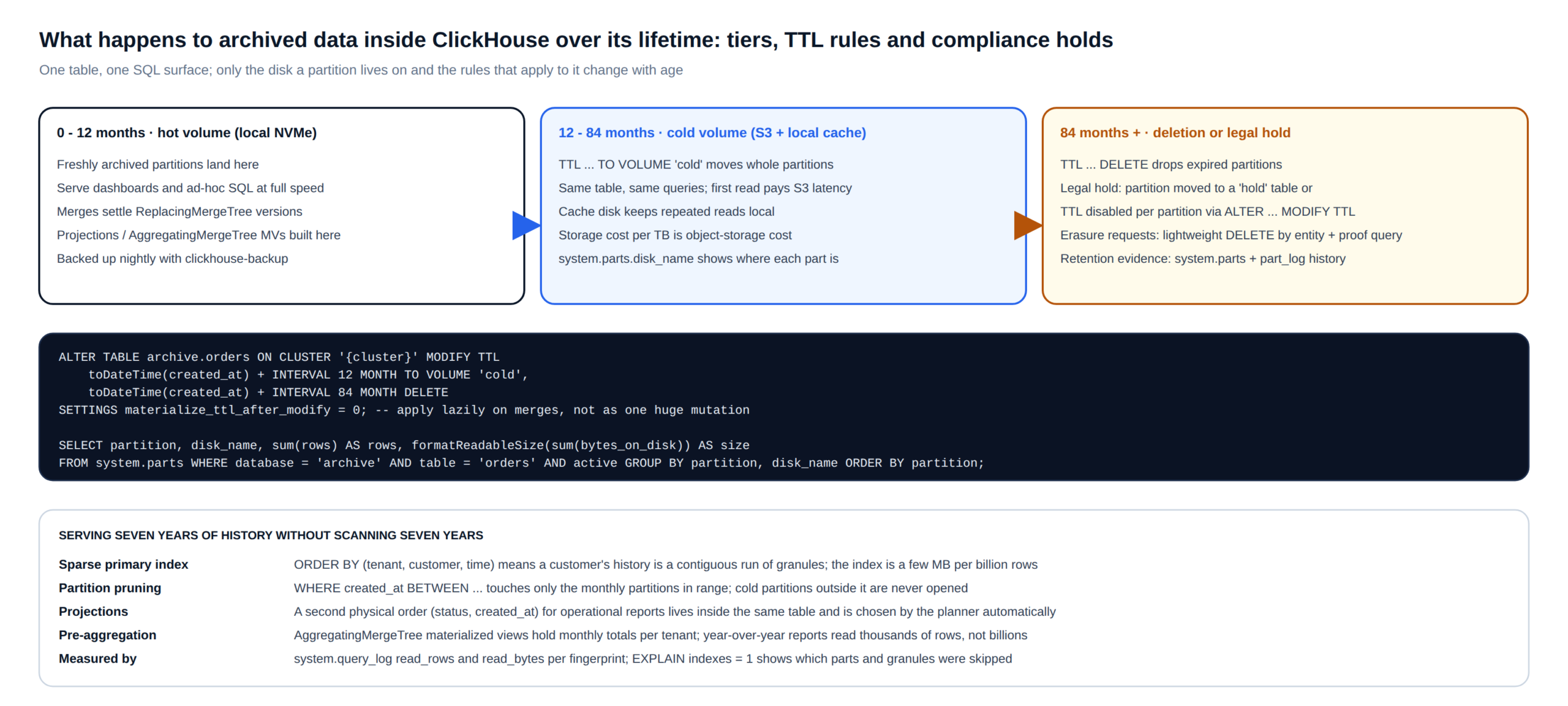
A few operational rules keep archiving data to ClickHouse safe over time. TTL changes on a large archive are applied with materialize_ttl_after_modify = 0 so they take effect on background merges rather than as one enormous mutation. Where a partition lives is visible in system.parts.disk_name, and every move and delete is recorded in system.part_log, which is the retention evidence. A legal hold is a partition moved into a separate hold table or a per-partition TTL override; an erasure request is a lightweight DELETE by entity followed by a proof-of-deletion query stored with the ticket. Backups run with clickhouse-backup to a versioned bucket, and the restore is drilled quarterly with a timed RTO.
Serving
Querying seven years of history after archiving data to ClickHouse
The point of archiving data to ClickHouse rather than to a bucket is that the history stays useful. Four mechanisms make that cheap. The sparse primary index over (tenant_id, customer_id, created_at) makes one customer’s full history a contiguous run of granules. Partition pruning means a query bounded by date opens only the monthly partitions in range, and cold partitions outside it are never touched. A projection gives operational reports a second physical order inside the same table, chosen by the planner automatically. And an AggregatingMergeTree materialized view holds monthly totals so that year-over-year reports read thousands of rows rather than billions.
-- After archiving data to ClickHouse: projection for operational reporting by status and time
ALTER TABLE archive.orders ON CLUSTER '{cluster}'
    ADD PROJECTION by_status (SELECT * ORDER BY (status, created_at));
ALTER TABLE archive.orders ON CLUSTER '{cluster}' MATERIALIZE PROJECTION by_status;

-- Monthly revenue per tenant as mergeable states
CREATE MATERIALIZED VIEW archive.orders_monthly_mv ON CLUSTER '{cluster}'
ENGINE = ReplicatedAggregatingMergeTree('/clickhouse/tables/{shard}/archive/orders_monthly', '{replica}')
PARTITION BY toYear(month) ORDER BY (tenant_id, month)
AS SELECT tenant_id, toStartOfMonth(created_at) AS month,
          sumState(total) AS revenue, countState() AS orders, uniqState(customer_id) AS customers
   FROM archive.orders GROUP BY tenant_id, month;

-- Prove the plan reads what you expect
EXPLAIN indexes = 1
SELECT count(), sum(total)
FROM archive.orders
WHERE tenant_id = 42 AND created_at BETWEEN '2021-01-01' AND '2021-12-31';
Every one of these is validated against the real fingerprints from the selection phase, and its benefit recorded as read rows and read bytes in system.query_log before and after. That log is also where the archive’s own SLO lives: p95 per fingerprint, worst first, reviewed weekly.
Reference pattern
Banking: real-time analytics and compliant archive on one ClickHouse estate
Banks are the clearest case for archiving data to ClickHouse because they need both ends at once: sub-second analytics on the last few months of transactions for fraud scoring, risk monitoring and operational dashboards, and a compliant, queryable archive of every transaction for seven years or more. The pattern below is a reference design, not a client claim, and it is sized per institution during the assessment.
Hot tier
Transactions stream in through CDC within seconds; AggregatingMergeTree views keep per-account and per-merchant features current for scoring models; row policies scope every analyst to the legal entity they belong to.
Archive tier
Monthly partitions age to object storage by TTL; the reconciliation table proves every partition matched the core banking system before it was purged there; retention is enforced by TTL and evidenced from system.part_log.
Regulatory reads
An audit request for one account’s decade of activity is a sort-key range read, answered from the archive without restoring anything; column-masking views serve the same rows to research teams with identifiers removed.
Field notes
Mistakes we see when reviewing archiving data to ClickHouse
| Mistake when archiving data to ClickHouse | What goes wrong | What we do instead |
|---|---|---|
| Copying the OLTP primary key as the ClickHouse sort key | Every analytical query scans the whole table because nothing it filters on is in the key | Build the sort key from the archive’s query fingerprints; put the PK last |
Plain MergeTree for the backfill | A retried load doubles a month; nobody notices until a report is wrong | ReplacingMergeTree with a version column from day one |
| Nullable everywhere | Extra files per part, slower reads, and Nullable keys are not allowed in the sort key | Nullable only where reads genuinely test for NULL; empty string or zero otherwise |
| Floats for money | Sums drift by cents; reconciliation against the source never matches | Decimal(18, 2), and compare with exact equality |
| Dropping the source partition right after the load | No rollback when a type mapping turns out wrong a week later | Detach, hold for the retention period, drop behind a confirmation gate |
| Pulling from the primary over the wire | Archive job competes with production for I/O and locks | Pull from a replica with a statement timeout; export to Parquet for large ranges |
| Applying a new TTL as one mutation | A multi-terabyte mutation saturates disks for hours | materialize_ttl_after_modify = 0; let merges apply it |
FAQ
Archiving data to ClickHouse: questions we hear most often
Is archiving data to ClickHouse an ACID copy?
No. ClickHouse gives atomic inserts per block and eventual consistency across replicas, and ReplacingMergeTree collapses versions on merge; reads use FINAL or an equivalent to see a single version. That is the right guarantee for reporting and compliance reads, and the reason the system of record for writes stays the row store.
How much smaller will the archive be than the source?
It depends on the columns. Timestamps, enumerations and identifiers compress very well under DoubleDelta, LowCardinality and ZSTD; free text compresses less. We measure it on a sample of your own partitions during the assessment rather than quoting a ratio, and system.parts reports the compressed and uncompressed bytes per column once the data is in.
Can archived rows still be updated?
Yes, through the CDC path: an update on the source becomes a new version in ReplacingMergeTree and the old one is collapsed on merge. For one-time or scheduled archival, a table whose old rows still change is not a candidate; widen the hot window until it is.
Do we need ChistaDATA Fabric for archiving data to ClickHouse?
No. Everything on this page runs with open-source ClickHouse and standard tooling. Fabric adds transparent read routing, so applications keep one endpoint while historical reads move to the archive; it is the natural next step once the archive is proven, not a prerequisite.
What does ChistaDATA operate after the archive is live?
Whatever the customer chooses: 24×7 consultative support with a 15-minute Severity 1 response while your team runs it, or managed services where ChistaDATA operates upgrades, capacity, backups, DR drills and the monthly archival job end to end.
Next step
Start with the catalog queries, not the cluster
An archival assessment from ChistaDATA runs the selection queries above on your PostgreSQL or MySQL estate, ranks the candidates by bytes and staleness, designs the archive DDL against your real query fingerprints, and sets the reconciliation and purge gates in writing. If the numbers say archiving data to ClickHouse is the right move, the same engineers build it, prove it and stay on as 24×7 support or the operating team, wherever your data lives.
Further reading: postgresql() table function · ReplacingMergeTree · MergeTree TTL · PostgreSQL partitioning · ChistaDATA University
Running ClickHouse in production? ChistaDATA provides ClickHouse consulting for architecture, performance and migrations, and 24×7 ClickHouse support with a 15-minute S1 response. For day-to-day operations see ClickHouse DBA services and ClickHouse managed services.
