ClickHouse Training · ClickHouse Education · ClickHouse Workshop · University Programs
ClickHouse Training, Education & University Programs for Engineering Teams
ChistaDATA University delivers production-grade ClickHouse Training across five structured programs: Beginner, Intermediate and Advanced ClickHouse Education tracks, plus dedicated programs in ClickHouse Troubleshooting and Advanced Analytics in ClickHouse. Every module is taught by senior ClickHouse engineers who operate petabyte-scale clusters under 24×7×365 enterprise SLAs.
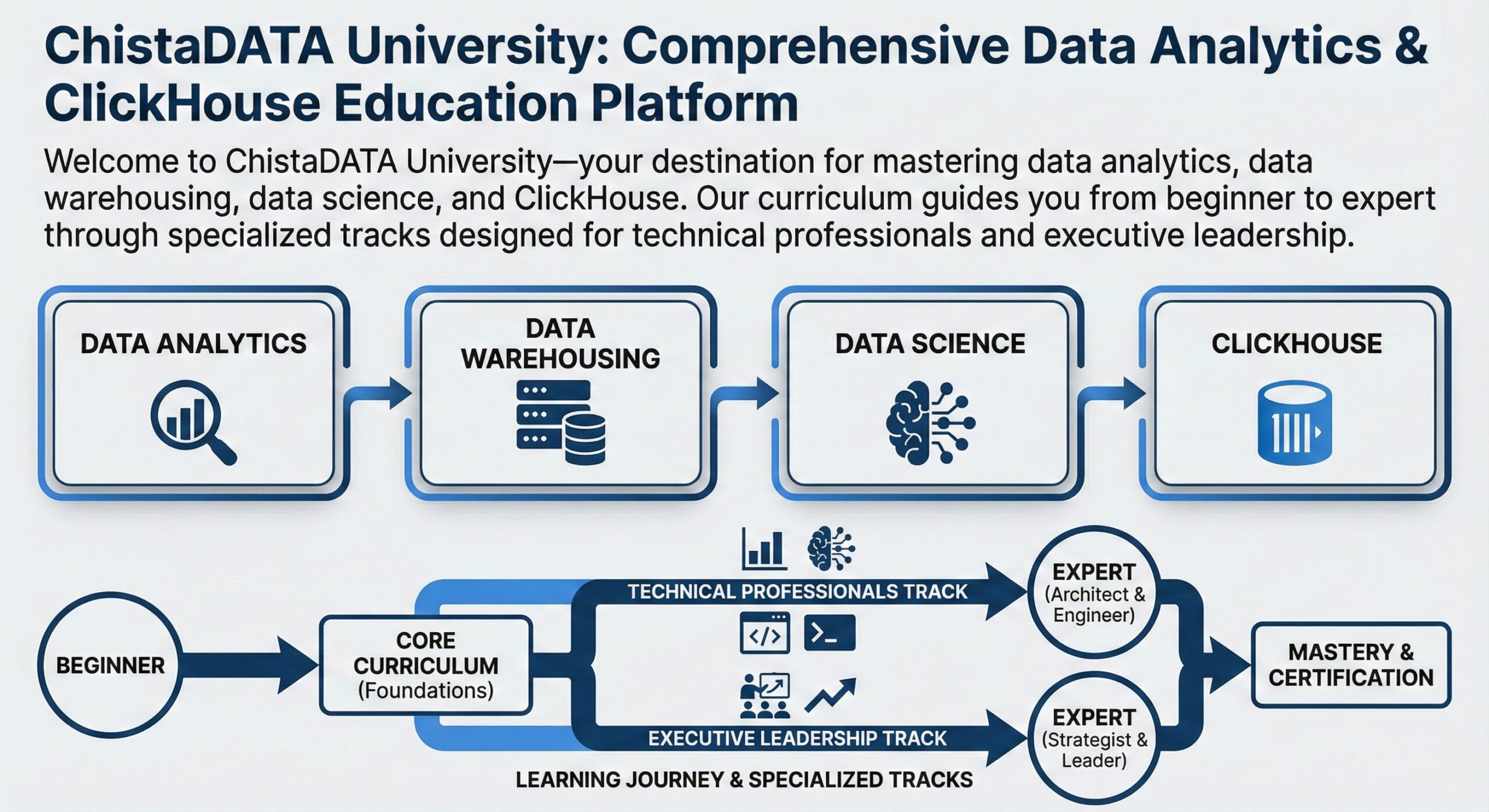
ClickHouse Education Program Overview
ClickHouse Training at ChistaDATA University is engineered as a competency ladder rather than a collection of unrelated courses. Each learner enters at a level determined by a free technical assessment, then progresses through a defined sequence of modules, labs and graded assessments. The curriculum is versioned against ClickHouse releases, so every ClickHouse Education cohort works with current syntax, current table engines and current cluster topologies rather than deprecated patterns.
The programme is organised into three core skill levels — Beginner, Intermediate and Advanced — plus two specialist programs that sit on top of the ladder: ClickHouse Troubleshooting and Advanced Analytics in ClickHouse. Executive briefings for CTOs and CXOs run in parallel so that technical adoption and business sponsorship advance together.
Table of Contents
- ClickHouse Education Program Overview
- Curriculum Framework and Learning Paths
- ClickHouse Architecture Taught Across the Curriculum
- Program 1 — Beginner ClickHouse Training (CHT-100)
- Program 2 — Intermediate ClickHouse Training (CHT-200)
- Program 3 — Advanced ClickHouse Training (CHT-300)
- Program 4 — ClickHouse Troubleshooting (CHT-400)
- Program 5 — Advanced Analytics in ClickHouse (CHT-500)
- Executive Track for CTOs and CXOs (CHT-900)
- Competency Matrix and Certification Ladder
- Delivery Models, Lab Environment and Corporate Training
- University and Academic Partnership Programs
- Engagement Process and Contracting
- ClickHouse Training FAQ
Curriculum Framework and Learning Paths
Figure 1 shows how the five ClickHouse Training programs relate to each other. Beginner, Intermediate and Advanced form the vertical spine of the ClickHouse Education curriculum. The Troubleshooting and Advanced Analytics programs branch from the Advanced tier and can also be delivered standalone to teams that already run ClickHouse in production.
Every ClickHouse Training program listed above is available as instructor-led virtual delivery, on-site workshop, or self-paced ClickHouse Education with graded labs.
ClickHouse Architecture Taught Across the Curriculum
Effective ClickHouse Training has to be grounded in the engine’s actual execution model. Learners are introduced to the architecture in the Beginner program at a conceptual level, revisit it in the Intermediate program from a schema-design perspective, and dissect it at source-code level in the Advanced program. Figure 2 is the reference model used throughout the ClickHouse Education curriculum.
MergeTree Write Path and Part Lifecycle
The single most common cause of production incidents in ClickHouse is a misunderstanding of how inserts become parts and how background merges consume them. This lifecycle is taught in the Intermediate program and forms the diagnostic backbone of the ClickHouse Troubleshooting program.
Program 1 — Beginner ClickHouse Training (CHT-100)
The Beginner tier of ClickHouse Training answers a single question rigorously: why is ClickHouse fast, and how do I use that speed correctly? Rather than starting with syntax, the program starts with the physics of columnar storage — compression ratios, sequential I/O, granule scanning and vectorised aggregation — then builds the SQL surface on top of that mental model. By the end of this ClickHouse Education track, a learner can stand up a single-node instance, model a first fact table, load hundreds of millions of rows and explain the query plan.
CHT-100 Module Breakdown
| Module | Topic | Technical Content | Lab Outcome |
|---|---|---|---|
| 1.1 | OLAP vs OLTP foundations | Row stores versus column stores, why analytical scans dominate, workload characterisation, ClickHouse positioning against PostgreSQL, Snowflake, BigQuery, Druid and Pinot | Workload classification worksheet |
| 1.2 | Columnar storage mechanics | Column files, marks files, granules, index_granularity, compression block sizing, why cardinality drives compression ratio | Measure on-disk size per codec |
| 1.3 | Installation and configuration | DEB/RPM, tarball and Docker installs, config.xml versus users.xml, config.d overrides, listen_host, memory and thread defaults, systemd unit tuning | Working hardened single node |
| 1.4 | Data types that matter | Integer width selection, Decimal versus Float, LowCardinality, Enum, FixedString, DateTime versus DateTime64, Nullable cost, Array, Map, Tuple, JSON handling | Schema type-optimisation exercise |
| 1.5 | MergeTree essentials | ORDER BY versus PRIMARY KEY, PARTITION BY selection rules, sparse index behaviour, part naming, ReplacingMergeTree and SummingMergeTree introduction | First fact table design |
| 1.6 | Ingestion fundamentals | Batch INSERT sizing, clickhouse-client ––query with stdin, formats (CSVWithNames, JSONEachRow, Parquet, Native), input_format settings, s3 and url table functions | Load a 100M row public dataset |
| 1.7 | ClickHouse SQL dialect | SELECT modifiers, GROUP BY WITH TOTALS/ROLLUP/CUBE, LIMIT BY, arrayJoin, date and time functions, conditional aggregation, uniq family estimators | 25 graded query exercises |
| 1.8 | Reading a query plan | EXPLAIN AST / SYNTAX / PLAN / PIPELINE / ESTIMATE, granules read versus granules skipped, interpreting rows_read and bytes_read in system.query_log | Before/after scan reduction report |
| 1.9 | Visualisation and access | Grafana and Superset connectivity, HTTP interface, Python and Go clients, connection pooling basics, read-only user profiles and quotas | Live analytics dashboard |
| 1.10 | Operational hygiene | Log locations, system database tour, disk layout, safe DROP/TRUNCATE, backup awareness, first-response checklist | Personal runbook v1 |
Representative Lab: Primary Key Selection and Granule Skipping
Beginner ClickHouse Training makes the cost of a bad sorting key measurable rather than theoretical. Learners create two tables over identical data and compare the number of granules read.
-- Variant A: sorting key does not match the access pattern
CREATE TABLE lab.events_a
(
    event_time  DateTime,
    tenant_id   UInt32,
    event_type  LowCardinality(String),
    user_id     UInt64,
    revenue     Decimal(18, 4)
)
ENGINE = MergeTree
PARTITION BY toYYYYMM(event_time)
ORDER BY (event_time);

-- Variant B: sorting key leads with the filtered, low-cardinality column
CREATE TABLE lab.events_b
(
    event_time  DateTime,
    tenant_id   UInt32,
    event_type  LowCardinality(String),
    user_id     UInt64,
    revenue     Decimal(18, 4)
)
ENGINE = MergeTree
PARTITION BY toYYYYMM(event_time)
ORDER BY (tenant_id, event_type, event_time);

-- The learner runs the same predicate against both and compares plans
EXPLAIN indexes = 1
SELECT event_type, sum(revenue)
FROM lab.events_b
WHERE tenant_id = 4711
  AND event_time >= now() - INTERVAL 7 DAY
GROUP BY event_type;
The measured outcome — typically one to two orders of magnitude fewer granules read in Variant B — anchors every later discussion of schema design in the Intermediate and Advanced ClickHouse Training programs.
CHT-100 Deliverables
- A documented single-node ClickHouse deployment with tuned users, profiles and quotas.
- A normalised-to-denormalised modelling exercise with justification for the chosen ORDER BY and PARTITION BY.
- Ten completed labs with graded query-performance evidence taken from system.query_log.
- A capstone dashboard answering ten business questions over a 100+ million row dataset.
- ChistaDATA Certified ClickHouse Professional (Associate) examination eligibility.
Program 2 — Intermediate ClickHouse Training (CHT-200)
Intermediate ClickHouse Training moves from single-table querying to designing and operating a real ingestion platform. The dominant theme is write-path engineering: how data arrives, how it is deduplicated, how aggregates are maintained incrementally, and how schema decisions made in week one determine query latency two years later. This is the tier most corporate ClickHouse Education engagements begin with, because it maps directly to the work a delivery team is already attempting.
CHT-200 Module Breakdown
| Module | Topic | Technical Content |
|---|---|---|
| 2.1 | MergeTree engine family in depth | ReplacingMergeTree with version and is_deleted columns, CollapsingMergeTree sign semantics, VersionedCollapsingMergeTree, SummingMergeTree column selection, AggregatingMergeTree with AggregateFunction state columns, GraphiteMergeTree rollup rules |
| 2.2 | Sorting key and partition key design | Cardinality ordering heuristics, prefix compression effects, index_granularity_bytes, partition count budgets, why monthly partitions usually beat daily, minmax pruning, projection versus second table trade-off |
| 2.3 | Data skipping indexes | minmax, set(N), bloom_filter, ngrambf_v1 and tokenbf_v1 sizing, false-positive tuning, GRANULARITY selection, verifying benefit with EXPLAIN indexes = 1 |
| 2.4 | Materialized views and incremental aggregation | Insert-trigger semantics, TO-table pattern, cascading views, state combinators, populate hazards, refreshable materialized views, backfilling safely without double counting |
| 2.5 | Streaming ingestion | Kafka table engine, consumer group sizing, kafka_max_block_size, virtual columns for offsets, exactly-once considerations, RabbitMQ and NATS engines, Vector and Kafka Connect alternatives, async_insert and wait_for_async_insert |
| 2.6 | Dictionaries and enrichment | flat, hashed, complex_key_hashed, cache, ssd_cache and ip_trie layouts, lifetime and update_field incremental refresh, dictGet in ORDER BY expressions, dictionary versus JOIN cost comparison |
| 2.7 | JOIN strategies | hash, parallel_hash, partial_merge, grace_hash and direct algorithms, join_algorithm setting, right-table memory accounting, IN versus JOIN rewrites, GLOBAL IN on clusters, denormalisation as first-choice design |
| 2.8 | Compression and codecs | LZ4 versus ZSTD level trade-offs, Delta and DoubleDelta for monotonic series, Gorilla and FPC for gauges, T64 for bounded integers, per-column codec benchmarking methodology |
| 2.9 | Mutations and data lifecycle | ALTER UPDATE/DELETE mechanics, lightweight DELETE, mutation queue monitoring, TTL DELETE and TTL TO VOLUME, tiered storage policies, partition-level operations (DETACH, FREEZE, MOVE, DROP) |
| 2.10 | Observability foundations | query_log, query_thread_log, part_log, asynchronous_metric_log, Prometheus endpoint, Grafana dashboards, defining latency SLOs and alert thresholds |
Reference Architecture Taught in CHT-200
The Intermediate ClickHouse Training capstone requires learners to build and defend the reference pipeline in Figure 4 end to end, including failure injection at each stage.
Representative Lab: Incremental Rollups With AggregatingMergeTree
-- Target rollup table holding aggregate states, not final values
CREATE TABLE analytics.hourly_tenant_stats
(
    hour          DateTime,
    tenant_id     UInt32,
    events        AggregateFunction(sum, UInt64),
    unique_users  AggregateFunction(uniqCombined64, UInt64),
    p95_latency   AggregateFunction(quantilesTDigest(0.95), Float32)
)
ENGINE = AggregatingMergeTree
PARTITION BY toYYYYMM(hour)
ORDER BY (tenant_id, hour);

-- Materialized view maintains the rollup on every insert into the raw table
CREATE MATERIALIZED VIEW analytics.hourly_tenant_stats_mv
TO analytics.hourly_tenant_stats AS
SELECT
    toStartOfHour(event_time)            AS hour,
    tenant_id,
    sumState(toUInt64(1))                AS events,
    uniqCombined64State(user_id)         AS unique_users,
    quantilesTDigestState(0.95)(latency) AS p95_latency
FROM analytics.raw_events
GROUP BY hour, tenant_id;

-- Read path merges the states at query time
SELECT
    tenant_id,
    sumMerge(events)                     AS events,
    uniqCombined64Merge(unique_users)     AS users,
    quantilesTDigestMerge(0.95)(p95_latency)[1] AS p95_ms
FROM analytics.hourly_tenant_stats
WHERE hour >= today() - 30
GROUP BY tenant_id
ORDER BY events DESC
LIMIT 20;
CHT-200 Deliverables
- A production-shaped streaming pipeline from Kafka to a replicated fact table with idempotent replay.
- A schema design document reviewed by a ChistaDATA principal engineer, including rejected alternatives.
- A rollup layer that reduces dashboard query cost by a measured, documented factor.
- A Grafana observability pack with alerting thresholds for part counts, merge backlog and insert latency.
Program 3 — Advanced ClickHouse Training (CHT-300)
Advanced ClickHouse Training is an internals and distributed-systems program. Learners work on a multi-shard, multi-replica cluster with ClickHouse Keeper, drive it into degraded states deliberately, and recover it. The syllabus reaches into the source tree: LSM-style part management, vectorised operator pipelines, allocator behaviour, and the replication protocol. Teams that complete this ClickHouse Education tier are equipped to own capacity planning, upgrade strategy and incident command for a ClickHouse fleet.
CHT-300 Module Breakdown
| Module | Topic | Technical Content |
|---|---|---|
| 3.1 | Storage engine internals | Part directory anatomy, primary.idx and .mrk2 mark files, wide versus compact parts, min_bytes_for_wide_part, granule addressing, checksums and part integrity verification |
| 3.2 | Query execution engine | Processors and the pull-based pipeline, QueryPlan to QueryPipeline lowering, SIMD-accelerated functions, two-level hash tables, adaptive aggregation spill, max_threads and max_streams interaction |
| 3.3 | Sharding and distribution | Distributed engine, sharding key selection, internal_replication, insert_distributed_sync, distributed_group_by_no_merge, two-stage aggregation, resharding without downtime, GLOBAL subquery broadcasting |
| 3.4 | Replication and coordination | ReplicatedMergeTree log, ClickHouse Keeper Raft quorum sizing, replication_queue anatomy, insert_quorum and select_sequential_consistency, ZooKeeper to Keeper migration, split-brain avoidance |
| 3.5 | Performance engineering | PREWHERE and move_all_conditions_to_prewhere, projections versus skip indexes, NUMA and CPU pinning, huge pages, jemalloc arenas, mark and uncompressed cache sizing, NVMe queue depth, filesystem selection |
| 3.6 | Write-path scaling | Async insert queues and deduplication, buffer tables, insert throughput ceilings, merge scheduler internals, background_pool_size, max_bytes_to_merge_at_max_space_in_pool, vertical merge algorithm |
| 3.7 | Object storage and separated compute | S3 and Azure disks, local metadata caching, zero-copy replication caveats, cold-tier query latency budgeting, S3Queue ingestion, cost modelling against local NVMe |
| 3.8 | Security architecture | RBAC roles and grants, row policies for multi-tenancy, column-level masking, LDAP and Kerberos integration, TLS for inter-node traffic, at-rest encryption, audit trail design |
| 3.9 | Kubernetes and infrastructure as code | Altinity ClickHouse operator patterns, StatefulSet and PVC topology, pod anti-affinity, resource requests versus ClickHouse memory settings, rolling upgrade strategy, Terraform and Ansible provisioning |
| 3.10 | Backup, DR and capacity planning | clickhouse-backup incremental strategy, FREEZE-based snapshots, RPO and RTO arithmetic, cross-region replication, restore rehearsal, growth modelling from compression ratios and retention policy |
Cluster Topology Built During Advanced ClickHouse Training
Failure Drills in CHT-300
- Keeper quorum loss: stop two of three Keeper nodes, observe read-only degradation, restore quorum, verify replication queue drain.
- Replica divergence: corrupt a part on one replica, detect via CHECK TABLE and system.parts checksums, restore with SYSTEM RESTORE REPLICA.
- Merge starvation: saturate the background pool, watch part counts climb, and apply the correct remediation order.
- Rolling upgrade: upgrade across a minor version boundary with mixed-version replicas and validate wire compatibility.
- Region failover: promote a cross-region replica set and measure achieved RPO against the design target.
Program 4 — ClickHouse Troubleshooting (CHT-400)
ClickHouse Troubleshooting is the program built directly from ChistaDATA’s break-fix engineering practice. Every scenario in the syllabus is derived from a real production incident: the cluster is pre-broken, the learner receives only the symptoms a monitoring alert would surface, and they must reach root cause using system tables, logs and profiling — not guesswork. This ClickHouse Training program is deliberately methodology-first, because the failure modes change between releases while the diagnostic discipline does not.
Diagnostic Methodology
Incident Catalogue Covered in CHT-400
| Symptom / Error | Primary Evidence | Root Causes Taught |
|---|---|---|
| Too many parts (DB::Exception 252) | system.parts, system.merges, part_log | Micro-batch inserts, over-granular PARTITION BY, undersized background pool, slow disks, mutation backlog blocking merges |
| Memory limit exceeded (241) / OOM | query_log peak_memory_usage, MemoryTracking metric, dmesg | Unbounded GROUP BY cardinality, hash JOIN on a large right table, missing max_bytes_before_external_group_by, oversized mark cache, concurrent query storms |
| Replication lag / stuck queue | system.replicas, system.replication_queue, Keeper logs | Poisoned queue entry, missing part on source, Keeper session churn, network partition, disk full on one replica, schema drift between replicas |
| Query latency regression after release | query_log diff by normalized_query_hash | Analyzer behaviour change, lost index usage, projection no longer chosen, setting default change, statistics shift after data growth |
| Disk space exhaustion | system.disks, system.parts bytes_on_disk, detached parts | TTL not moving data, orphaned detached parts, unfinished mutations doubling data, temporary merge space, log table growth without TTL |
| Duplicate or missing rows | Row counts by source offset, Kafka virtual columns | Insert deduplication window expiry, non-deterministic materialized view, Kafka consumer rebalance, ReplacingMergeTree read without FINAL |
| Kubernetes crash loop | Pod events, container logs, operator status | Memory limit below ClickHouse max_server_memory_usage, PVC permissions, readiness probe timeout during startup recovery, config map error, zone-aware scheduling conflicts |
| Distributed query timeouts | query_log on all shards, system.clusters | Skewed shard, straggler replica, GLOBAL IN broadcast size, connect_timeout_with_failover, DNS resolution latency, unbalanced sharding key |
Representative Diagnostic Queries Taught in CHT-400
-- 1. Which tables are accumulating active parts fastest?
SELECT database, table, partition,
       count() AS active_parts,
       formatReadableSize(sum(bytes_on_disk)) AS size
FROM system.parts
WHERE active
GROUP BY database, table, partition
ORDER BY active_parts DESC
LIMIT 20;

-- 2. Top offenders by scan volume over the last 24 hours
SELECT normalized_query_hash,
       count()                                  AS runs,
       formatReadableSize(sum(read_bytes))      AS total_read,
       round(avg(query_duration_ms))            AS avg_ms,
       formatReadableSize(max(memory_usage))    AS peak_mem,
       any(substring(query, 1, 120))            AS sample
FROM system.query_log
WHERE type = 'QueryFinish'
  AND event_time > now() - INTERVAL 1 DAY
GROUP BY normalized_query_hash
ORDER BY sum(read_bytes) DESC
LIMIT 15;

-- 3. Replication health at a glance
SELECT database, table, is_readonly, absolute_delay,
       queue_size, inserts_in_queue, merges_in_queue, last_queue_update
FROM system.replicas
WHERE absolute_delay > 30 OR is_readonly
ORDER BY absolute_delay DESC;

-- 4. Merge pressure and long-running merges
SELECT database, table, elapsed, progress, num_parts,
       formatReadableSize(total_size_bytes_compressed) AS merging_size
FROM system.merges
ORDER BY elapsed DESC;
CHT-400 Deliverables
- A tiered incident runbook covering severity classification, first-response commands and escalation paths.
- A reusable diagnostic query library packaged as saved views for the whole team.
- Root-cause analysis write-ups for six simulated production incidents.
- A preventive alerting specification with thresholds justified from measured baselines.
Teams often pair this ClickHouse Training program with ChistaDATA break-fix engineering support so that the same engineers who taught the drills are on call during the first production quarter.
Program 5 — Advanced Analytics in ClickHouse (CHT-500)
The Advanced Analytics program treats ClickHouse as an analytical compute engine rather than a storage layer. It teaches the function families that let teams replace multi-stage Spark or Python pipelines with a single declarative query: aggregate-function combinators, array and higher-order functions, window functions, sequence and funnel analysis, time-series interpolation, geospatial primitives and approximate algorithms. Learners leave able to express funnel, retention, attribution, cohort and anomaly workloads directly in ClickHouse SQL and to reason about their cost.
CHT-500 Module Breakdown
| Module | Topic | Analytical Outcome |
|---|---|---|
| 5.1 | Dimensional modelling for columnar engines | Wide-table versus star-schema trade-offs, dictionary-backed dimensions, slowly changing dimension patterns using ReplacingMergeTree and ASOF JOIN |
| 5.2 | Aggregate combinator mastery | Replace CASE-WHEN pivots with -If combinators, build reusable aggregate state tables, compose -Map and -ForEach for multi-metric rollups |
| 5.3 | Session and path analytics | Sessionisation with arrays and window functions, path enumeration, first-touch and last-touch attribution, Markov-style multi-touch weighting |
| 5.4 | Funnel, cohort and retention | windowFunnel step tuning, strict modes, cohort matrices with retention(), churn curves, lifetime value estimation over billions of events |
| 5.5 | Statistical analysis in SQL | Distribution summaries, correlation and covariance matrices, studentTTest, welchTTest, mannWhitneyUTest for A/B experiments, sequential testing caveats |
| 5.6 | Time-series and anomaly detection | Gap filling, seasonal decomposition, rolling z-scores, threshold and residual-based anomaly detection, alert-quality evaluation |
| 5.7 | Customer-facing analytics | Multi-tenant isolation with row policies, per-tenant quotas, p99 latency budgeting, query result cache, pre-aggregation ladders for embedded dashboards |
| 5.8 | Semantic layer and lakehouse interop | dbt-clickhouse project structure, incremental model strategies, Parquet and Iceberg/Delta table functions, federated queries against S3 and PostgreSQL |
Representative Lab: Funnel, Retention and Session Analytics
-- Conversion funnel across four steps within a 30-minute window
SELECT
    level,
    count() AS users
FROM
(
    SELECT
        user_id,
        windowFunnel(1800)(
            event_time,
            event_type = 'view_product',
            event_type = 'add_to_cart',
            event_type = 'begin_checkout',
            event_type = 'purchase'
        ) AS level
    FROM analytics.raw_events
    WHERE event_date >= today() - 30
    GROUP BY user_id
)
GROUP BY level
ORDER BY level DESC;

-- Weekly retention cohort matrix
SELECT
    cohort_week,
    retentionState[1] AS week_0,
    retentionState[2] AS week_1,
    retentionState[3] AS week_2,
    retentionState[4] AS week_3
FROM
(
    SELECT
        toMonday(min(event_date)) AS cohort_week,
        retention(
            event_date >= cohort_start,
            event_date >= cohort_start + 7,
            event_date >= cohort_start + 14,
            event_date >= cohort_start + 21
        ) AS retentionState
    FROM analytics.user_activity
    GROUP BY user_id
)
GROUP BY cohort_week
ORDER BY cohort_week;

-- Gap-free time series for a dashboard, with interpolation
SELECT
    toStartOfFiveMinutes(event_time) AS bucket,
    avg(latency_ms)                  AS avg_latency
FROM analytics.raw_events
WHERE event_time BETWEEN now() - INTERVAL 6 HOUR AND now()
GROUP BY bucket
ORDER BY bucket WITH FILL STEP INTERVAL 5 MINUTE
INTERPOLATE (avg_latency AS avg_latency);
CHT-500 Deliverables
- A production analytical model supporting funnel, cohort and retention questions with documented p95 latency.
- A rewrite portfolio converting at least five external-pipeline computations into single ClickHouse queries.
- An A/B testing harness with statistically defensible significance calculations executed in SQL.
- A multi-tenant customer-facing analytics API design with isolation, quotas and caching strategy.
Executive Track for CTOs and CXOs (CHT-900)
Technical ClickHouse Training succeeds faster when the sponsoring executive understands the same architecture at decision level. CHT-900 is a condensed 10-hour briefing series that runs alongside the engineering programs.
Related reading: how ChistaDATA partners with CTOs to build next-generation data infrastructure.
Competency Matrix and Certification Ladder
Each ClickHouse Training program maps to explicit, testable competencies. The matrix below is what hiring managers and delivery leads use to decide which program a given engineer needs.
| Competency | CHT-100 | CHT-200 | CHT-300 | CHT-400 | CHT-500 |
|---|---|---|---|---|---|
| Install, configure and secure a node | Core | Applied | Mastery | Applied | — |
| Sorting key and partition design | Intro | Core | Mastery | Applied | Applied |
| Materialized views and rollups | — | Core | Applied | Applied | Mastery |
| Streaming ingestion at scale | — | Core | Mastery | Applied | Intro |
| Sharding, replication and Keeper | — | Intro | Core | Mastery | — |
| Query and system performance tuning | Intro | Applied | Core | Mastery | Applied |
| Incident diagnosis and recovery | — | Intro | Applied | Core | — |
| Advanced analytical SQL | Intro | Applied | Applied | Intro | Core |
| Backup, DR and capacity planning | — | Intro | Core | Mastery | — |
Delivery Models, Lab Environment and Corporate Training
Every ClickHouse Training program is delivered in one of four formats. The syllabus and assessment standard are identical across formats; only pacing and interaction change.
| Format | Structure | Best For |
|---|---|---|
| Instructor-led virtual | Two live sessions per week, recorded, with office hours and a shared cluster per cohort | Distributed engineering teams and individual practitioners |
| On-site ClickHouse Workshop | Three to five consecutive days, 8 hours per day, taught against the customer’s own schema and data volumes | Teams starting a migration or hardening a new deployment |
| Self-paced ClickHouse Education | Video modules, downloadable datasets, auto-graded labs, asynchronous engineer review of submissions | Continuous onboarding and self-directed upskilling |
| Embedded mentorship | A ChistaDATA principal engineer joins sprint ceremonies and code review for a fixed number of hours per week | Teams already in production that need coaching rather than classroom time |
Lab Environment Specification
Hands-on time is the point of the program, so the lab platform is specified as tightly as the syllabus.
- Dedicated cluster per learner group: three shards, two replicas each, plus a three-node ClickHouse Keeper ensemble, provisioned on demand.
- Realistic data volumes: multi-billion row public datasets so that bad schema decisions actually hurt and good ones are measurably better.
- Full companion stack: Kafka or Redpanda, Grafana, Prometheus, MinIO for object storage tiers, and a Kubernetes cluster with the ClickHouse operator.
- Break-fix sandboxes: pre-broken clusters used exclusively by the ClickHouse Troubleshooting program, reset between attempts.
- Version matrix: labs available on current stable and one previous LTS line, so learners rehearse upgrades rather than only reading about them.
- Retained access: lab access continues for 30 days after the final session for revision and certification preparation.
Corporate ClickHouse Training
Corporate engagements are the most common way organisations consume ClickHouse Education from ChistaDATA. A corporate program is assembled from the five core programs and then customised: your schemas replace the sample schemas, your incident history becomes the troubleshooting case set, and your latency targets become the pass criteria for the labs.
University and Academic Partnership Programs
ChistaDATA University also licenses its ClickHouse Education material to higher-education institutions running database systems, data engineering and analytics courses. The academic package is designed to slot into an existing semester structure rather than replace it.
| Academic Package | Contents | Typical Placement |
|---|---|---|
| Semester module (14 weeks) | Lecture slides, lab manuals, graded assignments and an examination bank derived from CHT-100 and CHT-200 | Undergraduate database systems or data engineering elective |
| Graduate seminar | Internals reading list, ClickHouse source-code walkthroughs, distributed-systems assignments from CHT-300 | Master’s level advanced database or systems course |
| Capstone and thesis sponsorship | Real anonymised workloads, engineer mentorship, benchmark harnesses, publication support | Final-year project or research thesis |
| Faculty enablement | Train-the-trainer ClickHouse Training for teaching staff plus lab infrastructure guidance | Pre-semester faculty development week |
| Student certification pathway | Discounted examination vouchers and an industry-recognised credential on graduation | Alongside coursework, any year |
Departments and bootcamps can request a syllabus mapping document that aligns each ClickHouse Training module to their existing learning outcomes and accreditation requirements.
Engagement Process and Contracting
Most ClickHouse Training contracts follow the six-stage process below. Stages one and two are free of charge and produce a written scope before any commitment.
Why Engineering Teams Choose ChistaDATA for ClickHouse Training
For deeper technical background, the official ClickHouse documentation and the ClickHouse source repository are both used as primary references throughout the curriculum.
ClickHouse Training FAQ
Which ClickHouse Training program should my team start with?
Take the free 45-minute skills assessment. Teams with no ClickHouse exposure start at CHT-100. Teams already ingesting data but fighting query latency or part counts almost always belong in CHT-200, and teams running multi-node clusters in production start at CHT-300 or go straight into CHT-400 ClickHouse Troubleshooting.
Can the ClickHouse Troubleshooting program be taken standalone?
Yes. CHT-400 is regularly delivered as a standalone five-day workshop for on-call teams who already operate ClickHouse. The only firm prerequisite is comfort with ClickHouse SQL and Linux administration; the diagnostic methodology is taught from first principles.
Is the training delivered on our own data and schemas?
For corporate engagements, yes. Under NDA we replace the sample datasets with your schemas, query patterns and latency targets, which means the labs double as design review for your actual platform.
What does the Advanced Analytics in ClickHouse program replace?
CHT-500 is aimed at teams currently computing funnels, cohorts, retention or attribution in Spark, pandas or a warehouse job. It teaches the ClickHouse function families that express those workloads as single queries, along with the cost model needed to decide when that is appropriate.
Do you provide lab infrastructure or must we supply it?
ChistaDATA provisions a dedicated multi-shard, multi-replica cluster with Kafka, Grafana, Prometheus, object storage and a Kubernetes environment for each cohort. Customers who prefer to train inside their own VPC can host the lab instead, using our infrastructure-as-code templates.
Is the certification recognised outside ChistaDATA?
The credential is issued by ChistaDATA and is widely used by our enterprise customers as an internal on-call readiness standard. Because it requires a defended capstone on a live cluster rather than a multiple-choice test alone, it carries practical weight in technical hiring.
How quickly can a cohort start?
Public instructor-led cohorts begin monthly. Customised corporate ClickHouse Training typically starts two to three weeks after the syllabus is signed off, which is the time needed to rebuild the labs around your schemas.
Commission a ClickHouse Training Program
Tell us your workload, team size and target outcomes. You will receive a proposed syllabus, schedule and pass criteria — not a generic brochure. Corporate, university and individual ClickHouse Education enrolments all start with the same free assessment.
ChistaDATA Inc. — enterprise-class ClickHouse consulting, managed services and ClickHouse Training worldwide.