How MergeTree Internals Drive Query Latency: Parts, Granules, and Mark Files
ClickHouse’s MergeTree engine stands as one of the most sophisticated columnar database architectures, designed specifically for high-performance analytical workloads. Understanding how its internal components—parts, granules, and mark files—interact is crucial for optimizing query latency and achieving millisecond response times on trillion-row datasets. This comprehensive guide explores the intricate mechanisms that make MergeTree exceptionally fast and how you can leverage these internals for optimal performance.
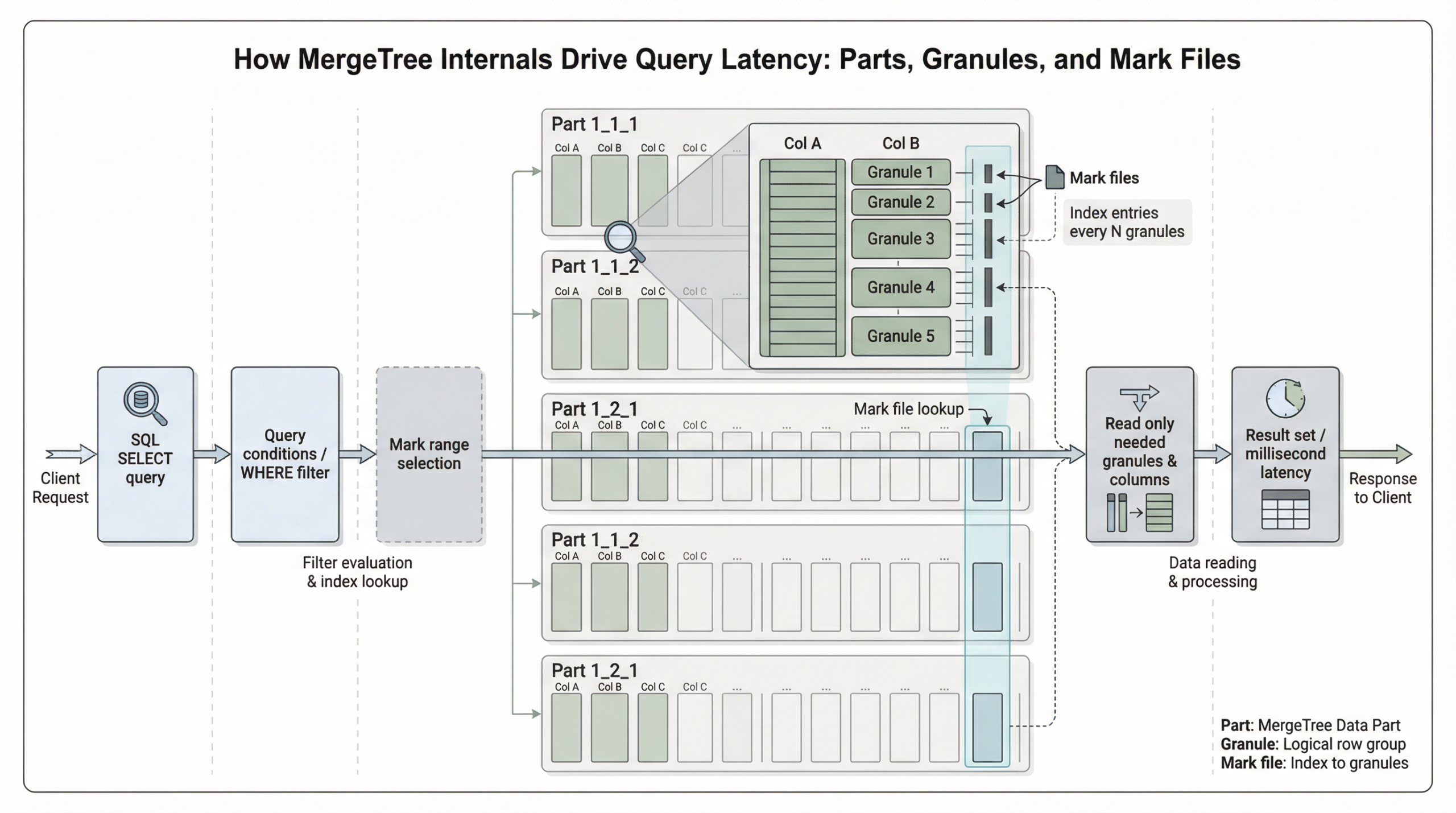
The Foundation: Understanding MergeTree Parts
What Are Parts?
Data parts form the fundamental storage unit for tables in the ClickHouse MergeTree engine family, organized on disk as a collection of immutable data structures. The MergeTree engine and other engines of the MergeTree family are designed for high data ingest rates and huge data volumes, with insert operations creating table parts that are merged by background processes.
The Part Creation Process
When ClickHouse processes an insert operation, it performs several critical steps: sorting the rows by the table’s sorting key, splitting the sorted data into columns, compressing each column, and writing the compressed columns along with a sparse primary index as binary files into a new directory representing the data part on disk.
This four-stage process ensures optimal storage efficiency and query performance:
- Sorting: Rows are ordered by the sorting key, establishing the physical layout
- Splitting: Data is separated into individual column files
- Compression: Each column is compressed using appropriate codecs
- Writing: Compressed data and metadata are persisted to disk
Self-Contained Architecture
Data parts are self-contained units that include all metadata needed to interpret their contents without requiring a central catalog. Beyond the sparse primary index, parts contain additional metadata such as secondary data skipping indexes, column statistics, checksums, and min-max indexes.
Background Merge Operations
To manage the number of parts per table, ClickHouse runs a background merge job that periodically combines smaller parts into larger ones until they reach a configurable compressed size (typically ~150 GB). Merged parts are marked as inactive and deleted after a configurable time interval, creating a hierarchical structure of merged parts.
This merge process is essential for maintaining query performance, as having many small files would be disadvantageous for query performance and storage efficiency.
Granules: The Atomic Units of Data Processing
Defining Granules
Granules are batches of rows in uncompressed blocks, with rows of a part logically divided into groups of 8192 records. A granule represents the smallest indivisible data set that is streamed into ClickHouse for data processing, meaning that instead of reading individual rows, ClickHouse always reads whole groups of rows in a streaming fashion and in parallel.
Adaptive Granularity
ClickHouse uses adaptive granularity, creating a new granule when either condition is met: 8,192 rows accumulated OR combined row size reaches 10 MB. This prevents pathologically large granules with wide rows. This intelligent sizing ensures consistent performance across different data types and row widths.
Critical Performance Implications
Granules are the smallest indivisible units ClickHouse reads during query execution. You cannot read half a granule – if a single row in a granule matches your filter, the entire granule must be read. This has critical implications for primary key design.
Understanding this principle is fundamental to optimizing query performance, as it directly impacts how much data must be processed for any given query.
Mark Files: The Navigation System
Understanding Marks
Mark cache is an in-memory cache that contains marks, which are metadata pointers enabling ClickHouse to quickly locate specific data within compressed column files. These marks allow ClickHouse to access the relevant data blocks directly, avoiding the need to decompress the entire file.
How Mark Files Work
In ClickHouse, the physical locations of all granules for a table are stored in mark files. Similar to data files, there is one mark file per table column. Data files are divided into granules, and each granule has a mark pointing to its location. When a query runs, ClickHouse checks the mark cache for these marks.
Mark Cache Performance Benefits
By storing metadata pointers to data granules in memory, mark cache allows ClickHouse to quickly locate and retrieve only the relevant data blocks needed for the query. This reduces the need to read and decompress entire files, resulting in significantly faster query execution times.
The performance impact is substantial: if marks are present in the cache, ClickHouse can skip reading irrelevant file portions, resulting in faster performance. If marks are not found in the cache, ClickHouse retrieves them from disk, leading to higher latency.
Query Execution: The Two-Stage Process
Stage 1: Granule Selection
When ClickHouse runs an aggregation query with a filter on the table’s primary key, it loads the primary index into memory to identify which granules need to be processed, and which can be safely skipped.
The sparse primary index allows ClickHouse to quickly identify groups of rows that could possibly match the query via binary search over index entries. Instead of directly locating single rows, this technique enables rapid identification of potentially matching row groups (granules).
Stage 2: Parallel Data Processing
The selected data is then dynamically distributed across n parallel processing lanes, which stream and process the data block by block into the final result. ClickHouse executes queries in a highly parallel fashion, using all available CPU cores, distributing data across processing lanes, and often pushing hardware close to its limits.
The number of parallel processing lanes is controlled by the max_threads setting, which by default matches the number of cores available to ClickHouse on the server.
The Sparse Primary Index Architecture
Index Structure
The primary index is an uncompressed flat array file (primary.idx), containing numerical index marks starting at 0. The index stores the primary key column values for each first row of each granule, with one entry per granule.
Binary Search Optimization
ClickHouse uses binary search over the index marks based on the primary key to identify granules that might contain matching rows. For example, when filtering on the first primary key column, ClickHouse can select a small number of granules (e.g., 1 out of 1083) using binary search, significantly reducing the data scanned compared to a full table scan.
Performance Optimization Strategies
Primary Key Design
The primary key defines the order in which data is stored on disk and is implemented as a sparse index that stores pointers to the first row of each granule. Granules in ClickHouse are the smallest units of data read during query execution.
Proper primary key design is crucial because it determines:
- Physical data layout on disk
- Granule selection efficiency
- Query pruning effectiveness
Bulk Insert Optimization
To minimize the number of initial parts and the overhead of merges, database clients are encouraged to either insert tuples in bulk (e.g., 20,000 rows at once) or use asynchronous insert mode, where ClickHouse buffers rows from multiple incoming INSERTs and creates a new part only after the buffer size exceeds a configurable threshold.
Cache Configuration
Mark cache performance improvements include faster query execution by storing metadata pointers to data granules in memory, and performance improvement for repeated queries accessing the same data patterns.
Proper cache sizing and configuration can dramatically impact query latency, especially for workloads with repeated access patterns.
Real-World Performance Implications
Granule-Level Data Skipping
ClickHouse achieves performance improvements by continuously maintaining current thresholds during query execution and using minmax data skipping indexes to dynamically skip granules whose values cannot improve results.
Parallel Processing Benefits
ClickHouse only allocates additional parallel processing lanes when there’s enough data to justify them. The “max” in max_threads refers to an upper limit, not a guaranteed number of threads used.
This intelligent resource allocation ensures optimal performance across different query sizes and system configurations.
Best Practices for Latency Optimization
1. Design Effective Primary Keys
- Order columns by query frequency and selectivity
- Consider cardinality and data distribution
- Align with common filter patterns
2. Optimize Insert Patterns
- Use bulk inserts (20,000+ rows)
- Implement asynchronous insert mode
- Monitor part count and merge activity
3. Configure Caches Appropriately
- Size mark cache based on working set
- Monitor cache hit rates
- Consider memory allocation patterns
4. Monitor System Metrics
- Track granule selection ratios
- Monitor merge queue depth
- Analyze query execution plans
Conclusion
Understanding MergeTree internals—parts, granules, and mark files—is essential for achieving optimal query performance in ClickHouse. These concepts are central to ClickHouse performance, determining how data is written, structured on disk, and how efficiently ClickHouse can skip reading data at query time.
The sophisticated interplay between immutable parts, granule-based processing, and mark file navigation creates a system capable of millisecond queries on massive datasets. By leveraging these internals through proper schema design, insert optimization, and cache configuration, you can unlock ClickHouse’s full potential for real-time analytics workloads.
The key to success lies in understanding that every optimization—whether materialized columns, skip indexes, primary keys, projections, or materialized views—builds upon these fundamental mechanisms. Master these internals, and you’ll be equipped to design high-performance analytical systems that scale to any data volume while maintaining consistently low query latency.
Further Reading
- ClickHouse Support
- ClickHouse Consulting
- ClickHouse Managed Services
- Data Analytics
- ChistaDATA University