ClickHouse replication is asynchronous, multi-master and coordinated through ClickHouse Keeper: every replica accepts inserts, writes a log entry describing the new part, and every other replica fetches that part when it reads the entry. Nothing is streamed row by row, there is no primary, and the replication log is a queue of part-level operations (fetch, merge, mutate, drop) that each replica executes in order. Every failure mode of ClickHouse replication is a failure of that queue, and every repair is a way of getting the queue moving again.
This page is organised as an operations reference: how an insert reaches every replica, the six failure modes seen in production and the repair for each, the health queries that catch them early, and the multi-region and backup designs that sit on top. The archive posts under this category cover the mechanism, the setup, the troubleshooting runbook and the cross-region designs in depth.
The archive holds the ReplicatedMergeTree introduction, the high-availability and replication overview, the high-watermark mechanism, the ZooKeeper-era cluster setup and six-node reference, the replication troubleshooting runbook, sharding troubleshooting, multi-region deployment, ClickHouse-backup, the MySQL sink connector, the CHT-400 drills and the 26.8 LTS HA changes.
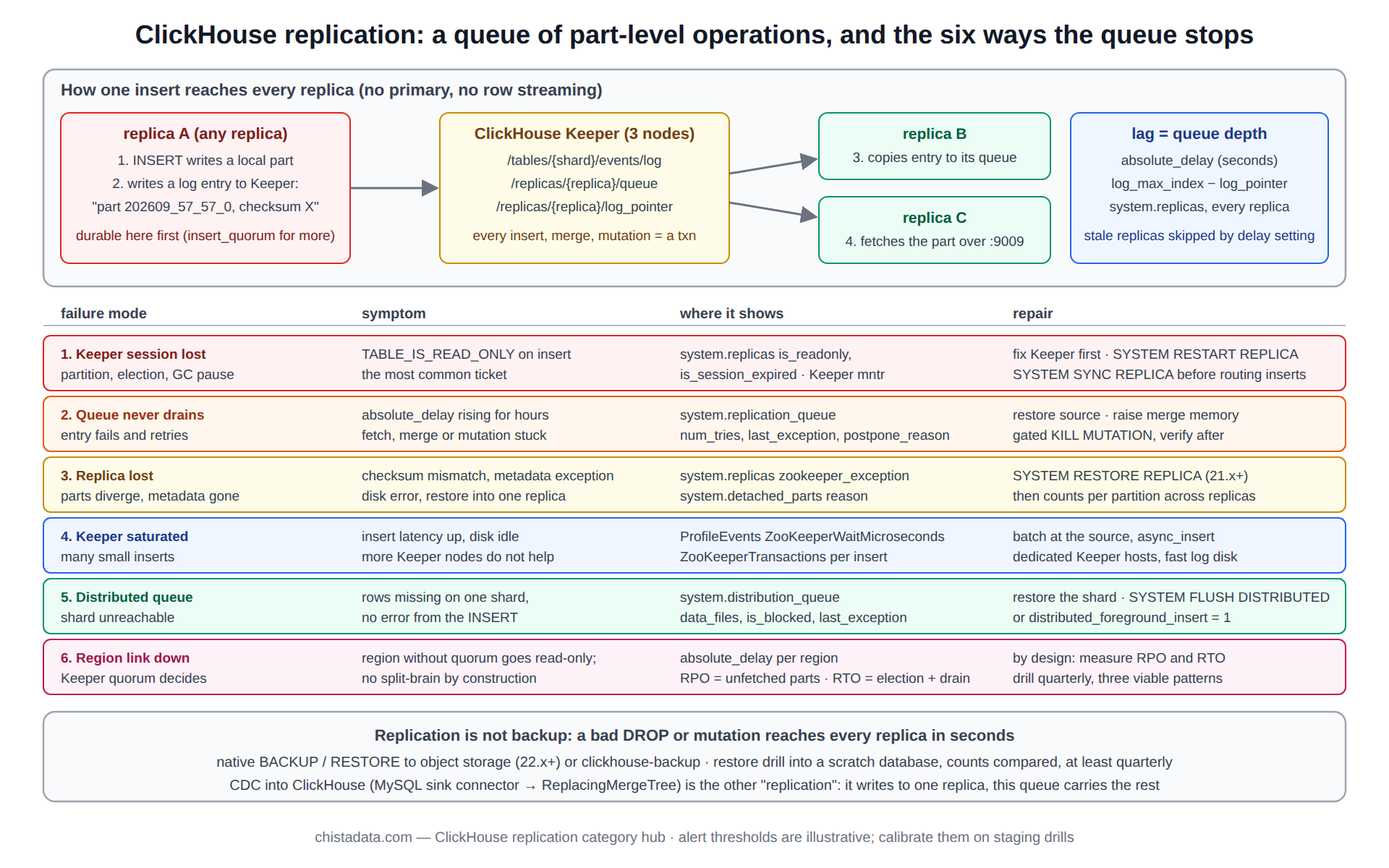
How an insert travels under ClickHouse replication
An insert on replica A writes a part locally, then writes a log entry to Keeper under the table’s replicated path: “part 202609_57_57_0 exists, checksum X, get it”. Replicas B and C each watch the log, copy the entry into their own queue, and execute it by fetching the part from a replica that has it, over the interserver HTTP port.
Merges work the same way: one replica is elected to plan the merge, writes a merge entry, and the others either perform the same merge locally or fetch the result, depending on size and settings. The introduction to ReplicatedMergeTree post walks the log and queue in detail; the high availability and replication post sets out what the design guarantees and what it does not.
Three consequences follow. Replication lag is a queue depth, not a byte offset. A replica that cannot reach Keeper cannot write, and goes read-only to protect the log. And an insert is durable on one replica before it is durable on any other, unless insert_quorum asks for more.
CREATE TABLE events ON CLUSTER 'ch_prod'
(
    ts         DateTime64(3),
    tenant_id  UInt32,
    event_type LowCardinality(String),
    user_id    UInt64
)
ENGINE = ReplicatedMergeTree('/clickhouse/tables/{shard}/events', '{replica}')
PARTITION BY toYYYYMM(ts)
ORDER BY (tenant_id, event_type, ts);

-- the log and the queue, as Keeper holds them
SELECT name, value FROM system.zookeeper WHERE path = '/clickhouse/tables/01/events/log' ORDER BY name DESC LIMIT 5;
SELECT name FROM system.zookeeper WHERE path = '/clickhouse/tables/01/events/replicas/ch-s1-r2/queue';

-- durability beyond one replica, for inserts that must not be lost with a node
SET insert_quorum = 2, insert_quorum_parallel = 1, insert_quorum_timeout = 60000;
The high watermark: how a replica knows it is behind
Each replica records the log pointer it has processed; the difference between the newest log entry and that pointer is the replica’s absolute delay, and the difference between its pointer and the furthest-ahead replica is its relative delay. A distributed query can refuse a replica whose delay exceeds max_replica_delay_for_distributed_queries, which is how stale reads are avoided without a primary. The high watermark for replication post explains the pointer mechanism and why lag under ClickHouse replication is measured in entries and seconds rather than bytes.
-- the health query that every replication alert is built on
SELECT
    hostName()                       AS host,
    database, table,
    is_leader, is_readonly, is_session_expired,
    absolute_delay, queue_size, inserts_in_queue, merges_in_queue,
    log_max_index - log_pointer      AS entries_behind,
    active_replicas, total_replicas,
    last_queue_update_exception
FROM clusterAllReplicas('ch_prod', system.replicas)
WHERE is_readonly OR absolute_delay > 60 OR queue_size > 100 OR active_replicas < total_replicas
ORDER BY absolute_delay DESC;
ClickHouse replication failure mode 1: read-only after a lost Keeper session
The most common ClickHouse replication ticket. The replica’s Keeper session expired (network partition, Keeper leader election, a long GC pause) and the table went read-only; inserts against it fail with TABLE_IS_READ_ONLY. The repair is to confirm Keeper is healthy and reachable, then let the server re-establish its session; on recent versions the table recovers on its own, and on older ones SYSTEM RESTART REPLICA forces it. The runbook for troubleshooting ClickHouse replication post gives the diagnosis order, starting with Keeper’s own state rather than the table.
-- 1. is Keeper reachable and led?  (from any replica)
SELECT * FROM system.zookeeper_connection;
-- from the Keeper host: echo mntr | nc ${KEEPER_HOST} 9181 | grep -E 'zk_server_state|zk_followers|zk_outstanding_requests'

-- 2. which tables are read-only, and why
SELECT database, table, is_readonly, is_session_expired, zookeeper_exception
FROM system.replicas WHERE is_readonly;

-- 3. force the session back once Keeper is confirmed healthy
SYSTEM RESTART REPLICA events;
SYSTEM SYNC REPLICA events;   -- wait for the queue to drain before routing inserts back
Failure mode 2: the queue grows and never drains
Under ClickHouse replication, queue depth rising across hours means entries are failing or being retried: a fetch from a replica that is down, a merge that exceeds memory, a mutation that errors on every attempt. system.replication_queue shows the entry, its attempt count and the last exception, which is the diagnosis. The repair depends on the entry: bring the source replica back, raise the merge memory bound, or drop a poisoned mutation with KILL MUTATION behind a confirmation gate. The sharding troubleshooting post covers the cases where the stuck entry is on a shard the initiator cannot see.
-- what is stuck, and why
SELECT database, table, type, create_time, num_tries, last_exception, postpone_reason, source_replica, new_part_name
FROM system.replication_queue
WHERE num_tries > 3 OR last_exception != ''
ORDER BY num_tries DESC
LIMIT 20;

-- a mutation failing on every attempt: verify before killing, kill behind a gate, verify after
SELECT mutation_id, command, is_done, latest_fail_reason FROM system.mutations WHERE table = 'events' AND NOT is_done;
-- CONFIRMATION GATE: the mutation is recorded in the change ticket and its effect will be re-applied correctly
-- KILL MUTATION WHERE table = 'events' AND mutation_id = '${MUTATION_ID}';
ClickHouse replication failure mode 3: parts diverge and a replica is lost
Rarely, a replica’s local parts stop matching what the log says it should have: a disk error, a manual file operation, a restore into one replica only. The server detects the mismatch on checksums and either re-fetches the affected part or, if the metadata in Keeper for that replica is gone or corrupt, marks the replica lost.
The repair for a lost replica is SYSTEM RESTORE REPLICA (21.x and later), which rebuilds the replica’s Keeper metadata from its local parts and re-attaches it; before that version the only path was to drop and re-create the replica and let it fetch everything, which on a large table is an all-night operation and a reason to keep replica sizes bounded through sharding.
-- detect: parts the log expects but the replica does not have, or has with the wrong checksum
SELECT database, table, name, reason FROM system.detached_parts WHERE reason != '' LIMIT 20;

-- repair a replica whose Keeper metadata is missing (table shows is_readonly with a metadata exception)
SYSTEM RESTORE REPLICA events;
SYSTEM SYNC REPLICA events;

-- verify: row counts per partition agree across replicas
SELECT hostName() AS host, partition, sum(rows) AS rows
FROM clusterAllReplicas('ch_prod', system.parts)
WHERE table = 'events' AND active
GROUP BY host, partition ORDER BY partition, host;
Failure mode 4: Keeper itself is the bottleneck
Every insert, merge and mutation under ClickHouse replication is a Keeper transaction, so an ingestion pattern of many small inserts saturates Keeper before it saturates disk, and the symptom is rising insert latency with ZooKeeperWaitMicroseconds dominating the profile. Adding Keeper nodes does not help, because writes go through the leader; the repair is at the ingestion layer (larger batches, async inserts) and, for the ensemble, dedicated hosts with fast storage for the coordination log. The cluster replication setup with ZooKeeper post shows the original ensemble design; the same layout applies to Keeper, which has been the recommended coordinator since 22.x.
-- Keeper cost per insert, p95, last hour
SELECT
    quantile(0.95)(ProfileEvents['ZooKeeperTransactions'])          AS p95_txn_per_insert,
    quantile(0.95)(ProfileEvents['ZooKeeperWaitMicroseconds']) / 1e3 AS p95_wait_ms,
    round(avg(written_rows))                                          AS avg_rows_per_insert
FROM system.query_log
WHERE type = 'QueryFinish' AND query_kind = 'Insert' AND event_time > now() - INTERVAL 1 HOUR;
-- finding: avg_rows_per_insert in the hundreds with p95_wait_ms in the hundreds = batch at the source
Failure mode 5: a distributed insert queued for an unreachable shard
Inserts through a Distributed table are written to a local directory per destination and shipped asynchronously; when a shard’s replicas are all unreachable, the files accumulate under the Distributed table’s data path and nothing reports it unless system.distribution_queue is watched. The repair is to restore the shard and let the queue flush, or, if the shard is gone for good, to redirect the queued files with SYSTEM FLUSH DISTRIBUTED after the cluster definition is changed. Synchronous distributed inserts (distributed_foreground_insert = 1) trade throughput for an immediate error instead of a silent queue.
SELECT database, table, data_files, formatReadableSize(data_compressed_bytes) AS pending, is_blocked, error_count, last_exception
FROM system.distribution_queue
WHERE data_files > 0 OR is_blocked;

SYSTEM FLUSH DISTRIBUTED events_dist;    -- after the destination shard is back
Failure mode 6: cross-region lag and the split-brain that does not happen
Across regions, ClickHouse replication behaves exactly as it does within one, with two differences: fetches cross a slower link, so lag is measured in seconds to minutes rather than milliseconds, and Keeper quorum placement decides which region can write when the link fails.
Because every write goes through Keeper, a region without quorum goes read-only rather than diverging, so split-brain is prevented by construction; what remains is the RPO (the parts not yet fetched by the surviving region) and the RTO (Keeper re-election plus queue drain). The designing multi-region ClickHouse deployments post sets out the three viable patterns and their RPO, and the 26.8 LTS performance and HA changes post covers what changed for cross-region operation in the current LTS.
| Failure mode | Symptom | Where it shows | Repair |
|---|---|---|---|
| 1. Session lost | TABLE_IS_READ_ONLY on insert | system.replicas is_readonly, is_session_expired | fix Keeper; SYSTEM RESTART REPLICA; SYNC |
| 2. Queue never drains | absolute_delay rising for hours | system.replication_queue num_tries, last_exception | restore source replica; raise merge memory; gated KILL MUTATION |
| 3. Replica lost | metadata exception, checksum mismatch | system.replicas zookeeper_exception; detached_parts | SYSTEM RESTORE REPLICA; verify counts per partition |
| 4. Keeper saturated | insert latency up, disk idle | ProfileEvents ZooKeeperWaitMicroseconds | batch at the source; dedicated Keeper hosts |
| 5. Distributed queue | rows missing on one shard | system.distribution_queue data_files | restore shard; SYSTEM FLUSH DISTRIBUTED |
| 6. Region link down | one region read-only, lag in minutes | system.replicas absolute_delay per region | by design; measure RPO and RTO, drill quarterly |
Setting up ClickHouse replication correctly the first time
Most of the failure modes above are avoided at setup: three Keeper nodes on dedicated hosts, macros for {shard} and {replica} that are unique and stable, an interserver HTTP port that is reachable between every pair of replicas and nowhere else, ON CLUSTER DDL with a distributed DDL queue that is monitored, and a Keeper path layout that does not embed anything that will change. The six-node cluster setup post gives the reference configuration for three shards with two replicas each, and the horizontal scaling hub covers when to add shards rather than replicas.
# config.d/macros.yaml on ch-s1-r2 (YAML config supported since 22.x)
macros:
  shard: "01"
  replica: "ch-s1-r2"

# config.d/keeper.yaml, identical on every replica
zookeeper:
  node:
    - {host: keeper-1, port: 9181}
    - {host: keeper-2, port: 9181}
    - {host: keeper-3, port: 9181}

# interserver: reachable only inside the cluster network
interserver_http_port: 9009
interserver_http_host: ch-s1-r2.internal
ClickHouse replication is not backup
A replica protects against a node failing; it does not protect against a bad DROP, a mutation that corrupted a column, or a schema change that was wrong, because ClickHouse replication copies all of those faithfully to every replica within seconds. Backup is a separate discipline: native BACKUP and RESTORE to object storage (22.x and later), or the clickhouse-backup tool for incremental part-level backups, with a restore drill run at least quarterly. The ClickHouse-backup for comprehensive backup and restore post covers the tool and its restore path; the reliability hub covers the drill cadence.
-- native backup of one table to object storage, incremental against the previous one
BACKUP TABLE events TO S3('https://${BUCKET}.s3.amazonaws.com/backups/events/2026-09-19', '${AWS_ACCESS_KEY_ID}', '${AWS_SECRET_ACCESS_KEY}')
SETTINGS base_backup = S3('https://${BUCKET}.s3.amazonaws.com/backups/events/2026-09-18', '${AWS_ACCESS_KEY_ID}', '${AWS_SECRET_ACCESS_KEY}');

-- the drill: restore into a scratch database and compare counts, never into the live table first
RESTORE TABLE events AS drill.events FROM S3('https://${BUCKET}.s3.amazonaws.com/backups/events/2026-09-19', '${AWS_ACCESS_KEY_ID}', '${AWS_SECRET_ACCESS_KEY}');
SELECT (SELECT count() FROM events) AS live, (SELECT count() FROM drill.events) AS restored;
Replication into ClickHouse from other databases
The word covers a second thing in the archive: change-data-capture from a transactional database into ClickHouse. The MySQL to ClickHouse replication with the sink connector post describes the Debezium-based path that reads the binlog and writes into ReplacingMergeTree tables with a version column, which is the standard design for keeping a ClickHouse copy of OLTP state current. It is replication in the CDC sense, not in the ReplicatedMergeTree sense, and the two compose: the sink connector writes to one replica and ClickHouse replication carries the parts to the rest.
Drilling the ClickHouse replication failure modes before they happen
Each of the six failure modes can be induced on staging: stop a Keeper node, partition a replica, poison a mutation, flood small inserts, take a shard down under a Distributed insert, cut the region link. The eight troubleshooting drills post is the CHT-400 curriculum that walks engineers through exactly these, with the health queries above as the instruments.
A team that has run the drills repairs failure mode 1 in minutes; a team that has not reads about it at 03:00. The real-time payments analytics post shows the replication layer of a design where the drills are part of the SLO.
The drills are also where the alert thresholds get calibrated: the delay and queue-size values in the health query above are starting points, and the staging drills show what each failure mode looks like on this cluster’s numbers before the alert is trusted in production.
Version notes
ClickHouse Keeper has been the recommended coordinator since 22.x; ZooKeeper still works. SYSTEM RESTORE REPLICA is 21.x and later. Native BACKUP and RESTORE are 22.x and later. insert_quorum_parallel defaults to on since 21.x. The data replication documentation is the source for the settings named above; confirm each on the running version before it goes into a runbook.
Reading the archive
Read the ReplicatedMergeTree introduction and the high-availability overview for the mechanism, then the high-watermark post for how lag is measured. The troubleshooting runbook and the sharding troubleshooting post cover failure modes 1 to 5; the multi-region post and the 26.8 HA changes cover mode 6. The ZooKeeper setup and six-node posts cover configuration; the backup post covers what replication does not; the sink-connector post covers CDC; the CHT-400 post covers the drills.
ChistaDATA operates replicated ClickHouse estates under managed services with the health query above as a standing alert and the six repairs as runbooks, and runs the multi-region and backup designs as ClickHouse consulting engagements. Every repair on this page touches a production replica: run it on staging first, keep the verification queries before and after, and never repair a replica without a tested backup of the table behind it.