ClickHouse DBA support is the part of running ClickHouse that no release note covers: the 3 a.m. page when a replica goes read-only, the Monday-morning ticket about a dashboard that got slow over the weekend, the quarterly question of whether the cluster will survive the next year of growth, and the upgrade nobody wants to schedule.
This page describes what that work actually consists of, organised the way a 24×7 support desk organises it: by severity, from the incidents that stop a business to the questions that shape one. For each severity it names the incidents that arrive most often, what the first fifteen minutes look like, and which post in this archive holds the full procedure.
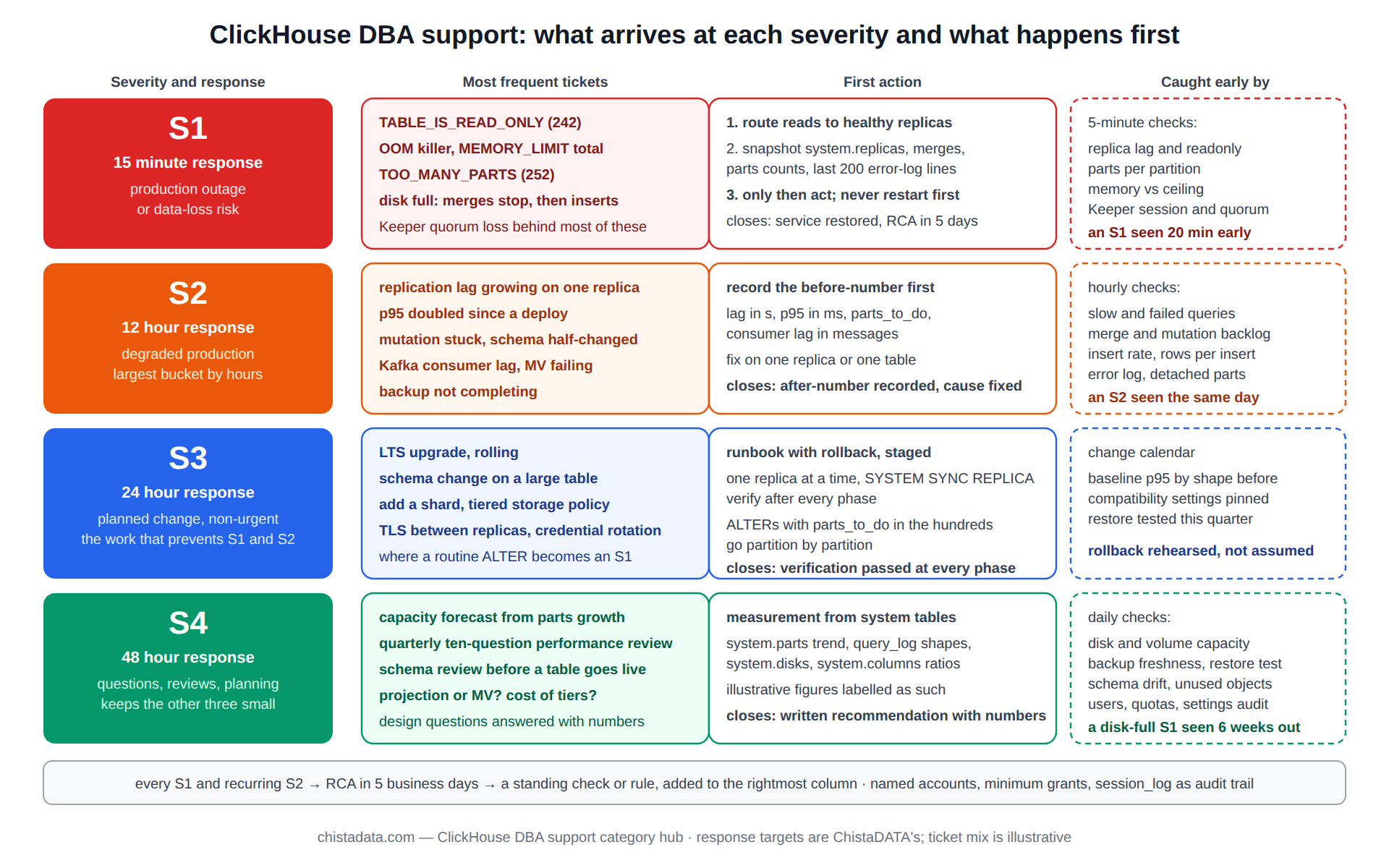
The severity definitions are the ones ChistaDATA operates under: S1 response within 15 minutes for a production outage or data-loss risk, S2 within 12 hours for degraded production, S3 within 24 hours for a non-production or non-urgent production issue, and S4 within 48 hours for questions, reviews and planning.
The archive has more than two hundred posts across all four; this page is the index by urgency.
S1: the ClickHouse DBA support incidents that stop a business
Four incident types account for most S1 pages on ClickHouse. A replica or a whole table in read-only mode (TABLE_IS_READ_ONLY, error 242) after a Keeper session loss. The server killed by the Linux OOM killer, or refusing all queries with MEMORY_LIMIT_EXCEEDED because a merge or one query has taken the ceiling. Inserts rejected with TOO_MANY_PARTS (error 252) so that the ingestion pipeline backs up into Kafka. And a disk full, which on ClickHouse means merges stop first and inserts fail second.
The first fifteen minutes of a ClickHouse DBA support S1 are the same regardless of type: confirm which replicas still serve reads and route traffic to them, capture system.replicas, system.merges, system.parts counts and the last 200 lines of the error log before anything is restarted, and only then act. Restarting first destroys the evidence the RCA needs and, for a Keeper-related read-only, usually does not help until the session can be re-established.
-- S1 triage snapshot: run on every replica, save the output
SELECT
    hostName()                                  AS host,
    (SELECT count() FROM system.replicas WHERE is_readonly)        AS readonly_tables,
    (SELECT count() FROM system.replicas WHERE is_session_expired) AS expired_sessions,
    (SELECT max(absolute_delay) FROM system.replicas)              AS max_delay_s,
    (SELECT count() FROM system.merges)                            AS running_merges,
    (SELECT max(value) FROM system.metrics WHERE metric = 'MemoryTracking') AS tracked_bytes,
    (SELECT min(free_space) FROM system.disks)                     AS min_free_bytes,
    (SELECT max(cnt) FROM (SELECT count() cnt FROM system.parts WHERE active GROUP BY table, partition)) AS max_parts_per_partition;
Each S1 type has a procedure in the archive. For read-only replicas, the CHT-400 troubleshooting techniques post covers Keeper session recovery and the SYSTEM RESTORE REPLICA path (available since 21.x) when metadata has diverged.
For memory, avoiding the Linux OOM killer and the memory hub are the references. For parts, the merge and mutation post explains why stopping the inserts, not raising parts_to_throw_insert, is the correct first move. For disks, the procedure is to find the largest droppable partition by retention policy and to move, never delete, before space is confirmed.
S2: degraded production, where most ClickHouse DBA support time goes
S2 is the largest bucket by hours. Replication lag that keeps growing on one replica; a query group whose p95 has doubled since a deploy; a mutation stuck for a day with the schema half-changed; Kafka consumer lag climbing because the materialized view behind the Kafka engine has started failing on a new message shape; a backup job that has not completed in three nights.
None of these stop the business today, and all of them will within a week if left alone.
The ClickHouse DBA support method for S2 is measurement first. Every S2 ticket opens with a before-number: the lag in seconds, the p95 in milliseconds, the mutation’s parts_to_do, the consumer lag in messages. The fix is proposed against that number, applied on one replica or one table, and the after-number is recorded before the ticket closes. The archive’s performance troubleshooting techniques, query performance tuning and sharding troubleshooting posts are the S2 playbooks, and the performance hub has the ten-question review that most S2 work follows.
-- S2 example: a stuck mutation, the number to record before touching it
SELECT
    database,
    table,
    mutation_id,
    command,
    create_time,
    parts_to_do,
    is_done,
    latest_fail_reason,
    latest_fail_time
FROM system.mutations
WHERE NOT is_done
ORDER BY create_time;
-- a non-empty latest_fail_reason means the mutation will never finish on its own:
-- fix the cause (usually a type or a missing column) or KILL MUTATION, then re-issue
S3: the work that prevents S1 and S2
S3 tickets are the planned changes: an upgrade from one LTS to the next, adding a shard, moving a table to a tiered storage policy, enabling TLS between replicas, a schema change on a billion-row table, rotating credentials. Each has a runbook with a rollback, and the ClickHouse DBA support desk’s job is to execute the runbook on a schedule the customer chooses, with verification after every phase. The upgrade guide is the archetype: rolling upgrade one replica at a time, SYSTEM SYNC REPLICA before and after, the compatibility settings to pin, and the query-log comparison that proves nothing regressed.
Online schema change deserves its own mention because it is where a routine S3 turns into an S1. ALTER TABLE ... MODIFY COLUMN on a large table is a mutation that rewrites every part; ADD COLUMN with a DEFAULT is metadata-only until a merge or a MATERIALIZE COLUMN touches the parts; renaming a column referenced by a materialized view breaks the view. The online schema change post lists which ALTERs are safe at what size, and the runbook rule is that any ALTER whose parts_to_do would exceed a few hundred is staged by partition.
-- S3 example: rolling upgrade, per replica, in order
-- 1. drain
SYSTEM STOP DISTRIBUTED SENDS;          -- on the replica being upgraded, if it hosts Distributed tables
SYSTEM SYNC REPLICA db.big_table;        -- wait for the queue to empty
-- 2. verify no merges or mutations are mid-flight on this replica
SELECT count() FROM system.merges;       -- expect 0 or only small merges
-- 3. package upgrade, restart (outside SQL)
-- 4. verify
SELECT version();
SELECT count() FROM system.replicas WHERE is_readonly OR is_session_expired;   -- expect 0
SELECT max(absolute_delay) FROM system.replicas;                                -- expect to fall to 0 within minutes
-- 5. compare the top query shapes' p95 with the pre-upgrade baseline before moving to the next replica
S4: questions, reviews and capacity planning
The fourth severity is the advisory work that keeps the other three small. Capacity planning from system.parts growth and query-log trends; a quarterly review of the ten performance questions; a schema review before a new table goes live; a cost review of the storage tiers; answering “should this be a projection or a materialized view” before someone builds the wrong one. The capacity planning post and the billion-row schema design post are the two S4 references used most.
-- S4 example: growth trend feeding the capacity forecast
SELECT
    toStartOfWeek(modification_time)          AS week,
    formatReadableSize(sum(bytes_on_disk))    AS bytes_written,
    sum(rows)                                 AS rows_written
FROM system.parts
WHERE active
  AND modification_time > now() - INTERVAL 12 WEEK
GROUP BY week
ORDER BY week;
-- fit the trend, apply the retention policy, compare with system.disks free_space
What a ClickHouse DBA support desk watches between tickets
Between incidents the desk runs the twelve checks documented on the DBA script hub at their three cadences, and the reason those checks exist is this page: each one is an S1 or S2 caught while it is still an S3. Replication lag and read-only replicas every five minutes catch the Keeper problem before the pager does. Parts per partition every five minutes catch the ingestion regression before TOO_MANY_PARTS. Merge and mutation backlog hourly catch the stuck ALTER on the same day. Disk growth daily turns the disk-full S1 into a capacity S4 six weeks earlier.
The alerting design matters as much as the checks. The disk and memory alerting post gives the thresholds; the principle is that every alert names the runbook step that answers it, so that the on-call engineer opens a procedure rather than a search box. The observability and monitoring post covers the dashboards that sit above the alerts, and the monitoring hub has the full stack.
ClickHouse DBA support by the numbers: what arrives and how it is handled
| Severity | Response | Most frequent tickets | First action | Closes when |
|---|---|---|---|---|
| S1 | 15 min | read-only replica, OOM, TOO_MANY_PARTS, disk full | route around, snapshot evidence, then act | service restored, RCA scheduled |
| S2 | 12 h | lag, p95 regression, stuck mutation, consumer lag, failed backup | record the before-number | after-number recorded, cause fixed |
| S3 | 24 h | upgrade, schema change, add shard, tiering, TLS | runbook with rollback, staged | verification passed at every phase |
| S4 | 48 h | capacity, schema review, cost, design questions | measurement from system tables | written recommendation with numbers |
An S1 as it runs: illustrative timeline
The sequence below is a composite of read-only-replica incidents, with times illustrative rather than from one case. 02:14, the five-minute check pages on is_readonly = 1 for six tables on replica 2 of 3. 02:16, the on-call engineer acknowledges, confirms replicas 1 and 3 serve reads, and moves the load balancer weight for replica 2 to zero. 02:19, the triage snapshot is captured on all three replicas and the Keeper four-letter mntr output shows a leader election eleven minutes earlier.
02:25, replica 2’s Keeper session is confirmed re-established and the tables leave read-only on their own; the replication queue drains by 02:41. 02:45, service is declared restored and the ticket drops to S2 for the RCA, which later attributes the election to a Keeper node’s disk latency spike and produces a standing recommendation to move Keeper’s log directory to its own volume. Total time in S1: 31 minutes, no data loss, no restart.
The RCA: what turns a closed S1 into a smaller next year
Every S1 and every S2 that recurs gets a written root-cause analysis within five business days: timeline from the first alert, the evidence captured in the first fifteen minutes, the cause as proven by that evidence (not as suspected), the fix applied, and the standing change that prevents the class of incident rather than the instance. A read-only replica caused by a Keeper GC pause produces a Keeper heap and JVM-free (ClickHouse Keeper) recommendation, not just a replica restart.
A TOO_MANY_PARTS caused by a new microservice inserting one row at a time produces a batching requirement in the integration standard, not just a merge. The archive’s hot-spot detection post is an example of an RCA class that became a standing check.
Where ClickHouse DBA support differs from PostgreSQL or MySQL DBA support
Engineers moving from transactional DBA work find three differences. There is no long-running transaction to kill and no lock wait to diagnose; the equivalents are the merge that is holding memory and the mutation that is holding a table. Backups are not a base plus a log; they are BACKUP snapshots (native since 22.x) or object-storage copies of parts, and restore drills test part integrity rather than log replay.
And replication is per part through Keeper, so the quorum and the Keeper hosts are part of the database’s health in a way a PostgreSQL DBA never has to think about for streaming replication. The data reliability engineering post frames these as SLOs.
How a ClickHouse DBA support ticket moves: intake to closure
Intake sets the severity from the customer’s description and the monitoring state, never from the customer’s choice of words alone: “the dashboard is slow” is an S2 unless the desk’s own checks show a replica down, in which case it is an S1 that the customer noticed second-hand. The engineer who takes the ticket records the before-number in the first reply, so that both sides agree on what “fixed” will mean.
Every action on production is written into the ticket before it is executed, with the verification query beside it, and destructive actions (a DROP PARTITION, a KILL MUTATION, a replica rebuild) carry a confirmation line that a second engineer or the customer acknowledges.
Closure is the after-number and, for S1 and recurring S2, the RCA date. A ticket that fixed the symptom without a cause (a restart that made the lag go away) closes as S2 with a follow-up S3 to find the cause, because ClickHouse DBA support that closes on restarts accumulates an unexplained-incident backlog that eventually becomes an outage nobody can explain. Handover between shifts is the open-ticket list with each ticket’s next action and the time it is due, so the 24×7 rotation never loses a thread at a time-zone boundary.
Access, credentials and the audit trail in ClickHouse DBA support
The desk works through named accounts, because ClickHouse DBA support without a per-engineer identity has no audit trail worth the name. It uses the minimum grants each severity needs: a read-only role for triage and S4 that can read every system table but nothing else, an operator role for S2 and S3 that can ALTER, KILL and run SYSTEM commands on named databases, and an emergency role for S1 that is checked out with a reason and expires.
Credentials are held in the customer’s secret store, referenced as placeholders (${CH_SUPPORT_USER}, ${CH_SUPPORT_PASSWORD}) in every runbook, and rotated on a schedule the customer sets. system.query_log and system.session_log (since 22.x) are the audit trail; the desk’s own ticket system holds the intent, and the two are reconciled in the quarterly access review. The security hub covers the RBAC model these roles are built on.
Version notes
SYSTEM RESTORE REPLICA is 21.x and later. Native BACKUP/RESTORE is 22.x and later. Lightweight DELETE is stable since 23.3. Default parts_to_throw_insert is 3,000 since 24.x (300 earlier). ClickHouse Keeper replaced ZooKeeper as the recommended coordinator from 22.x. The 26.8 LTS-specific procedures referenced in the archive apply to that line; confirm on the running version with SELECT version(). The official backup and restore documentation is the reference for the S3 procedures above.
Reading the archive
A ClickHouse DBA support archive of this size is best read by severity rather than by date, because a post written for one LTS line usually still describes the procedure for the next; where it does not, the version notes above say so.
Start with the CHT-400 troubleshooting techniques post for S1, the performance troubleshooting and query tuning posts for S2, the upgrade guide and online schema change posts for S3, and capacity planning for S4. The 26.8 LTS audit and settings posts are the current operational baseline.
ChistaDATA’s 24×7 ClickHouse support operates on exactly these severities and response targets, with managed services for customers who want the desk to own the cluster outright. Every procedure on this page is run on staging before production, carries a rollback, and assumes a tested restore exists; a support desk that cannot restore is not a support desk.