Understanding ClickHouse® Database
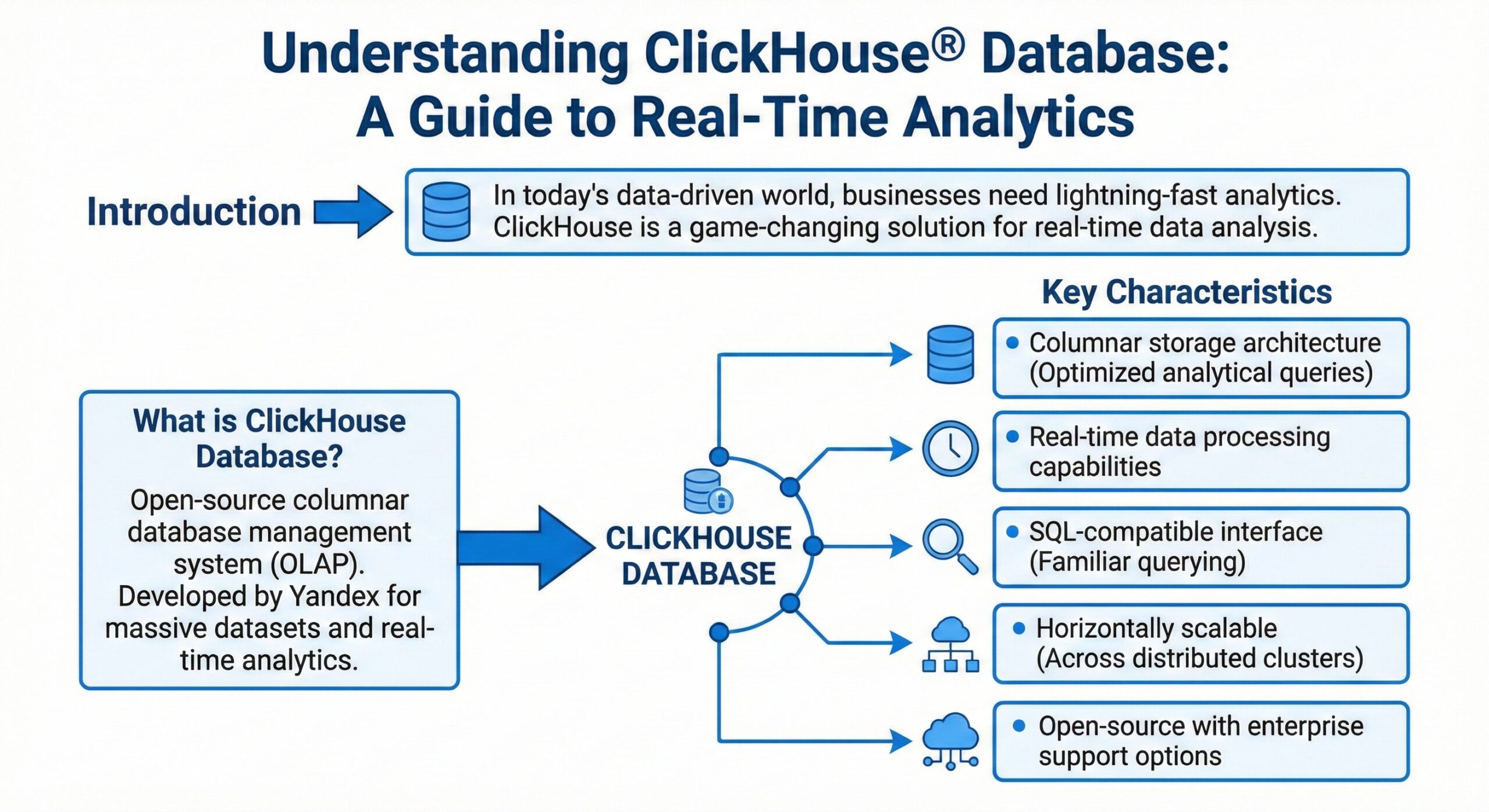
In today’s data-driven world, organizations face an unprecedented challenge: analyzing massive datasets in real-time to make informed business decisions. Traditional databases often struggle to deliver the speed and efficiency required for modern analytical workloads. Enter ClickHouse®—a revolutionary database management system that has transformed how enterprises approach real-time analytics.
This comprehensive guide explores everything you need to know about ClickHouse, from its fundamental architecture to practical implementation strategies.
What is ClickHouse?
ClickHouse is a high-performance, column-oriented SQL database management system (DBMS) designed specifically for online analytical processing (OLAP). Originally developed by Yandex, the Russian technology giant, ClickHouse was created to power Yandex.Metrica—one of the world’s largest web analytics platforms, processing more than 13 trillion records and over 20 billion events daily.
Unlike traditional row-oriented databases that store data row by row, ClickHouse stores data by columns. This fundamental architectural difference enables it to process analytical queries at extraordinary speeds—often returning results from billions of rows in milliseconds rather than minutes.
ClickHouse is available as both open-source software and a fully managed cloud offering, making it accessible to organizations of all sizes.
Why ClickHouse Matters: Understanding OLAP vs. OLTP
To appreciate ClickHouse’s significance, it’s essential to understand the distinction between OLAP and OLTP workloads.
OLTP (Online Transaction Processing)
Traditional transactional databases are optimized for OLTP workloads—handling frequent, small transactions like processing orders, updating inventory, or managing user accounts. These operations typically read and write just a few rows per query and complete in milliseconds.
OLAP (Online Analytical Processing)
Analytical workloads are fundamentally different. They involve complex SQL queries with calculations over massive datasets, often requiring aggregations, filters, and joins across billions of rows. In many use cases, these analytics queries must be “real-time,” returning results in less than one second.
ClickHouse excels at OLAP workloads, delivering the speed and efficiency that traditional databases simply cannot match for analytical queries.
Core Architecture: How ClickHouse Achieves Blazing Speed
ClickHouse’s exceptional performance stems from several innovative architectural decisions that work together to maximize query efficiency.
True Column-Oriented Storage
ClickHouse is a true column-oriented DBMS, meaning data is stored by columns rather than rows. In this architecture, values from each column are stored sequentially on disk, which provides several critical advantages:
- Reduced I/O: Analytical queries typically access only a subset of columns. Column-oriented storage allows ClickHouse to read only the necessary columns, avoiding the I/O overhead of reading entire rows with irrelevant data.
- Superior Compression: Since column values are of the same data type and often similar, they compress much more efficiently than row-based data. This reduces storage costs and speeds up data retrieval.
- Compact Storage: In a real column-oriented DBMS, no extra data is stored with the values. For example, a billion UInt8-type values consume approximately 1 GB uncompressed—exactly what you’d expect with no overhead.
Vectorized Query Execution
ClickHouse employs vectorized query execution, processing data in vectors (chunks of columns) rather than individual values 2. This approach:
- Dispatches operations on arrays rather than single values
- Utilizes SIMD (Single Instruction, Multiple Data) capabilities of modern CPUs
- Significantly reduces the cost of actual data processing
The vectorized execution engine processes data in blocks, where each block represents a subset of a table in memory. This design enables ClickHouse to achieve high CPU efficiency while processing massive datasets.
Parallel Processing
ClickHouse leverages parallel processing on multiple CPU cores to accelerate large queries. The system uses a max_threads setting to control parallelization, and a sophisticated concurrency control mechanism ensures fair resource allocation when multiple queries run simultaneously.
The MergeTree Engine: The Heart of ClickHouse
The MergeTree family of storage engines is the most functional and widely used table engine in ClickHouse, designed specifically for high-load environments and big-volume data analysis.
How MergeTree Works
Data in a MergeTree table is stored in “parts.” Each part stores data sorted by the primary key order, with all table columns stored in separate column.bin files. Here’s how the system operates:
- Data Insertion: When you insert data into a MergeTree table, the data is sorted by primary key order and forms a new part.
- Background Merging: Background threads periodically select parts and merge them into a single sorted part, keeping the total number of parts manageable. This is why it’s called “MergeTree”.
- Immutable Parts: All parts are immutable—they are only created and deleted, never modified. This design simplifies recovery and ensures data consistency.
Sparse Primary Index
MergeTree uses a “sparse” primary index that doesn’t address every single row. Instead, it stores the primary key value for every N-th row (where N is typically 8,192, controlled by the index_granularity setting). This approach:
- Enables maintaining trillions of rows per server without excessive memory consumption
- Allows efficient range queries while keeping the index compact
- Supports fast data extraction based on specific values or value ranges in under a few dozen milliseconds
Compression and Storage
The files in MergeTree consist of compressed blocks, typically ranging from 64 KB to 1 MB of uncompressed data. ClickHouse provides both efficient general-purpose compression codecs and specialized codecs for specific data types, allowing it to compete with and outperform niche databases like time-series systems.
MergeTree Variants
The MergeTree family includes several specialized engines:
- ReplacingMergeTree: Deduplicates data during merges
- AggregatingMergeTree: Pre-aggregates data during background merges
- CollapsingMergeTree: Handles row updates through collapsing logic
- SharedMergeTree: Cloud-native variant optimized for shared storage like Amazon S3 or Google Cloud Storage
Key Features That Set ClickHouse Apart
Comprehensive SQL Support
ClickHouse supports a declarative query language based on SQL that is largely compatible with the ANSI SQL standard. Supported features include:
- GROUP BY and ORDER BY clauses
- Subqueries in FROM clauses
- Various JOIN types with adaptive algorithms
- Window functions and scalar subqueries
- The IN operator for filtering
- Hundreds of analytical functions for complex aggregations
Data Compression Excellence
Data compression plays a key role in ClickHouse’s performance. The system offers:
- Efficient general-purpose compression codecs with different trade-offs between disk space and CPU consumption
- Specialized codecs for specific data types
- The ability to achieve compression ratios that significantly reduce storage costs
Distributed Processing
ClickHouse supports distributed query processing across multiple servers:
- Data can reside on different shards
- Each shard can have replicas for fault tolerance
- All shards execute queries in parallel, transparently to the user
- Distributed tables provide a unified view across cluster nodes
Data Skipping Indexes
Unlike traditional secondary indexes that point to specific rows, ClickHouse’s secondary indexes are “data skipping indexes.” They allow the database to know in advance that all rows in certain data parts won’t match query filtering conditions, enabling those parts to be skipped entirely.
Real-Time Query Processing
ClickHouse is designed for online queries, processing them without delay at the moment the user interface page is loading. This enables sub-second latencies even on massive datasets.
Use Cases: Where ClickHouse Excels
Real-Time Analytics
ClickHouse powers real-time analytics across industries where immediate insights are critical. Companies use it for:
- User behavior analysis
- Product analytics
- Financial reporting
- Marketing attribution
Observability and Monitoring
The ClickStack observability platform demonstrates ClickHouse’s capability to handle logs, metrics, and traces at scale. Organizations leverage ClickHouse for:
- Log aggregation and analysis
- Infrastructure monitoring
- Application performance management
- Security event analysis
Business Intelligence
ClickHouse serves as the analytical backend for business intelligence platforms, enabling:
- Ad-hoc reporting
- Dashboard visualization
- Data exploration
- Custom analytics applications
Time-Series Data
With specialized functions for dates and times, ClickHouse handles time-series workloads effectively, competing with dedicated time-series databases.
Performance Characteristics
Speed Benchmarks
ClickHouse consistently demonstrates exceptional performance:
- Processing 100 million rows in approximately 92 milliseconds
- Achieving throughput of hundreds of millions of rows per second
- Delivering sub-second query latency even on billions of rows
Scalability
ClickHouse scales both vertically and horizontally:
- Vertical Scaling: Efficiently utilizes all available CPU cores and memory
- Horizontal Scaling: Distributes data across multiple servers with automatic query parallelization
Resource Efficiency
ClickHouse is designed to be resource-efficient, making it cost-effective for organizations handling large data volumes. The combination of columnar storage, compression, and vectorized execution minimizes both storage and compute requirements.
Getting Started with ClickHouse
Deployment Options
ClickHouse offers flexible deployment options to suit different needs:
- ClickHouse Cloud: The quickest way to get started—a fully managed service that handles sizing, scaling, security, reliability, and upgrades.
- Self-Hosted: Install ClickHouse on your own infrastructure using:
- Package managers for Debian/Ubuntu and other Linux distributions
- Docker containers for containerized deployments
- Binary downloads for manual installation
Quick Start Steps
For ClickHouse Cloud:
- Create a ClickHouse service
- Connect using the SQL console, local client, or your preferred tool
- Add data via CDC, file upload, or direct insertion
For self-hosted installations:
- Set up the repository for your Linux distribution
- Install the ClickHouse server and client packages
- Start the ClickHouse service
- Connect and begin creating tables
Best Practices for ClickHouse Optimization
Table Design
- Choose the right primary key: The primary key determines data ordering and significantly impacts query performance
- Use appropriate data types: Smaller data types consume less storage and process faster
- Consider partitioning: Partition by time or other logical divisions for efficient data management
Query Optimization
- Leverage primary key ordering: Design queries to take advantage of the primary key sort order
- Use materialized views: Pre-aggregate frequently accessed data for faster queries
- Avoid unnecessary columns: Select only the columns you need
Data Ingestion
- Batch inserts: ClickHouse performs best with batch inserts rather than single-row insertions
- Use async inserts: For small, frequent inserts, enable async insert mode to overcome single-row limitations
- Consider the native protocol: The native ClickHouse protocol often outperforms other formats for ingestion
Monitoring and Maintenance
- Monitor query logs: Use ClickHouse’s built-in query logging to identify performance bottlenecks
- Profile CPU and memory usage: Understand resource consumption patterns
- Manage part counts: Ensure background merges keep part counts reasonable
Further Reading:
- ClickHouse Consulting
- ClickHouse Support
- ClickHouse DBA Support
- Data Analytics
- ClickHouse Performance Tuning and Optimization