Objective : Asabru server proxy
Asabru is a high-performance SQL Proxy developed by ChistaDATA, designed to improve the scalability and availability of database servers like ClickHouse, PostgreSQL, and MySQL. Asabru server enables users to easily configure and manage their database connections while enhancing their database performance.
At present, Asabru supports TCP/IP, HTTP/HTTPS, and TLS/SSL protocols for ClickHouse. We are also working on adding TLS/SSL support for MySQL and PostgreSQL, while wire-level protocol is already supported.
You can follow the below guidelines to build a server from the source code.
Installation
To install and run the Chista Asabru server, first clones the code on the server from GitHub repository, install essential packages and dependencies then configure and builds the Asabru server from the source code. Example on Ubuntu 22.04.2 LTS
Installation steps
apt-get update
git clone --recurse-submodules https://github.com/ChistaDATA/chista-asabru.git
cd chista-asabru
mkdir build
cd build
snap install cmake --classic
snap run cmake --version
ls -lhtr /snap/bin/cmake
apt-get install build-essential
cmake ..
make
Test and Verify
./Chista_Asabru 9100Asabru servers support various configurations to suit different needs and use cases. The proxy server operates on specific port numbers that correspond to the protocol used by the underlying database system. By leveraging Asabru server, users can benefit from its efficient and reliable proxying capabilities, making it an excellent tool for database management and optimization.
Asabru server provides users with an efficient and flexible way to manage their database connections through range of proxy port numbers for various config types, allowing users to configure and manage their database connections with ease. Here are the available configurations:
| # | Proxy Port # | DB Port # | Description | Proxy Mode | Status |
|---|---|---|---|---|---|
| 1 | 9100 | 9000 | Clickhouse Wirelevel Protocol ( various versions ) | Passthrough | Done |
| 2 | 9110 | 8123 | ClickHouse Java (POST), Python(GET),HTTP(POST) with Base64 encoded WireLevel Protocol | Passthrough | Done |
| 3 | 9120 | 9440 | ClickHouse TCP/TLS with WireLevel Protocol, Termination and routing to 9440 | Passthrough | Done |
| 4 | 9130 | 8443 | ClickHouse HTTPS with Java (POST), Python(GET),HTTP(POST) with Base64 encoded WireLevel Protocol | Passthrough | Done |
| 5 | 9140 | 5432 | PostgreSQL Wirelevel Protocol | Passthrough | Done |
| 6 | 9150 | 2345 | PostgreSQL TLS Wirelevel protocol | Passthrough | In Progress |
| 7 | 9160 | 3306 | MySQL Wirelevel Protocol | Passthrough | Done |
| 8 | 9170 | 3306 | MySQL TLS Wirelevel protocol | Passthrough | In Progress |
Running the proxy from the command line is a simple and straightforward process that requires just a few steps.
To begin, navigate to the Asabru server build directory in your terminal using the cd command. Once you’re in the correct directory, run the Asabru server using the following command:
./Chista_Asabru <port_number>
Here, replace <port_number> with the desired port number for the proxy. For example, if you want to run the proxy in the TCP/TLS mode with port number 9120, use the following command:
./Chista_Asabru 9120
This will start the Asabru server and enable it to proxy connections for ClickHouse using TCP/TLS with the WireLevel protocol. The proxy will now be ready to accept incoming connections on the specified port number.
To run the proxy for other configurations, refer to Table above and replace the port number in the command above with the corresponding port number for the desired configuration. For example, if you want to run the proxy for PostgreSQL using the WireLevel protocol with port number 9140, use the following command:
./Chista_Asabru 9140
By following these simple steps, you can easily run the Asabru server proxy from the command line for various database systems and configurations. This provides users with a powerful tool for managing their database connections and optimizing their database performance.
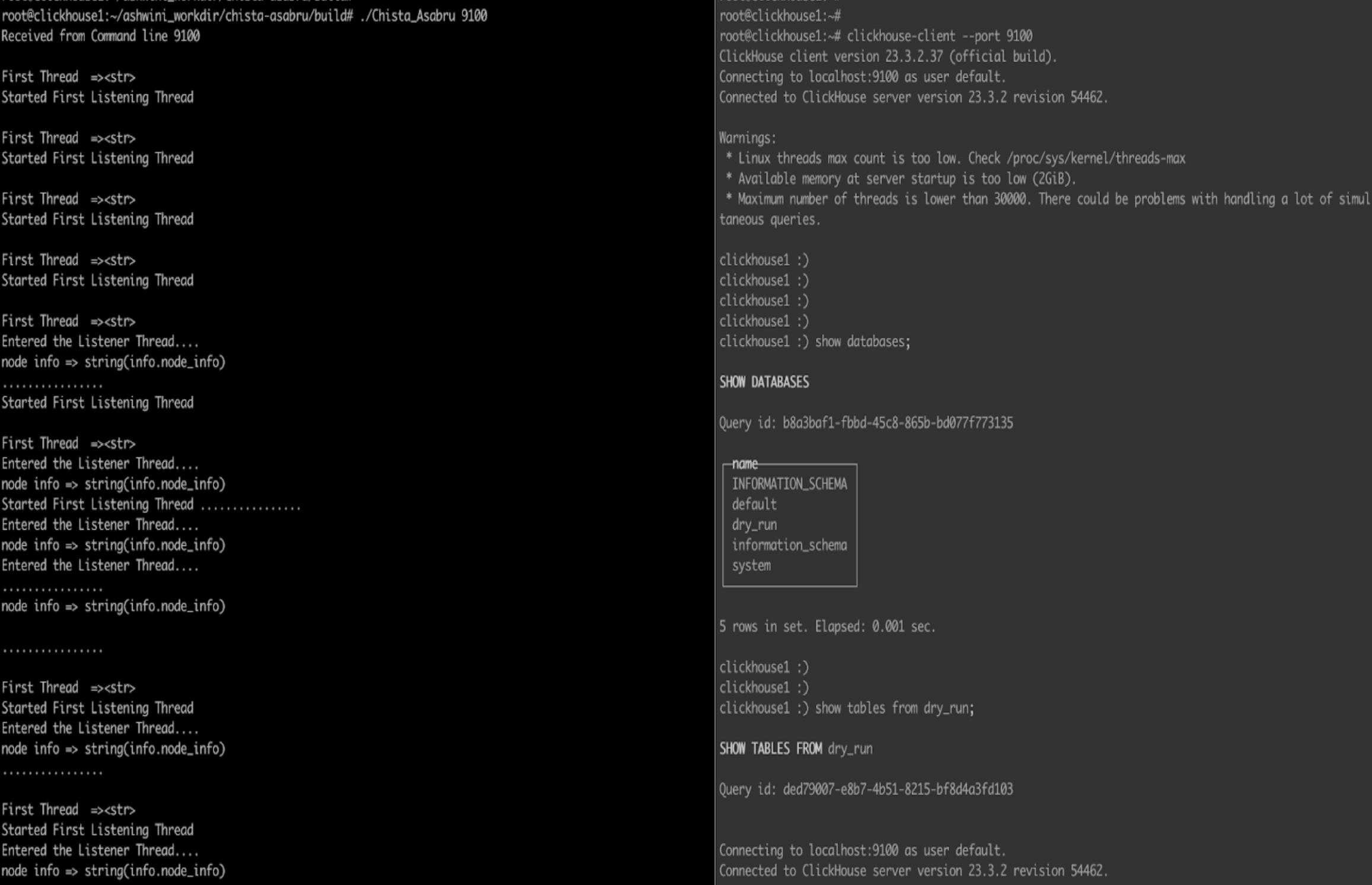
Another example to Start asabru on 9100 and connect to clickhouse via proxy ( In background asabru server uses port 9000 to proxy connections for ClickHouse database. )
root@clickhouse1:~/ashwini_workdir/chista-asabru/build# ./Chista_Asabru 9100
clickhouse-client --port 9100
Our current version of Asabru serves as a highly efficient forward proxy for client connections to ClickHouse, PostgreSQL, and MySQL databases. However, our long-term vision is to expand its capabilities to support multiple popular databases with a more robust reverse proxy that can intelligently interpret SQL and take appropriate actions for load balancing and high availability. With this enhanced functionality, Asabru will not only continue to serve as a forward proxy for clients but will also act as a reverse proxy for backend database servers.
Execution
1. Running Proxy in the Clickhouse TCP Wirelevel Passthrough mode
Run Proxy on port 9100 and clickHouse-client on 9100 ./Chista_Asabru 9100 ./clickhouse-client –port 9100
2. Running Proxy in the HTTP Passthrough mode.
Run Proxy on port 9110 and open the web page on the browser ./Chista_Asabru 9110 http://IP:9110/play (Access and Query)
3. Running Proxy in the TLS Wirelevel Pass-through mode.
Run Proxy on 9120 port execute clickhouse-client on 9120 Note – Make sure to enable SSL on ClickHouse Server, You can follow the official documentation for enabling SSL connection.
./Chista_Asabru 9120
./clickhouse-client --port 9120
4. Running Proxy in the TLS HTTP Passthrough mode.
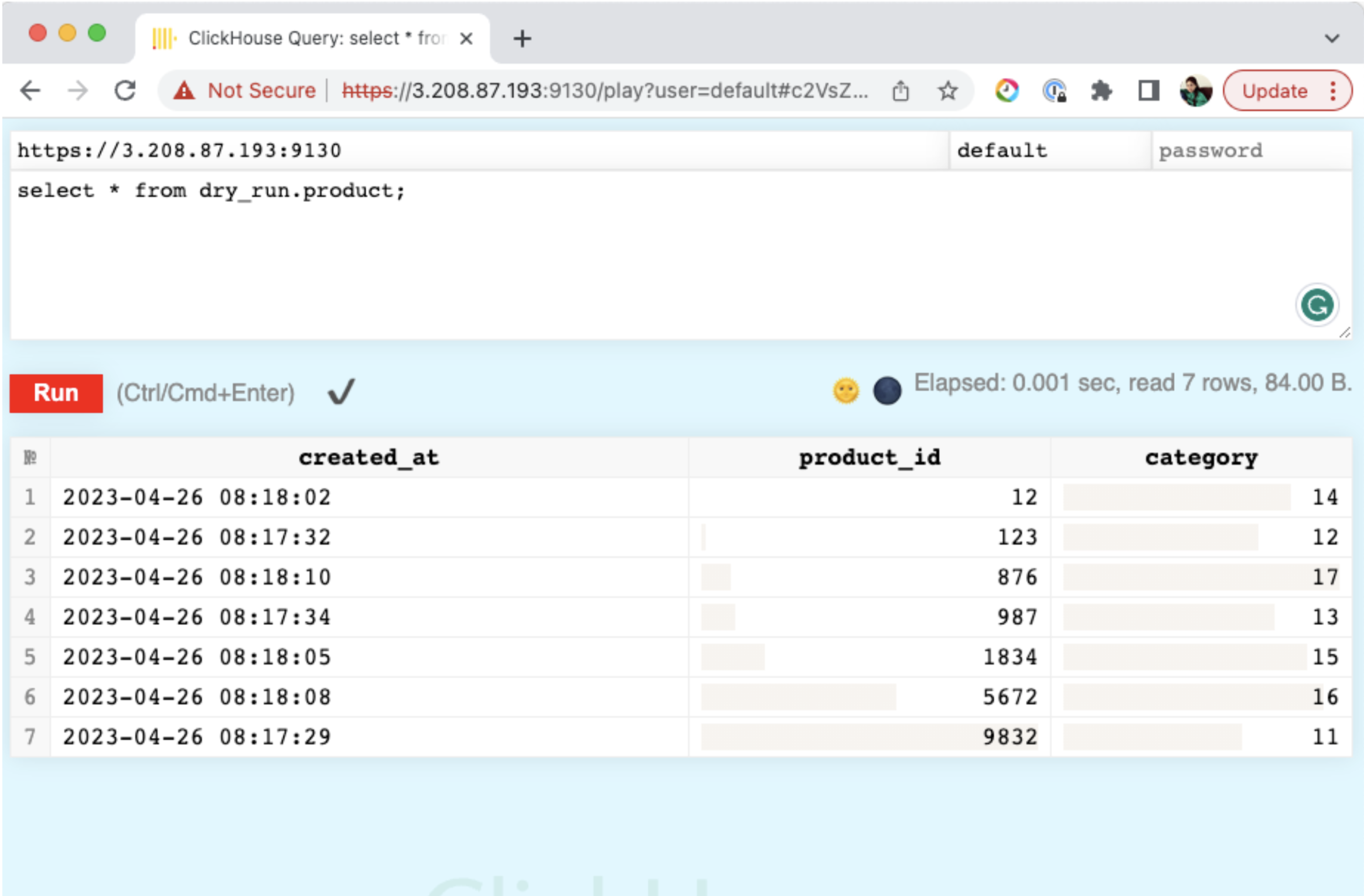
Run Proxy on 9130 port access web URL on 9130 Note – Make sure to enable SSL on ClickHouse Server, You can follow the official documentation for enabling SSL connection.
./Chista_Asabru 9130http://IP:9130/play (Access and Query)
5. Running the Proxy in PostgreSQL Passthrough mode.
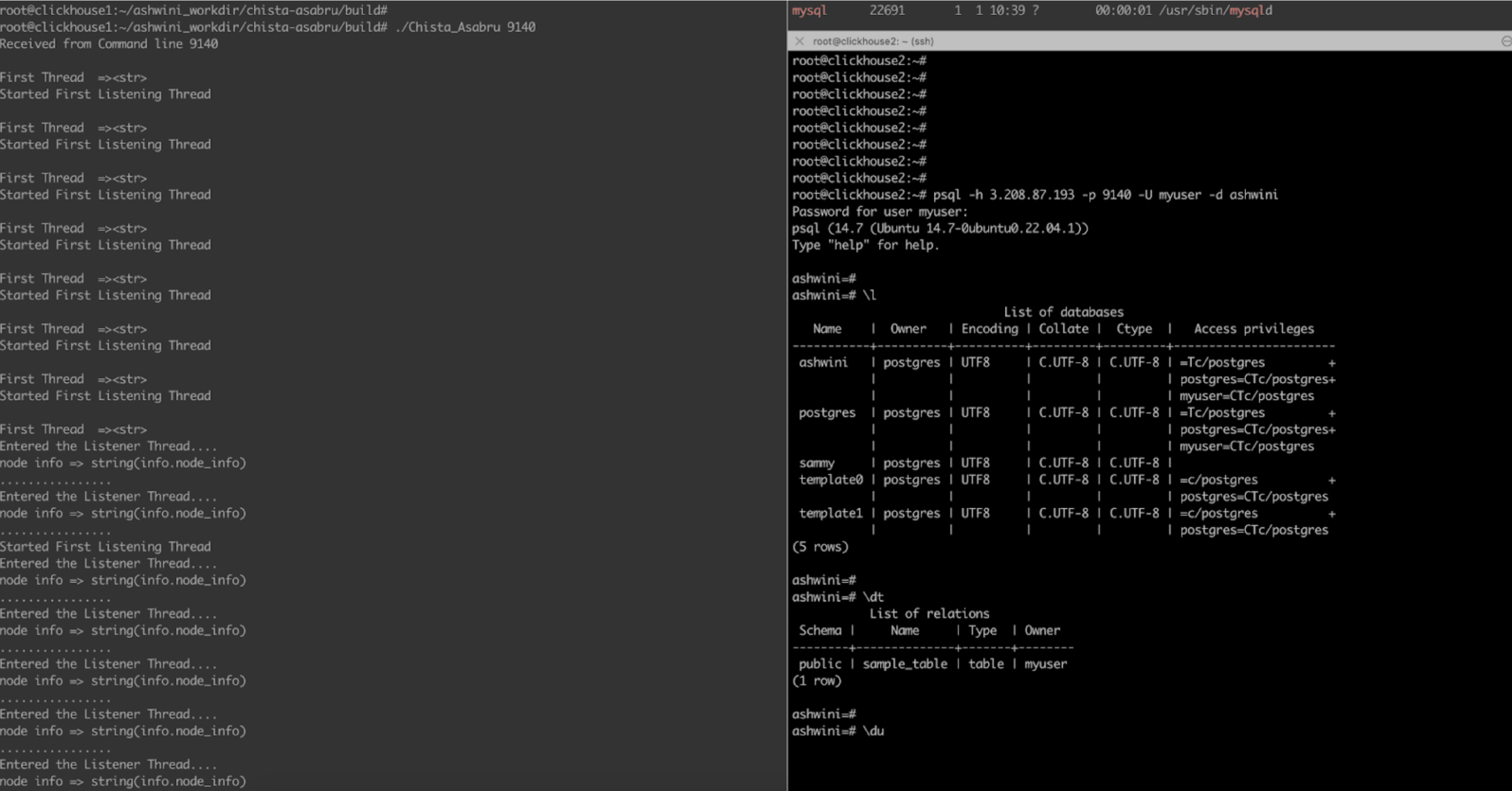
Run Proxy on port 9140 and connect to PostgreSQL from 9140 Note: Make sure you are able to make a connection on the 5432, i.e. default PostgreSQL port from a remote server
./Chista_Asabru 9140
psql -h remote_host -p 9140 -U username -d demo_db
Also can try to connect to PostgreSQL via DBeaver through Asabru Proxy with port 9140
6. Running the Proxy in Postgres TLS Wirelevel protocol
Work In progress
7. Running Proxy in MySQL Passthrough mode.
Run Proxy on port 9160 and connect to MySQL from 9160 Note: Make sure you are able to make a connection on the 3306, i.e., default MySQL port from a remote server
./Chista_Asabru 9160
mysql -uroot -ppassword -h remote_host -P 9160
Also can try to connect to MySQL via DBeaver through Asabru Proxy with port 9160
8. Running the Proxy in MySQL TLS Wirelevel protocol
Work In progress
Visual aid included
Glossary
Proxy Mode – Passthrough mode
Passthrough mode refers to a mode of operation where the proxy simply forwards the incoming network traffic to the destination database server without performing any modification or interpretation of the data. In Passthrough mode, the Asabru server acts as a transparent intermediary between the client and the database server, relaying network packets without any modification to the underlying protocol or data. This mode is useful in situations where the client application and the database server have a direct network connection and the Asabru server is simply acting as a “pass-through” proxy, providing an extra layer of security or performance optimization without interfering with the communication between the client and server.
Wirelevel Protocol
The Wirelevel Protocol is a low-level communication protocol used by MySQL/ClickHouse/PostgreSQL to exchange information between the client and server. It is based on TCP/IP and support a binary format making it efficient for transmitting large amounts of data. It includes features such as authentication, encryption, and compression to ensure secure and efficient communication between the client and the server. Examples of client applications that use the Wirelevel Protocol include the MySQL command-line client, MySQL Workbench, and various programming language connectors such as JDBC for Java or the mysql-python library for Python.
You might also like:
- Building Fast Data Loops in ClickHouse®
- ClickHouse Monitoring: Analysing ClickHouse Performance with strace
- Vectorized Query Processing for ClickHouse Performance
- 6 Reasons to work with ChistaDATA for Real-time Analytics on ClickHouse
- Mastering Performance Tuning in ClickHouse: Tips for Inspecting Statistics Objects
